Compare commits
241 Commits
| Author | SHA1 | Date | |
|---|---|---|---|
 github-actions[bot] github-actions[bot]
|
d8e517cb7b | ||
|
github-actions[bot]
|
9da5b4cacc | ||
|
Aaron
|
84af32242b | ||
|
Aaron
|
7a81472407 | ||
|
Aaron
|
9399d8df42 | ||
|
Aaron
|
459f73fd5c | ||
|
Aaron
|
c1c3d3b7c5 | ||
|
Aaron
|
380a9630e5 | ||
|
Aaron
|
984568e00c | ||
|
Aaron
|
5fefd8e083 | ||
|
Aaron
|
a6eef643f6 | ||
|
Aaron
|
a01928e010 | ||
|
Aaron
|
d901db2316 | ||
|
Kim Gyeongjae
|
fdda812078 | ||
|
Atomie CHEN
|
7c59e9d5b5 | ||
|
tanishq-aggarwal
|
c9b0c4da34 | ||
|
TomvdPeet
|
9f214141b4 | ||
|
kakuiho
|
4638e90f02 | ||
|
Snow
|
d1c50ab6f8 | ||
|
Abijith Vasanthakumar
|
489aa0ffd8 | ||
|
Aaron
|
ebcc605961 | ||
|
Aaron
|
bb630049d5 | ||
|
Aaron
|
39321adfe1 | ||
|
aklinker1
|
ea2b8df906 | ||
|
aklinker1
|
74a9b1aef4 | ||
|
github-actions[bot]
|
8b3e35de94 | ||
|
github-actions[bot]
|
9d4724fa99 | ||
|
Typed SIGTERM
|
a8379cbd80 | ||
|
Sam Carlton
|
bdfb6c5a84 | ||
|
sylva
|
87414d7137 | ||
|
Kuba
|
f9d0b64d7a | ||
|
Aaron
|
97918710bd | ||
|
btea
|
ac340b3f1e | ||
|
Alexander Kachkaev
|
a2097e148b | ||
|
Patryk Kuniczak
|
190be7f732 | ||
|
Aaron
|
0333ce5c46 | ||
|
Aaron
|
47df623fd4 | ||
|
dependabot[bot]
|
c609efbd9a | ||
|
Johnny Fekete
|
c8cd41a833 | ||
|
Yacine Benslimane
|
02a0110091 | ||
|
Sam Carlton
|
6c572c56a3 | ||
|
Greg Zajac
|
2db516ef3b | ||
|
Michał Warać
|
9f3787cd95 | ||
|
Nguyen Canh Toan
|
5511943237 | ||
|
John Valai
|
626838eba6 | ||
|
aklinker1
|
587328f54c | ||
|
aklinker1
|
1aa88b1fb6 | ||
|
ayu
|
e7db119545 | ||
|
Thomas Howlett
|
da79536456 | ||
|
aklinker1
|
aaaff43731 | ||
|
Nishu
|
5d77142758 | ||
|
wenyuan
|
586ea0002b | ||
|
流浪大法师
|
e642d6fe76 | ||
|
Achraf M. Bouhamid
|
7148f288d5 | ||
|
aklinker1
|
40abf3fb5b | ||
|
aklinker1
|
adea6c7177 | ||
|
Aaron
|
96a307e99f | ||
|
aklinker1
|
f0201f72ef | ||
|
aklinker1
|
0b1b677b3d | ||
|
aklinker1
|
b1dcec86cd | ||
|
Mark
|
7c783fe565 | ||
|
요술토끼(wizardrabbit)
|
9a0207d7cf | ||
|
Honwhy Wang
|
1b0e047d6b | ||
|
0xHPZ
|
7ab3c7e5d9 | ||
|
Nishu
|
9ece49d226 | ||
|
Aaron
|
1272e2ec74 | ||
|
Aaron
|
db16602018 | ||
|
Aaron
|
5c202805b9 | ||
|
Aaron
|
bfc8866b69 | ||
|
spookyuser
|
9aedc29289 | ||
|
Hyunbin Seo
|
e1f3d75ac4 | ||
|
Aaron
|
030f23d2e9 | ||
|
Nishu
|
6be9a4e71b | ||
|
Aaron
|
eb0bffb5dd | ||
|
BrowserLens
|
240bbb3676 | ||
|
Aaron
|
7d25110a6e | ||
|
Aaron
|
598eea703b | ||
|
Aaron
|
8793f7bff4 | ||
|
Aaron
|
c1b3911622 | ||
|
Aaron
|
b0bf05109d | ||
|
Aaron
|
d9cb0ebcc8 | ||
|
Aaron
|
1eda21f63f | ||
|
github-actions[bot]
|
f2dbcde124 | ||
|
Richard Lee
|
60f00db2c5 | ||
|
github-actions[bot]
|
a9332453fc | ||
|
Aaron
|
b99da14799 | ||
|
aklinker1
|
f02400a1fb | ||
|
aklinker1
|
bbcb7f7cdd | ||
|
aklinker1
|
30cf8e6d54 | ||
|
aklinker1
|
4f772fc0f7 | ||
|
Ahmed Rangel
|
2cf2582138 | ||
|
Stepan Rabotkin
|
ad4de4b92c | ||
|
MengXi
|
27ed73a6ae | ||
|
Qiwei Yang
|
a1570c8917 | ||
|
ТΞNSΛI
|
7e419ddd43 | ||
|
Honwhy Wang
|
b045d3616d | ||
|
𝖆𝖉𝖎𝖙𝖍𝐲𝖆
|
f6b50e2e77 | ||
|
aklinker1
|
9d1381cbb3 | ||
|
aklinker1
|
99b0242d86 | ||
|
aklinker1
|
db27628211 | ||
|
aklinker1
|
9b9d86229a | ||
|
Boris Zabolotskikh
|
46f830dacf | ||
|
github-actions[bot]
|
3dd9bc7772 | ||
|
Aaron
|
c7335add19 | ||
|
Aaron
|
c133498208 | ||
|
Aaron
|
6a52bb22a3 | ||
|
Aaron
|
6f970efda5 | ||
|
Aaron
|
c69350a0eb | ||
|
Aaron
|
4add8820eb | ||
|
Aaron
|
033dd4811e | ||
|
Aaron
|
da5cd32502 | ||
|
aklinker1
|
edf33fdec9 | ||
|
seaders
|
448cbf16c9 | ||
|
Aaron
|
e45b77b528 | ||
|
github-actions[bot]
|
b61fd1716e | ||
|
Aaron
|
d584b5cc7e | ||
|
Bang·_·
|
faf9cedfbd | ||
|
Aaron
|
3a38ac9339 | ||
|
github-actions[bot]
|
7ea36a3cfc | ||
|
Aaron
|
3577c0b47a | ||
|
Aaron
|
d0bef42186 | ||
|
github-actions[bot]
|
d9f10c62ad | ||
|
aklinker1
|
35d3c03e4b | ||
|
Yunsup Sim
|
fdd38a1580 | ||
|
ТΞNSΛI
|
3018801f06 | ||
|
Anh71me
|
8e96bfef06 | ||
|
ТΞNSΛI
|
31071bd11e | ||
|
Yuan
|
f5619f6be1 | ||
|
Aaron
|
adad1b5a2c | ||
|
Nishu
|
a6c4e19a5d | ||
|
Jack
|
af6f74c344 | ||
|
Aaron
|
ce45cb8a89 | ||
|
aklinker1
|
14d4aa202d | ||
|
Nishu
|
4c35798dba | ||
|
Aaron
|
656a9b365f | ||
|
Namu
|
67fa3db921 | ||
|
github-actions[bot]
|
f2d3061e97 | ||
|
Aaron
|
760c34e416 | ||
|
Bang·_·
|
48398b315c | ||
|
techlism
|
45d0d9d7f1 | ||
|
Aaron
|
b0f4ac8221 | ||
|
github-actions[bot]
|
719192b1aa | ||
|
Yunsup Sim
|
7eb32bdac8 | ||
|
nostro
|
862756fd5b | ||
|
nostro
|
5ba16e72e0 | ||
|
Aaron
|
e43ae0504d | ||
|
Aaron
|
acb6cd180c | ||
|
github-actions[bot]
|
a3301d0413 | ||
|
7sDream
|
b9e72358ac | ||
|
Aaron
|
61b42ef326 | ||
|
aklinker1
|
da9e27c28d | ||
|
aklinker1
|
6f80fbabaa | ||
|
Aaron
|
d2308bd45c | ||
|
nostro
|
d35972d24f | ||
|
Aaron
|
298a264934 | ||
|
Khalil Yao
|
ad63b595b4 | ||
|
aklinker1
|
986a9ceebf | ||
|
dependabot[bot]
|
682b65e723 | ||
|
dependabot[bot]
|
cb661506c0 | ||
|
dependabot[bot]
|
505aa06443 | ||
|
Aaron
|
f534a978f1 | ||
|
Aaron
|
1293815934 | ||
|
Aaron
|
0c0fd18bf4 | ||
|
Aaron
|
c49c31813f | ||
|
Aaron
|
877ab11bb4 | ||
|
Alec WM
|
0d18d8d7e3 | ||
|
Aaron
|
5f977857a1 | ||
|
Aaron
|
a63b21d417 | ||
|
Aaron
|
e1b7d6090e | ||
|
Aaron
|
1bcc5cdd81 | ||
|
Aaron
|
873fdbc4b3 | ||
|
Aaron
|
79128effea | ||
|
Aaron
|
14ef94fc09 | ||
|
aklinker1
|
759e3e3a4d | ||
|
Aaron
|
5b7b16efba | ||
|
aklinker1
|
7fd171acb5 | ||
|
Aaron
|
02ed3f1d44 | ||
|
Aaron
|
4f7f3f36a3 | ||
|
Aaron
|
73a8cf12a9 | ||
|
Aaron
|
5f5eb16705 | ||
|
github-actions[bot]
|
f0f4437870 | ||
|
github-actions[bot]
|
868c042511 | ||
|
Aaron
|
bdb49c0b3d | ||
|
Aaron
|
cc3c43d1bd | ||
|
Aaron
|
e47131efc1 | ||
|
Aaron
|
82d8024fb4 | ||
|
Aaron
|
c662a59d85 | ||
|
Aaron
|
4e50fb1f92 | ||
|
1natsu
|
fbae370d1e | ||
|
Aaron
|
9c64c9dd61 | ||
|
Aaron
|
8f6dba20d2 | ||
|
Aaron
|
f531fcd5c3 | ||
|
Aaron
|
ff1720a4c6 | ||
|
Aaron
|
d62203dff8 | ||
|
Aaron
|
99b5076d69 | ||
|
Aaron
|
298e7101f7 | ||
|
Aaron
|
b4ce36b708 | ||
|
Aaron
|
5d096a4a92 | ||
|
Aaron
|
e54df0aca8 | ||
|
Aaron
|
2e8baf0161 | ||
|
Aaron
|
c9dca0222c | ||
|
Aaron
|
6044ab73bd | ||
|
Aaron
|
660945c792 | ||
|
Aaron
|
bcb20874a8 | ||
|
Aaron
|
83ad0e3ff0 | ||
|
Aaron
|
aad17c8d26 | ||
|
Aaron
|
b0ef178c9c | ||
|
Aaron
|
0175c430a3 | ||
|
Aaron
|
2776587392 | ||
|
Aaron
|
b978465d7a | ||
|
Aaron
|
f7989ea1e0 | ||
|
Aaron
|
0cf34d3170 | ||
|
Aaron
|
4fe04c6f8a | ||
|
Aaron
|
1773762d2f | ||
|
Aaron
|
9057000e45 | ||
|
aklinker1
|
d540233673 | ||
|
Aaron
|
9907290a04 | ||
|
Aaron
|
d9fb919580 | ||
|
Aaron
|
17723d5828 | ||
|
Aaron
|
c7db2d26b3 | ||
|
Leo
|
259cec9ea8 | ||
|
ergou
|
2ced9c40d3 | ||
|
ergou
|
756efc9311 | ||
|
Eli
|
17fd2ff0ce | ||
|
Christoph Kolb
|
35833c00f0 | ||
|
aianddeng
|
300c045187 | ||
|
Aaron
|
4c05cc19e5 | ||
|
Leendert de Borst
|
72dab65a1d | ||
|
github-actions[bot]
|
4e5fb7745a | ||
|
Aaron
|
2bc92043f8 | ||
|
github-actions[bot]
|
3024bd825d | ||
|
Aaron
|
0b39774690 | ||
|
github-actions[bot]
|
a461a23845 | ||
|
Thomas
|
c0867e3374 | ||
|
ergou
|
47040277a2 | ||
|
Aaron
|
0f0daf378c | ||
|
Alec Larson
|
51b315f23a | ||
|
Aaron
|
60f5117bbc | ||
|
btea
|
15634ecb95 | ||
|
btea
|
0a5007aee0 | ||
|
Aaron
|
bc54e1bd63 |
@@ -11,3 +11,6 @@ yarn.lock linguist-generated
|
||||
|
||||
# Exclude templates from language statistics
|
||||
templates/**/* linguist-vendored
|
||||
|
||||
# Other generated files
|
||||
packages/browser/src/gen/** linguist-generated
|
||||
|
||||
@@ -1,6 +1,7 @@
|
||||
name: "\U0001F41E Bug report"
|
||||
description: Report an issue with WXT
|
||||
labels: [pending-triage]
|
||||
type: Bug
|
||||
body:
|
||||
- type: markdown
|
||||
attributes:
|
||||
|
||||
@@ -2,7 +2,7 @@
|
||||
name: Feature request
|
||||
about: Suggest an idea for WXT
|
||||
title: ''
|
||||
labels: feature
|
||||
type: Feature
|
||||
assignees: ''
|
||||
---
|
||||
|
||||
|
||||
@@ -4,12 +4,10 @@ description: Install PNPM, Node, and dependencies
|
||||
inputs:
|
||||
install:
|
||||
default: 'true'
|
||||
type: boolean
|
||||
description: Whether or not to run 'pnpm install'
|
||||
|
||||
installArgs:
|
||||
default: ''
|
||||
type: string
|
||||
description: Additional args to append to "pnpm install"
|
||||
|
||||
runs:
|
||||
@@ -17,12 +15,12 @@ runs:
|
||||
|
||||
steps:
|
||||
- name: 🛠️ Setup PNPM
|
||||
uses: pnpm/action-setup@v4
|
||||
uses: pnpm/action-setup@f2b2b233b538f500472c7274c7012f57857d8ce0 # v4.1.0
|
||||
|
||||
- name: 🛠️ Setup NodeJS
|
||||
uses: actions/setup-node@v4
|
||||
uses: actions/setup-node@b7234cc9fe124f0f4932554b4e5284543083ae7b # v4.4.0
|
||||
with:
|
||||
node-version: 18
|
||||
node-version: 20
|
||||
cache: pnpm
|
||||
|
||||
- name: 📦 Install Dependencies
|
||||
|
||||
@@ -14,9 +14,10 @@ jobs:
|
||||
build:
|
||||
name: Publish Test Packages
|
||||
runs-on: ubuntu-22.04
|
||||
if: ${{ github.repository == 'wxt-dev/wxt' }}
|
||||
steps:
|
||||
- name: Checkout
|
||||
uses: actions/checkout@v4
|
||||
uses: actions/checkout@ff7abcd0c3c05ccf6adc123a8cd1fd4fb30fb493 # v5.0.0
|
||||
|
||||
- name: Setup
|
||||
uses: ./.github/actions/setup
|
||||
|
||||
@@ -10,7 +10,7 @@ jobs:
|
||||
|
||||
steps:
|
||||
- name: Checkout
|
||||
uses: actions/checkout@11bd71901bbe5b1630ceea73d27597364c9af683 # v4.2.2
|
||||
uses: actions/checkout@ff7abcd0c3c05ccf6adc123a8cd1fd4fb30fb493 # v5.0.0
|
||||
with:
|
||||
# Only fetch the config file from the repository
|
||||
sparse-checkout-cone-mode: false
|
||||
|
||||
@@ -23,13 +23,13 @@ jobs:
|
||||
contents: write
|
||||
steps:
|
||||
- name: Checkout
|
||||
uses: actions/checkout@v4
|
||||
uses: actions/checkout@ff7abcd0c3c05ccf6adc123a8cd1fd4fb30fb493 # v5.0.0
|
||||
|
||||
- name: Setup
|
||||
uses: ./.github/actions/setup
|
||||
|
||||
- name: Login to Docker Registry
|
||||
uses: docker/login-action@v3
|
||||
uses: docker/login-action@184bdaa0721073962dff0199f1fb9940f07167d1 # v3.5.0
|
||||
with:
|
||||
registry: https://${{ secrets.DOCKER_REGISTRY_HOSTNAME }}
|
||||
username: ${{ secrets.DOCKER_REGISTRY_USERNAME }}
|
||||
|
||||
@@ -7,14 +7,17 @@ on:
|
||||
default: wxt
|
||||
type: choice
|
||||
options:
|
||||
- analytics
|
||||
- auto-icons
|
||||
- i18n
|
||||
- module-react
|
||||
- module-solid
|
||||
- module-svelte
|
||||
- module-vue
|
||||
- runner
|
||||
- storage
|
||||
- unocss
|
||||
- webextension-polyfill
|
||||
- wxt
|
||||
|
||||
permissions:
|
||||
@@ -35,9 +38,10 @@ jobs:
|
||||
- validate
|
||||
steps:
|
||||
- name: Checkout
|
||||
uses: actions/checkout@v4
|
||||
uses: actions/checkout@ff7abcd0c3c05ccf6adc123a8cd1fd4fb30fb493 # v5.0.0
|
||||
with:
|
||||
fetch-depth: 0
|
||||
ssh-key: ${{ secrets.DEPLOY_KEY }} # https://github.com/sbellone/release-workflow-example
|
||||
|
||||
- name: Setup
|
||||
uses: ./.github/actions/setup
|
||||
|
||||
@@ -7,13 +7,16 @@ on:
|
||||
default: wxt
|
||||
type: choice
|
||||
options:
|
||||
- analytics
|
||||
- auto-icons
|
||||
- i18n
|
||||
- module-react
|
||||
- module-solid
|
||||
- module-svelte
|
||||
- module-vue
|
||||
- runner
|
||||
- storage
|
||||
- webextension-polyfill
|
||||
- wxt
|
||||
|
||||
permissions:
|
||||
@@ -27,7 +30,7 @@ jobs:
|
||||
contents: write
|
||||
steps:
|
||||
- name: Checkout
|
||||
uses: actions/checkout@v4
|
||||
uses: actions/checkout@ff7abcd0c3c05ccf6adc123a8cd1fd4fb30fb493 # v5.0.0
|
||||
|
||||
- name: Setup
|
||||
uses: ./.github/actions/setup
|
||||
|
||||
@@ -0,0 +1,46 @@
|
||||
name: 🔄 Update @wxt-dev/browser
|
||||
on:
|
||||
workflow_dispatch:
|
||||
schedule:
|
||||
- cron: '0 0 * * *' # Every day at midnight
|
||||
|
||||
permissions:
|
||||
contents: read
|
||||
|
||||
jobs:
|
||||
sync:
|
||||
name: 'Sync with @types/chrome'
|
||||
runs-on: ubuntu-latest
|
||||
permissions:
|
||||
contents: write
|
||||
steps:
|
||||
- name: Checkout
|
||||
uses: actions/checkout@ff7abcd0c3c05ccf6adc123a8cd1fd4fb30fb493 # v5.0.0
|
||||
|
||||
- name: Setup
|
||||
uses: ./.github/actions/setup
|
||||
with:
|
||||
installArgs: --ignore-scripts
|
||||
|
||||
- name: Generate Latest Code
|
||||
working-directory: packages/browser
|
||||
run: pnpm gen
|
||||
|
||||
- name: Run Checks
|
||||
working-directory: packages/browser
|
||||
run: pnpm check
|
||||
|
||||
- name: Commit Changes
|
||||
id: commit
|
||||
uses: stefanzweifel/git-auto-commit-action@01d77ca6cb089da1360e540865f7d035c95aa199 # v6.0.1
|
||||
env:
|
||||
GITHUB_TOKEN: ${{ secrets.GITHUB_TOKEN }}
|
||||
with:
|
||||
commit_message: 'fix: Upgrade `@wxt-dev/browser` to latest `@types/chrome` version'
|
||||
|
||||
- name: Publish Package
|
||||
if: steps.commit.outputs.changes_detected == 'true'
|
||||
working-directory: packages/browser
|
||||
run: |
|
||||
echo "//registry.npmjs.org/:_authToken=${{ secrets.NPM_AUTH_TOKEN }}" > ~/.npmrc
|
||||
pnpm publish
|
||||
@@ -15,7 +15,7 @@ jobs:
|
||||
runs-on: ubuntu-22.04
|
||||
steps:
|
||||
- name: Checkout
|
||||
uses: actions/checkout@v4
|
||||
uses: actions/checkout@ff7abcd0c3c05ccf6adc123a8cd1fd4fb30fb493 # v5.0.0
|
||||
|
||||
- name: Setup
|
||||
uses: ./.github/actions/setup
|
||||
@@ -28,7 +28,7 @@ jobs:
|
||||
runs-on: ubuntu-22.04
|
||||
steps:
|
||||
- name: Checkout
|
||||
uses: actions/checkout@v4
|
||||
uses: actions/checkout@ff7abcd0c3c05ccf6adc123a8cd1fd4fb30fb493 # v5.0.0
|
||||
|
||||
- name: Setup
|
||||
uses: ./.github/actions/setup
|
||||
@@ -41,7 +41,7 @@ jobs:
|
||||
runs-on: ubuntu-22.04
|
||||
steps:
|
||||
- name: Checkout
|
||||
uses: actions/checkout@v4
|
||||
uses: actions/checkout@ff7abcd0c3c05ccf6adc123a8cd1fd4fb30fb493 # v5.0.0
|
||||
|
||||
- name: Setup
|
||||
uses: ./.github/actions/setup
|
||||
@@ -55,39 +55,41 @@ jobs:
|
||||
working-directory: packages/wxt-demo
|
||||
|
||||
tests:
|
||||
name: Tests
|
||||
runs-on: ubuntu-22.04
|
||||
name: Tests (${{ matrix.title }})
|
||||
runs-on: ${{ matrix.os }}
|
||||
strategy:
|
||||
matrix:
|
||||
include:
|
||||
- title: 'Linux'
|
||||
os: ubuntu-22.04
|
||||
coverage: true
|
||||
- title: 'Windows'
|
||||
os: windows-latest
|
||||
coverage: false
|
||||
steps:
|
||||
- name: Checkout
|
||||
uses: actions/checkout@v4
|
||||
uses: actions/checkout@ff7abcd0c3c05ccf6adc123a8cd1fd4fb30fb493 # v5.0.0
|
||||
|
||||
- name: Setup
|
||||
uses: ./.github/actions/setup
|
||||
|
||||
- name: Setup Bun
|
||||
uses: oven-sh/setup-bun@v2
|
||||
uses: oven-sh/setup-bun@22457c87c1b161cf7dde222c3e82b2b5f8d2bed2 # v2.0.2
|
||||
|
||||
- name: Run Tests
|
||||
run: pnpm test:coverage -- --reporter=default --reporter=hanging-process
|
||||
if: ${{ ! matrix.coverage }}
|
||||
run: pnpm test
|
||||
|
||||
- name: Run Tests (Coverage)
|
||||
if: matrix.coverage
|
||||
run: pnpm test:coverage --reporter=default --reporter=hanging-process
|
||||
|
||||
- name: Upload Coverage
|
||||
uses: codecov/codecov-action@v5
|
||||
if: matrix.coverage
|
||||
uses: codecov/codecov-action@fdcc8476540edceab3de004e990f80d881c6cc00 # v5.5.0
|
||||
env:
|
||||
CODECOV_TOKEN: ${{ secrets.CODECOV_TOKEN }}
|
||||
|
||||
windows-tests:
|
||||
name: Windows Tests
|
||||
runs-on: windows-latest
|
||||
steps:
|
||||
- name: Checkout
|
||||
uses: actions/checkout@v4
|
||||
|
||||
- name: Setup
|
||||
uses: ./.github/actions/setup
|
||||
|
||||
- name: Run Tests
|
||||
run: pnpm test
|
||||
|
||||
template:
|
||||
name: Template
|
||||
runs-on: ubuntu-22.04
|
||||
@@ -102,7 +104,7 @@ jobs:
|
||||
- vue
|
||||
steps:
|
||||
- name: Checkout
|
||||
uses: actions/checkout@v4
|
||||
uses: actions/checkout@ff7abcd0c3c05ccf6adc123a8cd1fd4fb30fb493 # v5.0.0
|
||||
|
||||
- name: Setup
|
||||
uses: ./.github/actions/setup
|
||||
|
||||
@@ -12,11 +12,12 @@ jobs:
|
||||
vhs:
|
||||
name: Create VHS
|
||||
runs-on: ubuntu-22.04
|
||||
if: ${{ github.repository == 'wxt-dev/wxt' }}
|
||||
permissions:
|
||||
contents: write
|
||||
steps:
|
||||
- name: Checkout
|
||||
uses: actions/checkout@v4
|
||||
uses: actions/checkout@ff7abcd0c3c05ccf6adc123a8cd1fd4fb30fb493 # v5.0.0
|
||||
|
||||
- name: Setup
|
||||
uses: ./.github/actions/setup
|
||||
@@ -30,12 +31,12 @@ jobs:
|
||||
pnpm dlx wxt@latest --version
|
||||
|
||||
- name: Record VHS
|
||||
uses: charmbracelet/vhs-action@v2.1.0
|
||||
uses: charmbracelet/vhs-action@59641cdc7fadf3978db65eb8c6937ea2752f4ec3 # v2.1.0
|
||||
with:
|
||||
path: 'docs/tapes/init-demo.tape'
|
||||
|
||||
- name: Save recorded GIF
|
||||
uses: stefanzweifel/git-auto-commit-action@v5
|
||||
uses: stefanzweifel/git-auto-commit-action@01d77ca6cb089da1360e540865f7d035c95aa199 # v6.0.1
|
||||
env:
|
||||
GITHUB_TOKEN: ${{ secrets.GITHUB_TOKEN }}
|
||||
with:
|
||||
|
||||
@@ -5,8 +5,10 @@
|
||||
.output
|
||||
.webextrc
|
||||
.wxt
|
||||
.wxt-runner
|
||||
*.log
|
||||
/docs/.vitepress/cache
|
||||
docs/.vitepress/.temp
|
||||
coverage
|
||||
dist
|
||||
node_modules
|
||||
|
||||
@@ -0,0 +1,6 @@
|
||||
{
|
||||
"$schema": "https://raw.githubusercontent.com/DavidAnson/markdownlint/refs/heads/main/schema/markdownlint-config-schema.json",
|
||||
"line-length": false,
|
||||
"no-inline-html": false,
|
||||
"first-line-heading": false
|
||||
}
|
||||
@@ -0,0 +1,9 @@
|
||||
node_modules
|
||||
.git
|
||||
.output
|
||||
dist
|
||||
|
||||
# Generated files
|
||||
packages/wxt/README.md
|
||||
packages/*/CHANGELOG.md
|
||||
docs/api
|
||||
@@ -5,3 +5,4 @@ dist
|
||||
docs/.vitepress/cache
|
||||
pnpm-lock.yaml
|
||||
CHANGELOG.md
|
||||
packages/browser/src/gen
|
||||
|
||||
+4
-4
@@ -60,7 +60,7 @@ representative at an online or offline event.
|
||||
|
||||
Instances of abusive, harassing, or otherwise unacceptable behavior may be
|
||||
reported to the community leaders responsible for enforcement at
|
||||
aaronklinker1@gmail.com.
|
||||
<aaronklinker1@gmail.com>.
|
||||
All complaints will be reviewed and investigated promptly and fairly.
|
||||
|
||||
All community leaders are obligated to respect the privacy and security of the
|
||||
@@ -116,7 +116,7 @@ the community.
|
||||
|
||||
This Code of Conduct is adapted from the [Contributor Covenant][homepage],
|
||||
version 2.0, available at
|
||||
https://www.contributor-covenant.org/version/2/0/code_of_conduct.html.
|
||||
<https://www.contributor-covenant.org/version/2/0/code_of_conduct.html>.
|
||||
|
||||
Community Impact Guidelines were inspired by [Mozilla's code of conduct
|
||||
enforcement ladder](https://github.com/mozilla/diversity).
|
||||
@@ -124,5 +124,5 @@ enforcement ladder](https://github.com/mozilla/diversity).
|
||||
[homepage]: https://www.contributor-covenant.org
|
||||
|
||||
For answers to common questions about this code of conduct, see the FAQ at
|
||||
https://www.contributor-covenant.org/faq. Translations are available at
|
||||
https://www.contributor-covenant.org/translations.
|
||||
<https://www.contributor-covenant.org/faq>. Translations are available at
|
||||
<https://www.contributor-covenant.org/translations>.
|
||||
|
||||
+18
-4
@@ -146,17 +146,21 @@ Releases are done with GitHub actions:
|
||||
|
||||
## Upgrading Dependencies
|
||||
|
||||
Use [`taze`](https://www.npmjs.com/package/taze) to upgrade dependencies throughout the entire monorepo.
|
||||
WXT has custom rules around what dependencies can be upgraded. Use the `scripts/upgrade-deps.ts` script to upgrade dependencies and follow these rules.
|
||||
|
||||
```sh
|
||||
pnpm dlx taze -r
|
||||
pnpm tsx scripts/upgrade-deps.ts
|
||||
```
|
||||
|
||||
Configuration is in [`taze.config.ts`](./taze.config.ts).
|
||||
To see all the options, run:
|
||||
|
||||
```sh
|
||||
pnpm tsx scripts/upgrade-deps.ts --help
|
||||
```
|
||||
|
||||
## Install Unreleased Versions
|
||||
|
||||
This repo uses https://pkg.pr.new to publish versions of all it's packages for almost every commit. You can install them via:
|
||||
This repo uses <https://pkg.pr.new> to publish versions of all it's packages for almost every commit. You can install them via:
|
||||
|
||||
```sh
|
||||
npm i https://pkg.pr.new/[package-name]@[ref]
|
||||
@@ -174,3 +178,13 @@ npm i https://pkg.pr.new/@wxt-dev/module-react@main
|
||||
# Install `@wxt-dev/storage` from a specific commit:
|
||||
npm i https://pkg.pr.new/@wxt-dev/module-react@426f907
|
||||
```
|
||||
|
||||
## Blog Posts
|
||||
|
||||
Anyone is welcome to submit a blog post on <https://wxt.dev/blog>!
|
||||
|
||||
> [!NOTE]
|
||||
> Before starting on a blog post, please message Aaron on Discord or start a discussion on GitHub to get permission to write about a topic, but most topics are welcome: Major version updates, tutorials, etc.
|
||||
|
||||
- **English only**: Blog posts should be written in English. Unfortunately, our maintainers don't have the bandwidth right now to translate our docs, let alone blog posts. Sorry 😓
|
||||
- **AI**: Please only use AI to translate or proof-read your blog post. Don't generate the whole thing... We don't want to publish that.
|
||||
|
||||
@@ -1,50 +1,32 @@
|
||||
<h1 align="center">
|
||||
<img align="top" width="44" src="https://raw.githubusercontent.com/wxt-dev/wxt/HEAD/docs/public/hero-logo.svg" alt="WXT Logo">
|
||||
<span>WXT</span>
|
||||
</h1>
|
||||
<div align="center">
|
||||
|
||||
<p align="center">
|
||||
<a href="https://www.npmjs.com/package/wxt" target="_blank"><img alt="npm version" src="https://img.shields.io/npm/v/wxt?labelColor=black&color=%234fa048"></a>
|
||||
<span> </span>
|
||||
<a href="https://www.npmjs.com/package/wxt" target="_blank"><img alt="downloads" src="https://img.shields.io/npm/dm/wxt?labelColor=black&color=%234fa048"></a>
|
||||
<span> </span>
|
||||
<a href="https://github.com/wxt-dev/wxt/blob/main/LICENSE" target="_blank"><img alt="license | MIT" src="https://img.shields.io/npm/l/wxt?labelColor=black&color=%234fa048"></a>
|
||||
<span> </span>
|
||||
<a href="https://codecov.io/github/wxt-dev/wxt" target="_blank"><img alt="coverage" src="https://img.shields.io/codecov/c/github/wxt-dev/wxt?labelColor=black&color=%234fa048"></a>
|
||||
</p>
|
||||
# <img align="top" width="44" src="https://raw.githubusercontent.com/wxt-dev/wxt/HEAD/docs/public/hero-logo.svg" alt="WXT Logo"> WXT
|
||||
|
||||
<p align="center">
|
||||
<span>Next-gen framework for developing web extensions.</span>
|
||||
<br/>
|
||||
<span>⚡</span>
|
||||
<br/>
|
||||
<q><i>It's like Nuxt, but for Web Extensions</i></q>
|
||||
</p>
|
||||
[](https://www.npmjs.com/package/wxt)
|
||||
[](https://www.npmjs.com/package/wxt)
|
||||
[](https://github.com/wxt-dev/wxt/blob/main/LICENSE)
|
||||
[](https://codecov.io/github/wxt-dev/wxt)
|
||||
|
||||
<p align="center">
|
||||
<a href="https://wxt.dev/guide/installation.html" target="_blank">Get Started</a>
|
||||
•
|
||||
<a href="https://wxt.dev/api/config.html" target="_blank">Configuration</a>
|
||||
•
|
||||
<a href="https://wxt.dev/examples.html" target="_blank">Examples</a>
|
||||
•
|
||||
<a href="https://github.com/wxt-dev/wxt/blob/main/packages/wxt/CHANGELOG.md" target="_blank">Changelog</a>
|
||||
•
|
||||
<a href="https://discord.gg/ZFsZqGery9" target="_blank">Discord</a>
|
||||
</p>
|
||||
Next-gen framework for developing web extensions.<br/>⚡<br/><q><i>It's like Nuxt, but for Web Extensions</i></q>
|
||||
|
||||
[Get Started](https://wxt.dev/guide/installation.html) •
|
||||
[Configuration](https://wxt.dev/api/config.html) •
|
||||
[Examples](https://wxt.dev/examples.html) •
|
||||
[Changelog](https://github.com/wxt-dev/wxt/blob/main/packages/wxt/CHANGELOG.md) •
|
||||
[Discord](https://discord.gg/ZFsZqGery9)
|
||||
|
||||
</div>
|
||||
|
||||
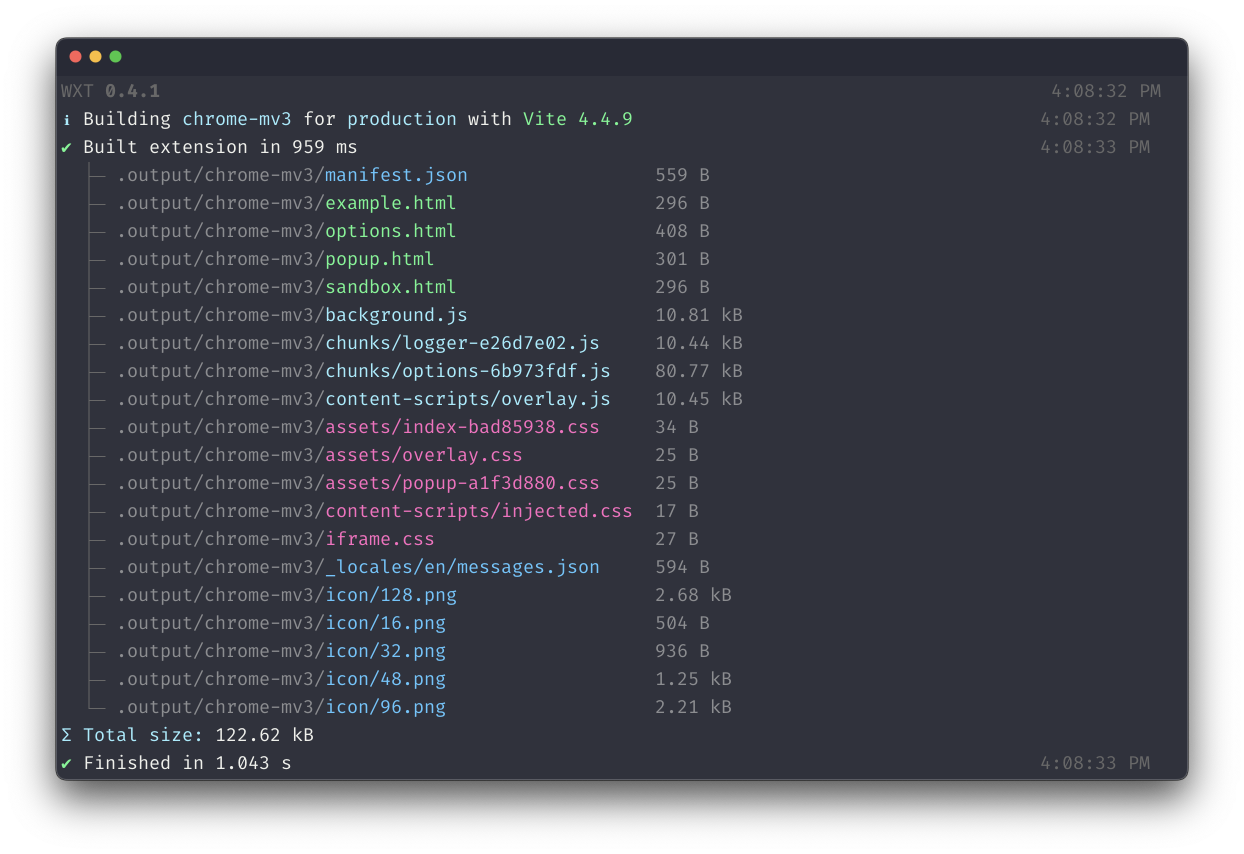
|
||||
|
||||
## Demo
|
||||
|
||||
https://github.com/wxt-dev/wxt/assets/10101283/4d678939-1bdb-495c-9c36-3aa281d84c94
|
||||
<https://github.com/wxt-dev/wxt/assets/10101283/4d678939-1bdb-495c-9c36-3aa281d84c94>
|
||||
|
||||
## Quick Start
|
||||
|
||||
Bootstrap a new project:
|
||||
|
||||
<!-- automd:pm-x version="latest" name="wxt" args="init" -->
|
||||
|
||||
```sh
|
||||
# npm
|
||||
npx wxt@latest init
|
||||
@@ -56,8 +38,6 @@ pnpm dlx wxt@latest init
|
||||
bunx wxt@latest init
|
||||
```
|
||||
|
||||
<!-- /automd -->
|
||||
|
||||
Or see the [installation guide](https://wxt.dev/guide/installation.html) to get started with WXT.
|
||||
|
||||
## Features
|
||||
@@ -79,17 +59,11 @@ Or see the [installation guide](https://wxt.dev/guide/installation.html) to get
|
||||
|
||||
WXT is a [MIT-licensed](https://github.com/wxt-dev/wxt/blob/main/LICENSE) open source project with its ongoing development made possible entirely by the support of these awesome backers. If you'd like to join them, please consider [sponsoring WXT's development](https://github.com/sponsors/wxt-dev).
|
||||
|
||||
<a href="https://github.com/sponsors/wxt-dev"><img alt="WXT Sponsors" src="https://raw.githubusercontent.com/wxt-dev/static/refs/heads/main/sponsorkit/sponsors.svg"></a>
|
||||
[](https://github.com/sponsors/wxt-dev)
|
||||
|
||||
## Contributors
|
||||
|
||||
<!-- automd:contributors author="aklinker1" license="MIT" github="wxt-dev/wxt" -->
|
||||
|
||||
Published under the [MIT](https://github.com/wxt-dev/wxt/blob/main/LICENSE) license.
|
||||
Made by [@aklinker1](https://github.com/aklinker1) and [community](https://github.com/wxt-dev/wxt/graphs/contributors) 💛
|
||||
<br><br>
|
||||
<a href="https://github.com/wxt-dev/wxt/graphs/contributors">
|
||||
<img src="https://contrib.rocks/image?repo=wxt-dev/wxt" />
|
||||
</a>
|
||||
|
||||
<!-- /automd -->
|
||||
[](https://github.com/wxt-dev/wxt/graphs/contributors)
|
||||
|
||||
@@ -0,0 +1,70 @@
|
||||
<script lang="ts" setup>
|
||||
import { computed } from 'vue';
|
||||
// @ts-expect-error: Vitepress data-loader magic, this import is correct
|
||||
import { data } from '../loaders/blog.data';
|
||||
import BlogPostPreview from './BlogPostPreview.vue';
|
||||
|
||||
const posts = computed(() =>
|
||||
data
|
||||
.map((post) => ({
|
||||
...post,
|
||||
...post.frontmatter,
|
||||
date: new Date(post.frontmatter.date),
|
||||
}))
|
||||
.sort((a, b) => b.date.getTime() - a.date.getTime()),
|
||||
);
|
||||
</script>
|
||||
|
||||
<template>
|
||||
<div class="container">
|
||||
<div>
|
||||
<div class="vp-doc">
|
||||
<h1>Blog</h1>
|
||||
</div>
|
||||
|
||||
<ul>
|
||||
<BlogPostPreview v-for="post of posts" :key="post.url" :post />
|
||||
</ul>
|
||||
</div>
|
||||
</div>
|
||||
</template>
|
||||
|
||||
<style scoped>
|
||||
.container {
|
||||
display: flex;
|
||||
flex-direction: column;
|
||||
align-items: center;
|
||||
}
|
||||
.container > div {
|
||||
padding: 32px;
|
||||
max-width: 900px;
|
||||
width: 100%;
|
||||
min-width: 0;
|
||||
}
|
||||
|
||||
h1 {
|
||||
padding-bottom: 16px;
|
||||
}
|
||||
|
||||
ul {
|
||||
display: flex;
|
||||
flex-direction: column;
|
||||
list-style: none;
|
||||
}
|
||||
ul,
|
||||
li {
|
||||
padding: 0;
|
||||
margin: 0;
|
||||
}
|
||||
|
||||
ul li {
|
||||
padding-top: 16px;
|
||||
margin-top: 16px;
|
||||
border-top: 1px solid var(--vp-c-default);
|
||||
}
|
||||
ul li:last-child {
|
||||
padding-bottom: 16px;
|
||||
margin-bottom: 16px;
|
||||
border-bottom: 1px solid var(--vp-c-default);
|
||||
}
|
||||
</style>
|
||||
@@ -0,0 +1,76 @@
|
||||
<script lang="ts" setup>
|
||||
import useBlogDate from '../composables/useBlogDate';
|
||||
import { useData } from 'vitepress';
|
||||
|
||||
const { frontmatter } = useData();
|
||||
const date = useBlogDate(() => frontmatter.value.date);
|
||||
</script>
|
||||
|
||||
<template>
|
||||
<div class="vp-doc">
|
||||
<main class="container-content">
|
||||
<h1 v-html="$frontmatter.title" />
|
||||
<p class="meta-row">
|
||||
<a
|
||||
class="author"
|
||||
v-for="author of $frontmatter.authors"
|
||||
:key="author.github"
|
||||
:href="`https://github.com/${author.github}`"
|
||||
>
|
||||
<img :src="`https://github.com/${author.github}.png?size=96`" />
|
||||
<span>{{ author.name }}</span>
|
||||
</a>
|
||||
<span>•</span>
|
||||
<span>{{ date }}</span>
|
||||
</p>
|
||||
<Content />
|
||||
</main>
|
||||
</div>
|
||||
</template>
|
||||
|
||||
<style scoped>
|
||||
vp-doc {
|
||||
display: flex;
|
||||
}
|
||||
main {
|
||||
max-width: 1080px;
|
||||
padding: 32px;
|
||||
margin: auto;
|
||||
}
|
||||
@media (min-width: 768px) {
|
||||
main {
|
||||
padding: 64px;
|
||||
}
|
||||
}
|
||||
.meta-row {
|
||||
display: flex;
|
||||
color: var(--vp-c-text-2);
|
||||
gap: 16px;
|
||||
overflow: hidden;
|
||||
padding-bottom: 32px;
|
||||
}
|
||||
.meta-row > * {
|
||||
flex-shrink: 0;
|
||||
}
|
||||
.author {
|
||||
display: flex;
|
||||
gap: 8px;
|
||||
align-items: center;
|
||||
color: var(--vp-c-text-2);
|
||||
font-weight: normal;
|
||||
text-decoration: none;
|
||||
}
|
||||
.author img {
|
||||
width: 24px;
|
||||
height: 24px;
|
||||
border-radius: 100%;
|
||||
}
|
||||
.author span {
|
||||
padding: 0;
|
||||
margin: 0;
|
||||
}
|
||||
.author:hover {
|
||||
text-decoration: underline;
|
||||
color: var(--vp-c-text-2);
|
||||
}
|
||||
</style>
|
||||
@@ -0,0 +1,72 @@
|
||||
<script lang="ts" setup>
|
||||
import useBlogDate from '../composables/useBlogDate';
|
||||
|
||||
const props = defineProps<{
|
||||
post: {
|
||||
title: string;
|
||||
description?: string;
|
||||
date: Date;
|
||||
url: string;
|
||||
authors: Array<{ name: string; github: string }>;
|
||||
};
|
||||
}>();
|
||||
|
||||
const date = useBlogDate(() => props.post.date);
|
||||
</script>
|
||||
|
||||
<template>
|
||||
<li class="blog-list-item">
|
||||
<a :href="post.url">
|
||||
<div class="vp-doc">
|
||||
<h3 class="title" v-html="post.title" />
|
||||
<p class="description" v-html="post.description" />
|
||||
<p class="meta">
|
||||
{{ post.authors.map((author) => author.name).join(', ') }}
|
||||
•
|
||||
{{ date }}
|
||||
</p>
|
||||
</div>
|
||||
</a>
|
||||
</li>
|
||||
</template>
|
||||
|
||||
<style scoped>
|
||||
li {
|
||||
padding: 0;
|
||||
margin: 0;
|
||||
}
|
||||
|
||||
p {
|
||||
margin: 0;
|
||||
}
|
||||
h3 {
|
||||
margin: 0;
|
||||
padding: 0;
|
||||
border: none;
|
||||
}
|
||||
|
||||
li > a > div {
|
||||
display: flex;
|
||||
flex-direction: column;
|
||||
margin: 0 -16px;
|
||||
padding: 16px;
|
||||
border-radius: 16px;
|
||||
}
|
||||
li > a > div:hover {
|
||||
background: var(--vp-c-default);
|
||||
}
|
||||
li .title {
|
||||
color: var(--vp-c-text);
|
||||
margin-bottom: 12px;
|
||||
}
|
||||
li .description {
|
||||
font-size: 16px;
|
||||
color: var(--vp-c-text-2);
|
||||
margin-bottom: 8px;
|
||||
}
|
||||
li .meta {
|
||||
font-weight: 400;
|
||||
font-size: 12px;
|
||||
color: var(--vp-c-text-2);
|
||||
}
|
||||
</style>
|
||||
@@ -4,7 +4,7 @@ import useListExtensionDetails, {
|
||||
ChromeExtension,
|
||||
} from '../composables/useListExtensionDetails';
|
||||
|
||||
// Add extension IDs here. Order doesn't matter, will be sorted by a combination of weekly active users and rating.
|
||||
// Add extension IDs to end of the list. On the website, extensions will be sorted by a combination of weekly active users and rating.
|
||||
// Change the commit message or PR title to: "docs: Added "[extension name]" to the homepage"
|
||||
const chromeExtensionIds = [
|
||||
'ocfdgncpifmegplaglcnglhioflaimkd', // GitHub: Better Line Counts
|
||||
@@ -68,6 +68,40 @@ const chromeExtensionIds = [
|
||||
'dlnjcbkmomenmieechnmgglgcljhoepd', // Youtube Live Chat Fullscreen
|
||||
'keiealdacakpnbbljlmhfgcebmaadieg', // Python Code Runner
|
||||
'hafcajcllbjnoolpfngclfmmgpikdhlm', // Monochromate
|
||||
'bmoggiinmnodjphdjnmpcnlleamkfedj', // AliasVault - Open-Source Password & (Email) Alias Manager
|
||||
'hlnhhamckimoaiekbglafiebkfimhapb', // SnapThePrice: AI-Powered Real-time Lowest Price Finder
|
||||
'gdjampjdgjmbifnhldgcnccdjkcoicmg', // radiofrance - news & broadcasts (French), music (international)
|
||||
'jlnhphlghikichhgbnkepenehbmloenb', // Blens - Time Tracker and AI Insight
|
||||
'njnammmpdodmfkodnfpammnpdcbhnlcm', // Always Light Mode - Setting website always in light mode
|
||||
'lblmfclcfniabobmamfkdogcgdagbhhb', // DesignPicker - Color Picker & Font Detector
|
||||
'pamnlaoeobcmhkliljfaofekeddpmfoh', // Web to PDF
|
||||
'jmbcbeepjfenihlocplnbmbhimcoooka', // Online CSV Viewer
|
||||
'nkjcoophmpcmmgadnljnlpbpfdfacgbo', // YouTube Video Transcript
|
||||
'lcaieahkjgeggeiihblhcjbbjlppgieh', // NetSuite Record Scripts
|
||||
'gmocfknjllodfiomnljmaehcplnekhlo', // VueTracker
|
||||
'ggcfemmoabhhelfkhknhbnkmeahloiod', // CanCopy - A web extension that allow you to copy any content from website
|
||||
'modkelfkcfjpgbfmnbnllalkiogfofhb', // Language Learning with AI
|
||||
'npfopljnjbamegincfjelhjhnonnjloo', // Bilibili Feed History Helper
|
||||
'edkhpdceeinkcacjdgebjehipmnbomce', // NZBDonkey - The ultimate NZB file download tool
|
||||
'cckggnbnimdbbpmdinkkgbbncopbloob', // WeChat Markdown Editor(微信 Markdown 编辑器)
|
||||
'jcblcjolcojmfopefcighfmkkefbaofg', // Tab Grab
|
||||
'eehmoikadcijkapfjocnhjclpbaindlb', // BrowserLens - https://browserlens.com/
|
||||
'hfhellofkjebbchcdffmicekjdomkcmc', // Epic Games Library Extension
|
||||
'gknigcbhlammoakmmdddkblknanpjiac', // Zen Analytics Pixel Tracker - zapt.web.app
|
||||
'cnklededohhcbmjjdlbjdkkihkgoggol', // Crypto Pulse - Compose your newtab with nature images, widgets & realtime Crypto Price & Bitcoin RSS.
|
||||
'miponnamafdenpgjemkknimgjfibicdc', // Youtube Video Scheduler
|
||||
'nhmbcmalgpkjbomhlhgdicanmkkaajmg', // Chatslator: Livestream Chat Translator
|
||||
'mbamjfdjbcdgpopfnkkmlohadbbnplhm', // 公众号阅读增强器 - https://wxreader.honwhy.wang
|
||||
'hannhecbnjnnbbafffmogdlnajpcomek', // 토탐정
|
||||
'ehboaofjncodknjkngdggmpdinhdoijp', // 2FAS Pass - https://2fas.com/
|
||||
'hnjamiaoicaepbkhdoknhhcedjdocpkd', // Quick Prompt - https://github.com/wenyuanw/quick-prompt
|
||||
'kacblhilkacgfnkjfodalohcnllcgmjd', // Add QR Code Generator Icon Back To Address Bar
|
||||
'fkbdlogfdjmpfepbbbjcgcfbgbcfcnne', // Piwik PRO Tracking Helper
|
||||
'nkbikckldmljjiiajklecmgmajgapbfl', // PIPX - Take Control of Picture-in-Picture, Automatically
|
||||
'hgppdobcpkfkmiegekaglonjajeojmdd', // Browsely - AI-powered browser extension
|
||||
'ehmoihnjgkdimihkhokkmfjdgomohjgm', // Filmbudd Pro - Simple, private – and synced ratings and watch notes across all your devices
|
||||
'alglchohmdikgdjhafiicilegegieafa', // MultiField CopyCat - Copy, Paste & Autofill Web Forms Instantly
|
||||
'aamihahiiogceidpbnfgehacgiecephe', // ChatSight - Add Table of Contents to ChatGPT
|
||||
];
|
||||
|
||||
const { data, err, isLoading } = useListExtensionDetails(chromeExtensionIds);
|
||||
|
||||
@@ -0,0 +1,15 @@
|
||||
import { computed, toValue, MaybeRefOrGetter } from 'vue';
|
||||
|
||||
const MONTH_FORMATTER = new Intl.DateTimeFormat(
|
||||
globalThis?.navigator?.language,
|
||||
{
|
||||
month: 'long',
|
||||
},
|
||||
);
|
||||
|
||||
export default function (date: MaybeRefOrGetter<Date | string>) {
|
||||
return computed(() => {
|
||||
const d = new Date(toValue(date));
|
||||
return `${MONTH_FORMATTER.format(d)} ${d.getDate()}, ${d.getFullYear()}`;
|
||||
});
|
||||
}
|
||||
@@ -35,6 +35,9 @@ export default function (ids: string[]) {
|
||||
query,
|
||||
variables: { ids },
|
||||
}),
|
||||
headers: {
|
||||
'Content-Type': 'application/json',
|
||||
},
|
||||
})
|
||||
.then(async (res) => {
|
||||
isLoading.value = false;
|
||||
|
||||
+90
-21
@@ -1,4 +1,4 @@
|
||||
import { defineConfig } from 'vitepress';
|
||||
import { DefaultTheme, defineConfig } from 'vitepress';
|
||||
import typedocSidebar from '../api/reference/typedoc-sidebar.json';
|
||||
import {
|
||||
menuGroup,
|
||||
@@ -14,38 +14,102 @@ import { version as i18nVersion } from '../../packages/i18n/package.json';
|
||||
import { version as autoIconsVersion } from '../../packages/auto-icons/package.json';
|
||||
import { version as unocssVersion } from '../../packages/unocss/package.json';
|
||||
import { version as storageVersion } from '../../packages/storage/package.json';
|
||||
import knowledge from 'vitepress-knowledge';
|
||||
import { version as analyticsVersion } from '../../packages/analytics/package.json';
|
||||
import { version as runnerVersion } from '../../packages/runner/package.json';
|
||||
import addKnowledge from 'vitepress-knowledge';
|
||||
import {
|
||||
groupIconMdPlugin,
|
||||
groupIconVitePlugin,
|
||||
localIconLoader,
|
||||
} from 'vitepress-plugin-group-icons';
|
||||
import { Feed } from 'feed';
|
||||
import { writeFile } from 'node:fs/promises';
|
||||
import { join } from 'node:path';
|
||||
|
||||
const origin = 'https://wxt.dev';
|
||||
|
||||
const title = 'Next-gen Web Extension Framework';
|
||||
const titleSuffix = ' – WXT';
|
||||
const description =
|
||||
"WXT provides the best developer experience, making it quick, easy, and fun to develop web extensions. With built-in utilities for building, zipping, and publishing your extension, it's easy to get started.";
|
||||
const ogTitle = `${title}${titleSuffix}`;
|
||||
const ogUrl = 'https://wxt.dev';
|
||||
const ogImage = 'https://wxt.dev/social-preview.png';
|
||||
const ogUrl = origin;
|
||||
const ogImage = `${origin}/social-preview.png`;
|
||||
|
||||
const otherPackages = {
|
||||
analytics: analyticsVersion,
|
||||
'auto-icons': autoIconsVersion,
|
||||
i18n: i18nVersion,
|
||||
storage: storageVersion,
|
||||
unocss: unocssVersion,
|
||||
runner: runnerVersion,
|
||||
};
|
||||
|
||||
const knowledge = addKnowledge<DefaultTheme.Config>({
|
||||
serverUrl: 'https://knowledge.wxt.dev',
|
||||
paths: {
|
||||
'/': 'docs',
|
||||
'/api/': 'api-reference',
|
||||
'/blog/': 'blog',
|
||||
},
|
||||
layoutSelectors: {
|
||||
blog: '.container-content',
|
||||
},
|
||||
pageSelectors: {
|
||||
'examples.md': '#VPContent > .VPPage',
|
||||
'blog.md': '#VPContent > .VPPage',
|
||||
},
|
||||
});
|
||||
|
||||
// https://vitepress.dev/reference/site-config
|
||||
export default defineConfig({
|
||||
extends: knowledge({
|
||||
serverUrl: 'https://knowledge.wxt.dev',
|
||||
paths: {
|
||||
'/': 'docs',
|
||||
'/api/': 'api-reference',
|
||||
},
|
||||
pageSelectors: {
|
||||
'examples.md': '#VPContent > .VPPage',
|
||||
},
|
||||
}),
|
||||
extends: knowledge,
|
||||
|
||||
titleTemplate: `:title${titleSuffix}`,
|
||||
title: 'WXT',
|
||||
description,
|
||||
vite: {
|
||||
clearScreen: false,
|
||||
plugins: [
|
||||
groupIconVitePlugin({
|
||||
customIcon: {
|
||||
'wxt.config.ts': localIconLoader(
|
||||
import.meta.url,
|
||||
'../public/logo.svg',
|
||||
),
|
||||
},
|
||||
}),
|
||||
],
|
||||
},
|
||||
lastUpdated: true,
|
||||
sitemap: {
|
||||
hostname: 'https://wxt.dev',
|
||||
hostname: origin,
|
||||
},
|
||||
|
||||
async buildEnd(site) {
|
||||
// @ts-expect-error: knowledge.buildEnd is not typed, but it exists.
|
||||
await knowledge.buildEnd(site);
|
||||
|
||||
// Only construct the RSS document for production builds
|
||||
const { default: blogDataLoader } = await import('./loaders/blog.data');
|
||||
const posts = await blogDataLoader.load();
|
||||
const feed = new Feed({
|
||||
copyright: 'MIT',
|
||||
id: 'wxt',
|
||||
title: 'WXT Blog',
|
||||
link: `${origin}/blog`,
|
||||
});
|
||||
posts.forEach((post) => {
|
||||
feed.addItem({
|
||||
date: post.frontmatter.date,
|
||||
link: new URL(post.url, origin).href,
|
||||
title: post.frontmatter.title,
|
||||
description: post.frontmatter.description,
|
||||
});
|
||||
});
|
||||
// console.log('rss.xml:');
|
||||
// console.log(feed.rss2());
|
||||
await writeFile(join(site.outDir, 'rss.xml'), feed.rss2(), 'utf8');
|
||||
},
|
||||
|
||||
head: [
|
||||
@@ -64,6 +128,10 @@ export default defineConfig({
|
||||
markdown: {
|
||||
config: (md) => {
|
||||
md.use(footnote);
|
||||
md.use(groupIconMdPlugin);
|
||||
},
|
||||
languageAlias: {
|
||||
mjs: 'js',
|
||||
},
|
||||
},
|
||||
|
||||
@@ -101,6 +169,7 @@ export default defineConfig({
|
||||
navItem('Guide', '/guide/installation'),
|
||||
navItem('Examples', '/examples'),
|
||||
navItem('API', '/api/reference/wxt'),
|
||||
navItem('Blog', '/blog'),
|
||||
navItem(`v${wxtVersion}`, [
|
||||
navItem('wxt', [
|
||||
navItem(`v${wxtVersion}`, '/'),
|
||||
@@ -109,12 +178,12 @@ export default defineConfig({
|
||||
'https://github.com/wxt-dev/wxt/blob/main/packages/wxt/CHANGELOG.md',
|
||||
),
|
||||
]),
|
||||
navItem('Other Packages', [
|
||||
navItem(`@wxt-dev/storage — ${storageVersion}`, '/storage'),
|
||||
navItem(`@wxt-dev/auto-icons — ${autoIconsVersion}`, '/auto-icons'),
|
||||
navItem(`@wxt-dev/i18n — ${i18nVersion}`, '/i18n'),
|
||||
navItem(`@wxt-dev/unocss — ${unocssVersion}`, '/unocss'),
|
||||
]),
|
||||
navItem(
|
||||
'Other Packages',
|
||||
Object.entries(otherPackages).map(([name, version]) =>
|
||||
navItem(`@wxt-dev/${name} — ${version}`, `/${name}`),
|
||||
),
|
||||
),
|
||||
]),
|
||||
],
|
||||
|
||||
|
||||
@@ -0,0 +1,3 @@
|
||||
import { createContentLoader } from 'vitepress';
|
||||
|
||||
export default createContentLoader('blog/*.md');
|
||||
@@ -3,14 +3,18 @@ import Icon from '../components/Icon.vue';
|
||||
import EntrypointPatterns from '../components/EntrypointPatterns.vue';
|
||||
import UsingWxtSection from '../components/UsingWxtSection.vue';
|
||||
import ExampleSearch from '../components/ExampleSearch.vue';
|
||||
import BlogLayout from '../components/BlogLayout.vue';
|
||||
import './custom.css';
|
||||
import 'virtual:group-icons.css';
|
||||
|
||||
export default {
|
||||
extends: DefaultTheme,
|
||||
enhanceApp(ctx) {
|
||||
ctx.app.component('Icon', Icon);
|
||||
ctx.app.component('EntrypointPatterns', EntrypointPatterns);
|
||||
ctx.app.component('UsingWxtSection', UsingWxtSection);
|
||||
ctx.app.component('ExampleSearch', ExampleSearch);
|
||||
ctx.app
|
||||
.component('Icon', Icon)
|
||||
.component('EntrypointPatterns', EntrypointPatterns)
|
||||
.component('UsingWxtSection', UsingWxtSection)
|
||||
.component('ExampleSearch', ExampleSearch)
|
||||
.component('blog', BlogLayout);
|
||||
},
|
||||
};
|
||||
|
||||
@@ -0,0 +1 @@
|
||||
<!--@include: ../packages/analytics/README.md-->
|
||||

Binary file not shown.
|
Before Width: | Height: | Size: 132 KiB After Width: | Height: | Size: 131 KiB |
@@ -0,0 +1,9 @@
|
||||
---
|
||||
layout: page
|
||||
---
|
||||
|
||||
<script lang="ts" setup>
|
||||
import BlogHome from './.vitepress/components/BlogHome.vue';
|
||||
</script>
|
||||
|
||||
<BlogHome />
|
||||
@@ -0,0 +1,12 @@
|
||||
---
|
||||
layout: blog
|
||||
title: Real World Messaging
|
||||
description: |
|
||||
The extension messaging APIs are difficult to learn. Let's go beyond the simple examples from Chrome and Firefox's documentation to build our own simple messaging system from scratch.
|
||||
authors:
|
||||
- name: Aaron Klinker
|
||||
github: aklinker1
|
||||
date: 2024-10-20T04:54:23.601Z
|
||||
---
|
||||
|
||||
Test content **bold** _italic_
|
||||
@@ -0,0 +1,76 @@
|
||||
---
|
||||
layout: blog
|
||||
title: Introducing <code>#imports</code>
|
||||
description: Learn how WXT's new <code>#imports</code> module works and how to use it.
|
||||
authors:
|
||||
- name: Aaron Klinker
|
||||
github: aklinker1
|
||||
date: 2024-12-06T14:39:00.000Z
|
||||
---
|
||||
|
||||
WXT v0.20 introduced a new way of manually importing its APIs: **the `#imports` module**. This module was introduced to simplify import statements and provide more visibility into all the APIs WXT provides.
|
||||
|
||||
<!-- prettier-ignore -->
|
||||
```ts
|
||||
import { browser } from 'wxt/browser'; // [!code --]
|
||||
import { createShadowRootUi } from 'wxt/utils/content-script-ui/shadow-root'; // [!code --]
|
||||
import { defineContentScript } from 'wxt/utils/define-content-script'; // [!code --]
|
||||
import { injectScript } from 'wxt/utils/inject-script'; // [!code --]
|
||||
import { // [!code ++]
|
||||
browser, createShadowRootUi, defineContentScript, injectScript // [!code ++]
|
||||
} from '#imports'; // [!code ++]
|
||||
```
|
||||
|
||||
The `#imports` module is considered a "virtual module", because the file doesn't actually exist. At build-time, imports are split into individual statements for each API:
|
||||
|
||||
:::code-group
|
||||
|
||||
```ts [What you write]
|
||||
import { defineContentScript, injectScript } from '#imports';
|
||||
```
|
||||
|
||||
```ts [What the bundler sees]
|
||||
import { defineContentScript } from 'wxt/utils/define-content-script';
|
||||
import { injectScript } from 'wxt/utils/inject-script';
|
||||
```
|
||||
|
||||
:::
|
||||
|
||||
Think of `#imports` as a convenient way to access all of WXT's APIs from one place, without impacting performance or bundle size.
|
||||
|
||||
This enables better tree-shaking compared to v0.19 and below.
|
||||
|
||||
:::tip Need to lookup the full import path of an API?
|
||||
Open up your project's `.wxt/types/imports-module.d.ts` file.
|
||||
:::
|
||||
|
||||
## Mocking
|
||||
|
||||
When writing tests, you might need to mock APIs from the `#imports` module. While mocking these APIs is very easy, it may not be immediately clear how to accomplish it.
|
||||
|
||||
Let's look at an example using Vitest. When [configured with `wxt/testing`](/guide/essentials/unit-testing#vitest), Vitest sees the same transformed code as the bundler. That means to mock an API from `#imports`, you need to call `vi.mock` with the real import path, not `#imports`:
|
||||
|
||||
```ts
|
||||
import { injectScript } from '#imports';
|
||||
import { vi } from 'vitest';
|
||||
|
||||
vi.mock('wxt/utils/inject-script')
|
||||
const injectScriptMock = vi.mocked(injectScript);
|
||||
|
||||
injectScriptMock.mockReturnValueOnce(...);
|
||||
```
|
||||
|
||||
## Conclusion
|
||||
|
||||
You don't have to use `#imports` if you don't like - you can continue importing APIs from their submodules. However, using `#imports` is the recommended approach moving forwards.
|
||||
|
||||
- As more APIs are added, you won't have to memorize additional import paths.
|
||||
- If breaking changes are made to import paths in future major versions, `#imports` won't break.
|
||||
|
||||
Happy Coding 😄
|
||||
|
||||
> P.S. Yes, this is exactly how [Nuxt's `#imports`](https://nuxt.com/docs/guide/concepts/auto-imports#explicit-imports) works! We use the exact same library, [`unimport`](https://github.com/unjs/unimport).
|
||||
|
||||
---
|
||||
|
||||
[Discuss this blog post on Github](https://github.com/wxt-dev/wxt/discussions/1543).
|
||||
@@ -46,7 +46,7 @@ import image from '~/assets/image.png';
|
||||
|
||||
## `/public` Directory
|
||||
|
||||
Files inside `<srcDir>/public/` are copied into the output folder as-is, without being processed by WXT's bundler.
|
||||
Files inside `<rootDir>/public/` are copied into the output folder as-is, without being processed by WXT's bundler.
|
||||
|
||||
Here's how you access them:
|
||||
|
||||
@@ -81,6 +81,10 @@ img.src = imageUrl;
|
||||
|
||||
:::
|
||||
|
||||
:::warning
|
||||
Assets in the `public/` directory are **_not_** accessible in content scripts by default. To use a public asset in a content script, you must add it to your manifest's [`web_accessible_resources` array](/api/reference/wxt/type-aliases/UserManifest#web-accessible-resources).
|
||||
:::
|
||||
|
||||
## Inside Content Scripts
|
||||
|
||||
Assets inside content scripts are a little different. By default, when you import an asset, it returns just the path to the asset. This is because Vite assumes you're loading assets from the same hostname.
|
||||
@@ -89,8 +93,7 @@ But, inside content scripts, the hostname is whatever the tab is set to. So if y
|
||||
|
||||
To fix this, you need to convert the image to a full URL using `browser.runtime.getURL`:
|
||||
|
||||
```ts
|
||||
// entrypoints/content.ts
|
||||
```ts [entrypoints/content.ts]
|
||||
import iconUrl from '/icon/128.png';
|
||||
|
||||
export default defineContentScript({
|
||||
@@ -135,8 +138,7 @@ Run `wxt build`, and you should see the WASM file copied into your `.output/chro
|
||||
|
||||
Next, since this is in a content script and we'll be fetching the WASM file over the network to load it, we need to add the file to the `web_accessible_resources`:
|
||||
|
||||
```ts
|
||||
// wxt.config.ts
|
||||
```ts [wxt.config.ts]
|
||||
export default defineConfig({
|
||||
manifest: {
|
||||
web_accessible_resources: [
|
||||
@@ -153,8 +155,7 @@ export default defineConfig({
|
||||
|
||||
And finally, we need to load and initialize the `.wasm` file inside the content script to use it:
|
||||
|
||||
```ts
|
||||
// entrypoints/content.ts
|
||||
```ts [entrypoints/content.ts]
|
||||
import initWasm, { parseSync } from '@oxc-parser/wasm';
|
||||
|
||||
export default defineContentScript({
|
||||
|
||||
@@ -11,19 +11,7 @@ export default defineConfig({
|
||||
});
|
||||
```
|
||||
|
||||
By default, WXT sets up auto-imports for all of it's own APIs:
|
||||
|
||||
- [`browser`](/api/reference/wxt/browser/variables/browser) from `wxt/browser`
|
||||
- [`defineContentScript`](/api/reference/wxt/sandbox/functions/defineContentScript) from `wxt/sandbox`
|
||||
- [`defineBackground`](/api/reference/wxt/sandbox/functions/defineBackground) from `wxt/sandbox`
|
||||
- [`defineUnlistedScript`](/api/reference/wxt/sandbox/functions/defineUnlistedScript) from `wxt/sandbox`
|
||||
- [`createIntegratedUi`](/api/reference/wxt/client/functions/createIntegratedUi) from `wxt/client`
|
||||
- [`createShadowRootUi`](/api/reference/wxt/client/functions/createShadowRootUi) from `wxt/client`
|
||||
- [`createIframeUi`](/api/reference/wxt/client/functions/createIframeUi) from `wxt/client`
|
||||
- [`fakeBrowser`](/api/reference/wxt/testing/variables/fakeBrowser) from `wxt/testing`
|
||||
- And more!
|
||||
|
||||
WXT also adds some project directories as auto-import sources automatically:
|
||||
By default, WXT automatically sets up auto-imports for all of it's own APIs and some of your project directories:
|
||||
|
||||
- `<srcDir>/components/*`
|
||||
- `<srcDir>/composables/*`
|
||||
@@ -32,6 +20,8 @@ WXT also adds some project directories as auto-import sources automatically:
|
||||
|
||||
All named and default exports from files in these directories are available everywhere else in your project without having to import them.
|
||||
|
||||
To see the complete list of auto-imported APIs, run [`wxt prepare`](/api/cli/wxt-prepare) and look at your project's `.wxt/types/imports-module.d.ts` file.
|
||||
|
||||
## TypeScript
|
||||
|
||||
For TypeScript and your editor to recognize auto-imported variables, you need to run the [`wxt prepare` command](/api/cli/wxt-prepare).
|
||||
@@ -110,3 +100,19 @@ export default defineConfig({
|
||||
imports: false, // [!code ++]
|
||||
});
|
||||
```
|
||||
|
||||
## Explicit Imports (`#imports`)
|
||||
|
||||
You can manually import all of WXT's APIs via the `#imports` module:
|
||||
|
||||
```ts
|
||||
import {
|
||||
createShadowRootUi,
|
||||
ContentScriptContext,
|
||||
MatchPattern,
|
||||
} from '#imports';
|
||||
```
|
||||
|
||||
To learn more about how the `#imports` module works, read the [related blog post](/blog/2024-12-06-using-imports-module).
|
||||
|
||||
If you've disabled auto-imports, you should still use `#imports` to import all of WXT's APIs from a single place.
|
||||
|
||||
@@ -4,7 +4,7 @@ outline: deep
|
||||
|
||||
# Browser Startup
|
||||
|
||||
> See the [API Reference](/api/reference/wxt/interfaces/ExtensionRunnerConfig) for a full list of config.
|
||||
> See the [API Reference](/api/reference/wxt/interfaces/WebExtConfig) for a full list of config.
|
||||
|
||||
During development, WXT uses [`web-ext` by Mozilla](https://www.npmjs.com/package/web-ext) to automatically open a browser window with your extension installed.
|
||||
|
||||
@@ -14,15 +14,15 @@ You can configure browser startup in 3 places:
|
||||
|
||||
1. `<rootDir>/web-ext.config.ts`: Ignored from version control, this file lets you configure your own options for a specific project without affecting other developers
|
||||
|
||||
```ts
|
||||
import { defineRunnerConfig } from 'wxt';
|
||||
```ts [web-ext.config.ts]
|
||||
import { defineWebExtConfig } from 'wxt';
|
||||
|
||||
export default defineRunnerConfig({
|
||||
export default defineWebExtConfig({
|
||||
// ...
|
||||
});
|
||||
```
|
||||
|
||||
2. `<rootDir>/wxt.config.ts`: Via the [`runner` config](/api/reference/wxt/interfaces/InlineConfig#runner), included in version control
|
||||
2. `<rootDir>/wxt.config.ts`: Via the [`webExt` config](/api/reference/wxt/interfaces/InlineConfig#webext), included in version control
|
||||
3. `$HOME/web-ext.config.ts`: Provide default values for all WXT projects on your computer
|
||||
|
||||
## Recipes
|
||||
@@ -31,8 +31,8 @@ You can configure browser startup in 3 places:
|
||||
|
||||
To set or customize the browser opened during development:
|
||||
|
||||
```ts
|
||||
export default defineRunnerConfig({
|
||||
```ts [web-ext.config.ts]
|
||||
export default defineWebExtConfig({
|
||||
binaries: {
|
||||
chrome: '/path/to/chrome-beta', // Use Chrome Beta instead of regular Chrome
|
||||
firefox: 'firefoxdeveloperedition', // Use Firefox Developer Edition instead of regular Firefox
|
||||
@@ -54,7 +54,7 @@ To persist data, set the `--user-data-dir` flag:
|
||||
:::code-group
|
||||
|
||||
```ts [Mac/Linux]
|
||||
export default defineRunnerConfig({
|
||||
export default defineWebExtConfig({
|
||||
chromiumArgs: ['--user-data-dir=./.wxt/chrome-data'],
|
||||
});
|
||||
```
|
||||
@@ -62,7 +62,7 @@ export default defineRunnerConfig({
|
||||
```ts [Windows]
|
||||
import { resolve } from 'node:path';
|
||||
|
||||
export default defineRunnerConfig({
|
||||
export default defineWebExtConfig({
|
||||
// On Windows, the path must be absolute
|
||||
chromiumProfile: resolve('.wxt/chrome-data'),
|
||||
keepProfileChanges: true,
|
||||
@@ -81,8 +81,8 @@ You can use any directory you'd like for `--user-data-dir`, the examples above c
|
||||
|
||||
If you prefer to load the extension into your browser manually, you can disable the auto-open behavior:
|
||||
|
||||
```ts
|
||||
export default defineRunnerConfig({
|
||||
```ts [web-ext.config.ts]
|
||||
export default defineWebExtConfig({
|
||||
disabled: true,
|
||||
});
|
||||
```
|
||||
|
||||
@@ -10,70 +10,10 @@ WXT does several pre-processing steps to try and prevent errors during this proc
|
||||
2. Use `@webext-core/fake-browser` to create a fake version of the `chrome` and `browser` globals expected by extensions.
|
||||
3. Pre-process the JS/TS code, stripping out the `main` function then tree-shaking unused code from the file
|
||||
|
||||
However, this process is not perfect. It doesn't setup all the globals found in the browser and the APIs may behave differently. As such, **_you should avoid using browser or extension APIs outside the `main` function of your entrypoints!_**
|
||||
However, this process is not perfect. It doesn't setup all the globals found in the browser and the APIs may behave differently. As such, **_you should avoid using browser or extension APIs outside the `main` function of your entrypoints!_** See [Entrypoint Limitations](/guide/essentials/extension-apis#entrypoint-limitations) for more details.
|
||||
|
||||
:::tip
|
||||
If you're running into errors while importing entrypoints, run `wxt prepare --debug` to see more details about this process. When debugging, WXT will print out the pre-processed code to help you identify issues.
|
||||
:::
|
||||
|
||||
Once the environment has been polyfilled and your code pre-processed, it's up the entrypoint loader to import your code, extracting the options from the default export.
|
||||
|
||||
There are two options for loading your entrypoints:
|
||||
|
||||
1. `vite-node` - default as of `v0.19.0`
|
||||
2. `jiti` (**DEPRECATED, will be removed in `v0.20.0`**) - Default before `v0.19.0`
|
||||
|
||||
## vite-node
|
||||
|
||||
Since 0.19.0, WXT uses `vite-node`, the same tool that powers Vitest and Nuxt, to import your entrypoint files. It re-uses the same vite config used when building your extension, making it the most stable entrypoint loader.
|
||||
|
||||
## jiti
|
||||
|
||||
To enable `jiti`:
|
||||
|
||||
```ts
|
||||
export default defineConfig({
|
||||
entrypointLoader: 'jiti',
|
||||
});
|
||||
```
|
||||
|
||||
This is the original method WXT used to import TS files. However, because it doesn't support vite plugins like `vite-node`, it does one additional pre-processing step: It removes **_ALL_** imports from your code.
|
||||
|
||||
That means you cannot use imported variables outside the `main` function in JS entrypoints, like for content script `matches` or other options:
|
||||
|
||||
```ts
|
||||
// entrypoints/content.ts
|
||||
import { GOOGLE_MATCHES } from '~/utils/match-patterns';
|
||||
|
||||
export default defineContentScript({
|
||||
matches: GOOGLE_MATCHES,
|
||||
main() {
|
||||
// ...
|
||||
},
|
||||
});
|
||||
```
|
||||
|
||||
```
|
||||
$ wxt build
|
||||
wxt build
|
||||
|
||||
WXT 0.14.1
|
||||
ℹ Building chrome-mv3 for production with Vite 5.0.5
|
||||
✖ Command failed after 360 ms
|
||||
|
||||
[8:55:54 AM] ERROR entrypoints/content.ts: Cannot use imported variable "GOOGLE_MATCHES" before main function.
|
||||
```
|
||||
|
||||
Usually, this error occurs when you try to extract options into a shared file or when running code outside the `main` function. To fix the example from above, use literal values when defining an entrypoint instead of importing them:
|
||||
|
||||
```ts
|
||||
import { GOOGLE_MATCHES } from '~/utils/match-patterns'; // [!code --]
|
||||
|
||||
export default defineContentScript({
|
||||
matches: GOOGLE_MATCHES, // [!code --]
|
||||
matches: ['*//*.google.com/*'], // [!code ++]
|
||||
main() {
|
||||
// ...
|
||||
},
|
||||
});
|
||||
```
|
||||
|
||||
@@ -4,7 +4,7 @@
|
||||
|
||||
WXT supports [dotenv files the same way as Vite](https://vite.dev/guide/env-and-mode.html#env-files). Create any of the following files:
|
||||
|
||||
```
|
||||
```plaintext
|
||||
.env
|
||||
.env.local
|
||||
.env.[mode]
|
||||
@@ -42,6 +42,8 @@ WXT provides some custom environment variables based on the current command:
|
||||
| `import.meta.env.EDGE` | `boolean` | Equivalent to `import.meta.env.BROWSER === "edge"` |
|
||||
| `import.meta.env.OPERA` | `boolean` | Equivalent to `import.meta.env.BROWSER === "opera"` |
|
||||
|
||||
You can set the [`targetBrowsers`](/api/reference/wxt/interfaces/InlineConfig#targetbrowsers) option to make the `BROWSER` variable a more specific type, like `"chrome" | "firefox"`.
|
||||
|
||||
You can also access all of [Vite's environment variables](https://vite.dev/guide/env-and-mode.html#env-variables):
|
||||
|
||||
| Usage | Type | Description |
|
||||
@@ -63,7 +65,6 @@ To use environment variables in the manifest, you need to use the function synta
|
||||
|
||||
```ts
|
||||
export default defineConfig({
|
||||
extensionApi: 'chrome',
|
||||
modules: ['@wxt-dev/module-vue'],
|
||||
manifest: { // [!code --]
|
||||
oauth2: { // [!code --]
|
||||
@@ -79,3 +80,16 @@ export default defineConfig({
|
||||
```
|
||||
|
||||
WXT can't load your `.env` files until after the config file has been loaded. So by using the function syntax for `manifest`, it defers creating the object until after the `.env` files are loaded into the process.
|
||||
|
||||
Note that Vite's runtime environment variables, like `import.meta.env.DEV`, will not be defined. Instead, access the `mode` like this:
|
||||
|
||||
```ts
|
||||
export default defineConfig({
|
||||
manifest: ({ mode }) => {
|
||||
const isDev = mode === 'development';
|
||||
console.log('Is development mode:', isDev);
|
||||
|
||||
// ...
|
||||
},
|
||||
});
|
||||
```
|
||||
|
||||
@@ -6,8 +6,7 @@ WXT includes a system that lets you hook into the build process and make changes
|
||||
|
||||
The easiest way to add a hook is via the `wxt.config.ts`. Here's an example hook that modifies the `manifest.json` file before it is written to the output directory:
|
||||
|
||||
```ts
|
||||
// wxt.config.ts
|
||||
```ts [wxt.config.ts]
|
||||
export default defineConfig({
|
||||
hooks: {
|
||||
'build:manifestGenerated': (wxt, manifest) => {
|
||||
@@ -33,7 +32,7 @@ Because hooks can be defined in multiple places, including [WXT Modules](/guide/
|
||||
|
||||
To see the order for your project, run `wxt prepare --debug` flag and search for the "Hook execution order":
|
||||
|
||||
```
|
||||
```plaintext
|
||||
⚙ Hook execution order:
|
||||
⚙ 1. wxt:built-in:unimport
|
||||
⚙ 2. src/modules/auto-icons.ts
|
||||
@@ -51,7 +50,9 @@ Changing execution order is simple:
|
||||
📄 0.my-module.ts
|
||||
📄 1.another-module.ts
|
||||
```
|
||||
|
||||
- If you need to run an NPM module after user modules, just make it a user module and prefix the filename with a number!
|
||||
|
||||
```ts
|
||||
// modules/2.i18n.ts
|
||||
export { default } from '@wxt-dev/i18n/module';
|
||||
|
||||
@@ -128,7 +128,7 @@ If a version is not present in your `package.json`, it defaults to `"0.0.0"`.
|
||||
|
||||
WXT automatically discovers your extension's icon by looking at files in the `public/` directory:
|
||||
|
||||
```
|
||||
```plaintext
|
||||
public/
|
||||
├─ icon-16.png
|
||||
├─ icon-24.png
|
||||
@@ -183,7 +183,7 @@ export default defineConfig({
|
||||
```ts
|
||||
export default defineConfig({
|
||||
manifest: {
|
||||
permissions: ['storage', 'tabs'],
|
||||
host_permissions: ['https://www.google.com/*'],
|
||||
},
|
||||
});
|
||||
```
|
||||
@@ -235,6 +235,7 @@ If you want to use the `activeTab` permission or the `browser.action.onClicked`
|
||||
|
||||
1. Delete the [Popup entrypoint](/guide/essentials/entrypoints#popup) if it exists
|
||||
2. Add the `action` key to your manifest:
|
||||
|
||||
```ts
|
||||
export default defineConfig({
|
||||
manifest: {
|
||||
|
||||
@@ -5,10 +5,10 @@
|
||||
Define runtime configuration in a single place, `<srcDir>/app.config.ts`:
|
||||
|
||||
```ts
|
||||
import { defineAppConfig } from 'wxt/sandbox';
|
||||
import { defineAppConfig } from '#imports';
|
||||
|
||||
// Define types for your config
|
||||
declare module 'wxt/sandbox' {
|
||||
declare module 'wxt/utils/define-app-config' {
|
||||
export interface WxtAppConfig {
|
||||
theme?: 'light' | 'dark';
|
||||
}
|
||||
@@ -20,13 +20,13 @@ export default defineAppConfig({
|
||||
```
|
||||
|
||||
:::warning
|
||||
This file is committed to the repo, so don't put any secrets here. Instead, use [Environment Variables](#environment-variables)
|
||||
This file is committed to the repo, so don't put any secrets here. Instead, use [Environment Variables](/guide/essentials/config/environment-variables)
|
||||
:::
|
||||
|
||||
To access runtime config, WXT provides the `useAppConfig` function:
|
||||
|
||||
```ts
|
||||
import { useAppConfig } from 'wxt/sandbox';
|
||||
import { useAppConfig } from '#imports';
|
||||
|
||||
console.log(useAppConfig()); // { theme: "dark" }
|
||||
```
|
||||
@@ -36,7 +36,7 @@ console.log(useAppConfig()); // { theme: "dark" }
|
||||
You can use environment variables in the `app.config.ts` file.
|
||||
|
||||
```ts
|
||||
declare module 'wxt/sandbox' {
|
||||
declare module 'wxt/utils/define-app-config' {
|
||||
export interface WxtAppConfig {
|
||||
apiKey?: string;
|
||||
skipWelcome: boolean;
|
||||
|
||||
@@ -12,8 +12,7 @@ In most cases, you shouldn't change Vite's build settings. WXT provides sensible
|
||||
|
||||
You can change Vite's config via the `wxt.config.ts` file:
|
||||
|
||||
```ts
|
||||
// wxt.config.ts
|
||||
```ts [wxt.config.ts]
|
||||
import { defineConfig } from 'wxt';
|
||||
|
||||
export default defineConfig({
|
||||
@@ -28,8 +27,7 @@ export default defineConfig({
|
||||
|
||||
To add a plugin, install the NPM package and add it to the Vite config:
|
||||
|
||||
```ts
|
||||
// wxt.config.ts
|
||||
```ts [wxt.config.ts]
|
||||
import { defineConfig } from 'wxt';
|
||||
import VueRouter from 'unplugin-vue-router/vite';
|
||||
|
||||
@@ -47,8 +45,7 @@ export default defineConfig({
|
||||
:::warning
|
||||
Due to the way WXT orchestrates Vite builds, some plugins may not work as expected. For example, `vite-plugin-remove-console` normally only runs when you build for production (`vite build`). However, WXT uses a combination of dev server and builds during development, so you need to manually tell it when to run:
|
||||
|
||||
```ts
|
||||
// wxt.config.ts
|
||||
```ts [wxt.config.ts]
|
||||
import { defineConfig } from 'wxt';
|
||||
import removeConsole from 'vite-plugin-remove-console';
|
||||
|
||||
|
||||
@@ -19,7 +19,7 @@ export default defineContentScript({
|
||||
|
||||
This object is responsible for tracking whether or not the content script's context is "invalidated". Most browsers, by default, do not stop content scripts if the extension is uninstalled, updated, or disabled. When this happens, content scripts start reporting this error:
|
||||
|
||||
```
|
||||
```plaintext
|
||||
Error: Extension context invalidated.
|
||||
```
|
||||
|
||||
@@ -76,8 +76,8 @@ To create a standalone content script that only includes a CSS file:
|
||||
|
||||
1. Create the CSS file: `entrypoints/example.content.css`
|
||||
2. Use the `build:manifestGenerated` hook to add the content script to the manifest:
|
||||
```ts
|
||||
// wxt.config.ts
|
||||
|
||||
```ts [wxt.config.ts]
|
||||
export default defineConfig({
|
||||
hooks: {
|
||||
'build:manifestGenerated': (wxt, manifest) => {
|
||||
@@ -211,9 +211,7 @@ export default defineContentScript({
|
||||
anchor: 'body',
|
||||
onMount: (container) => {
|
||||
// Create the Svelte app inside the UI container
|
||||
mount(App, {
|
||||
target: container,
|
||||
});
|
||||
return mount(App, { target: container });
|
||||
},
|
||||
onRemove: (app) => {
|
||||
// Destroy the app when the UI is removed
|
||||
@@ -257,13 +255,13 @@ export default defineContentScript({
|
||||
|
||||
:::
|
||||
|
||||
See the [API Reference](/api/reference/wxt/client/functions/createIntegratedUi) for the complete list of options.
|
||||
See the [API Reference](/api/reference/wxt/utils/content-script-ui/integrated/functions/createIntegratedUi) for the complete list of options.
|
||||
|
||||
### Shadow Root
|
||||
|
||||
Often in web extensions, you don't want your content script's CSS affecting the page, or vise-versa. The [`ShadowRoot`](https://developer.mozilla.org/en-US/docs/Web/API/ShadowRoot) API is ideal for this.
|
||||
|
||||
WXT's [`createShadowRootUi`](/api/reference/wxt/client/functions/createShadowRootUi) abstracts all the `ShadowRoot` setup away, making it easy to create UIs whose styles are isolated from the page. It also supports an optional `isolateEvents` parameter to further isolate user interactions.
|
||||
WXT's [`createShadowRootUi`](/api/reference/wxt/utils/content-script-ui/shadow-root/functions/createShadowRootUi) abstracts all the `ShadowRoot` setup away, making it easy to create UIs whose styles are isolated from the page. It also supports an optional `isolateEvents` parameter to further isolate user interactions.
|
||||
|
||||
To use `createShadowRootUi`, follow these steps:
|
||||
|
||||
@@ -396,11 +394,9 @@ export default defineContentScript({
|
||||
anchor: 'body',
|
||||
onMount: (container) => {
|
||||
// Create the Svelte app inside the UI container
|
||||
mount(App, {
|
||||
target: container,
|
||||
});
|
||||
return mount(App, { target: container });
|
||||
},
|
||||
onRemove: () => {
|
||||
onRemove: (app) => {
|
||||
// Destroy the app when the UI is removed
|
||||
unmount(app);
|
||||
},
|
||||
@@ -446,7 +442,7 @@ export default defineContentScript({
|
||||
|
||||
:::
|
||||
|
||||
See the [API Reference](/api/reference/wxt/client/functions/createShadowRootUi) for the complete list of options.
|
||||
See the [API Reference](/api/reference/wxt/utils/content-script-ui/shadow-root/functions/createShadowRootUi) for the complete list of options.
|
||||
|
||||
Full examples:
|
||||
|
||||
@@ -457,9 +453,10 @@ Full examples:
|
||||
|
||||
If you don't need to run your UI in the same frame as the content script, you can use an IFrame to host your UI instead. Since an IFrame just hosts an HTML page, **_HMR is supported_**.
|
||||
|
||||
WXT provides a helper function, [`createIframeUi`](/api/reference/wxt/client/functions/createIframeUi), which simplifies setting up the IFrame.
|
||||
WXT provides a helper function, [`createIframeUi`](/api/reference/wxt/utils/content-script-ui/iframe/functions/createIframeUi), which simplifies setting up the IFrame.
|
||||
|
||||
1. Create an HTML page that will be loaded into your IFrame:
|
||||
|
||||
```html
|
||||
<!-- entrypoints/example-iframe.html -->
|
||||
<!doctype html>
|
||||
@@ -474,9 +471,10 @@ WXT provides a helper function, [`createIframeUi`](/api/reference/wxt/client/fun
|
||||
</body>
|
||||
</html>
|
||||
```
|
||||
|
||||
1. Add the page to the manifest's `web_accessible_resources`:
|
||||
```ts
|
||||
// wxt.config.ts
|
||||
|
||||
```ts [wxt.config.ts]
|
||||
export default defineConfig({
|
||||
manifest: {
|
||||
web_accessible_resources: [
|
||||
@@ -488,6 +486,7 @@ WXT provides a helper function, [`createIframeUi`](/api/reference/wxt/client/fun
|
||||
},
|
||||
});
|
||||
```
|
||||
|
||||
1. Create and mount the IFrame:
|
||||
|
||||
```ts
|
||||
@@ -512,7 +511,7 @@ WXT provides a helper function, [`createIframeUi`](/api/reference/wxt/client/fun
|
||||
});
|
||||
```
|
||||
|
||||
See the [API Reference](/api/reference/wxt/client/functions/createIframeUi) for the complete list of options.
|
||||
See the [API Reference](/api/reference/wxt/utils/content-script-ui/iframe/functions/createIframeUi) for the complete list of options.
|
||||
|
||||
## Isolated World vs Main World
|
||||
|
||||
@@ -623,7 +622,7 @@ export default defineContentScript({
|
||||
When the `ui.remove` is called, `autoMount` also stops.
|
||||
:::
|
||||
|
||||
See the [API Reference](/api/reference/wxt/client/interfaces/ContentScriptUi.html#automount) for the complete list of options.
|
||||
See the [API Reference](/api/reference/wxt/utils/content-script-ui/types/interfaces/ContentScriptUi#automount) for the complete list of options.
|
||||
|
||||
## Dealing with SPAs
|
||||
|
||||
|
||||
@@ -4,50 +4,30 @@ outline: deep
|
||||
|
||||
# Entrypoints
|
||||
|
||||
WXT uses the files inside the `entrypoints/` directory as inputs when bundling your extension. They can be HTML, JS, CSS, or any variant of those file types supported by Vite (Pug, TS, JSX, SCSS, etc).
|
||||
WXT uses the files inside the `entrypoints/` directory as inputs when bundling your extension. They can be HTML, JS, CSS, or any variant of those file types supported by Vite (TS, JSX, SCSS, etc).
|
||||
|
||||
Here's an example set of entrypoints:
|
||||
## Folder Structure
|
||||
|
||||
Inside the `entrypoints/` directory, an entrypoint is defined as a single file or directory (with an `index` file) inside it.
|
||||
|
||||
:::code-group
|
||||
|
||||
<!-- prettier-ignore -->
|
||||
```html
|
||||
```html [Single File]
|
||||
📂 entrypoints/
|
||||
📂 popup/
|
||||
📄 index.html
|
||||
📄 main.ts
|
||||
📄 style.css
|
||||
📄 background.ts
|
||||
📄 content.ts
|
||||
📄 {name}.{ext}
|
||||
```
|
||||
|
||||
[[toc]]
|
||||
<!-- prettier-ignore -->
|
||||
```html [Directory]
|
||||
📂 entrypoints/
|
||||
📂 {name}/
|
||||
📄 index.{ext}
|
||||
```
|
||||
|
||||
## Listed vs Unlisted
|
||||
|
||||
For web extensions, there are two types of entrypoints:
|
||||
|
||||
- **Listed**: Referenced in the `manifest.json`
|
||||
- **Unlisted**: Not referenced in the `manifest.json`
|
||||
|
||||
Throughout the rest of WXT's documentation, listed entrypoints are referred to by name. For example:
|
||||
|
||||
- Popup
|
||||
- Options
|
||||
- Background
|
||||
- Content Scripts
|
||||
- Etc.
|
||||
|
||||
Some examples of "unlisted" entrypoints:
|
||||
|
||||
- A welcome page shown when the extension is installed
|
||||
- JS files injected by content scripts into the page's main world
|
||||
|
||||
:::tip
|
||||
Regardless of whether an entrypoint is listed or unlisted, it will still be bundled into your extension and be available at runtime.
|
||||
:::
|
||||
|
||||
## Adding Entrypoints
|
||||
|
||||
An entrypoint can be defined as a single file or directory with an `index` file inside it.
|
||||
The entrypoint's `name` dictates the type of entrypoint. For example, to add a ["Background" entrypoint](#background), either of these files would work:
|
||||
|
||||
:::code-group
|
||||
|
||||
@@ -66,18 +46,103 @@ An entrypoint can be defined as a single file or directory with an `index` file
|
||||
|
||||
:::
|
||||
|
||||
The entrypoint's name dictates the type of entrypoint, listed vs unlisted. In this example, "background" is the name of the ["Background" entrypoint](#background).
|
||||
|
||||
Refer to the [Entrypoint Types](#entrypoint-types) section for the full list of listed entrypoints and their filename patterns.
|
||||
|
||||
### Including Other Files
|
||||
|
||||
When using an entrypoint directory, `entrypoints/{name}/index.{ext}`, you can add related files next to the `index` file.
|
||||
|
||||
<!-- prettier-ignore -->
|
||||
```html
|
||||
📂 entrypoints/
|
||||
📂 popup/
|
||||
📄 index.html ← This file is the entrypoint
|
||||
📄 main.ts
|
||||
📄 style.css
|
||||
📂 background/
|
||||
📄 index.ts ← This file is the entrypoint
|
||||
📄 alarms.ts
|
||||
📄 messaging.ts
|
||||
📂 youtube.content/
|
||||
📄 index.ts ← This file is the entrypoint
|
||||
📄 style.css
|
||||
```
|
||||
|
||||
:::danger
|
||||
**DO NOT** put files related to an entrypoint directly inside the `entrypoints/` directory. WXT will treat them as entrypoints and try to build them, usually resulting in an error.
|
||||
|
||||
Instead, use a directory for that entrypoint:
|
||||
|
||||
<!-- prettier-ignore -->
|
||||
```html
|
||||
📂 entrypoints/
|
||||
📄 popup.html <!-- [!code --] -->
|
||||
📄 popup.ts <!-- [!code --] -->
|
||||
📄 popup.css <!-- [!code --] -->
|
||||
📂 popup/ <!-- [!code ++] -->
|
||||
📄 index.html <!-- [!code ++] -->
|
||||
📄 main.ts <!-- [!code ++] -->
|
||||
📄 style.css <!-- [!code ++] -->
|
||||
```
|
||||
|
||||
:::
|
||||
|
||||
### Deeply Nested Entrypoints
|
||||
|
||||
While the `entrypoints/` directory might resemble the `pages/` directory of other web frameworks, like Nuxt or Next.js, **it does not support deeply nesting entrypoints** in the same way.
|
||||
|
||||
Entrypoints must be zero or one levels deep for WXT to discover and build them:
|
||||
|
||||
<!-- prettier-ignore -->
|
||||
```html
|
||||
📂 entrypoints/
|
||||
📂 youtube/ <!-- [!code --] -->
|
||||
📂 content/ <!-- [!code --] -->
|
||||
📄 index.ts <!-- [!code --] -->
|
||||
📄 ... <!-- [!code --] -->
|
||||
📂 injected/ <!-- [!code --] -->
|
||||
📄 index.ts <!-- [!code --] -->
|
||||
📄 ... <!-- [!code --] -->
|
||||
📂 youtube.content/ <!-- [!code ++] -->
|
||||
📄 index.ts <!-- [!code ++] -->
|
||||
📄 ... <!-- [!code ++] -->
|
||||
📂 youtube-injected/ <!-- [!code ++] -->
|
||||
📄 index.ts <!-- [!code ++] -->
|
||||
📄 ... <!-- [!code ++] -->
|
||||
```
|
||||
|
||||
## Unlisted Entrypoints
|
||||
|
||||
In web extensions, there are two types of entrypoints:
|
||||
|
||||
1. **Listed**: Referenced in the `manifest.json`
|
||||
2. **Unlisted**: Not referenced in the `manifest.json`
|
||||
|
||||
Throughout the rest of WXT's documentation, listed entrypoints are referred to by name. For example:
|
||||
|
||||
- Popup
|
||||
- Options
|
||||
- Background
|
||||
- Content Script
|
||||
|
||||
However, not all entrypoints in web extensions are listed in the manifest. Some are not listed in the manifest, but are still used by extensions. For example:
|
||||
|
||||
- A welcome page shown in a new tab when the extension is installed
|
||||
- JS files injected by content scripts into the main world
|
||||
|
||||
For more details on how to add unlisted entrypoints, see:
|
||||
|
||||
- [Unlisted Pages](#unlisted-pages)
|
||||
- [Unlisted Scripts](#unlisted-scripts)
|
||||
- [Unlisted CSS](#unlisted-css)
|
||||
|
||||
## Defining Manifest Options
|
||||
|
||||
Most listed entrypoints have options that need to be added to the `manifest.json`. However with WXT, instead of defining the options in a separate file, _you define these options inside the entrypoint file itself_.
|
||||
|
||||
For example, here's how to define `matches` for content scripts:
|
||||
|
||||
```ts
|
||||
// entrypoints/content.ts
|
||||
```ts [entrypoints/content.ts]
|
||||
export default defineContentScript({
|
||||
matches: ['*://*.wxt.dev/*'],
|
||||
main() {
|
||||
@@ -107,8 +172,6 @@ When building your extension, WXT will look at the options defined in your entry
|
||||
|
||||
[Chrome Docs](https://developer.chrome.com/docs/extensions/mv3/manifest/background/) • [Firefox Docs](https://developer.mozilla.org/en-US/docs/Mozilla/Add-ons/WebExtensions/manifest.json/background)
|
||||
|
||||
For MV2, the background is added as a script to the background page. For MV3, the background becomes a service worker.
|
||||
|
||||
<EntrypointPatterns
|
||||
:patterns="[
|
||||
['background.[jt]s', 'background.js'],
|
||||
@@ -142,6 +205,25 @@ export default defineBackground({
|
||||
|
||||
:::
|
||||
|
||||
For MV2, the background is added as a script to the background page. For MV3, the background becomes a service worker.
|
||||
|
||||
When defining your background entrypoint, keep in mind that WXT will import this file in a NodeJS environment during the build process. That means you cannot place any runtime code outside the `main` function.
|
||||
|
||||
<!-- prettier-ignore -->
|
||||
```ts
|
||||
browser.action.onClicked.addListener(() => { // [!code --]
|
||||
// ... // [!code --]
|
||||
}); // [!code --]
|
||||
|
||||
export default defineBackground(() => {
|
||||
browser.action.onClicked.addListener(() => { // [!code ++]
|
||||
// ... // [!code ++]
|
||||
}); // [!code ++]
|
||||
});
|
||||
```
|
||||
|
||||
Refer to the [Entrypoint Loaders](/guide/essentials/config/entrypoint-loaders) documentation for more details.
|
||||
|
||||
### Bookmarks
|
||||
|
||||
[Chrome Docs](https://developer.chrome.com/docs/extensions/mv3/override/) • [Firefox Docs](https://developer.mozilla.org/en-US/docs/Mozilla/Add-ons/WebExtensions/manifest.json/chrome_url_overrides)
|
||||
@@ -170,18 +252,18 @@ export default defineBackground({
|
||||
</html>
|
||||
```
|
||||
|
||||
When you define a Bookmarks entrypoint, WXT will automatically update the manifest to override the browser's bookmarks page with your own HTML page.
|
||||
|
||||
### Content Scripts
|
||||
|
||||
[Chrome Docs](https://developer.chrome.com/docs/extensions/mv3/content_scripts/) • [Firefox Docs](https://developer.mozilla.org/en-US/docs/Mozilla/Add-ons/WebExtensions/Content_scripts)
|
||||
|
||||
See [Content Script UI](/guide/essentials/content-scripts) for more info on creating UIs and including CSS in content scripts.
|
||||
|
||||
<EntrypointPatterns
|
||||
:patterns="[
|
||||
['content.[jt]sx?', 'content-scripts/content.js'],
|
||||
['content/index.[jt]sx?', 'content-scripts/content.js'],
|
||||
['<name>.content.[jt]sx?', 'content-scripts/<name>.js'],
|
||||
['<name>.content/index.[jt]sx?', 'content-scripts/<name>.js'],
|
||||
['{name}.content.[jt]sx?', 'content-scripts/{name}.js'],
|
||||
['{name}.content/index.[jt]sx?', 'content-scripts/{name}.js'],
|
||||
]"
|
||||
/>
|
||||
|
||||
@@ -214,12 +296,29 @@ export default defineContentScript({
|
||||
});
|
||||
```
|
||||
|
||||
When defining content script entrypoints, keep in mind that WXT will import this file in a NodeJS environment during the build process. That means you cannot place any runtime code outside the `main` function.
|
||||
|
||||
<!-- prettier-ignore -->
|
||||
```ts
|
||||
const container = document.createElement('div'); // [!code --]
|
||||
document.body.append(container); // [!code --]
|
||||
|
||||
export default defineContentScript({
|
||||
main: function () {
|
||||
const container = document.createElement('div'); // [!code ++]
|
||||
document.body.append(container); // [!code ++]
|
||||
},
|
||||
});
|
||||
```
|
||||
|
||||
Refer to the [Entrypoint Loaders](/guide/essentials/config/entrypoint-loaders) documentation for more details.
|
||||
|
||||
See [Content Script UI](/guide/essentials/content-scripts) for more info on creating UIs and including CSS in content scripts.
|
||||
|
||||
### Devtools
|
||||
|
||||
[Chrome Docs](https://developer.chrome.com/docs/extensions/mv3/devtools/) • [Firefox Docs](https://developer.mozilla.org/en-US/docs/Mozilla/Add-ons/WebExtensions/manifest.json/devtools_page)
|
||||
|
||||
Follow the [Devtools Example](https://github.com/wxt-dev/examples/tree/main/examples/devtools-extension#readme) to add different panels and panes.
|
||||
|
||||
<EntrypointPatterns
|
||||
:patterns="[
|
||||
['devtools.html', 'devtools.html'],
|
||||
@@ -243,6 +342,8 @@ Follow the [Devtools Example](https://github.com/wxt-dev/examples/tree/main/exam
|
||||
</html>
|
||||
```
|
||||
|
||||
Follow the [Devtools Example](https://github.com/wxt-dev/examples/tree/main/examples/devtools-extension#readme) to add different panels and panes.
|
||||
|
||||
### History
|
||||
|
||||
[Chrome Docs](https://developer.chrome.com/docs/extensions/mv3/override/) • [Firefox Docs](https://developer.mozilla.org/en-US/docs/Mozilla/Add-ons/WebExtensions/manifest.json/chrome_url_overrides)
|
||||
@@ -271,6 +372,8 @@ Follow the [Devtools Example](https://github.com/wxt-dev/examples/tree/main/exam
|
||||
</html>
|
||||
```
|
||||
|
||||
When you define a History entrypoint, WXT will automatically update the manifest to override the browser's history page with your own HTML page.
|
||||
|
||||
### Newtab
|
||||
|
||||
[Chrome Docs](https://developer.chrome.com/docs/extensions/mv3/override/) • [Firefox Docs](https://developer.mozilla.org/en-US/docs/Mozilla/Add-ons/WebExtensions/manifest.json/chrome_url_overrides)
|
||||
@@ -299,6 +402,8 @@ Follow the [Devtools Example](https://github.com/wxt-dev/examples/tree/main/exam
|
||||
</html>
|
||||
```
|
||||
|
||||
When you define a Newtab entrypoint, WXT will automatically update the manifest to override the browser's new tab page with your own HTML page.
|
||||
|
||||
### Options
|
||||
|
||||
[Chrome Docs](https://developer.chrome.com/docs/extensions/mv3/options/) • [Firefox Docs](https://developer.mozilla.org/en-US/docs/Mozilla/Add-ons/WebExtensions/manifest.json/options_ui)
|
||||
@@ -388,8 +493,8 @@ Firefox does not support sandboxed pages.
|
||||
:patterns="[
|
||||
['sandbox.html', 'sandbox.html'],
|
||||
['sandbox/index.html', 'sandbox.html'],
|
||||
['<name>.sandbox.html', '<name>.html'],
|
||||
['<name>.sandbox/index.html', '<name>.html'],
|
||||
['{name}.sandbox.html', '{name}.html'],
|
||||
['{name}.sandbox/index.html', '{name}.html'],
|
||||
]"
|
||||
/>
|
||||
|
||||
@@ -415,14 +520,12 @@ Firefox does not support sandboxed pages.
|
||||
|
||||
[Chrome Docs](https://developer.chrome.com/docs/extensions/reference/sidePanel/) • [Firefox Docs](https://developer.mozilla.org/en-US/docs/Mozilla/Add-ons/WebExtensions/user_interface/Sidebars)
|
||||
|
||||
In Chrome, side panels use the `side_panel` API, while Firefox uses the `sidebar_action` API.
|
||||
|
||||
<EntrypointPatterns
|
||||
:patterns="[
|
||||
['sidepanel.html', 'sidepanel.html'],
|
||||
['sidepanel/index.html', 'sidepanel.html'],
|
||||
['<name>.sidepanel.html', '<name>.html` '],
|
||||
['<name>.sidepanel/index.html', '<name>.html` '],
|
||||
['{name}.sidepanel.html', '{name}.html` '],
|
||||
['{name}.sidepanel/index.html', '{name}.html` '],
|
||||
]"
|
||||
/>
|
||||
|
||||
@@ -456,20 +559,18 @@ In Chrome, side panels use the `side_panel` API, while Firefox uses the `sidebar
|
||||
</html>
|
||||
```
|
||||
|
||||
In Chrome, side panels use the `side_panel` API, while Firefox uses the `sidebar_action` API.
|
||||
|
||||
### Unlisted CSS
|
||||
|
||||
Follow Vite's guide to setup your preprocessor of choice: https://vitejs.dev/guide/features.html#css-pre-processors
|
||||
|
||||
CSS entrypoints are always unlisted. To add CSS to a content script, see the [Content Script](/guide/essentials/content-scripts#css) docs.
|
||||
|
||||
<EntrypointPatterns
|
||||
:patterns="[
|
||||
['<name>.(css|scss|sass|less|styl|stylus)', '<name>.css'],
|
||||
['<name>/index.(css|scss|sass|less|styl|stylus)', '<name>.css'],
|
||||
['{name}.(css|scss|sass|less|styl|stylus)', '{name}.css'],
|
||||
['{name}/index.(css|scss|sass|less|styl|stylus)', '{name}.css'],
|
||||
['content.(css|scss|sass|less|styl|stylus)', 'content-scripts/content.css'],
|
||||
['content/index.(css|scss|sass|less|styl|stylus)', 'content-scripts/content.css'],
|
||||
['<name>.content.(css|scss|sass|less|styl|stylus)', 'content-scripts/<name>.css'],
|
||||
['<name>.content/index.(css|scss|sass|less|styl|stylus)', 'content-scripts/<name>.css'],
|
||||
['{name}.content.(css|scss|sass|less|styl|stylus)', 'content-scripts/{name}.css'],
|
||||
['{name}.content/index.(css|scss|sass|less|styl|stylus)', 'content-scripts/{name}.css'],
|
||||
]"
|
||||
/>
|
||||
|
||||
@@ -479,12 +580,16 @@ body {
|
||||
}
|
||||
```
|
||||
|
||||
Follow Vite's guide to setup your preprocessor of choice: <https://vitejs.dev/guide/features.html#css-pre-processors>
|
||||
|
||||
CSS entrypoints are always unlisted. To add CSS to a content script, see the [Content Script](/guide/essentials/content-scripts#css) docs.
|
||||
|
||||
### Unlisted Pages
|
||||
|
||||
<EntrypointPatterns
|
||||
:patterns="[
|
||||
['<name>.html', '<name>.html'],
|
||||
['<name>/index.html', '<name>.html'],
|
||||
['{name}.html', '{name}.html'],
|
||||
['{name}/index.html', '{name}.html'],
|
||||
]"
|
||||
/>
|
||||
|
||||
@@ -506,20 +611,21 @@ body {
|
||||
</html>
|
||||
```
|
||||
|
||||
Pages are accessible at `/<name>.html`:
|
||||
At runtime, unlisted pages are accessible at `/{name}.html`:
|
||||
|
||||
```ts
|
||||
const url = browser.runtime.getURL('/<name>.html');
|
||||
const url = browser.runtime.getURL('/{name}.html');
|
||||
|
||||
console.log(url); // "chrome-extension://<id>/<name>.html"
|
||||
console.log(url); // "chrome-extension://{id}/{name}.html"
|
||||
window.open(url); // Open the page in a new tab
|
||||
```
|
||||
|
||||
### Unlisted Scripts
|
||||
|
||||
<EntrypointPatterns
|
||||
:patterns="[
|
||||
['<name>.[jt]sx?', '<name>.js'],
|
||||
['<name>/index.[jt]sx?', '<name>.js'],
|
||||
['{name}.[jt]sx?', '{name}.js'],
|
||||
['{name}/index.[jt]sx?', '{name}.js'],
|
||||
]"
|
||||
/>
|
||||
|
||||
@@ -545,12 +651,29 @@ export default defineUnlistedScript({
|
||||
|
||||
:::
|
||||
|
||||
Scripts are accessible from `/<name>.js`:
|
||||
At runtime, unlisted scripts are accessible from `/{name}.js`:
|
||||
|
||||
```ts
|
||||
const url = browser.runtime.getURL('/<name>.js');
|
||||
const url = browser.runtime.getURL('/{name}.js');
|
||||
|
||||
console.log(url); // "chrome-extension://<id>/<name>.js"
|
||||
console.log(url); // "chrome-extension://{id}/{name}.js"
|
||||
```
|
||||
|
||||
You are responsible for loading/running these scripts where needed. If necessary, don't forget to add the script and/or any related assets to [`web_accessible_resources`](https://developer.chrome.com/docs/extensions/reference/manifest/web-accessible-resources).
|
||||
|
||||
When defining an unlisted script, keep in mind that WXT will import this file in a NodeJS environment during the build process. That means you cannot place any runtime code outside the `main` function.
|
||||
|
||||
<!-- prettier-ignore -->
|
||||
```ts
|
||||
document.querySelectorAll('a').forEach((anchor) => { // [!code --]
|
||||
// ... // [!code --]
|
||||
}); // [!code --]
|
||||
|
||||
export default defineUnlistedScript(() => {
|
||||
document.querySelectorAll('a').forEach((anchor) => { // [!code ++]
|
||||
// ... // [!code ++]
|
||||
}); // [!code ++]
|
||||
});
|
||||
```
|
||||
|
||||
Refer to the [Entrypoint Loaders](/guide/essentials/config/entrypoint-loaders) documentation for more details.
|
||||
|
||||
@@ -1,6 +1,6 @@
|
||||
# ES Modules
|
||||
|
||||
You source code should always be written as ESM. However, you have some control whether an entrypoint is bundled as ESM.
|
||||
Your source code should always be written as ESM. However, you have some control whether an entrypoint is bundled as ESM.
|
||||
|
||||
## HTML Pages <Badge type="warning" text="≥0.0.1" />
|
||||
|
||||
|
||||
@@ -4,62 +4,47 @@
|
||||
|
||||
Different browsers provide different global variables for accessing the extension APIs (chrome provides `chrome`, firefox provides `browser`, etc).
|
||||
|
||||
WXT simplifies this - always use `browser`:
|
||||
WXT merges these two into a unified API accessed through the `browser` variable.
|
||||
|
||||
```ts
|
||||
import { browser } from 'wxt/browser';
|
||||
|
||||
browser.action.onClicked.addListener(() => {
|
||||
// ...
|
||||
});
|
||||
```
|
||||
|
||||
Other than that, refer to Chrome and Mozilla's documentation for how to use specific APIs. Everything a normal extension can do, WXT can do as well, just via `browser` instead of `chrome`.
|
||||
:::tip
|
||||
With auto-imports enabled, you don't even need to import this variable from `wxt/browser`!
|
||||
:::
|
||||
|
||||
## Webextension Polyfill
|
||||
The `browser` variable WXT provides is a simple export of the `browser` or `chrome` globals provided by the browser at runtime:
|
||||
|
||||
> Since `v0.1.0`
|
||||
<<< @/../packages/browser/src/index.mjs#snippet
|
||||
|
||||
By default, WXT uses the [`webextension-polyfill` by Mozilla](https://www.npmjs.com/package/webextension-polyfill) to make the extension API consistent between browsers.
|
||||
This means you can use the promise-style API for both MV2 and MV3, and it will work across all browsers (Chromium, Firefox, Safari, etc).
|
||||
|
||||
To access types, you should import the relevant namespace from `wxt/browser`:
|
||||
## Accessing Types
|
||||
|
||||
All types can be accessed via WXT's `Browser` namespace:
|
||||
|
||||
```ts
|
||||
import { Runtime } from 'wxt/browser';
|
||||
import { type Browser } from 'wxt/browser';
|
||||
|
||||
function handleMessage(message: any, sender: Runtime.Sender) {
|
||||
function handleMessage(message: any, sender: Browser.runtime.MessageSender) {
|
||||
// ...
|
||||
}
|
||||
```
|
||||
|
||||
### Disabling the polyfill
|
||||
## Using `webextension-polyfill`
|
||||
|
||||
> Since `v0.19.0`
|
||||
If you want to use the `webextension-polyfill` when importing `browser`, you can do so by installing the `@wxt-dev/webextension-polyfill` package.
|
||||
|
||||
After the release of MV3 and Chrome's official deprecation of MV2 in June 2024, the polyfill isn't really doing anything useful anymore.
|
||||
|
||||
You can disable it with a single line:
|
||||
|
||||
```ts
|
||||
// wxt.config.ts
|
||||
export default defineConfig({
|
||||
extensionApi: 'chrome',
|
||||
});
|
||||
```
|
||||
|
||||
This will change `wxt/browser` to simply export the `browser` or `chrome` globals based on browser at runtime:
|
||||
|
||||
<<< @/../packages/wxt/src/browser/chrome.ts#snippet
|
||||
|
||||
Accessing types is a little different with the polyfill disabled. They do not need to be imported; they're available on the `browser` object itself:
|
||||
|
||||
```ts
|
||||
function handleMessage(message: any, sender: browser.runtime.Sender) {
|
||||
// ...
|
||||
}
|
||||
```
|
||||
See it's [Installation Guide](https://github.com/wxt-dev/wxt/blob/main/packages/webextension-polyfill/README.md) to get started.
|
||||
|
||||
## Feature Detection
|
||||
|
||||
Depending on the manifest version and browser, some APIs are not available at runtime. If an API is not available, it will be `undefined`.
|
||||
Depending on the manifest version, browser, and permissions, some APIs are not available at runtime. If an API is not available, it will be `undefined`.
|
||||
|
||||
:::warning
|
||||
Types will not help you here. The types WXT provides for `browser` assume all APIs exist. You are responsible for knowing whether an API is available or not.
|
||||
@@ -90,3 +75,63 @@ Alternatively, if you're trying to use similar APIs under different names (to su
|
||||
//
|
||||
});
|
||||
```
|
||||
|
||||
## Entrypoint Limitations
|
||||
|
||||
Because WXT imports your entrypoint files into a NodeJS, non-extension environment, the `chrome`/`browser` variables provided to extensions by the browser **will not be available**.
|
||||
|
||||
To prevent some basic errors, WXT polyfills these globals with the same in-memory, fake implementation it uses for testing: [`@webext-core/fake-browser`](https://webext-core.aklinker1.io/fake-browser/installation/). However, not all the APIs have been implemented.
|
||||
|
||||
So it is extremely important to NEVER use `browser.*` extension APIs outside the main function of any JS/TS entrypoints (background, content scripts, and unlisted scripts). If you do, you'll see an error like this:
|
||||
|
||||
```plaintext
|
||||
✖ Command failed after 440 ms
|
||||
|
||||
ERROR Browser.action.onClicked.addListener not implemented.
|
||||
```
|
||||
|
||||
The fix is simple, just move your API usage into the entrypoint's main function:
|
||||
|
||||
:::code-group
|
||||
|
||||
```ts [background.ts]
|
||||
browser.action.onClicked.addListener(() => {
|
||||
/* ... */
|
||||
}); // [!code --]
|
||||
|
||||
export default defineBackground(() => {
|
||||
browser.action.onClicked.addListener(() => {
|
||||
/* ... */
|
||||
}); // [!code ++]
|
||||
});
|
||||
```
|
||||
|
||||
```ts [content.ts]
|
||||
browser.runtime.onMessage.addListener(() => {
|
||||
/* ... */
|
||||
}); // [!code --]
|
||||
|
||||
export default defineContentScript({
|
||||
main() {
|
||||
browser.runtime.onMessage.addListener(() => {
|
||||
/* ... */
|
||||
}); // [!code ++]
|
||||
},
|
||||
});
|
||||
```
|
||||
|
||||
```ts [unlisted.ts]
|
||||
browser.runtime.onMessage.addListener(() => {
|
||||
/* ... */
|
||||
}); // [!code --]
|
||||
|
||||
export default defineUnlistedScript(() => {
|
||||
browser.runtime.onMessage.addListener(() => {
|
||||
/* ... */
|
||||
}); // [!code ++]
|
||||
});
|
||||
```
|
||||
|
||||
:::
|
||||
|
||||
Read [Entrypoint Loaders](/guide/essentials/config/entrypoint-loaders) for more technical details about this limitation.
|
||||
|
||||
@@ -9,6 +9,7 @@ This page discusses how to setup internationalization using the vanilla `browser
|
||||
## Usage
|
||||
|
||||
1. Add `default_locale` to your manifest:
|
||||
|
||||
```ts
|
||||
export default defineConfig({
|
||||
manifest: {
|
||||
@@ -16,11 +17,12 @@ This page discusses how to setup internationalization using the vanilla `browser
|
||||
},
|
||||
});
|
||||
```
|
||||
|
||||
2. Create `messages.json` files in the `public/` directory:
|
||||
|
||||
<!-- prettier-ignore -->
|
||||
```html
|
||||
📂 {srcDir}/
|
||||
📂 {rootDir}/
|
||||
📂 public/
|
||||
📂 _locales/
|
||||
📂 en/
|
||||
@@ -41,9 +43,11 @@ This page discusses how to setup internationalization using the vanilla `browser
|
||||
```
|
||||
|
||||
3. Get the translation:
|
||||
|
||||
```ts
|
||||
browser.i18n.getMessage('helloWorld');
|
||||
```
|
||||
|
||||
4. _Optional_: Add translations for extension name and description:
|
||||
|
||||
```json
|
||||
|
||||
@@ -30,9 +30,10 @@ Here's a brief summary of each of these files and directories:
|
||||
- `.wxt/`: Generated by WXT, it contains TS config
|
||||
- `assets/`: Contains all CSS, images, and other assets that should be processed by WXT
|
||||
- `components/`: Auto-imported by default, contains UI components
|
||||
- `composables/`: Auto-imported by default, contains composable functions for Vue
|
||||
- `composables/`: Auto-imported by default, contains source code for your project's composable functions for Vue
|
||||
- `entrypoints/`: Contains all the entrypoints that get bundled into your extension
|
||||
- `hooks/`: Auto-imported by default, contains hooks for React and Solid
|
||||
- `hooks/`: Auto-imported by default, contains source code for your project's hooks for React and Solid
|
||||
- `modules/`: Contains [local WXT Modules](/guide/essentials/wxt-modules) for your project
|
||||
- `public/`: Contains any files you want to copy into the output folder as-is, without being processed by WXT
|
||||
- `utils/`: Auto-imported by default, contains generic utilities used throughout your project
|
||||
- `.env`: Contains [Environment Variables](/guide/essentials/config/environment-variables)
|
||||
@@ -47,8 +48,7 @@ Here's a brief summary of each of these files and directories:
|
||||
|
||||
Many developers like having a `src/` directory to separate source code from configuration files. You can enable it inside the `wxt.config.ts` file:
|
||||
|
||||
```ts
|
||||
// wxt.config.ts
|
||||
```ts [wxt.config.ts]
|
||||
export default defineConfig({
|
||||
srcDir: 'src',
|
||||
});
|
||||
@@ -61,14 +61,14 @@ After enabling it, your project structure should look like this:
|
||||
📂 {rootDir}/
|
||||
📁 .output/
|
||||
📁 .wxt/
|
||||
📁 modules/
|
||||
📁 public/
|
||||
📂 src/
|
||||
📁 assets/
|
||||
📁 components/
|
||||
📁 composables/
|
||||
📁 entrypoints/
|
||||
📁 hooks/
|
||||
📁 modules/
|
||||
📁 public/
|
||||
📁 utils/
|
||||
📄 app.config.ts
|
||||
📄 .env
|
||||
@@ -84,17 +84,16 @@ After enabling it, your project structure should look like this:
|
||||
You can configure the following directories:
|
||||
|
||||
<!-- prettier-ignore -->
|
||||
```ts
|
||||
// wxt.config.ts
|
||||
```ts [wxt.config.ts]
|
||||
export default defineConfig({
|
||||
// Relative to project root
|
||||
srcDir: "src", // default: "."
|
||||
modulesDir: "wxt-modules", // default: "modules"
|
||||
outDir: "dist", // default: ".output"
|
||||
publicDir: "static", // default: "public"
|
||||
|
||||
// Relative to srcDir
|
||||
entrypointsDir: "entries", // default: "entrypoints"
|
||||
modulesDir: "wxt-modules", // default: "modules"
|
||||
publicDir: "static", // default: "public"
|
||||
})
|
||||
```
|
||||
|
||||
|
||||
@@ -23,7 +23,7 @@ WXT provides two commands to help automate submitting a new version for review a
|
||||
- `wxt submit init`: Setup all the required secrets and options for the `wxt submit` command
|
||||
- `wxt submit`: Submit new versions of your extension for review (and publish them automatically once approved)
|
||||
|
||||
To get started, run `wxt submit init` and follow the prompts. Once finished, you should have a `.env.submit` file! WXT will use this file to submit your updates.
|
||||
To get started, run `wxt submit init` and follow the prompts, or run `wxt submit --help` to view all available options. Once finished, you should have a `.env.submit` file! WXT will use this file to submit your updates.
|
||||
|
||||
> In CI, make sure you add all the environment variables to the submit step.
|
||||
|
||||
@@ -72,13 +72,13 @@ jobs:
|
||||
submit:
|
||||
runs-on: ubuntu-latest
|
||||
steps:
|
||||
- uses: actions/checkout@v4
|
||||
- uses: actions/checkout@v5
|
||||
|
||||
- uses: pnpm/action-setup@v4
|
||||
|
||||
- uses: actions/setup-node@v4
|
||||
with:
|
||||
node-version: 20
|
||||
node-version: 22
|
||||
cache: 'pnpm'
|
||||
|
||||
- name: Install dependencies
|
||||
@@ -133,8 +133,7 @@ When running `wxt zip -b firefox`, WXT will zip both your extension and sources.
|
||||
|
||||
To customize which files are zipped, add the `zip` option to your config file.
|
||||
|
||||
```ts
|
||||
// wxt.config.ts
|
||||
```ts [wxt.config.ts]
|
||||
import { defineConfig } from 'wxt';
|
||||
|
||||
export default defineConfig({
|
||||
@@ -184,8 +183,7 @@ See Issue [#377](https://github.com/wxt-dev/wxt/issues/377) for more details.
|
||||
|
||||
If you use private packages and you don't want to provide your auth token to the Firefox team during the review process, you can use `zip.downloadPackages` to download any private packages and include them in the zip.
|
||||
|
||||
```ts
|
||||
// wxt.config.ts
|
||||
```ts [wxt.config.ts]
|
||||
export default defineConfig({
|
||||
zip: {
|
||||
downloadPackages: [
|
||||
|
||||
@@ -6,7 +6,7 @@ You can use the vanilla APIs (see docs above), use [WXT's built-in storage API](
|
||||
|
||||
## Alternatives
|
||||
|
||||
1. [`wxt/storage`](/storage) (recommended): WXT ships with its own wrapper around the vanilla storage APIs that simplifies common use cases
|
||||
1. [`wxt/utils/storage`](/storage) (recommended): WXT ships with its own wrapper around the vanilla storage APIs that simplifies common use cases
|
||||
|
||||
2. DIY: If you're migrating to WXT and already have a storage wrapper, keep using it. In the future, if you want to delete that code, you can use one of these alternatives, but there's no reason to replace working code during a migration.
|
||||
|
||||
|
||||
@@ -62,6 +62,7 @@ Here are some examples:
|
||||
```
|
||||
|
||||
- HTML file only built for all targets other than `chrome`:
|
||||
|
||||
```html
|
||||
<!doctype html>
|
||||
<html lang="en">
|
||||
|
||||
@@ -32,7 +32,7 @@ Here are real projects with unit testing setup. Look at the code and tests to se
|
||||
|
||||
### Example Tests
|
||||
|
||||
This example demonstrates that you don't have to mock `browser.storage` (used by `wxt/storage`) in tests - [`@webext-core/fake-browser`](https://webext-core.aklinker1.io/fake-browser/installation) implements storage in-memory so it behaves like it would in a real extension!
|
||||
This example demonstrates that you don't have to mock `browser.storage` (used by `wxt/utils/storage`) in tests - [`@webext-core/fake-browser`](https://webext-core.aklinker1.io/fake-browser/installation) implements storage in-memory so it behaves like it would in a real extension!
|
||||
|
||||
```ts
|
||||
import { describe, it, expect } from 'vitest';
|
||||
@@ -71,10 +71,38 @@ describe('isLoggedIn', () => {
|
||||
});
|
||||
```
|
||||
|
||||
### Mocking WXT APIs
|
||||
|
||||
First, you need to understand how the `#imports` module works. When WXT (and vitest) sees this import during a preprocessing step, the import is replaced with multiple imports pointing to their "real" import path.
|
||||
|
||||
For example, this is what your write in your source code:
|
||||
|
||||
```ts
|
||||
// What you write
|
||||
import { injectScript, createShadowRootUi } from '#imports';
|
||||
```
|
||||
|
||||
But Vitest sees this:
|
||||
|
||||
```ts
|
||||
import { injectScript } from 'wxt/utils/inject-script';
|
||||
import { createShadowRootUi } from 'wxt/utils/content-script-ui/shadow-root';
|
||||
```
|
||||
|
||||
So in this case, if you wanted to mock `injectScript`, you need to pass in `"wxt/utils/inject-script"`, not `"#imports"`.
|
||||
|
||||
```ts
|
||||
vi.mock("wxt/utils/inject-script", () => ({
|
||||
injectScript: ...
|
||||
}))
|
||||
```
|
||||
|
||||
Refer to your project's `.wxt/types/imports-module.d.ts` file to lookup real import paths for `#imports`. If the file doesn't exist, run [`wxt prepare`](/guide/essentials/config/typescript).
|
||||
|
||||
## Other Testing Frameworks
|
||||
|
||||
To use a different framework, you will likely have to disable auto-imports, setup import aliases, manually mock the extension APIs, and setup the test environment to support all of WXT's features that you use.
|
||||
|
||||
It is possible to do, but will require a bit more setup. Refer to Vitest's setup for an example of how to setup a test environment:
|
||||
|
||||
https://github.com/wxt-dev/wxt/blob/main/packages/wxt/src/testing/wxt-vitest-plugin.ts
|
||||
<https://github.com/wxt-dev/wxt/blob/main/packages/wxt/src/testing/wxt-vitest-plugin.ts>
|
||||
|
||||
@@ -9,19 +9,23 @@ WXT provides a "module system" that let's you run code at different steps in the
|
||||
There are two ways to add a module to your project:
|
||||
|
||||
1. **NPM**: install an NPM package, like [`@wxt-dev/auto-icons`](https://www.npmjs.com/package/@wxt-dev/auto-icons) and add it to your config:
|
||||
```ts
|
||||
// wxt.config.ts
|
||||
|
||||
```ts [wxt.config.ts]
|
||||
export default defineConfig({
|
||||
modules: ['@wxt-dev/auto-icons'],
|
||||
});
|
||||
```
|
||||
|
||||
> Searching for ["wxt module"](https://www.npmjs.com/search?q=wxt%20module) on NPM is a good way to find published WXT modules.
|
||||
|
||||
2. **Local**: add a file to your project's `modules/` directory:
|
||||
```
|
||||
<srcDir>/
|
||||
|
||||
```plaintext
|
||||
<rootDir>/
|
||||
modules/
|
||||
my-module.ts
|
||||
```
|
||||
|
||||
> To learn more about writing your own modules, read the [Writing Modules](/guide/essentials/wxt-modules) docs.
|
||||
|
||||
## Module Options
|
||||
@@ -112,12 +116,12 @@ export default defineWxtModule<AnalyticModuleOptions>({
|
||||
|
||||
```ts
|
||||
import { defineWxtModule } from 'wxt/modules';
|
||||
import 'wxt/sandbox';
|
||||
import 'wxt/utils/define-app-config';
|
||||
|
||||
export interface MyModuleRuntimeOptions {
|
||||
// Add your runtime options here...
|
||||
}
|
||||
declare module 'wxt/sandbox' {
|
||||
declare module 'wxt/utils/define-app-config' {
|
||||
export interface WxtAppConfig {
|
||||
myModule: MyModuleOptions;
|
||||
}
|
||||
|
||||
@@ -45,48 +45,64 @@ Once you've run the `dev` command, continue to [Next Steps](#next-steps)!
|
||||
|
||||
1. Create a new project
|
||||
:::code-group
|
||||
|
||||
```sh [PNPM]
|
||||
cd my-project
|
||||
pnpm init
|
||||
```
|
||||
|
||||
```sh [Bun]
|
||||
cd my-project
|
||||
bun init
|
||||
```
|
||||
|
||||
```sh [NPM]
|
||||
cd my-project
|
||||
npm init
|
||||
```
|
||||
|
||||
```sh [Yarn]
|
||||
cd my-project
|
||||
yarn init
|
||||
```
|
||||
|
||||
:::
|
||||
|
||||
2. Install WXT:
|
||||
:::code-group
|
||||
|
||||
```sh [PNPM]
|
||||
pnpm i -D wxt
|
||||
```
|
||||
|
||||
```sh [Bun]
|
||||
bun i -D wxt
|
||||
```
|
||||
|
||||
```sh [NPM]
|
||||
npm i -D wxt
|
||||
```
|
||||
|
||||
```sh [Yarn]
|
||||
yarn add --dev wxt
|
||||
```
|
||||
|
||||
:::
|
||||
|
||||
3. Add an entrypoint, `my-project/entrypoints/background.ts`:
|
||||
:::code-group
|
||||
|
||||
```ts
|
||||
export default defineBackground(() => {
|
||||
console.log('Hello world!');
|
||||
});
|
||||
```
|
||||
|
||||
:::
|
||||
|
||||
4. Add scripts to your `package.json`:
|
||||
```json
|
||||
|
||||
```json [package.json]
|
||||
{
|
||||
"scripts": {
|
||||
"dev": "wxt", // [!code ++]
|
||||
@@ -99,20 +115,26 @@ Once you've run the `dev` command, continue to [Next Steps](#next-steps)!
|
||||
}
|
||||
}
|
||||
```
|
||||
|
||||
5. Run your extension in dev mode
|
||||
:::code-group
|
||||
|
||||
```sh [PNPM]
|
||||
pnpm dev
|
||||
```
|
||||
|
||||
```sh [Bun]
|
||||
bun run dev
|
||||
```
|
||||
|
||||
```sh [NPM]
|
||||
npm run dev
|
||||
```
|
||||
|
||||
```sh [Yarn]
|
||||
yarn dev
|
||||
```
|
||||
|
||||
:::
|
||||
WXT will automatically open a browser window with your extension installed.
|
||||
|
||||
|
||||
@@ -1,4 +1,4 @@
|
||||
# Welcome to WXT!
|
||||
# Welcome to WXT
|
||||
|
||||
WXT is a modern, open-source framework for building web extensions. Inspired by Nuxt, its goals are to:
|
||||
|
||||
|
||||
@@ -20,13 +20,13 @@ await chrome.scripting.getRegisteredContentScripts();
|
||||
|
||||
## How do I disable opening the browser automatically during development?
|
||||
|
||||
See https://wxt.dev/guide/essentials/config/browser-startup.html#disable-opening-browser
|
||||
See <https://wxt.dev/guide/essentials/config/browser-startup.html#disable-opening-browser>
|
||||
|
||||
## How do I stay logged into a website during development?
|
||||
|
||||
See https://wxt.dev/guide/essentials/config/browser-startup.html#persist-data
|
||||
See <https://wxt.dev/guide/essentials/config/browser-startup.html#persist-data>
|
||||
|
||||
## My component library doesn't work in content scripts!
|
||||
## My component library doesn't work in content scripts
|
||||
|
||||
This is usually caused by one of two things (or both) when using `createShadowRootUi`:
|
||||
|
||||
@@ -36,7 +36,6 @@ This is usually caused by one of two things (or both) when using `createShadowRo
|
||||
Some component libraries manually add CSS to the page by adding a `<style>` or `<link>` element. They place this element in the document's `<head>` by default. This causes your styles to be placed outside the `ShadowRoot` and it's isolation blocks the styles from being applied to your UI.
|
||||
|
||||
When a library does this, **you need to tell the library where to put its styles**. Here's the documentation for a few popular component libraries:
|
||||
|
||||
- Ant Design: [`StyleProvider`](https://ant.design/docs/react/compatible-style#shadow-dom-usage)
|
||||
- Mantine: [`MantineProvider#getRootElement` and `MantineProvider#cssVariablesSelector`](https://mantine.dev/theming/mantine-provider/)
|
||||
|
||||
@@ -167,8 +166,23 @@ Both issues have the same fix: tell the library to put elements inside the `Shad
|
||||
|
||||
## Is there an LLM trained on WXT's docs that I chat with?
|
||||
|
||||
Not yet, but we're working on it. For now, https://wxt.dev hosts pre-aggregated and pre-formatted knowledge files containing all the docs from this website:
|
||||
Yes! There's a "Ask AI" button in the bottom right of the page, try it out! Or visit <https://knowledge.wxt.dev/> for a fullscreen experience.
|
||||
|
||||
- Index listing available knowledge files: https://wxt.dev/knowledge/index.json
|
||||
Additionally, if you want to train your own model or provide context to your editor, you can use the LLM knowledge files hosted by the site:
|
||||
|
||||
<https://wxt.dev/knowledge/index.json>
|
||||
|
||||
You don't need to crawl the entire website, these files already contain all the relevant docs for training a LLM on WXT. But feel free to crawl it and generate your own files if you want!
|
||||
|
||||
## How do I run my WXT project with docker / [devcontainers](https://containers.dev)?
|
||||
|
||||
To run the WXT dev server in a devcontainer, but load the dev build of your extension in your browser:
|
||||
|
||||
1. **Bind-mount your project directory to your host**
|
||||
If you're using VS Code, you can open your project folder with the `Dev Containers: Open Folder in Container...` command. This keeps the folder synchronized between your host and the devcontainer, ensuring that the extension `dist` directory remains accessible from the host.
|
||||
|
||||
2. **Disable auto-opening the browser**
|
||||
WXT automatically opens your browser during development, but since you're running inside a container, it won't be able to access it. Follow [the guide here](https://wxt.dev/guide/essentials/config/browser-startup.html#disable-opening-browser) to disable browser auto-opening in your `wxt.config.ts`.
|
||||
|
||||
3. **Tell WXT to listen on all network interfaces**
|
||||
To enable hot-reloading, your extension has to connect to the WXT dev server running inside your container. WXT will only listen on `localhost` by default, which prevents connections from outside the devcontainer. To fix this you can instruct WXT to listen on all interfaces with `wxt --host 0.0.0.0`.
|
||||
|
||||
@@ -18,7 +18,7 @@ pnpm dlx wxt@latest init example-wxt --template vanilla
|
||||
In general, you'll need to:
|
||||
|
||||
 <input type="checkbox" /> Install `wxt`<br />
|
||||
 <input type="checkbox" /> [Extend `.wxt/tsconfig.json`](/guide/essentials/config/typescript.html#typescript-configuration) in your project's `tsconfig.json`<br />
|
||||
 <input type="checkbox" /> [Extend `.wxt/tsconfig.json`](/guide/essentials/config/typescript#typescript-configuration) in your project's `tsconfig.json`<br />
|
||||
 <input type="checkbox" /> Update/create `package.json` scripts to use `wxt` (don't forget about `postinstall`)<br />
|
||||
 <input type="checkbox" /> Move entrypoints into `entrypoints/` directory<br />
|
||||
 <input type="checkbox" /> Move assets into either the `assets/` or `public/` directories<br />
|
||||
@@ -26,7 +26,7 @@ In general, you'll need to:
|
||||
 <input type="checkbox" /> Convert custom import syntax to be compatible with Vite<br />
|
||||
 <input type="checkbox" /> Add a default export to JS entrypoints (`defineBackground`, `defineContentScript`, or `defineUnlistedScript`)<br />
|
||||
 <input type="checkbox" /> Use the `browser` global instead of `chrome`<br />
|
||||
 <input type="checkbox" /> Compare final `manifest.json` files, making sure permissions and host permissions are unchanged<br/>
|
||||
 <input type="checkbox" /> ⚠️ Compare final `manifest.json` files, making sure permissions and host permissions are unchanged<br/>
|
||||
:::warning
|
||||
If your extension is already live on the Chrome Web Store, use [Google's update testing tool](https://github.com/GoogleChromeLabs/extension-update-testing-tool) to make sure no new permissions are being requested.
|
||||
:::
|
||||
@@ -48,7 +48,25 @@ Here's specific steps for other popular frameworks/build tools.
|
||||
5. Convert Plasmo's custom import resolutions to Vite's
|
||||
6. If importing remote code via a URL, add a `url:` prefix so it works with WXT
|
||||
7. Replace your [Plasmo tags](https://docs.plasmo.com/framework/workflows/build#with-a-custom-tag) (`--tag`) with [WXT build modes](/guide/essentials/config/build-mode) (`--mode`)
|
||||
8. Compare your output `manifest.json` files from before the migration to after the migration. They should have the same content. If not, tweak your entrypoints and config to get as close as possible.
|
||||
8. ⚠️ Compare the old production manifest to `.output/*/manifest.json`. They should have the same content as before. If not, tweak your entrypoints and config until they are the same.
|
||||
|
||||
### CRXJS
|
||||
|
||||
If you used CRXJS's vite plugin, it's a simple refactor! The main difference between CRXJS and WXT is how the tools decide which entrypoints to build. CRXJS looks at your `manifest` (and vite config for "unlisted" entries), while WXT looks at files in the `entrypoints` directory.
|
||||
|
||||
To migrate:
|
||||
|
||||
1. Move all entrypoints into the `entrypoints` directory, refactoring to WXT's style (TS files have a default export).
|
||||
2. Move [entrypoint specific options out of the manifest](/guide/essentials/entrypoints#defining-manifest-options) and into the entrypoint files themselves (like content script `matches` or `run_at`).
|
||||
3. Move any other `manifest.json` options [into the `wxt.config.ts` file](/guide/essentials/config/manifest), like permissions.
|
||||
4. For simplicity, you'll probably want to [disable auto-imports](/guide/essentials/config/auto-imports#disabling-auto-imports) at first (unless you were already using them via `unimport` or `unplugin-auto-imports`). If you like the feature, you can enable it later once you've finished the migration.
|
||||
5. Update your `package.json` to include all of [WXT's suggested scripts (see step 4)](/guide/installation#from-scratch)
|
||||
6. Specifically, make sure you add the `"postinstall": "wxt prepare"` script to your `package.json`.
|
||||
7. Delete your `vite.config.ts` file. Move any plugins into the `wxt.config.ts` file. If you use a frontend framework, [install the relevant WXT module](/guide/essentials/frontend-frameworks).
|
||||
8. Update your typescript project. [Extend WXT's generated config](/guide/essentials/config/typescript), and [add any path aliases to your `wxt.config.ts` file](/guide/essentials/config/typescript#tsconfig-paths).
|
||||
9. ⚠️ Compare the old production manifest to `.output/*/manifest.json`. They should have the same content as before. If not, tweak your entrypoints and config until they are the same.
|
||||
|
||||
Here's an example migration: [GitHub Better Line Counts - CRXJS → WXT](https://github.com/aklinker1/github-better-line-counts/commit/39d766d2ba86866efefc2e9004af554ee434e2a8)
|
||||
|
||||
### `vite-plugin-web-extension`
|
||||
|
||||
@@ -60,4 +78,4 @@ Since you're already using Vite, it's a simple refactor.
|
||||
4. Add `"postinstall": "wxt prepare"` script
|
||||
5. Move the `manifest.json` into `wxt.config.ts`
|
||||
6. Move any custom settings from `vite.config.ts` into `wxt.config.ts`'s
|
||||
7. Compare `dist/manifest.json` to `.output/*/manifest.json`, they should have the same content as before. If not, tweak your entrypoints and config to get as close as possible.
|
||||
7. ⚠️ Compare the old production manifest to `.output/*/manifest.json`. They should have the same content as before. If not, tweak your entrypoints and config until they are the same.
|
||||
|
||||
@@ -1,17 +1,304 @@
|
||||
---
|
||||
outline: deep
|
||||
---
|
||||
|
||||
# Upgrading WXT
|
||||
|
||||
## Overview
|
||||
|
||||
To upgrade WXT to the latest version... just install it!
|
||||
To upgrade WXT to the latest major version:
|
||||
|
||||
1. Install it, skipping scripts so `wxt prepare` doesn't run - it will probably throw an error after a major version change (we'll run it later).
|
||||
|
||||
```sh
|
||||
pnpm i wxt@latest --ignore-scripts
|
||||
```
|
||||
|
||||
2. Follow the upgrade steps below to fix any breaking changes.
|
||||
3. Run `wxt prepare`. It should succeed and type errors will go away afterwords.
|
||||
|
||||
```sh
|
||||
pnpm wxt prepare
|
||||
```
|
||||
|
||||
4. Manually test to make sure both dev mode and production builds work.
|
||||
|
||||
For minor or patch version updates, there are no special steps. Just update it with your package manager:
|
||||
|
||||
```sh
|
||||
pnpm i wxt@latest
|
||||
```
|
||||
|
||||
---
|
||||
|
||||
Listed below are all the breaking changes you should address when upgrading to a new version of WXT.
|
||||
|
||||
Currently, WXT is in pre-release. This means changes to the second digit, `v0.X`, are considered major and have breaking changes. Once v1 is released, only major version bumps will have breaking changes.
|
||||
|
||||
## v0.19.0 → v0.20.0
|
||||
|
||||
v0.20 is a big release! There are lots of breaking changes because this version is intended to be a release candidate for v1.0. If all goes well, v1.0 will be released with no additional breaking changes.
|
||||
|
||||
:::tip
|
||||
Read through all the changes once before updating your code.
|
||||
:::
|
||||
|
||||
### `webextension-polyfill` Removed
|
||||
|
||||
WXT's `browser` no longer uses the `webextension-polyfill`!
|
||||
|
||||
:::details Why?
|
||||
See <https://github.com/wxt-dev/wxt/issues/784>
|
||||
:::
|
||||
|
||||
To upgrade, you have two options:
|
||||
|
||||
1. **Stop using the polyfill**
|
||||
- If you're already using `extensionApi: "chrome"`, then you're not using the polyfill and there is nothing to change!
|
||||
- Otherwise there is only one change: `browser.runtime.onMessage` no longer supports using promises to return a response:
|
||||
|
||||
```ts
|
||||
browser.runtime.onMessage.addListener(async () => { // [!code --]
|
||||
const res = await someAsyncWork(); // [!code --]
|
||||
return res; // [!code --]
|
||||
browser.runtime.onMessage.addListener(async (_message, _sender, sendResponse) => { // [!code ++]
|
||||
someAsyncWork().then((res) => { // [!code ++]
|
||||
sendResponse(res); // [!code ++]
|
||||
}); // [!code ++]
|
||||
return true; // [!code ++]
|
||||
});
|
||||
```
|
||||
|
||||
2. **Continue using the polyfill** - If you want to keep using the polyfill, you can! One less thing to worry about during this upgrade.
|
||||
- Install `webextension-polyfill` and WXT's [new polyfill module](https://www.npmjs.com/package/@wxt-dev/webextension-polyfill):
|
||||
|
||||
```sh
|
||||
pnpm i webextension-polyfill @wxt-dev/webextension-polyfill
|
||||
```
|
||||
|
||||
- Add the WXT module to your config:
|
||||
|
||||
```ts [wxt.config.ts]
|
||||
export default defineConfig({
|
||||
modules: ['@wxt-dev/webextension-polyfill'],
|
||||
});
|
||||
```
|
||||
|
||||
The new `browser` object (and types) is backed by WXT's new package: [`@wxt-dev/browser`](https://www.npmjs.com/package/@wxt-dev/browser). This package continues WXT's mission of providing useful packages for the whole community. Just like [`@wxt-dev/storage`](https://www.npmjs.com/package/@wxt-dev/storage), [`@wxt-dev/i18n`](https://www.npmjs.com/package/@wxt-dev/i18n), [`@wxt-dev/analytics`](https://www.npmjs.com/package/@wxt-dev/analytics), it is designed to be easy to use in any web extension project, not just those using WXT, and provides a consistent API across all browsers and manifest versions.
|
||||
|
||||
### `extensionApi` Config Removed
|
||||
|
||||
The `extensionApi` config has been removed. Before, this config provided a way to opt into using the new `browser` object prior to v0.20.0.
|
||||
|
||||
Remove it from your `wxt.config.ts` file if present:
|
||||
|
||||
```ts [wxt.config.ts]
|
||||
export default defineConfig({
|
||||
extensionApi: 'chrome', // [!code --]
|
||||
});
|
||||
```
|
||||
|
||||
### Extension API Type Changes
|
||||
|
||||
With the new `browser` introduced in v0.20, how you access types has changed. WXT now provides types based on `@types/chrome` instead of `@types/webextension-polyfill`.
|
||||
|
||||
These types are more up-to-date with MV3 APIs, contain less bugs, are better organized, and don't have any auto-generated names.
|
||||
|
||||
To access types, use the new `Browser` namespace from `wxt/browser`:
|
||||
|
||||
<!-- prettier-ignore -->
|
||||
```ts
|
||||
import type { Runtime } from 'wxt/browser'; // [!code --]
|
||||
import type { Browser } from 'wxt/browser'; // [!code ++]
|
||||
|
||||
function getMessageSenderUrl(sender: Runtime.MessageSender): string { // [!code --]
|
||||
function getMessageSenderUrl(sender: Browser.runtime.MessageSender): string { // [!code ++]
|
||||
// ...
|
||||
}
|
||||
```
|
||||
|
||||
> If you use auto-imports, `Browser` will be available without manually importing it.
|
||||
|
||||
Not all type names will be the same as what `@types/webextension-polyfill` provides. You'll have to find the new type names by looking at the types of the `browser.*` API's you use.
|
||||
|
||||
### `public/` and `modules/` Directories Moved
|
||||
|
||||
The default location for the `public/` and `modules/` directories have changed to better align with standards set by other frameworks (Nuxt, Next, Astro, etc). Now, each path is relative to the project's **root directory**, not the src directory.
|
||||
|
||||
- If you follow the default folder structure, you don't need to make any changes.
|
||||
- If you set a custom `srcDir`, you have two options:
|
||||
1. Move the your `public/` and `modules/` directories to the project root:
|
||||
<!-- prettier-ignore -->
|
||||
```html
|
||||
📂 {rootDir}/
|
||||
📁 modules/ <!-- [!code ++] -->
|
||||
📁 public/ <!-- [!code ++] -->
|
||||
📂 src/
|
||||
📁 components/
|
||||
📁 entrypoints/
|
||||
📁 modules/ <!-- [!code --] -->
|
||||
📁 public/ <!-- [!code --] -->
|
||||
📁 utils/
|
||||
📄 app.config.ts
|
||||
📄 wxt.config.ts
|
||||
```
|
||||
|
||||
2. Keep the folders in the same place and update your project config:
|
||||
|
||||
```ts [wxt.config.ts]
|
||||
export default defineConfig({
|
||||
srcDir: 'src',
|
||||
publicDir: 'src/public', // [!code ++]
|
||||
modulesDir: 'src/modules', // [!code ++]
|
||||
});
|
||||
```
|
||||
|
||||
### Import Path Changes and `#imports`
|
||||
|
||||
The APIs exported by `wxt/sandbox`, `wxt/client`, or `wxt/storage` have moved to individual exports under the `wxt/utils/*` path.
|
||||
|
||||
:::details Why?
|
||||
As WXT grows and more utilities are added, any helper with side-effects will not be tree-shaken out of your final bundle.
|
||||
|
||||
This can cause problems because not every API used by these side-effects is available in every type of entrypoint. Some APIs can only be used in the background, sandboxed pages can't use any extension API, etc. This was leading to JS throwing errors in the top-level scope, preventing your code from running.
|
||||
|
||||
Splitting each util into it's own module solves this problem, making sure you're only importing APIs and side-effects into entrypoints they can run in.
|
||||
:::
|
||||
|
||||
Refer to the updated [API Reference](/api/reference/) to see the list of new import paths.
|
||||
|
||||
However, you don't need to memorize or learn the new import paths! v0.20 introduces a new virtual module, `#imports`, that abstracts all this away from developers. See the [blog post](/blog/2024-12-06-using-imports-module) for more details about how this module works.
|
||||
|
||||
So to upgrade, just replace any imports from `wxt/storage`, `wxt/client`, and `wxt/sandbox` with an import to the new `#imports` module:
|
||||
|
||||
```ts
|
||||
import { storage } from 'wxt/storage'; // [!code --]
|
||||
import { defineContentScript } from 'wxt/sandbox'; // [!code --]
|
||||
import { ContentScriptContext, useAppConfig } from 'wxt/client'; // [!code --]
|
||||
import { storage } from '#imports'; // [!code ++]
|
||||
import { defineContentScript } from '#imports'; // [!code ++]
|
||||
import { ContentScriptContext, useAppConfig } from '#imports'; // [!code ++]
|
||||
```
|
||||
|
||||
You can combine the imports into a single import statement, but it's easier to just find/replace each statement.
|
||||
|
||||
```ts
|
||||
import { storage } from 'wxt/storage'; // [!code --]
|
||||
import { defineContentScript } from 'wxt/sandbox'; // [!code --]
|
||||
import { ContentScriptContext, useAppConfig } from 'wxt/client'; // [!code --]
|
||||
import {
|
||||
// [!code ++]
|
||||
storage, // [!code ++]
|
||||
defineContentScript, // [!code ++]
|
||||
ContentScriptContext, // [!code ++]
|
||||
useAppConfig, // [!code ++]
|
||||
} from '#imports'; // [!code ++]
|
||||
```
|
||||
|
||||
:::tip
|
||||
Before types will work, you'll need to run `wxt prepare` after installing v0.20 to generate the new TypeScript declarations.
|
||||
:::
|
||||
|
||||
### `createShadowRootUi` CSS Changes
|
||||
|
||||
WXT now resets styles inherited from the webpage (`visibility`, `color`, `font-size`, etc.) by setting `all: initial` inside the shadow root.
|
||||
|
||||
:::warning
|
||||
This doesn't effect `rem` units. You should continue using `postcss-rem-to-px` or an equivalent library if the webpage sets the HTML element's `font-size`.
|
||||
:::
|
||||
|
||||
If you use `createShadowRootUi`:
|
||||
|
||||
1. Remove any manual CSS overrides that reset the style of specific websites. For example:
|
||||
|
||||
<!-- prettier-ignore -->
|
||||
```css [entrypoints/reddit.content/style.css]
|
||||
body { /* [!code --] */
|
||||
/* Override Reddit's default "hidden" visibility on elements */ /* [!code --] */
|
||||
visibility: visible !important; /* [!code --] */
|
||||
} /* [!code --] */
|
||||
```
|
||||
|
||||
2. Double check that your UI looks the same as before.
|
||||
|
||||
If you run into problems with the new behavior, you can disable it and continue using your current CSS:
|
||||
|
||||
```ts
|
||||
const ui = await createShadowRootUi({
|
||||
inheritStyles: true, // [!code ++]
|
||||
// ...
|
||||
});
|
||||
```
|
||||
|
||||
### Default Output Directories Changed
|
||||
|
||||
The default value for the [`outDirTemplate`](/api/reference/wxt/interfaces/InlineConfig#outdirtemplate) config has changed. Now, different build modes are output to different directories:
|
||||
|
||||
- `--mode production` → `.output/chrome-mv3`: Production builds are unchanged
|
||||
- `--mode development` → `.output/chrome-mv3-dev`: Dev mode now has a `-dev` suffix so it doesn't overwrite production builds
|
||||
- `--mode custom` → `.output/chrome-mv3-custom`: Other custom modes end with a `-[mode]` suffix
|
||||
|
||||
To use the old behavior, writing all output to the same directory, set the `outDirTemplate` option:
|
||||
|
||||
```ts [wxt.config.ts]
|
||||
export default defineConfig({
|
||||
outDirTemplate: '{{browser}}-mv{{manifestVersion}}', // [!code ++]
|
||||
});
|
||||
```
|
||||
|
||||
:::warning
|
||||
If you've previously loaded the extension into your browser manually for development, you'll need to uninstall and re-install it from the new dev output directory.
|
||||
:::
|
||||
|
||||
### Deprecated APIs Removed
|
||||
|
||||
- `entrypointLoader` option: WXT now uses `vite-node` for importing entrypoints during the build process.
|
||||
<!-- markdownlint-disable-next-line MD051 -->
|
||||
> This was deprecated in v0.19.0, see the [v0.19 section](#v0-18-5-rarr-v0-19-0) for migration steps.
|
||||
- `transformManifest` option: Use the `build:manifestGenerated` hook to transform the manifest instead:
|
||||
<!-- prettier-ignore -->
|
||||
```ts [wxt.config.ts]
|
||||
export default defineConfig({
|
||||
transformManifest(manifest) { // [!code --]
|
||||
hooks: { // [!code ++]
|
||||
'build:manifestGenerated': (_, manifest) => { // [!code ++]
|
||||
// ...
|
||||
}, // [!code ++]
|
||||
},
|
||||
});
|
||||
```
|
||||
|
||||
### New Deprecations
|
||||
|
||||
#### `runner` APIs Renamed
|
||||
|
||||
To improve consistency with the `web-ext.config.ts` filename, the "runner" API and config options have been renamed. You can continue using the old names, but they have been deprecated and will be removed in a future version:
|
||||
|
||||
1. The `runner` option has been renamed to `webExt`:
|
||||
|
||||
```ts [wxt.config.ts]
|
||||
export default defineConfig({
|
||||
runner: { // [!code --]
|
||||
webExt: { // [!code ++]
|
||||
startUrls: ["https://wxt.dev"],
|
||||
},
|
||||
});
|
||||
```
|
||||
|
||||
2. `defineRunnerConfig` has been renamed to `defineWebExtConfig`:
|
||||
|
||||
```ts [web-ext.config.ts]
|
||||
import { defineRunnerConfig } from 'wxt'; // [!code --]
|
||||
import { defineWebExtConfig } from 'wxt'; // [!code ++]
|
||||
```
|
||||
|
||||
3. The `ExtensionRunnerConfig` type has been renamed to `WebExtConfig`
|
||||
|
||||
```ts
|
||||
import type { ExtensionRunnerConfig } from 'wxt'; // [!code --]
|
||||
import type { WebExtConfig } from 'wxt'; // [!code ++]
|
||||
```
|
||||
|
||||
## v0.18.5 → v0.19.0
|
||||
|
||||
### `vite-node` Entrypoint Loader
|
||||
@@ -19,7 +306,7 @@ Currently, WXT is in pre-release. This means changes to the second digit, `v0.X`
|
||||
The default entrypoint loader has changed to `vite-node`. If you use any NPM packages that depend on the `webextension-polyfill`, you need to add them to Vite's `ssr.noExternal` option:
|
||||
|
||||
<!-- prettier-ignore -->
|
||||
```ts
|
||||
```ts [wxt.config.ts]
|
||||
export default defineConfig({
|
||||
vite: () => ({ // [!code ++]
|
||||
ssr: { // [!code ++]
|
||||
@@ -35,8 +322,7 @@ export default defineConfig({
|
||||
|
||||
Importing variables and using them in the entrypoint options:
|
||||
|
||||
```ts
|
||||
// entrypoints/content.ts
|
||||
```ts [entrypoints/content.ts]
|
||||
import { GOOGLE_MATCHES } from '~/utils/constants'
|
||||
|
||||
export default defineContentScript({
|
||||
@@ -47,8 +333,7 @@ export default defineContentScript({
|
||||
|
||||
Using Vite-specific APIs like `import.meta.glob` to define entrypoint options:
|
||||
|
||||
```ts
|
||||
// entrypoints/content.ts
|
||||
```ts [entrypoints/content.ts]
|
||||
const providers: Record<string, any> = import.meta.glob('../providers/*', {
|
||||
eager: true,
|
||||
});
|
||||
@@ -69,7 +354,7 @@ Basically, you can now import and do things outside the `main` function of the e
|
||||
|
||||
To continue using the old approach, add the following to your `wxt.config.ts` file:
|
||||
|
||||
```ts
|
||||
```ts [wxt.config.ts]
|
||||
export default defineConfig({
|
||||
entrypointLoader: 'jiti', // [!code ++]
|
||||
});
|
||||
@@ -86,7 +371,7 @@ WXT no longer ships with Common JS support. If you're using CJS, here's your mig
|
||||
1. Add [`"type": "module"`](https://nodejs.org/api/packages.html#type) to your `package.json`.
|
||||
2. Change the file extension of any `.js` files that use CJS syntax to `.cjs`, or update them to use EMS syntax.
|
||||
|
||||
Vite also provides steps for migrating to ESM. Check them out for more details: https://vitejs.dev/guide/migration#deprecate-cjs-node-api
|
||||
Vite also provides steps for migrating to ESM. Check them out for more details: <https://vitejs.dev/guide/migration#deprecate-cjs-node-api>
|
||||
|
||||
## v0.18.0 → v0.18.5
|
||||
|
||||
@@ -101,12 +386,13 @@ If you already have `<srcDir>/modules` or `<srcDir>/Modules` directory, `wxt pre
|
||||
You have two options:
|
||||
|
||||
1. [Recommended] Keep your files where they are and tell WXT to look in a different folder:
|
||||
```ts
|
||||
// wxt.config.ts
|
||||
|
||||
```ts [wxt.config.ts]
|
||||
export default defineConfig({
|
||||
modulesDir: 'wxt-modules', // defaults to "modules"
|
||||
});
|
||||
```
|
||||
|
||||
2. Rename your `modules` directory to something else.
|
||||
|
||||
## v0.17.0 → v0.18.0
|
||||
@@ -160,7 +446,7 @@ item.watch((newValue: number, oldValue: number) => { // [!code ++]
|
||||
|
||||
JS entrypoints in the output directory have been moved. Unless you're doing some kind of post-build work referencing files, you don't have to make any changes.
|
||||
|
||||
```
|
||||
```plaintext
|
||||
.output/
|
||||
<target>/
|
||||
chunks/
|
||||
@@ -175,8 +461,7 @@ JS entrypoints in the output directory have been moved. Unless you're doing some
|
||||
|
||||
### Renamed `zip.ignoredSources` to `zip.excludeSources`
|
||||
|
||||
```ts
|
||||
// wxt.config.ts
|
||||
```ts [wxt.config.ts]
|
||||
export default defineConfig({
|
||||
zip: {
|
||||
ignoredSources: [
|
||||
@@ -191,7 +476,7 @@ export default defineConfig({
|
||||
|
||||
### Renamed Undocumented Constants
|
||||
|
||||
Renamed undocumented constants for detecting the build config at runtime in [#380](https://github.com/wxt-dev/wxt/pull/380). Now documented here: https://wxt.dev/guide/multiple-browsers.html#runtime
|
||||
Renamed undocumented constants for detecting the build config at runtime in [#380](https://github.com/wxt-dev/wxt/pull/380). Now documented here: <https://wxt.dev/guide/multiple-browsers.html#runtime>
|
||||
|
||||
- `__BROWSER__` → `import.meta.env.BROWSER`
|
||||
- `__COMMAND__` → `import.meta.env.COMMAND`
|
||||
@@ -218,7 +503,7 @@ Renamed undocumented constants for detecting the build config at runtime in [#38
|
||||
|
||||
### New `wxt/storage` APIs
|
||||
|
||||
`wxt/storage` no longer relies on [`unstorage`](https://www.npmjs.com/package/unstorage). Some `unstorage` APIs, like `prefixStorage`, have been removed, while others, like `snapshot`, are methods on the new `storage` object. Most of the standard usage remains the same. See https://wxt.dev/guide/storage and https://wxt.dev/api/reference/wxt/storage/ for more details ([#300](https://github.com/wxt-dev/wxt/pull/300))
|
||||
`wxt/storage` no longer relies on [`unstorage`](https://www.npmjs.com/package/unstorage). Some `unstorage` APIs, like `prefixStorage`, have been removed, while others, like `snapshot`, are methods on the new `storage` object. Most of the standard usage remains the same. See <https://wxt.dev/guide/storage> and <https://wxt.dev/api/reference/wxt/storage/> for more details ([#300](https://github.com/wxt-dev/wxt/pull/300))
|
||||
|
||||
## v0.11.0 → v0.12.0
|
||||
|
||||
@@ -228,6 +513,7 @@ Renamed undocumented constants for detecting the build config at runtime in [#38
|
||||
|
||||
- If you use auto-imports, no changes are required.
|
||||
- If you have disabled auto-imports, you'll need to manually update your import statements:
|
||||
|
||||
```ts
|
||||
import { defineBackground, defineContentScript } from 'wxt/client'; // [!code --]
|
||||
import { defineBackground, defineContentScript } from 'wxt/sandbox'; // [!code ++]
|
||||
|
||||
@@ -32,6 +32,8 @@
|
||||
/guide/build-targets.html /guide/multiple-browsers.html
|
||||
/guide/installation.html /get-started/installation.html
|
||||
/guide/introduction.html /get-started/introduction.html
|
||||
/guide/upgrade-guide/wxt /guide/resources/upgrading.html
|
||||
/guide/upgrade-guide/wxt.html /guide/resources/upgrading.html
|
||||
|
||||
# 0.19.0
|
||||
/guide/go-further/entrypoint-side-effects.html /guide/go-further/entrypoint-loaders.html
|
||||
|
||||
@@ -0,0 +1 @@
|
||||
<!--@include: ../packages/runner/README.md-->
|
||||
+7
-8
@@ -15,7 +15,7 @@ A simplified wrapper around the extension storage APIs.
|
||||
This module is built-in to WXT, so you don't need to install anything.
|
||||
|
||||
```ts
|
||||
import { storage } from 'wxt/storage';
|
||||
import { storage } from '#imports';
|
||||
```
|
||||
|
||||
If you use auto-imports, `storage` is auto-imported for you, so you don't even need to import it!
|
||||
@@ -37,10 +37,9 @@ import { storage } from '@wxt-dev/storage';
|
||||
|
||||
## Storage Permission
|
||||
|
||||
To use the `wxt/storage` API, the `"storage"` permission must be added to the manifest:
|
||||
To use the `@wxt-dev/storage` API, the `"storage"` permission must be added to the manifest:
|
||||
|
||||
```ts
|
||||
// wxt.config.ts
|
||||
```ts [wxt.config.ts]
|
||||
export default defineConfig({
|
||||
manifest: {
|
||||
permissions: ['storage'],
|
||||
@@ -75,7 +74,7 @@ await storage.watch<number>(
|
||||
await storage.getMeta<{ v: number }>('local:installDate');
|
||||
```
|
||||
|
||||
For a full list of methods available, see the [API reference](/api/reference/@wxt-dev/storage/interfaces/WxtStorage).
|
||||
For a full list of methods available, see the [API reference](/api/reference/wxt/utils/storage/interfaces/WxtStorage).
|
||||
|
||||
## Watchers
|
||||
|
||||
@@ -98,7 +97,7 @@ unwatch();
|
||||
|
||||
## Metadata
|
||||
|
||||
`wxt/storage` also supports setting metadata for keys, stored at `key + "$"`. Metadata is a collection of properties associated with a key. It might be a version number, last modified date, etc.
|
||||
`@wxt-dev/storage` also supports setting metadata for keys, stored at `key + "$"`. Metadata is a collection of properties associated with a key. It might be a version number, last modified date, etc.
|
||||
|
||||
[Other than versioning](#versioning), you are responsible for managing a field's metadata:
|
||||
|
||||
@@ -158,7 +157,7 @@ const unwatch = showChangelogOnUpdate.watch((newValue) => {
|
||||
});
|
||||
```
|
||||
|
||||
For a full list of properties and methods available, see the [API reference](/api/reference/@wxt-dev/storage/interfaces/WxtStorageItem).
|
||||
For a full list of properties and methods available, see the [API reference](/api/reference/wxt/utils/storage/interfaces/WxtStorageItem).
|
||||
|
||||
### Versioning
|
||||
|
||||
@@ -354,4 +353,4 @@ await storage.setItems([
|
||||
]);
|
||||
```
|
||||
|
||||
Refer to the [API Reference](/api/reference/@wxt-dev/storage/interfaces/WxtStorage) for types and examples of how to use all the bulk APIs.
|
||||
Refer to the [API Reference](/api/reference/wxt/utils/storage/interfaces/WxtStorage) for types and examples of how to use all the bulk APIs.
|
||||
|
||||
+31
-26
@@ -4,7 +4,7 @@
|
||||
"engines": {
|
||||
"node": ">=18.20.3"
|
||||
},
|
||||
"packageManager": "pnpm@10.5.2",
|
||||
"packageManager": "pnpm@10.15.1",
|
||||
"scripts": {
|
||||
"check": "check && pnpm -r --sequential run check",
|
||||
"test": "pnpm -r --sequential run test run",
|
||||
@@ -17,31 +17,36 @@
|
||||
"docs:preview": "pnpm -s docs:gen && vitepress preview docs"
|
||||
},
|
||||
"devDependencies": {
|
||||
"@aklinker1/buildc": "catalog:",
|
||||
"@aklinker1/check": "catalog:",
|
||||
"@commitlint/config-conventional": "catalog:",
|
||||
"@commitlint/types": "catalog:",
|
||||
"@types/fs-extra": "catalog:",
|
||||
"@vitest/coverage-v8": "catalog:",
|
||||
"changelogen": "catalog:",
|
||||
"consola": "catalog:",
|
||||
"fast-glob": "catalog:",
|
||||
"fs-extra": "catalog:",
|
||||
"lint-staged": "catalog:",
|
||||
"markdown-it-footnote": "catalog:",
|
||||
"nano-spawn": "catalog:",
|
||||
"prettier": "catalog:",
|
||||
"simple-git-hooks": "catalog:",
|
||||
"tsx": "catalog:",
|
||||
"typedoc": "catalog:",
|
||||
"typedoc-plugin-frontmatter": "catalog:",
|
||||
"typedoc-plugin-markdown": "catalog:",
|
||||
"typedoc-vitepress-theme": "catalog:",
|
||||
"typescript": "catalog:",
|
||||
"vitepress": "catalog:",
|
||||
"vitepress-knowledge": "catalog:",
|
||||
"vitest-mock-extended": "catalog:",
|
||||
"vue": "catalog:",
|
||||
"@aklinker1/buildc": "^1.1.5",
|
||||
"@aklinker1/check": "^2.1.0",
|
||||
"@commitlint/config-conventional": "^19.8.1",
|
||||
"@commitlint/types": "^19.8.1",
|
||||
"@types/fs-extra": "^11.0.4",
|
||||
"@types/semver": "^7.7.1",
|
||||
"@vitest/coverage-v8": "^3.2.4",
|
||||
"changelogen": "^0.6.2",
|
||||
"consola": "^3.4.2",
|
||||
"fast-glob": "^3.3.3",
|
||||
"feed": "^5.1.0",
|
||||
"fs-extra": "^11.3.1",
|
||||
"lint-staged": "^16.1.6",
|
||||
"markdown-it-footnote": "^4.0.0",
|
||||
"markdownlint-cli": "^0.45.0",
|
||||
"nano-spawn": "^1.0.2",
|
||||
"prettier": "^3.6.2",
|
||||
"semver": "^7.7.2",
|
||||
"simple-git-hooks": "^2.13.1",
|
||||
"tsx": "4.20.5",
|
||||
"typedoc": "^0.25.4",
|
||||
"typedoc-plugin-frontmatter": "^1.3.0",
|
||||
"typedoc-plugin-markdown": "4.0.0-next.23",
|
||||
"typedoc-vitepress-theme": "1.0.0-next.3",
|
||||
"typescript": "^5.9.2",
|
||||
"vitepress": "^1.6.4",
|
||||
"vitepress-knowledge": "^0.4.1",
|
||||
"vitepress-plugin-group-icons": "^1.6.3",
|
||||
"vitest-mock-extended": "^3.1.0",
|
||||
"vue": "^3.5.21",
|
||||
"wxt": "workspace:*"
|
||||
},
|
||||
"simple-git-hooks": {
|
||||
|
||||
@@ -0,0 +1,40 @@
|
||||
# Changelog
|
||||
|
||||
## v0.5.1
|
||||
|
||||
[compare changes](https://github.com/wxt-dev/wxt/compare/analytics-v0.5.0...analytics-v0.5.1)
|
||||
|
||||
### 🚀 Enhancements
|
||||
|
||||
- Integrate latest measurement protocol changes ([#1767](https://github.com/wxt-dev/wxt/pull/1767))
|
||||
|
||||
### 🩹 Fixes
|
||||
|
||||
- Use `@wxt-dev/browser` instead of `@types/chrome` ([#1645](https://github.com/wxt-dev/wxt/pull/1645))
|
||||
|
||||
### 🏡 Chore
|
||||
|
||||
- Stop using PNPM catalog ([#1644](https://github.com/wxt-dev/wxt/pull/1644))
|
||||
- Upgrade `@aklinker1/check` to v2 ([#1647](https://github.com/wxt-dev/wxt/pull/1647))
|
||||
- Change browser workspace dependency to `^` ([c7335add](https://github.com/wxt-dev/wxt/commit/c7335add))
|
||||
- Fix auto-fixable `markdownlint` errors ([#1710](https://github.com/wxt-dev/wxt/pull/1710))
|
||||
- **deps:** Upgrade typescript from 5.8.3 to 5.9.2 ([a6eef643](https://github.com/wxt-dev/wxt/commit/a6eef643))
|
||||
- Create script for managing dependency upgrades ([#1875](https://github.com/wxt-dev/wxt/pull/1875))
|
||||
- **deps:** Upgrade all dev dependencies ([#1876](https://github.com/wxt-dev/wxt/pull/1876))
|
||||
|
||||
### ❤️ Contributors
|
||||
|
||||
- Aaron ([@aklinker1](https://github.com/aklinker1))
|
||||
- Tanishq-aggarwal ([@tanishq-aggarwal](https://github.com/tanishq-aggarwal))
|
||||
|
||||
## v0.5.0
|
||||
|
||||
[⚠️ breaking changes](https://wxt.dev/guide/resources/upgrading.html) • [compare changes](https://github.com/wxt-dev/wxt/compare/analytics-v0.4.1...analytics-v0.5.0)
|
||||
|
||||
### 🩹 Fixes
|
||||
|
||||
- ⚠️ Update min WXT version to 0.20 ([2e8baf0](https://github.com/wxt-dev/wxt/commit/2e8baf0))
|
||||
|
||||
### ❤️ Contributors
|
||||
|
||||
- Aaron ([@aklinker1](https://github.com/aklinker1))
|
||||
@@ -0,0 +1,277 @@
|
||||
# WXT Analytics
|
||||
|
||||
Report analytics events from your web extension extension.
|
||||
|
||||
## Supported Analytics Providers
|
||||
|
||||
- [Google Analytics 4 (Measurement Protocol)](#google-analytics-4-measurement-protocol)
|
||||
- [Umami](#umami)
|
||||
|
||||
## Install With WXT
|
||||
|
||||
1. Install the NPM package:
|
||||
|
||||
```bash
|
||||
pnpm i @wxt-dev/analytics
|
||||
```
|
||||
|
||||
2. In your `wxt.config.ts`, add the WXT module:
|
||||
|
||||
```ts
|
||||
export default defineConfig({
|
||||
modules: ['@wxt-dev/analytics/module'],
|
||||
});
|
||||
```
|
||||
|
||||
3. In your `<srcDir>/app.config.ts`, add a provider:
|
||||
|
||||
```ts
|
||||
// <srcDir>/app.config.ts
|
||||
import { umami } from '@wxt-dev/analytics/providers/umami';
|
||||
|
||||
export default defineAppConfig({
|
||||
analytics: {
|
||||
debug: true,
|
||||
providers: [
|
||||
// ...
|
||||
],
|
||||
},
|
||||
});
|
||||
```
|
||||
|
||||
4. Then use the `#analytics` module to report events:
|
||||
|
||||
```ts
|
||||
import { analytics } from '#analytics';
|
||||
|
||||
await analytics.track('some-event');
|
||||
await analytics.page();
|
||||
await analytics.identify('some-user-id');
|
||||
analytics.autoTrack(document.body);
|
||||
```
|
||||
|
||||
## Install Without WXT
|
||||
|
||||
1. Install the NPM package:
|
||||
|
||||
```bash
|
||||
pnpm i @wxt-dev/analytics
|
||||
```
|
||||
|
||||
2. Create an `analytics` instance:
|
||||
|
||||
```ts
|
||||
// utils/analytics.ts
|
||||
import { createAnalytics } from '@wxt-dev/analytics';
|
||||
|
||||
export const analytics = createAnalytics({
|
||||
providers: [
|
||||
// ...
|
||||
],
|
||||
});
|
||||
```
|
||||
|
||||
3. Import your analytics module in the background to initialize the message listener:
|
||||
|
||||
```ts
|
||||
// background.ts
|
||||
import './utils/analytics';
|
||||
```
|
||||
|
||||
4. Then use your `analytics` instance to report events:
|
||||
|
||||
```ts
|
||||
import { analytics } from './utils/analytics';
|
||||
|
||||
await analytics.track('some-event');
|
||||
await analytics.page();
|
||||
await analytics.identify('some-user-id');
|
||||
analytics.autoTrack(document.body);
|
||||
```
|
||||
|
||||
## Providers
|
||||
|
||||
### Google Analytics 4 (Measurement Protocol)
|
||||
|
||||
The [Measurement Protocol](https://developers.google.com/analytics/devguides/collection/protocol/ga4) is an alternative to GTag for reporting events to Google Analytics for MV3 extensions.
|
||||
|
||||
> [Why use the Measurement Protocol instead of GTag?](https://developer.chrome.com/docs/extensions/how-to/integrate/google-analytics-4#measurement-protocol)
|
||||
|
||||
Follow [Google's documentation](https://developer.chrome.com/docs/extensions/how-to/integrate/google-analytics-4#setup-credentials) to obtain your credentials and put them in your `.env` file:
|
||||
|
||||
```dotenv
|
||||
WXT_GA_API_SECRET='...'
|
||||
```
|
||||
|
||||
Then add the `googleAnalytics4` provider to your `<srcDir>/app.config.ts` file:
|
||||
|
||||
```ts
|
||||
import { googleAnalytics4 } from '@wxt-dev/analytics/providers/google-analytics-4';
|
||||
|
||||
export default defineAppConfig({
|
||||
analytics: {
|
||||
providers: [
|
||||
googleAnalytics4({
|
||||
apiSecret: import.meta.env.WXT_GA_API_SECRET,
|
||||
measurementId: '...',
|
||||
}),
|
||||
],
|
||||
},
|
||||
});
|
||||
```
|
||||
|
||||
### Umami
|
||||
|
||||
[Umami](https://umami.is/) is a privacy-first, open source analytics platform.
|
||||
|
||||
In Umami's dashboard, create a new website. The website's name and domain can be anything. Obviously, an extension doesn't have a domain, so make one up if you don't have one.
|
||||
|
||||
After the website has been created, save the website ID and domain to your `.env` file:
|
||||
|
||||
```dotenv
|
||||
WXT_UMAMI_WEBSITE_ID='...'
|
||||
WXT_UMAMI_DOMAIN='...'
|
||||
```
|
||||
|
||||
Then add the `umami` provider to your `<srcDir>/app.config.ts` file:
|
||||
|
||||
```ts
|
||||
import { umami } from '@wxt-dev/analytics/providers/umami';
|
||||
|
||||
export default defineAppConfig({
|
||||
analytics: {
|
||||
providers: [
|
||||
umami({
|
||||
apiUrl: 'https://<your-umami-instance>/api',
|
||||
websiteId: import.meta.env.WXT_UMAMI_WEBSITE_ID,
|
||||
domain: import.meta.env.WXT_UMAMI_DOMAIN,
|
||||
}),
|
||||
],
|
||||
},
|
||||
});
|
||||
```
|
||||
|
||||
### Custom Provider
|
||||
|
||||
If your analytics platform is not supported, you can provide an implementation of the `AnalyticsProvider` type in your `app.config.ts` instead:
|
||||
|
||||
```ts
|
||||
import { defineAnalyticsProvider } from '@wxt-dev/analytics/client';
|
||||
|
||||
interface CustomAnalyticsOptions {
|
||||
// ...
|
||||
}
|
||||
|
||||
const customAnalytics = defineAnalyticsProvider<CustomAnalyticsOptions>(
|
||||
(analytics, analyticsConfig, providerOptions) => {
|
||||
// ...
|
||||
},
|
||||
);
|
||||
|
||||
export default defineAppConfig({
|
||||
analytics: {
|
||||
providers: [
|
||||
customAnalytics({
|
||||
// ...
|
||||
}),
|
||||
],
|
||||
},
|
||||
});
|
||||
```
|
||||
|
||||
Example `AnalyticsProvider` implementations can be found at [`./modules/analytics/providers`](https://github.com/wxt-dev/wxt/tree/main/packages/analytics/modules/analytics/providers).
|
||||
|
||||
## User Properties
|
||||
|
||||
User ID and properties are stored in `browser.storage.local`. To change this or customize where these values are stored, use the `userId` and `userProperties` config:
|
||||
|
||||
```ts
|
||||
// app.config.ts
|
||||
import { storage } from 'wxt/storage';
|
||||
|
||||
export default defineAppConfig({
|
||||
analytics: {
|
||||
userId: storage.defineItem('local:custom-user-id-key'),
|
||||
userProperties: storage.defineItem('local:custom-user-properties-key'),
|
||||
},
|
||||
});
|
||||
```
|
||||
|
||||
To set the values at runtime, use the `identify` function:
|
||||
|
||||
```ts
|
||||
await analytics.identify(userId, userProperties);
|
||||
```
|
||||
|
||||
Alternatively, a common pattern is to use a random string as the user ID. This keeps the actual user information private, while still providing useful metrics in your analytics platform. This can be done very easily using WXT's storage API:
|
||||
|
||||
```ts
|
||||
// app.config.ts
|
||||
import { storage } from 'wxt/storage';
|
||||
|
||||
export default defineAppConfig({
|
||||
analytics: {
|
||||
userId: storage.defineItem('local:custom-user-id-key', {
|
||||
init: () => crypto.randomUUID(),
|
||||
}),
|
||||
},
|
||||
});
|
||||
```
|
||||
|
||||
If you aren't using `wxt` or `@wxt-dev/storage`, you can define custom implementations for the `userId` and `userProperties` config:
|
||||
|
||||
```ts
|
||||
const analytics = createAnalytics({
|
||||
userId: {
|
||||
getValue: () => ...,
|
||||
setValue: (userId) => ...,
|
||||
}
|
||||
})
|
||||
```
|
||||
|
||||
## Auto-track UI events
|
||||
|
||||
Call `analytics.autoTrack(container)` to automatically track UI events so you don't have to manually add them. Currently it:
|
||||
|
||||
- Tracks clicks to elements inside the `container`
|
||||
|
||||
In your extension's HTML pages, you'll want to call it with `document`:
|
||||
|
||||
```ts
|
||||
analytics.autoTrack(document);
|
||||
```
|
||||
|
||||
But in content scripts, you usually only care about interactions with your own UI:
|
||||
|
||||
```ts
|
||||
const ui = createIntegratedUi({
|
||||
// ...
|
||||
onMount(container) {
|
||||
analytics.autoTrack(container);
|
||||
},
|
||||
});
|
||||
ui.mount();
|
||||
```
|
||||
|
||||
## Enabling/Disabling
|
||||
|
||||
By default, **analytics is disabled**. You can configure how the value is stored (and change the default value) via the `enabled` config:
|
||||
|
||||
```ts
|
||||
// app.config.ts
|
||||
import { storage } from 'wxt/storage';
|
||||
|
||||
export default defineAppConfig({
|
||||
analytics: {
|
||||
enabled: storage.defineItem('local:analytics-enabled', {
|
||||
fallback: true,
|
||||
}),
|
||||
},
|
||||
});
|
||||
```
|
||||
|
||||
At runtime, you can call `setEnabled` to change the value:
|
||||
|
||||
```ts
|
||||
analytics.setEnabled(true);
|
||||
```
|
||||
@@ -0,0 +1,20 @@
|
||||
import { defineAppConfig } from 'wxt/utils/define-app-config';
|
||||
import { googleAnalytics4 } from './modules/analytics/providers/google-analytics-4';
|
||||
import { umami } from './modules/analytics/providers/umami';
|
||||
|
||||
export default defineAppConfig({
|
||||
analytics: {
|
||||
debug: true,
|
||||
providers: [
|
||||
googleAnalytics4({
|
||||
apiSecret: '...',
|
||||
measurementId: '...',
|
||||
}),
|
||||
umami({
|
||||
apiUrl: 'https://umami.aklinker1.io/api',
|
||||
domain: 'analytics.wxt.dev',
|
||||
websiteId: '8f1c2aa4-fad3-406e-a5b2-33e8d4501716',
|
||||
}),
|
||||
],
|
||||
},
|
||||
});
|
||||
@@ -0,0 +1,21 @@
|
||||
import { defineBuildConfig } from 'unbuild';
|
||||
import { resolve } from 'node:path';
|
||||
|
||||
// Build module and plugins
|
||||
export default defineBuildConfig({
|
||||
rootDir: resolve(__dirname, 'modules/analytics'),
|
||||
outDir: resolve(__dirname, 'dist'),
|
||||
entries: [
|
||||
{ input: 'index.ts', name: 'module' },
|
||||
{ input: 'client.ts', name: 'index' },
|
||||
'background-plugin.ts',
|
||||
'types.ts',
|
||||
'providers/google-analytics-4.ts',
|
||||
'providers/umami.ts',
|
||||
],
|
||||
externals: ['#analytics'],
|
||||
replace: {
|
||||
'import.meta.env.NPM': 'true',
|
||||
},
|
||||
declaration: true,
|
||||
});
|
||||
@@ -0,0 +1,17 @@
|
||||
<!doctype html>
|
||||
<html lang="en">
|
||||
<head>
|
||||
<meta charset="UTF-8" />
|
||||
<meta name="viewport" content="width=device-width, initial-scale=1.0" />
|
||||
<title>Popup</title>
|
||||
</head>
|
||||
<body>
|
||||
<label>
|
||||
<input id="enabledCheckbox" type="checkbox" />
|
||||
 Analytics enabled
|
||||
</label>
|
||||
<button id="button1">Button 1</button>
|
||||
<button class="cool-button">Button 2</button>
|
||||
<script type="module" src="./main.ts"></script>
|
||||
</body>
|
||||
</html>
|
||||
@@ -0,0 +1,9 @@
|
||||
import { analytics } from '#analytics';
|
||||
|
||||
declare const enabledCheckbox: HTMLInputElement;
|
||||
|
||||
analytics.autoTrack(document);
|
||||
|
||||
enabledCheckbox.oninput = () => {
|
||||
void analytics.setEnabled(enabledCheckbox.checked);
|
||||
};
|
||||
@@ -0,0 +1,3 @@
|
||||
import '#analytics';
|
||||
|
||||
export default () => {};
|
||||
@@ -0,0 +1,289 @@
|
||||
import { UAParser } from 'ua-parser-js';
|
||||
import type {
|
||||
Analytics,
|
||||
AnalyticsConfig,
|
||||
AnalyticsPageViewEvent,
|
||||
AnalyticsStorageItem,
|
||||
AnalyticsTrackEvent,
|
||||
BaseAnalyticsEvent,
|
||||
AnalyticsEventMetadata,
|
||||
AnalyticsProvider,
|
||||
} from './types';
|
||||
import { browser } from '@wxt-dev/browser';
|
||||
|
||||
const ANALYTICS_PORT = '@wxt-dev/analytics';
|
||||
|
||||
export function createAnalytics(config?: AnalyticsConfig): Analytics {
|
||||
if (!browser?.runtime?.id)
|
||||
throw Error(
|
||||
'Cannot use WXT analytics in contexts without access to the browser.runtime APIs',
|
||||
);
|
||||
if (config == null) {
|
||||
console.warn(
|
||||
"[@wxt-dev/analytics] Config not provided to createAnalytics. If you're using WXT, add the 'analytics' property to '<srcDir>/app.config.ts'.",
|
||||
);
|
||||
}
|
||||
|
||||
// TODO: This only works for standard WXT extensions, add a more generic
|
||||
// background script detector that works with non-WXT projects.
|
||||
if (location.pathname === '/background.js')
|
||||
return createBackgroundAnalytics(config);
|
||||
|
||||
return createFrontendAnalytics();
|
||||
}
|
||||
|
||||
/**
|
||||
* Creates an analytics client in the background responsible for uploading events to the server to avoid CORS errors.
|
||||
*/
|
||||
function createBackgroundAnalytics(
|
||||
config: AnalyticsConfig | undefined,
|
||||
): Analytics {
|
||||
// User properties storage
|
||||
const userIdStorage =
|
||||
config?.userId ?? defineStorageItem<string>('wxt-analytics:user-id');
|
||||
const userPropertiesStorage =
|
||||
config?.userProperties ??
|
||||
defineStorageItem<Record<string, string>>(
|
||||
'wxt-analytics:user-properties',
|
||||
{},
|
||||
);
|
||||
const enabled =
|
||||
config?.enabled ??
|
||||
defineStorageItem<boolean>('local:wxt-analytics:enabled', false);
|
||||
|
||||
// Cached values
|
||||
const platformInfo = browser.runtime.getPlatformInfo();
|
||||
const userAgent = UAParser();
|
||||
let userId = Promise.resolve(userIdStorage.getValue()).then(
|
||||
(id) => id ?? globalThis.crypto.randomUUID(),
|
||||
);
|
||||
let userProperties = userPropertiesStorage.getValue();
|
||||
const manifest = browser.runtime.getManifest();
|
||||
|
||||
const getBackgroundMeta = () => ({
|
||||
timestamp: Date.now(),
|
||||
// Don't track sessions for the background, it can be running
|
||||
// indefinitely, and will inflate session duration stats.
|
||||
sessionId: undefined,
|
||||
language: navigator.language,
|
||||
referrer: undefined,
|
||||
screen: undefined,
|
||||
url: location.href,
|
||||
title: undefined,
|
||||
});
|
||||
|
||||
const getBaseEvent = async (
|
||||
meta: AnalyticsEventMetadata,
|
||||
): Promise<BaseAnalyticsEvent> => {
|
||||
const platform = await platformInfo;
|
||||
return {
|
||||
meta,
|
||||
user: {
|
||||
id: await userId,
|
||||
properties: {
|
||||
version: config?.version ?? manifest.version_name ?? manifest.version,
|
||||
wxtMode: import.meta.env.MODE,
|
||||
wxtBrowser: import.meta.env.BROWSER,
|
||||
arch: platform.arch,
|
||||
os: platform.os,
|
||||
browser: userAgent.browser.name,
|
||||
browserVersion: userAgent.browser.version,
|
||||
...(await userProperties),
|
||||
},
|
||||
},
|
||||
};
|
||||
};
|
||||
|
||||
const analytics = {
|
||||
identify: async (
|
||||
newUserId: string,
|
||||
newUserProperties: Record<string, string> = {},
|
||||
meta: AnalyticsEventMetadata = getBackgroundMeta(),
|
||||
) => {
|
||||
// Update in-memory cache for all providers
|
||||
userId = Promise.resolve(newUserId);
|
||||
userProperties = Promise.resolve(newUserProperties);
|
||||
// Persist user info to storage
|
||||
await Promise.all([
|
||||
userIdStorage.setValue?.(newUserId),
|
||||
userPropertiesStorage.setValue?.(newUserProperties),
|
||||
]);
|
||||
// Notify providers
|
||||
const event = await getBaseEvent(meta);
|
||||
if (config?.debug) console.debug('[@wxt-dev/analytics] identify', event);
|
||||
if (await enabled.getValue()) {
|
||||
await Promise.allSettled(
|
||||
providers.map((provider) => provider.identify(event)),
|
||||
);
|
||||
} else if (config?.debug) {
|
||||
console.debug(
|
||||
'[@wxt-dev/analytics] Analytics disabled, identify() not uploaded',
|
||||
);
|
||||
}
|
||||
},
|
||||
page: async (
|
||||
location: string,
|
||||
meta: AnalyticsEventMetadata = getBackgroundMeta(),
|
||||
) => {
|
||||
const baseEvent = await getBaseEvent(meta);
|
||||
const event: AnalyticsPageViewEvent = {
|
||||
...baseEvent,
|
||||
page: {
|
||||
url: meta?.url ?? globalThis.location?.href,
|
||||
location,
|
||||
title: meta?.title ?? globalThis.document?.title,
|
||||
},
|
||||
};
|
||||
if (config?.debug) console.debug('[@wxt-dev/analytics] page', event);
|
||||
if (await enabled.getValue()) {
|
||||
await Promise.allSettled(
|
||||
providers.map((provider) => provider.page(event)),
|
||||
);
|
||||
} else if (config?.debug) {
|
||||
console.debug(
|
||||
'[@wxt-dev/analytics] Analytics disabled, page() not uploaded',
|
||||
);
|
||||
}
|
||||
},
|
||||
track: async (
|
||||
eventName: string,
|
||||
eventProperties?: Record<string, string>,
|
||||
meta: AnalyticsEventMetadata = getBackgroundMeta(),
|
||||
) => {
|
||||
const baseEvent = await getBaseEvent(meta);
|
||||
const event: AnalyticsTrackEvent = {
|
||||
...baseEvent,
|
||||
event: { name: eventName, properties: eventProperties },
|
||||
};
|
||||
if (config?.debug) console.debug('[@wxt-dev/analytics] track', event);
|
||||
if (await enabled.getValue()) {
|
||||
await Promise.allSettled(
|
||||
providers.map((provider) => provider.track(event)),
|
||||
);
|
||||
} else if (config?.debug) {
|
||||
console.debug(
|
||||
'[@wxt-dev/analytics] Analytics disabled, track() not uploaded',
|
||||
);
|
||||
}
|
||||
},
|
||||
setEnabled: async (newEnabled) => {
|
||||
await enabled.setValue?.(newEnabled);
|
||||
},
|
||||
autoTrack: () => {
|
||||
// Noop, background doesn't have a UI
|
||||
return () => {};
|
||||
},
|
||||
} satisfies Analytics;
|
||||
|
||||
const providers =
|
||||
config?.providers?.map((provider) => provider(analytics, config)) ?? [];
|
||||
|
||||
// Listen for messages from the rest of the extension
|
||||
browser.runtime.onConnect.addListener((port) => {
|
||||
if (port.name === ANALYTICS_PORT) {
|
||||
port.onMessage.addListener(({ fn, args }) => {
|
||||
// @ts-expect-error: Untyped fn key
|
||||
void analytics[fn]?.(...args);
|
||||
});
|
||||
}
|
||||
});
|
||||
|
||||
return analytics;
|
||||
}
|
||||
|
||||
/**
|
||||
* Creates an analytics client for non-background contexts.
|
||||
*/
|
||||
function createFrontendAnalytics(): Analytics {
|
||||
const port = browser.runtime.connect({ name: ANALYTICS_PORT });
|
||||
const sessionId = Date.now();
|
||||
const getFrontendMetadata = (): AnalyticsEventMetadata => ({
|
||||
sessionId,
|
||||
timestamp: Date.now(),
|
||||
language: navigator.language,
|
||||
referrer: globalThis.document?.referrer || undefined,
|
||||
screen: globalThis.window
|
||||
? `${globalThis.window.screen.width}x${globalThis.window.screen.height}`
|
||||
: undefined,
|
||||
url: location.href,
|
||||
title: document.title || undefined,
|
||||
});
|
||||
|
||||
const methodForwarder =
|
||||
(fn: string) =>
|
||||
(...args: any[]) => {
|
||||
port.postMessage({ fn, args: [...args, getFrontendMetadata()] });
|
||||
};
|
||||
|
||||
const analytics: Analytics = {
|
||||
identify: methodForwarder('identify'),
|
||||
page: methodForwarder('page'),
|
||||
track: methodForwarder('track'),
|
||||
setEnabled: methodForwarder('setEnabled'),
|
||||
autoTrack: (root) => {
|
||||
const onClick = (event: Event) => {
|
||||
const element = event.target as any;
|
||||
if (
|
||||
!element ||
|
||||
(!INTERACTIVE_TAGS.has(element.tagName) &&
|
||||
!INTERACTIVE_ROLES.has(element.getAttribute('role')))
|
||||
)
|
||||
return;
|
||||
|
||||
void analytics.track('click', {
|
||||
tagName: element.tagName?.toLowerCase(),
|
||||
id: element.id || undefined,
|
||||
className: element.className || undefined,
|
||||
textContent: element.textContent?.substring(0, 50) || undefined, // Limit text content length
|
||||
href: element.href,
|
||||
});
|
||||
};
|
||||
root.addEventListener('click', onClick, { capture: true, passive: true });
|
||||
return () => {
|
||||
root.removeEventListener('click', onClick);
|
||||
};
|
||||
},
|
||||
};
|
||||
return analytics;
|
||||
}
|
||||
|
||||
function defineStorageItem<T>(
|
||||
key: string,
|
||||
defaultValue?: NonNullable<T>,
|
||||
): AnalyticsStorageItem<T> {
|
||||
return {
|
||||
getValue: async () =>
|
||||
(await browser.storage.local.get(key))[key] ?? defaultValue,
|
||||
setValue: (newValue) => browser.storage.local.set({ [key]: newValue }),
|
||||
};
|
||||
}
|
||||
|
||||
const INTERACTIVE_TAGS = new Set([
|
||||
'A',
|
||||
'BUTTON',
|
||||
'INPUT',
|
||||
'SELECT',
|
||||
'TEXTAREA',
|
||||
]);
|
||||
const INTERACTIVE_ROLES = new Set([
|
||||
'button',
|
||||
'link',
|
||||
'checkbox',
|
||||
'menuitem',
|
||||
'tab',
|
||||
'radio',
|
||||
]);
|
||||
|
||||
export function defineAnalyticsProvider<T = never>(
|
||||
definition: (
|
||||
/** The analytics object. */
|
||||
analytics: Analytics,
|
||||
/** Config passed into the analytics module from `app.config.ts`. */
|
||||
config: AnalyticsConfig,
|
||||
/** Provider options */
|
||||
options: T,
|
||||
) => ReturnType<AnalyticsProvider>,
|
||||
): (options: T) => AnalyticsProvider {
|
||||
return (options) => (analytics, config) =>
|
||||
definition(analytics, config, options);
|
||||
}
|
||||
@@ -0,0 +1,91 @@
|
||||
import 'wxt';
|
||||
import 'wxt/utils/define-app-config';
|
||||
import {
|
||||
addAlias,
|
||||
addViteConfig,
|
||||
addWxtPlugin,
|
||||
defineWxtModule,
|
||||
} from 'wxt/modules';
|
||||
import { relative, resolve } from 'node:path';
|
||||
import type { AnalyticsConfig } from './types';
|
||||
|
||||
declare module 'wxt/utils/define-app-config' {
|
||||
export interface WxtAppConfig {
|
||||
analytics: AnalyticsConfig;
|
||||
}
|
||||
}
|
||||
|
||||
export default defineWxtModule({
|
||||
name: 'analytics',
|
||||
imports: [{ name: 'analytics', from: '#analytics' }],
|
||||
setup(wxt) {
|
||||
// Paths
|
||||
const wxtAnalyticsFolder = resolve(wxt.config.wxtDir, 'analytics');
|
||||
const wxtAnalyticsIndex = resolve(wxtAnalyticsFolder, 'index.ts');
|
||||
const clientModuleId = import.meta.env.NPM
|
||||
? '@wxt-dev/analytics'
|
||||
: resolve(wxt.config.modulesDir, 'analytics/client');
|
||||
const pluginModuleId = import.meta.env.NPM
|
||||
? '@wxt-dev/analytics/background-plugin'
|
||||
: resolve(wxt.config.modulesDir, 'analytics/background-plugin');
|
||||
|
||||
// Add required permissions
|
||||
wxt.hook('build:manifestGenerated', (_, manifest) => {
|
||||
manifest.permissions ??= [];
|
||||
if (!manifest.permissions.includes('storage')) {
|
||||
manifest.permissions.push('storage');
|
||||
}
|
||||
});
|
||||
|
||||
// Generate #analytics module
|
||||
const wxtAnalyticsCode = [
|
||||
`import { createAnalytics } from '${
|
||||
import.meta.env.NPM
|
||||
? clientModuleId
|
||||
: relative(wxtAnalyticsFolder, clientModuleId)
|
||||
}';`,
|
||||
`import { useAppConfig } from '#imports';`,
|
||||
``,
|
||||
`export const analytics = createAnalytics(useAppConfig().analytics);`,
|
||||
``,
|
||||
].join('\n');
|
||||
addAlias(wxt, '#analytics', wxtAnalyticsIndex);
|
||||
wxt.hook('prepare:types', async (_, entries) => {
|
||||
entries.push({
|
||||
path: wxtAnalyticsIndex,
|
||||
text: wxtAnalyticsCode,
|
||||
});
|
||||
});
|
||||
|
||||
// Ensure there is a background entrypoint
|
||||
wxt.hook('entrypoints:resolved', (_, entrypoints) => {
|
||||
const hasBackground = entrypoints.find(
|
||||
(entry) => entry.type === 'background',
|
||||
);
|
||||
if (!hasBackground) {
|
||||
entrypoints.push({
|
||||
type: 'background',
|
||||
inputPath: 'virtual:user-background',
|
||||
name: 'background',
|
||||
options: {},
|
||||
outputDir: wxt.config.outDir,
|
||||
skipped: false,
|
||||
});
|
||||
}
|
||||
});
|
||||
|
||||
// Ensure analytics is initialized in every context, mainly the background.
|
||||
// TODO: Once there's a way to filter which entrypoints a plugin is applied to, only apply this to the background
|
||||
addWxtPlugin(wxt, pluginModuleId);
|
||||
|
||||
// Fix issues with dependencies
|
||||
addViteConfig(wxt, () => ({
|
||||
optimizeDeps: {
|
||||
// Ensure the "#analytics" import is processed by vite in the background plugin
|
||||
exclude: ['@wxt-dev/analytics'],
|
||||
// Ensure the CJS subdependency is preprocessed into ESM
|
||||
include: ['@wxt-dev/analytics > ua-parser-js'],
|
||||
},
|
||||
}));
|
||||
},
|
||||
});
|
||||
@@ -0,0 +1,74 @@
|
||||
import { defineAnalyticsProvider } from '../client';
|
||||
import type { BaseAnalyticsEvent } from '../types';
|
||||
|
||||
const DEFAULT_ENGAGEMENT_TIME_IN_MSEC = 100;
|
||||
|
||||
export interface GoogleAnalytics4ProviderOptions {
|
||||
apiSecret: string;
|
||||
measurementId: string;
|
||||
}
|
||||
|
||||
export const googleAnalytics4 =
|
||||
defineAnalyticsProvider<GoogleAnalytics4ProviderOptions>(
|
||||
(_, config, options) => {
|
||||
const send = async (
|
||||
data: BaseAnalyticsEvent,
|
||||
eventName: string,
|
||||
eventProperties: Record<string, string | undefined> | undefined,
|
||||
): Promise<void> => {
|
||||
const url = new URL(
|
||||
config?.debug ? '/debug/mp/collect' : '/mp/collect',
|
||||
'https://www.google-analytics.com',
|
||||
);
|
||||
if (options.apiSecret)
|
||||
url.searchParams.set('api_secret', options.apiSecret);
|
||||
if (options.measurementId)
|
||||
url.searchParams.set('measurement_id', options.measurementId);
|
||||
|
||||
const userProperties = {
|
||||
language: data.meta.language,
|
||||
screen: data.meta.screen,
|
||||
...data.user.properties,
|
||||
};
|
||||
const mappedUserProperties = Object.fromEntries(
|
||||
Object.entries(userProperties).map(([name, value]) => [
|
||||
name,
|
||||
value == null ? undefined : { value },
|
||||
]),
|
||||
);
|
||||
|
||||
await fetch(url.href, {
|
||||
method: 'POST',
|
||||
body: JSON.stringify({
|
||||
client_id: data.user.id,
|
||||
consent: {
|
||||
ad_user_data: 'DENIED',
|
||||
ad_personalization: 'DENIED',
|
||||
},
|
||||
user_properties: mappedUserProperties,
|
||||
user_agent: navigator.userAgent,
|
||||
events: [
|
||||
{
|
||||
name: eventName,
|
||||
params: {
|
||||
session_id: data.meta.sessionId,
|
||||
engagement_time_msec: DEFAULT_ENGAGEMENT_TIME_IN_MSEC,
|
||||
...eventProperties,
|
||||
},
|
||||
},
|
||||
],
|
||||
}),
|
||||
});
|
||||
};
|
||||
|
||||
return {
|
||||
identify: () => Promise.resolve(), // No-op, user data uploaded in page/track
|
||||
page: (event) =>
|
||||
send(event, 'page_view', {
|
||||
page_title: event.page.title,
|
||||
page_location: event.page.location,
|
||||
}),
|
||||
track: (event) => send(event, event.event.name, event.event.properties),
|
||||
};
|
||||
},
|
||||
);
|
||||
@@ -0,0 +1,70 @@
|
||||
import { defineAnalyticsProvider } from '../client';
|
||||
|
||||
export interface UmamiProviderOptions {
|
||||
apiUrl: string;
|
||||
websiteId: string;
|
||||
domain: string;
|
||||
}
|
||||
|
||||
export const umami = defineAnalyticsProvider<UmamiProviderOptions>(
|
||||
(_, config, options) => {
|
||||
const send = (payload: UmamiPayload) => {
|
||||
if (config.debug) {
|
||||
console.debug('[@wxt-dev/analytics] Sending event to Umami:', payload);
|
||||
}
|
||||
return fetch(`${options.apiUrl}/send`, {
|
||||
method: 'POST',
|
||||
headers: {
|
||||
'Content-Type': 'application/json',
|
||||
},
|
||||
body: JSON.stringify({ type: 'event', payload }),
|
||||
});
|
||||
};
|
||||
|
||||
return {
|
||||
identify: () => Promise.resolve(), // No-op, user data uploaded in page/track
|
||||
page: async (event) => {
|
||||
await send({
|
||||
name: 'page_view',
|
||||
website: options.websiteId,
|
||||
url: event.page.url,
|
||||
hostname: options.domain,
|
||||
language: event.meta.language ?? '',
|
||||
referrer: event.meta.referrer ?? '',
|
||||
screen: event.meta.screen ?? '',
|
||||
title: event.page.title ?? '<blank>',
|
||||
data: event.user.properties,
|
||||
});
|
||||
},
|
||||
track: async (event) => {
|
||||
await send({
|
||||
name: event.event.name,
|
||||
website: options.websiteId,
|
||||
url: event.meta.url ?? '/',
|
||||
title: '<blank>',
|
||||
hostname: options.domain,
|
||||
language: event.meta.language ?? '',
|
||||
referrer: event.meta.referrer ?? '',
|
||||
screen: event.meta.screen ?? '',
|
||||
data: {
|
||||
...event.event.properties,
|
||||
...event.user.properties,
|
||||
},
|
||||
});
|
||||
},
|
||||
};
|
||||
},
|
||||
);
|
||||
|
||||
/** @see https://umami.is/docs/api/sending-stats#post-/api/send */
|
||||
interface UmamiPayload {
|
||||
hostname?: string;
|
||||
language?: string;
|
||||
referrer?: string;
|
||||
screen?: string;
|
||||
title?: string;
|
||||
url?: string;
|
||||
website: string;
|
||||
name: string;
|
||||
data?: Record<string, string | undefined>;
|
||||
}
|
||||
@@ -0,0 +1,99 @@
|
||||
export interface Analytics {
|
||||
/** Report a page change. */
|
||||
page: (url: string) => void;
|
||||
/** Report a custom event. */
|
||||
track: (eventName: string, eventProperties?: Record<string, string>) => void;
|
||||
/** Save information about the user. */
|
||||
identify: (userId: string, userProperties?: Record<string, string>) => void;
|
||||
/** Automatically setup and track user interactions, returning a function to remove any listeners that were setup. */
|
||||
autoTrack: (root: Document | ShadowRoot | Element) => () => void;
|
||||
/** Calls `config.enabled.setValue`. */
|
||||
setEnabled: (enabled: boolean) => void;
|
||||
}
|
||||
|
||||
export interface AnalyticsConfig {
|
||||
/**
|
||||
* Array of providers to send analytics to.
|
||||
*/
|
||||
providers: AnalyticsProvider[];
|
||||
/**
|
||||
* Enable debug logs and other provider-specific debugging features.
|
||||
*/
|
||||
debug?: boolean;
|
||||
/**
|
||||
* Your extension's version, reported alongside events.
|
||||
* @default browser.runtime.getManifest().version`.
|
||||
*/
|
||||
version?: string;
|
||||
/**
|
||||
* Configure how the enabled flag is persisted. Defaults to using `browser.storage.local`.
|
||||
*/
|
||||
enabled?: AnalyticsStorageItem<boolean>;
|
||||
/**
|
||||
* Configure how the user Id is persisted. Defaults to using `browser.storage.local`.
|
||||
*/
|
||||
userId?: AnalyticsStorageItem<string>;
|
||||
/**
|
||||
* Configure how user properties are persisted. Defaults to using `browser.storage.local`.
|
||||
*/
|
||||
userProperties?: AnalyticsStorageItem<Record<string, string>>;
|
||||
}
|
||||
|
||||
export interface AnalyticsStorageItem<T> {
|
||||
getValue: () => T | Promise<T>;
|
||||
setValue?: (newValue: T) => void | Promise<void>;
|
||||
}
|
||||
|
||||
export type AnalyticsProvider = (
|
||||
analytics: Analytics,
|
||||
config: AnalyticsConfig,
|
||||
) => {
|
||||
/** Upload a page view event. */
|
||||
page: (event: AnalyticsPageViewEvent) => Promise<void>;
|
||||
/** Upload a custom event. */
|
||||
track: (event: AnalyticsTrackEvent) => Promise<void>;
|
||||
/** Upload information about the user. */
|
||||
identify: (event: BaseAnalyticsEvent) => Promise<void>;
|
||||
};
|
||||
|
||||
export interface BaseAnalyticsEvent {
|
||||
meta: AnalyticsEventMetadata;
|
||||
user: {
|
||||
id: string;
|
||||
properties: Record<string, string | undefined>;
|
||||
};
|
||||
}
|
||||
|
||||
export interface AnalyticsEventMetadata {
|
||||
/** Identifier of the session the event was fired from. */
|
||||
sessionId: number | undefined;
|
||||
/** `Date.now()` of when the event was reported. */
|
||||
timestamp: number;
|
||||
/** Ex: `"1920x1080"`. */
|
||||
screen: string | undefined;
|
||||
/** `document.referrer` */
|
||||
referrer: string | undefined;
|
||||
/** `navigator.language` */
|
||||
language: string | undefined;
|
||||
/** `location.href` */
|
||||
url: string | undefined;
|
||||
/** `document.title` */
|
||||
title: string | undefined;
|
||||
}
|
||||
|
||||
export interface AnalyticsPageInfo {
|
||||
url: string;
|
||||
title: string | undefined;
|
||||
location: string | undefined;
|
||||
}
|
||||
|
||||
export interface AnalyticsPageViewEvent extends BaseAnalyticsEvent {
|
||||
page: AnalyticsPageInfo;
|
||||
}
|
||||
|
||||
export interface AnalyticsTrackEvent extends BaseAnalyticsEvent {
|
||||
event: {
|
||||
name: string;
|
||||
properties?: Record<string, string>;
|
||||
};
|
||||
}
|
||||
@@ -0,0 +1,65 @@
|
||||
{
|
||||
"name": "@wxt-dev/analytics",
|
||||
"version": "0.5.1",
|
||||
"description": "Add analytics to your web extension",
|
||||
"repository": {
|
||||
"type": "git",
|
||||
"url": "git+https://github.com/wxt-dev/wxt.git",
|
||||
"directory": "packages/analytics"
|
||||
},
|
||||
"license": "MIT",
|
||||
"type": "module",
|
||||
"exports": {
|
||||
".": {
|
||||
"types": "./dist/index.d.mts",
|
||||
"default": "./dist/index.mjs"
|
||||
},
|
||||
"./module": {
|
||||
"types": "./dist/module.d.mts",
|
||||
"default": "./dist/module.mjs"
|
||||
},
|
||||
"./background-plugin": {
|
||||
"types": "./dist/background-plugin.d.mts",
|
||||
"default": "./dist/background-plugin.mjs"
|
||||
},
|
||||
"./types": {
|
||||
"types": "./dist/types.d.mts"
|
||||
},
|
||||
"./providers/google-analytics-4": {
|
||||
"types": "./dist/providers/google-analytics-4.d.mts",
|
||||
"default": "./dist/providers/google-analytics-4.mjs"
|
||||
},
|
||||
"./providers/umami": {
|
||||
"types": "./dist/providers/umami.d.mts",
|
||||
"default": "./dist/providers/umami.mjs"
|
||||
}
|
||||
},
|
||||
"module": "./dist/index.mjs",
|
||||
"types": "./dist/index.d.ts",
|
||||
"files": [
|
||||
"dist"
|
||||
],
|
||||
"scripts": {
|
||||
"dev": "buildc --deps-only -- wxt",
|
||||
"dev:build": "buildc --deps-only -- wxt build",
|
||||
"check": "pnpm build && check",
|
||||
"build": "buildc -- unbuild",
|
||||
"prepack": "pnpm -s build",
|
||||
"prepare": "buildc --deps-only -- wxt prepare"
|
||||
},
|
||||
"peerDependencies": {
|
||||
"wxt": ">=0.20.0"
|
||||
},
|
||||
"devDependencies": {
|
||||
"@aklinker1/check": "^2.1.0",
|
||||
"@types/ua-parser-js": "^0.7.39",
|
||||
"publint": "^0.3.12",
|
||||
"typescript": "^5.9.2",
|
||||
"unbuild": "^3.6.1",
|
||||
"wxt": "workspace:*"
|
||||
},
|
||||
"dependencies": {
|
||||
"@wxt-dev/browser": "workspace:^",
|
||||
"ua-parser-js": "^1.0.40"
|
||||
}
|
||||
}
|
||||
@@ -0,0 +1,9 @@
|
||||
{
|
||||
"extends": ["../../tsconfig.base.json", "./.wxt/tsconfig.json"],
|
||||
"compilerOptions": {
|
||||
"paths": {
|
||||
"#analytics": ["./.wxt/analytics/index.ts"]
|
||||
}
|
||||
},
|
||||
"exclude": ["node_modules", "dist"]
|
||||
}
|
||||
@@ -0,0 +1,11 @@
|
||||
import { defineConfig } from 'wxt';
|
||||
|
||||
export default defineConfig({
|
||||
// Unimport doesn't look for imports in node_modules, so when developing a
|
||||
// WXT module, we need to disable this to simplify the build process
|
||||
imports: false,
|
||||
|
||||
manifest: {
|
||||
name: 'Analytics Demo',
|
||||
},
|
||||
});
|
||||
@@ -1,5 +1,37 @@
|
||||
# Changelog
|
||||
|
||||
## v1.1.0
|
||||
|
||||
[compare changes](https://github.com/wxt-dev/wxt/compare/auto-icons-v1.0.2...auto-icons-v1.1.0)
|
||||
|
||||
### 🚀 Enhancements
|
||||
|
||||
- Add overlay option for dev icons ([#1825](https://github.com/wxt-dev/wxt/pull/1825))
|
||||
|
||||
### 📖 Documentation
|
||||
|
||||
- Rewrite and restructure the documentation website ([#933](https://github.com/wxt-dev/wxt/pull/933))
|
||||
- Use full URLs in README so they work on the docs site ([d20793d5](https://github.com/wxt-dev/wxt/commit/d20793d5))
|
||||
- Add SVG compatibility note ([#1830](https://github.com/wxt-dev/wxt/pull/1830))
|
||||
|
||||
### 🏡 Chore
|
||||
|
||||
- Add `oxlint` for linting ([#947](https://github.com/wxt-dev/wxt/pull/947))
|
||||
- **deps:** Bump sharp from 0.33.4 to 0.33.5 ([#959](https://github.com/wxt-dev/wxt/pull/959))
|
||||
- Upgrade all non-major dependencies ([#1040](https://github.com/wxt-dev/wxt/pull/1040))
|
||||
- **deps:** Upgrade all non-major dependencies ([#1164](https://github.com/wxt-dev/wxt/pull/1164))
|
||||
- **deps:** Bump dev and non-breaking major dependencies ([#1167](https://github.com/wxt-dev/wxt/pull/1167))
|
||||
- Use PNPM 10's new catelog feature ([#1493](https://github.com/wxt-dev/wxt/pull/1493))
|
||||
- Move production dependencies to PNPM 10 catelog ([#1494](https://github.com/wxt-dev/wxt/pull/1494))
|
||||
- Stop using PNPM catalog ([#1644](https://github.com/wxt-dev/wxt/pull/1644))
|
||||
- Upgrade `@aklinker1/check` to v2 ([#1647](https://github.com/wxt-dev/wxt/pull/1647))
|
||||
|
||||
### ❤️ Contributors
|
||||
|
||||
- Typed SIGTERM ([@typed-sigterm](https://github.com/typed-sigterm))
|
||||
- Kuba ([@zizzfizzix](https://github.com/zizzfizzix))
|
||||
- Aaron ([@aklinker1](https://github.com/aklinker1))
|
||||
|
||||
## v1.0.2
|
||||
|
||||
[compare changes](https://github.com/wxt-dev/wxt/compare/auto-icons-v1.0.1...auto-icons-v1.0.2)
|
||||
|
||||
@@ -5,7 +5,8 @@
|
||||
## Features
|
||||
|
||||
- Generate extension icons with the correct sizes
|
||||
- Make the icon greyscale during development
|
||||
- Make the icon greyscale or include a visible overlay during development
|
||||
- SVG is supported
|
||||
|
||||
## Usage
|
||||
|
||||
|
||||
@@ -24,7 +24,7 @@
|
||||
}
|
||||
],
|
||||
"license": "MIT",
|
||||
"version": "1.0.2",
|
||||
"version": "1.1.0",
|
||||
"type": "module",
|
||||
"module": "./dist/index.mjs",
|
||||
"types": "./dist/index.d.ts",
|
||||
@@ -45,16 +45,16 @@
|
||||
"wxt": ">=0.19.0"
|
||||
},
|
||||
"dependencies": {
|
||||
"defu": "catalog:",
|
||||
"fs-extra": "catalog:",
|
||||
"sharp": "catalog:"
|
||||
"defu": "^6.1.4",
|
||||
"fs-extra": "^11.3.1",
|
||||
"sharp": "^0.34.1"
|
||||
},
|
||||
"devDependencies": {
|
||||
"@aklinker1/check": "catalog:",
|
||||
"oxlint": "catalog:",
|
||||
"publint": "catalog:",
|
||||
"typescript": "catalog:",
|
||||
"unbuild": "catalog:",
|
||||
"@aklinker1/check": "^2.1.0",
|
||||
"oxlint": "^1.14.0",
|
||||
"publint": "^0.3.12",
|
||||
"typescript": "^5.9.2",
|
||||
"unbuild": "^3.6.1",
|
||||
"wxt": "workspace:*"
|
||||
}
|
||||
}
|
||||
|
||||
@@ -14,11 +14,24 @@ export default defineWxtModule<AutoIconsOptions>({
|
||||
{
|
||||
enabled: true,
|
||||
baseIconPath: resolve(wxt.config.srcDir, 'assets/icon.png'),
|
||||
grayscaleOnDevelopment: true,
|
||||
developmentIndicator: 'grayscale',
|
||||
sizes: [128, 48, 32, 16],
|
||||
},
|
||||
);
|
||||
|
||||
// Backward compatibility for the deprecated option
|
||||
if (options?.grayscaleOnDevelopment !== undefined) {
|
||||
wxt.logger.warn(
|
||||
'`[auto-icons]` "grayscaleOnDevelopment" is deprecated. Use "developmentIndicator" instead.',
|
||||
);
|
||||
|
||||
if (options?.developmentIndicator === undefined) {
|
||||
parsedOptions.developmentIndicator = options!.grayscaleOnDevelopment
|
||||
? 'grayscale'
|
||||
: false;
|
||||
}
|
||||
}
|
||||
|
||||
const resolvedPath = resolve(wxt.config.srcDir, parsedOptions.baseIconPath);
|
||||
|
||||
if (!parsedOptions.enabled)
|
||||
@@ -42,21 +55,44 @@ export default defineWxtModule<AutoIconsOptions>({
|
||||
});
|
||||
|
||||
wxt.hooks.hook('build:done', async (wxt, output) => {
|
||||
const image = sharp(resolvedPath).png();
|
||||
|
||||
if (
|
||||
wxt.config.mode === 'development' &&
|
||||
parsedOptions.grayscaleOnDevelopment
|
||||
) {
|
||||
image.grayscale();
|
||||
}
|
||||
|
||||
const outputFolder = wxt.config.outDir;
|
||||
|
||||
for (const size of parsedOptions.sizes) {
|
||||
const resized = image.resize(size);
|
||||
const resizedImage = sharp(resolvedPath).resize(size).png();
|
||||
|
||||
if (wxt.config.mode === 'development') {
|
||||
if (parsedOptions.developmentIndicator === 'grayscale') {
|
||||
resizedImage.grayscale();
|
||||
} else if (parsedOptions.developmentIndicator === 'overlay') {
|
||||
// Helper to build an overlay that places a yellow rectangle at the bottom
|
||||
// of the icon with the text "DEV" in black. The overlay has the same
|
||||
// dimensions as the icon so we can composite it with default gravity.
|
||||
const buildDevOverlay = (size: number) => {
|
||||
const rectHeight = Math.round(size * 0.5);
|
||||
const fontSize = Math.round(size * 0.35);
|
||||
|
||||
return Buffer.from(`<?xml version="1.0" encoding="UTF-8"?>
|
||||
<svg width="${size}" height="${size}" viewBox="0 0 ${size} ${size}" xmlns="http://www.w3.org/2000/svg">
|
||||
<rect x="0" y="${size - rectHeight}" width="${size}" height="${rectHeight}" fill="#ffff00" />
|
||||
<text x="${size / 2}" y="${size - rectHeight / 2}" font-family="Arial, Helvetica, sans-serif" font-size="${fontSize}" font-weight="bold" fill="black" text-anchor="middle" dominant-baseline="middle">DEV</text>
|
||||
</svg>`);
|
||||
};
|
||||
const overlayBuffer = await sharp(buildDevOverlay(size))
|
||||
.png()
|
||||
.toBuffer();
|
||||
|
||||
resizedImage.composite([
|
||||
{
|
||||
input: overlayBuffer,
|
||||
left: 0,
|
||||
top: 0,
|
||||
},
|
||||
]);
|
||||
}
|
||||
}
|
||||
|
||||
ensureDir(resolve(outputFolder, 'icons'));
|
||||
await resized.toFile(resolve(outputFolder, `icons/${size}.png`));
|
||||
await resizedImage.toFile(resolve(outputFolder, `icons/${size}.png`));
|
||||
|
||||
output.publicAssets.push({
|
||||
type: 'asset',
|
||||
@@ -89,9 +125,20 @@ export interface AutoIconsOptions {
|
||||
* @default "<srcDir>/assets/icon.png"
|
||||
*/
|
||||
baseIconPath?: string;
|
||||
/**
|
||||
* Apply a visual indicator to the icon when running in development mode.
|
||||
*
|
||||
* "grayscale" converts the icon to grayscale.
|
||||
* "overlay" covers the bottom half with a yellow rectangle and writes "DEV" in black text.
|
||||
* Set to `false` to disable any indicator.
|
||||
*
|
||||
* @default "grayscale"
|
||||
*/
|
||||
developmentIndicator?: 'grayscale' | 'overlay' | false;
|
||||
/**
|
||||
* Grayscale the image when in development mode to indicate development
|
||||
* @default true
|
||||
* @deprecated Use `developmentIndicator` instead
|
||||
*/
|
||||
grayscaleOnDevelopment?: boolean;
|
||||
/**
|
||||
|
||||
@@ -0,0 +1,58 @@
|
||||
# `@wxt-dev/browser`
|
||||
|
||||
Provides access to the `browser` or `chrome` extension APIs and related types.
|
||||
|
||||
```ts
|
||||
import { browser, Browser } from '@wxt-dev/browser';
|
||||
// Or if you're using WXT:
|
||||
// import { browser, Browser } from 'wxt/browser';
|
||||
|
||||
console.log(browser.runtime.id);
|
||||
|
||||
const onMessage = (message: any, sender: Browser.runtime.MessageSender) => {
|
||||
console.log(message);
|
||||
};
|
||||
browser.runtime.onMessage.addListener(onMessage);
|
||||
```
|
||||
|
||||
## Installation
|
||||
|
||||
If you're using WXT, this package is already installed, you don't need to install it manually.
|
||||
|
||||
Otherwise, you can install the package from NPM:
|
||||
|
||||
```sh
|
||||
pnpm install @wxt-dev/browser
|
||||
```
|
||||
|
||||
## Upgrading to Latest Types
|
||||
|
||||
Just run:
|
||||
|
||||
```sh
|
||||
pnpm upgrade @wxt-dev/browser
|
||||
```
|
||||
|
||||
This should update both the manually installed version and the subdependency inside WXT.
|
||||
|
||||
## Contributing
|
||||
|
||||
### Code Generation
|
||||
|
||||
Types are generated based on the `@types/chrome` package, and with modifications specifically for use with WXT.
|
||||
|
||||
### Updating `@types/chrome` Version
|
||||
|
||||
You don't need to do anything! [A github action](https://github.com/wxt-dev/wxt/actions/workflows/update-browser-package.yml) is ran every day to generate and publish this package using the latest `@types/chrome` version.
|
||||
|
||||
You can manually generate types via:
|
||||
|
||||
```sh
|
||||
pnpm gen
|
||||
```
|
||||
|
||||
### Why not just use `@types/chrome`?
|
||||
|
||||
With WXT, you must import the `browser` variable to use the extension APIs. The way `@types/chrome` is implemented forces you to define a global `chrome` variable. With WXT, this isn't acceptable, we don't want to pollute the global (type) scope or introduce conflicts with auto-imports.
|
||||
|
||||
Additionally, WXT overrides types to provide additional type safety for some APIs, like `browser.runtime.getURL` and `browser.i18n.getMessage`. With `@types/chrome`'s nested namespace approach, it's not possible to override the types for those functions.
|
||||
@@ -0,0 +1,38 @@
|
||||
{
|
||||
"name": "@wxt-dev/browser",
|
||||
"description": "Provides a cross-browser API for using extension APIs and types based on @types/chrome",
|
||||
"version": "0.1.4",
|
||||
"type": "module",
|
||||
"main": "src/index.mjs",
|
||||
"types": "src/index.d.ts",
|
||||
"repository": {
|
||||
"type": "git",
|
||||
"url": "git+https://github.com/wxt-dev/wxt.git",
|
||||
"directory": "packages/browser"
|
||||
},
|
||||
"scripts": {
|
||||
"check": "check",
|
||||
"gen": "tsx scripts/generate.ts"
|
||||
},
|
||||
"author": {
|
||||
"name": "Aaron Klinker",
|
||||
"email": "aaronklinker1+wxt@gmail.com"
|
||||
},
|
||||
"license": "MIT",
|
||||
"files": [
|
||||
"src"
|
||||
],
|
||||
"devDependencies": {
|
||||
"@types/chrome": "0.1.6",
|
||||
"fs-extra": "^11.3.1",
|
||||
"nano-spawn": "^1.0.2",
|
||||
"tsx": "4.20.5",
|
||||
"typescript": "^5.9.2",
|
||||
"vitest": "^3.2.4"
|
||||
},
|
||||
"dependencies": {
|
||||
"@types/filesystem": "*",
|
||||
"@types/har-format": "*"
|
||||
},
|
||||
"peerDependencies": {}
|
||||
}
|
||||
@@ -0,0 +1,82 @@
|
||||
import spawn from 'nano-spawn';
|
||||
import fs from 'fs-extra';
|
||||
import { fileURLToPath } from 'node:url';
|
||||
import { dirname, join, resolve, sep } from 'node:path';
|
||||
import { sep as posixSep } from 'node:path/posix';
|
||||
|
||||
// Fetch latest version
|
||||
|
||||
console.log('Getting latest version of \x1b[36m@types/chrome\x1b[0m');
|
||||
await spawn('pnpm', ['i', '--ignore-scripts', '-D', '@types/chrome@latest']);
|
||||
|
||||
// Generate new package.json
|
||||
|
||||
console.log('Generating new \x1b[36mpackage.json\x1b[0m');
|
||||
|
||||
const pkgJsonPath = fileURLToPath(
|
||||
import.meta.resolve('@types/chrome/package.json'),
|
||||
);
|
||||
const pkgDir = dirname(pkgJsonPath);
|
||||
const pkgJson = await fs.readJson(pkgJsonPath);
|
||||
const pkgJsonTemplate = await fs.readFile('templates/package.json', 'utf8');
|
||||
const newPkgJson = JSON.parse(
|
||||
pkgJsonTemplate.replaceAll('{{chromeTypesVersion}}', pkgJson.version),
|
||||
);
|
||||
newPkgJson.dependencies = pkgJson.dependencies;
|
||||
newPkgJson.peerDependencies = pkgJson.peerDependencies;
|
||||
newPkgJson.peerDependenciesMeta = pkgJson.peerDependenciesMeta;
|
||||
|
||||
const outPkgJsonPath = resolve('package.json');
|
||||
await fs.writeJson(outPkgJsonPath, newPkgJson);
|
||||
await spawn('pnpm', ['-w', 'prettier', '--write', outPkgJsonPath]);
|
||||
|
||||
// Generate declaration files
|
||||
|
||||
console.log('Generating declaration files');
|
||||
const outDir = resolve('src/gen');
|
||||
const declarationFileMapping = (
|
||||
await fs.readdir(pkgDir, {
|
||||
recursive: true,
|
||||
encoding: 'utf8',
|
||||
})
|
||||
)
|
||||
// Filter to .d.ts files
|
||||
.filter((file) => file.endsWith('.d.ts'))
|
||||
// Map to usable paths
|
||||
.map((file) => ({
|
||||
file: file.replaceAll(sep, posixSep),
|
||||
srcPath: join(pkgDir, file),
|
||||
destPath: join(outDir, file),
|
||||
}));
|
||||
|
||||
for (const { file, srcPath, destPath } of declarationFileMapping) {
|
||||
const content = await fs.readFile(srcPath, 'utf8');
|
||||
const transformedContent = transformFile(file, content);
|
||||
const destDir = dirname(destPath);
|
||||
await fs.mkdir(destDir, { recursive: true });
|
||||
await fs.writeFile(destPath, transformedContent);
|
||||
console.log(` \x1b[2m-\x1b[0m \x1b[36m${file}\x1b[0m`);
|
||||
}
|
||||
|
||||
// Done!
|
||||
|
||||
console.log(
|
||||
'\x1b[32m✔\x1b[0m Done in ' + performance.now().toFixed(0) + ' ms',
|
||||
);
|
||||
|
||||
// Transformations
|
||||
|
||||
function transformFile(file: string, content: string): string {
|
||||
return (
|
||||
// Add prefix
|
||||
`/* DO NOT EDIT - generated by scripts/generate.ts */\n\n${content}\n`
|
||||
// Remove global type declaration
|
||||
.replaceAll('chrome: typeof chrome;', '// chrome: typeof chrome;')
|
||||
// Rename `chrome` namespace to `Browser` and export it
|
||||
.replaceAll('declare namespace chrome', 'export namespace Browser')
|
||||
// Update references to `chrome` namespace to `Browser`
|
||||
.replaceAll('chrome.', 'Browser.')
|
||||
// Fix links to developer.chrome.com
|
||||
.replaceAll('developer.Browser.com', 'developer.chrome.com')
|
||||
);
|
||||
}
|
||||
@@ -0,0 +1,23 @@
|
||||
/// <reference types="chrome" />
|
||||
import { describe, expectTypeOf, it } from 'vitest';
|
||||
import { browser, type Browser } from '../index';
|
||||
|
||||
describe('browser', () => {
|
||||
describe('types', () => {
|
||||
it('should provide types via the Browser import', () => {
|
||||
expectTypeOf<Browser.runtime.MessageSender>().toMatchTypeOf<chrome.runtime.MessageSender>();
|
||||
expectTypeOf<Browser.storage.AreaName>().toMatchTypeOf<chrome.storage.AreaName>();
|
||||
expectTypeOf<Browser.i18n.LanguageDetectionResult>().toMatchTypeOf<chrome.i18n.LanguageDetectionResult>();
|
||||
});
|
||||
|
||||
it('should provide values via the browser import', () => {
|
||||
expectTypeOf(browser.runtime.id).toMatchTypeOf<string>();
|
||||
expectTypeOf(
|
||||
browser.storage.local,
|
||||
).toMatchTypeOf<Browser.storage.StorageArea>();
|
||||
expectTypeOf(
|
||||
browser.i18n.detectLanguage('Hello, world!'),
|
||||
).resolves.toMatchTypeOf<chrome.i18n.LanguageDetectionResult>();
|
||||
});
|
||||
});
|
||||
});
|
||||
+1160
File diff suppressed because it is too large
Load Diff
+9
@@ -0,0 +1,9 @@
|
||||
/* DO NOT EDIT - generated by scripts/generate.ts */
|
||||
|
||||
import { Entry, Log } from "har-format";
|
||||
|
||||
declare global {
|
||||
export type HARFormatEntry = Entry;
|
||||
export type HARFormatLog = Log;
|
||||
}
|
||||
|
||||
+14547
File diff suppressed because it is too large
Load Diff
Vendored
+4
@@ -0,0 +1,4 @@
|
||||
import { Browser } from './gen';
|
||||
|
||||
export const browser: typeof Browser;
|
||||
export { Browser };
|
||||
@@ -0,0 +1,5 @@
|
||||
// #region snippet
|
||||
export const browser = globalThis.browser?.runtime?.id
|
||||
? globalThis.browser
|
||||
: globalThis.chrome;
|
||||
// #endregion snippet
|
||||
@@ -0,0 +1,33 @@
|
||||
{
|
||||
"name": "@wxt-dev/browser",
|
||||
"description": "Provides a cross-browser API for using extension APIs and types based on @types/chrome",
|
||||
"version": "{{chromeTypesVersion}}",
|
||||
"type": "module",
|
||||
"main": "src/index.mjs",
|
||||
"types": "src/index.d.ts",
|
||||
"repository": {
|
||||
"type": "git",
|
||||
"url": "git+https://github.com/wxt-dev/wxt.git",
|
||||
"directory": "packages/browser"
|
||||
},
|
||||
"scripts": {
|
||||
"check": "check",
|
||||
"gen": "tsx scripts/generate.ts"
|
||||
},
|
||||
"author": {
|
||||
"name": "Aaron Klinker",
|
||||
"email": "aaronklinker1+wxt@gmail.com"
|
||||
},
|
||||
"license": "MIT",
|
||||
"files": [
|
||||
"src"
|
||||
],
|
||||
"devDependencies": {
|
||||
"@types/chrome": "{{chromeTypesVersion}}",
|
||||
"fs-extra": "^11.3.1",
|
||||
"nano-spawn": "^1.0.2",
|
||||
"tsx": "4.19.4",
|
||||
"typescript": "^5.9.2",
|
||||
"vitest": "^3.1.2"
|
||||
}
|
||||
}
|
||||
@@ -0,0 +1,4 @@
|
||||
{
|
||||
"extends": "../../tsconfig.base.json",
|
||||
"compilerOptions": {}
|
||||
}
|
||||
@@ -1,5 +1,36 @@
|
||||
# Changelog
|
||||
|
||||
## v0.2.4
|
||||
|
||||
[compare changes](https://github.com/wxt-dev/wxt/compare/i18n-v0.2.3...i18n-v0.2.4)
|
||||
|
||||
### 🩹 Fixes
|
||||
|
||||
- Standardize locale codes and warn about unsupported ones ([#1617](https://github.com/wxt-dev/wxt/pull/1617))
|
||||
- Use `@wxt-dev/browser` instead of `@types/chrome` ([#1645](https://github.com/wxt-dev/wxt/pull/1645))
|
||||
|
||||
### 📖 Documentation
|
||||
|
||||
- Add react language ID to README ([#1347](https://github.com/wxt-dev/wxt/pull/1347))
|
||||
- Fix public path reference ([bcb20874](https://github.com/wxt-dev/wxt/commit/bcb20874))
|
||||
|
||||
### 🏡 Chore
|
||||
|
||||
- **deps:** Upgrade all non-major dependencies ([#1164](https://github.com/wxt-dev/wxt/pull/1164))
|
||||
- **deps:** Bump dev and non-breaking major dependencies ([#1167](https://github.com/wxt-dev/wxt/pull/1167))
|
||||
- Add funding links to `package.json` files ([#1446](https://github.com/wxt-dev/wxt/pull/1446))
|
||||
- Use PNPM 10's new catelog feature ([#1493](https://github.com/wxt-dev/wxt/pull/1493))
|
||||
- Move production dependencies to PNPM 10 catelog ([#1494](https://github.com/wxt-dev/wxt/pull/1494))
|
||||
- Stop using PNPM catalog ([#1644](https://github.com/wxt-dev/wxt/pull/1644))
|
||||
- Upgrade `@aklinker1/check` to v2 ([#1647](https://github.com/wxt-dev/wxt/pull/1647))
|
||||
- Change browser workspace dependency to `^` ([c7335add](https://github.com/wxt-dev/wxt/commit/c7335add))
|
||||
|
||||
### ❤️ Contributors
|
||||
|
||||
- Aaron ([@aklinker1](https://github.com/aklinker1))
|
||||
- Okinea Dev ([@okineadev](https://github.com/okineadev))
|
||||
- Redwoodlid ([@redwoodlid](https://github.com/redwoodlid))
|
||||
|
||||
## v0.2.3
|
||||
|
||||
[compare changes](https://github.com/wxt-dev/wxt/compare/i18n-v0.2.2...i18n-v0.2.3)
|
||||
|
||||
@@ -6,7 +6,7 @@
|
||||
|
||||
1. Simple messages file format
|
||||
2. Plural form support
|
||||
3. Integrates with the [I18n Ally VS Code extension](#vscode)
|
||||
3. Integrates with the [I18n Ally VS Code extension](#vs-code)
|
||||
|
||||
It also provides several benefits over other non-web extension specific i18n packages:
|
||||
|
||||
@@ -49,7 +49,7 @@ However, it does have one major downside:
|
||||
helloWorld: Hello world!
|
||||
```
|
||||
|
||||
> `@wxt-dev/i18n` supports the standard messages format, so if you already have localization files at `<srcDir>/public/_locale/<lang>/messages.json`, you don't need to convert them to YAML or refactor them - just move them to `<srcDir>/locales/<lang>.json` and they'll just work out of the box!
|
||||
> `@wxt-dev/i18n` supports the standard messages format, so if you already have localization files at `<rootDir>/public/_locale/<lang>/messages.json`, you don't need to convert them to YAML or refactor them - just move them to `<srcDir>/locales/<lang>.json` and they'll just work out of the box!
|
||||
|
||||
4. To get a translation, use the auto-imported `i18n` object or import it manually:
|
||||
|
||||
@@ -81,7 +81,7 @@ And you're done! Using WXT, you get type-safety out of the box.
|
||||
|
||||
> [!NOTE]
|
||||
> For the best DX, you should to integrate `@wxt-dev/i18n` into your build process. This enables:
|
||||
|
||||
>
|
||||
> 1. Plural forms
|
||||
> 2. Simple messages file format
|
||||
> 3. Type safety
|
||||
|
||||
+13
-13
@@ -1,7 +1,7 @@
|
||||
{
|
||||
"name": "@wxt-dev/i18n",
|
||||
"description": "Type-safe wrapper around browser.i18n.getMessage with additional features",
|
||||
"version": "0.2.3",
|
||||
"version": "0.2.4",
|
||||
"type": "module",
|
||||
"repository": {
|
||||
"type": "git",
|
||||
@@ -26,9 +26,10 @@
|
||||
"test": "buildc --deps-only -- vitest"
|
||||
},
|
||||
"dependencies": {
|
||||
"chokidar": "catalog:",
|
||||
"confbox": "catalog:",
|
||||
"fast-glob": "catalog:"
|
||||
"@wxt-dev/browser": "workspace:^",
|
||||
"chokidar": "^4.0.3",
|
||||
"confbox": "^0.1.8 || ^0.2.2",
|
||||
"fast-glob": "^3.3.3"
|
||||
},
|
||||
"peerDependencies": {
|
||||
"wxt": ">=0.19.7"
|
||||
@@ -39,15 +40,14 @@
|
||||
}
|
||||
},
|
||||
"devDependencies": {
|
||||
"@aklinker1/check": "catalog:",
|
||||
"@types/chrome": "catalog:",
|
||||
"@types/node": "catalog:",
|
||||
"oxlint": "catalog:",
|
||||
"publint": "catalog:",
|
||||
"typescript": "catalog:",
|
||||
"unbuild": "catalog:",
|
||||
"vitest": "catalog:",
|
||||
"vitest-plugin-random-seed": "catalog:",
|
||||
"@aklinker1/check": "^2.1.0",
|
||||
"@types/node": "^20.17.6",
|
||||
"oxlint": "^1.14.0",
|
||||
"publint": "^0.3.12",
|
||||
"typescript": "^5.9.2",
|
||||
"unbuild": "^3.6.1",
|
||||
"vitest": "^3.2.4",
|
||||
"vitest-plugin-random-seed": "^1.1.1",
|
||||
"wxt": "workspace:*"
|
||||
},
|
||||
"main": "./dist/index.cjs",
|
||||
|
||||
@@ -1,13 +1,18 @@
|
||||
import { describe, it, expect, vi, beforeEach } from 'vitest';
|
||||
import { createI18n } from '../index';
|
||||
import { browser } from '@wxt-dev/browser';
|
||||
|
||||
const getMessageMock = vi.fn();
|
||||
|
||||
vi.stubGlobal('chrome', {
|
||||
i18n: {
|
||||
getMessage: getMessageMock,
|
||||
},
|
||||
vi.mock('@wxt-dev/browser', async () => {
|
||||
const { vi } = await import('vitest');
|
||||
return {
|
||||
browser: {
|
||||
i18n: {
|
||||
getMessage: vi.fn(),
|
||||
},
|
||||
},
|
||||
};
|
||||
});
|
||||
const getMessageMock = vi.mocked(browser.i18n.getMessage);
|
||||
|
||||
describe('createI18n', () => {
|
||||
beforeEach(() => {
|
||||
|
||||
@@ -1,13 +1,18 @@
|
||||
import { beforeEach, describe, it, vi } from 'vitest';
|
||||
import { createI18n } from '..';
|
||||
import { browser } from '@wxt-dev/browser';
|
||||
|
||||
const getMessageMock = vi.fn();
|
||||
|
||||
vi.stubGlobal('chrome', {
|
||||
i18n: {
|
||||
getMessage: getMessageMock,
|
||||
},
|
||||
vi.mock('@wxt-dev/browser', async () => {
|
||||
const { vi } = await import('vitest');
|
||||
return {
|
||||
browser: {
|
||||
i18n: {
|
||||
getMessage: vi.fn(),
|
||||
},
|
||||
},
|
||||
};
|
||||
});
|
||||
const getMessageMock = vi.mocked(browser.i18n.getMessage);
|
||||
|
||||
const n: number = 1;
|
||||
|
||||
|
||||
@@ -1,10 +1,14 @@
|
||||
import { describe, it, expect } from 'vitest';
|
||||
import { ChromeMessage } from '../build';
|
||||
import { applyChromeMessagePlaceholders, getSubstitutionCount } from '../utils';
|
||||
import {
|
||||
applyChromeMessagePlaceholders,
|
||||
getSubstitutionCount,
|
||||
standardizeLocale,
|
||||
} from '../utils';
|
||||
|
||||
describe('Utils', () => {
|
||||
describe('applyChromeMessagePlaceholders', () => {
|
||||
it('should return the combined stirng', () => {
|
||||
it('should return the combined string', () => {
|
||||
const input = {
|
||||
message: 'Hello $username$, welcome to $appName$',
|
||||
placeholders: {
|
||||
@@ -60,4 +64,30 @@ describe('Utils', () => {
|
||||
expect(getSubstitutionCount('Hello $10')).toBe(1);
|
||||
});
|
||||
});
|
||||
|
||||
describe('standardizeLocale', () => {
|
||||
it('should convert two-letter locale codes to lowercase', () => {
|
||||
expect(standardizeLocale('en')).toEqual('en');
|
||||
expect(standardizeLocale('EN')).toEqual('en');
|
||||
});
|
||||
|
||||
it('should convert locale code extensions to uppercase', () => {
|
||||
expect(standardizeLocale('en_US')).toEqual('en_US');
|
||||
expect(standardizeLocale('en_us')).toEqual('en_US');
|
||||
expect(standardizeLocale('es_419')).toEqual('es_419');
|
||||
});
|
||||
|
||||
it('should convert dashes to underscores', () => {
|
||||
expect(standardizeLocale('en_US')).toEqual('en_US');
|
||||
expect(standardizeLocale('en-US')).toEqual('en_US');
|
||||
});
|
||||
|
||||
it('should return the input string as-is for unknown formats', () => {
|
||||
expect(standardizeLocale('en_USSS')).toEqual('en_USSS');
|
||||
expect(standardizeLocale('en-')).toEqual('en-');
|
||||
expect(standardizeLocale('------')).toEqual('------');
|
||||
expect(standardizeLocale('test')).toEqual('test');
|
||||
expect(standardizeLocale('hello-world')).toEqual('hello-world');
|
||||
});
|
||||
});
|
||||
});
|
||||
|
||||
@@ -10,6 +10,8 @@ import { parseYAML, parseJSON5, parseTOML } from 'confbox';
|
||||
import { dirname, extname } from 'node:path';
|
||||
import { applyChromeMessagePlaceholders, getSubstitutionCount } from './utils';
|
||||
|
||||
export { SUPPORTED_LOCALES } from './supported-locales';
|
||||
|
||||
//
|
||||
// TYPES
|
||||
//
|
||||
|
||||
Some files were not shown because too many files have changed in this diff Show More
Reference in New Issue
Block a user