Compare commits
319 Commits
| Author | SHA1 | Date | |
|---|---|---|---|
 GitHub Actions GitHub Actions
|
b98a5c378e | ||
|
Aaron
|
215def7e15 | ||
|
Aaron
|
3b954cc6fb | ||
|
Aaron
|
20bdd8ad2f | ||
|
Edoan
|
cb9a9c0530 | ||
|
Aaron
|
48d8d236c0 | ||
|
Aaron
|
87d9511b31 | ||
|
Aaron
|
5d8efef02f | ||
|
Aaron
|
c9008cd835 | ||
|
GitHub Actions
|
203a9cc234 | ||
|
Aaron
|
5fcaf7c68b | ||
|
Aaron
|
c74e530d4a | ||
|
Edoan
|
3f78be0c95 | ||
|
Linus Norton
|
2a3d52045d | ||
|
Jeffrey Zang
|
ea5b81d25e | ||
|
Emmanuel Ferdman
|
cec9d7103a | ||
|
GitHub Actions
|
34dd2c1487 | ||
|
Aaron
|
a5667f85d0 | ||
|
Aaron
|
ec3dd52f83 | ||
|
Aaron
|
87ebde3abb | ||
|
Aaron
|
dc5b55bffb | ||
|
Aaron
|
df20993917 | ||
|
Aaron
|
caa0fb31e6 | ||
|
GitHub Actions
|
95da4fb054 | ||
|
Aaron
|
a917f32a0e | ||
|
Aaron
|
6ca376749c | ||
|
Aaron
|
792e3032b9 | ||
|
alegal200
|
38a5a2c440 | ||
|
yacine-bens
|
21106ce188 | ||
|
Aaron
|
ec7263e7de | ||
|
dependabot[bot]
|
e7c3fc2a5e | ||
|
dependabot[bot]
|
f808cb7526 | ||
|
dependabot[bot]
|
c4795e7479 | ||
|
dependabot[bot]
|
b44a96ab81 | ||
|
evsamson
|
3bfdc5c755 | ||
|
Aaron
|
acb75543ff | ||
|
Aaron
|
25b45b9c09 | ||
|
Aaron
|
efd5c40043 | ||
|
Aaron
|
e47519fb76 | ||
|
Ayden
|
171e32c272 | ||
|
wuzequanyouzi
|
54e5ed0bb4 | ||
|
Aaron
|
a94d673f31 | ||
|
yacine-bens
|
b7f7222c26 | ||
|
Can Rau
|
aa5a9d4fa9 | ||
|
日高 凌
|
77da2d6ade | ||
|
Bas van Zanten
|
3119c04e10 | ||
|
couriourc
|
c09994263e | ||
|
ThinkStu
|
2a4fa9ae5c | ||
|
Aaron
|
c833d3b15b | ||
|
Aaron
|
d6e095bfce | ||
|
Aaron
|
825160a3cc | ||
|
Aaron
|
e29ca33f82 | ||
|
GitHub Actions
|
ca5a52c6f1 | ||
|
Aaron
|
982c69f8ae | ||
|
Aaron
|
6fc7d9254a | ||
|
dependabot[bot]
|
2e0e104d48 | ||
|
dependabot[bot]
|
02430fd7b8 | ||
|
dependabot[bot]
|
2e6d35d193 | ||
|
dependabot[bot]
|
7cf412ac1f | ||
|
Aaron
|
9398cbb596 | ||
|
dependabot[bot]
|
ca9b96142e | ||
|
Aaron
|
db57c8e079 | ||
|
GitHub Actions
|
7e37e11caf | ||
|
Aaron
|
bb90029c54 | ||
|
Aaron
|
d3b14afbce | ||
|
Aaron
|
ba2197a609 | ||
|
Aaron
|
4c558d3eb6 | ||
|
Qiwei Yang
|
dcd175444a | ||
|
Aaron
|
16fc58404a | ||
|
GitHub Actions
|
28c7e7d9ed | ||
|
Zizheng Tai
|
5a3b42a4b0 | ||
|
Aaron
|
c9c5d721ec | ||
|
Aaron
|
1556b9ad73 | ||
|
GitHub Actions
|
ca15b1f321 | ||
|
Aaron
|
448436cb08 | ||
|
Aaron
|
c9ddc3d0f2 | ||
|
Guillaume
|
6b72f883b6 | ||
|
GitHub Actions
|
cd3446bd7f | ||
|
Aaron
|
829b371bba | ||
|
Aaron
|
36b399dd49 | ||
|
btea
|
08f32aa685 | ||
|
Vlad Fedosov
|
05db264e02 | ||
|
btea
|
de5a01834c | ||
|
Lpmvb
|
1d260dbacb | ||
|
Aaron
|
53c63b4556 | ||
|
btea
|
816878bc15 | ||
|
Guillaume
|
e087a0d6ef | ||
|
Aaron
|
56b71491a6 | ||
|
Aaron
|
121b521157 | ||
|
Sunshio
|
16c2e3218b | ||
|
Aaron
|
d9cba55d34 | ||
|
Guillaume
|
832cd5d640 | ||
|
btea
|
bb95e08d71 | ||
|
Aaron
|
35269dad9e | ||
|
btea
|
64d1498460 | ||
|
Luca Dalli
|
0d540a6df9 | ||
|
Aaron
|
b47c150daa | ||
|
GitHub Actions
|
38345481df | ||
|
Aaron
|
da92449e0f | ||
|
Aaron
|
23b3980645 | ||
|
Aaron
|
81b4b629c9 | ||
|
Aaron
|
4f7e9cb050 | ||
|
GitHub Actions
|
b226d9b947 | ||
|
Aaron
|
aabba41e86 | ||
|
Aaron
|
f19e6908b0 | ||
|
Aaron
|
5f651cc3fe | ||
|
Aaron
|
8a6acbaaf2 | ||
|
dependabot[bot]
|
13ab8e4d01 | ||
|
dependabot[bot]
|
bd039dcbab | ||
|
Aaron Klinker
|
9cd4e8342b | ||
|
dependabot[bot]
|
c9633cefec | ||
|
GitHub Actions
|
1dd1370ed7 | ||
|
Aaron
|
9ff90d0acf | ||
|
Aaron Klinker
|
b754435589 | ||
|
Aaron Klinker
|
195d2cceaf | ||
|
Aaron
|
420d78b638 | ||
|
btea
|
b35e499355 | ||
|
Aaron
|
41c3d6d015 | ||
|
GitHub Actions
|
64610bad41 | ||
|
Aaron
|
45b7d7c67f | ||
|
Aaron
|
0bb2746869 | ||
|
Aaron Klinker
|
f9b0aa45f8 | ||
|
btea
|
6f6ce33bbd | ||
|
Aaron Klinker
|
e1c6020997 | ||
|
Aaron Klinker
|
012bd7e67f | ||
|
Aaron Klinker
|
35778f70cb | ||
|
Aaron Klinker
|
cb4f9aa752 | ||
|
Aaron Klinker
|
f80fb42483 | ||
|
Leo Shklovskii
|
02c79ca244 | ||
|
Qiwei Yang
|
50e8c86ce9 | ||
|
GitHub Actions
|
6fbfc15be7 | ||
|
Aaron
|
c793d3cf6b | ||
|
Aaron Klinker
|
b5f4d8cc1b | ||
|
Aaron Klinker
|
77e6d1f5a4 | ||
|
GitHub Actions
|
3f149ac4fa | ||
|
Aaron
|
c0dbffaa82 | ||
|
Aaron Klinker
|
707f03a3eb | ||
|
GitHub Actions
|
8372462041 | ||
|
Aaron Klinker
|
3fbbe2ccde | ||
|
Leo Shklovskii
|
e7880fcde0 | ||
|
Aaron Klinker
|
ee5e76e4b1 | ||
|
GitHub Actions
|
1ae8d6bc46 | ||
|
Aaron
|
de7dd09f60 | ||
|
Aaron
|
1649785826 | ||
|
Aaron Klinker
|
91fc41cb15 | ||
|
Aaron
|
9c80ad832b | ||
|
Aaron Klinker
|
86b7162d99 | ||
|
Aaron Klinker
|
b8f8acd33d | ||
|
GitHub Actions
|
d8905d23a4 | ||
|
Aaron
|
5d2d124e5a | ||
|
Aaron Klinker
|
4fda203def | ||
|
Aaron Klinker
|
905bfc7a38 | ||
|
Aaron Klinker
|
7c6973f0e6 | ||
|
GitHub Actions
|
969e39c541 | ||
|
Aaron
|
b256939cc4 | ||
|
Aaron
|
c46137644b | ||
|
Aaron
|
1bd7ef56c4 | ||
|
Aaron Klinker
|
c258b99cec | ||
|
GitHub Actions
|
d3abb32cb4 | ||
|
Aaron
|
223ede9ff9 | ||
|
Aaron
|
9d31a4eba1 | ||
|
okou
|
ea0e40c269 | ||
|
Aaron Klinker
|
bc24ea45a4 | ||
|
GitHub Actions
|
86d0c9b397 | ||
|
Aaron
|
c275ccf0da | ||
|
Aaron Klinker
|
447a48f306 | ||
|
GitHub Actions
|
70b5cbc8db | ||
|
Aaron
|
3459de0375 | ||
|
Aaron
|
c6817479bd | ||
|
Aaron
|
f02aae21f6 | ||
|
Aaron Klinker
|
87a62a1791 | ||
|
Aaron Klinker
|
a0d1643021 | ||
|
William Gérald Blondel
|
856a946fa7 | ||
|
GitHub Actions
|
9d97164c20 | ||
|
lionelhorn
|
6d526e7043 | ||
|
Aaron Klinker
|
946072fc5a | ||
|
Aaron Klinker
|
6b8dfdf02d | ||
|
okou
|
ba85fdf470 | ||
|
okou
|
295f8601e3 | ||
|
Aaron
|
a38ccd8624 | ||
|
GitHub Actions
|
b2dcec2f8a | ||
|
Aaron Klinker
|
e8355029d9 | ||
|
Aaron Klinker
|
2b374b98d2 | ||
|
GitHub Actions
|
d14d76a0c8 | ||
|
Aaron Klinker
|
d0f1c7065c | ||
|
Aaron
|
3edb66d76d | ||
|
Aaron
|
bba8cdace1 | ||
|
Aaron
|
22f82a67ee | ||
|
Aaron
|
b32c60ca73 | ||
|
Aaron Klinker
|
c93620cba5 | ||
|
GitHub Actions
|
dd05ed4d4c | ||
|
Aaron
|
21636defda | ||
|
Aaron
|
bb022646e3 | ||
|
Aaron Klinker
|
37ad2c7ceb | ||
|
dependabot[bot]
|
b992631e00 | ||
|
dependabot[bot]
|
35a5cc6717 | ||
|
dependabot[bot]
|
310b56fe5d | ||
|
dependabot[bot]
|
148234382e | ||
|
dependabot[bot]
|
c1a97b77b0 | ||
|
Chen Hua
|
557ccb4854 | ||
|
Chen Hua
|
83e7e8aab9 | ||
|
dependabot[bot]
|
7bf490c59d | ||
|
dependabot[bot]
|
9670babdbb | ||
|
Florian Metz
|
42dfc2d5cf | ||
|
GitHub Actions
|
1527f0e275 | ||
|
Aaron
|
66bd957ee0 | ||
|
GitHub Actions
|
72e3c5baa2 | ||
|
Aaron Klinker
|
9318346ab3 | ||
|
Aaron Klinker
|
1d6aceab0a | ||
|
Florian Metz
|
c1b5a9d270 | ||
|
Aaron Klinker
|
f0b2a12724 | ||
|
Aaron Klinker
|
c45677ed48 | ||
|
GitHub Actions
|
7a3f075e21 | ||
|
Aaron Klinker
|
1e12ce2a0d | ||
|
Aaron
|
eca30296a7 | ||
|
dependabot[bot]
|
41fa320815 | ||
|
dependabot[bot]
|
873c24fa50 | ||
|
dependabot[bot]
|
d92db5ba8f | ||
|
dependabot[bot]
|
1a6fe33f97 | ||
|
GitHub Actions
|
2db4ea77a9 | ||
|
Aaron
|
ba5349ccaf | ||
|
GitHub Actions
|
addb689de9 | ||
|
Aaron
|
2af8d28b82 | ||
|
Aaron Klinker
|
ddbc66813e | ||
|
GitHub Actions
|
0c8fc013a8 | ||
|
Aaron
|
26e30aaae9 | ||
|
Nenad Novaković
|
6557dfe430 | ||
|
Aaron Klinker
|
9cee9eefb4 | ||
|
GitHub Actions
|
f9cd7aaf05 | ||
|
0x7a7a
|
9049804413 | ||
|
Aaron
|
d027a496f5 | ||
|
Aaron
|
dd7abddb7c | ||
|
Aaron Klinker
|
98d2792e02 | ||
|
Aaron Klinker
|
39b76d3ec0 | ||
|
Aaron Klinker
|
bc29bfd434 | ||
|
GitHub Actions
|
5e60f37ec5 | ||
|
Aaron
|
6f901b32eb | ||
|
Aaron
|
927aca612e | ||
|
Nenad Novaković
|
2dcdae91eb | ||
|
Aaron Klinker
|
eb758bdeb8 | ||
|
Aaron
|
5acf51af9d | ||
|
Aaron Klinker
|
f9718a1b71 | ||
|
GitHub Actions
|
cf7f23d4c3 | ||
|
Aaron Klinker
|
62ecb6f41e | ||
|
Aaron Klinker
|
fc45c37f22 | ||
|
Aaron Klinker
|
68874e607e | ||
|
Aaron Klinker
|
35865adcb2 | ||
|
Aaron Klinker
|
3b63a51475 | ||
|
東奈比
|
d32e59e38f | ||
|
Aaron Klinker
|
dab8efa140 | ||
|
GitHub Actions
|
c298d8552b | ||
|
Aaron
|
87267347f3 | ||
|
Aaron
|
326e84b667 | ||
|
Aaron Klinker
|
4b005b450e | ||
|
Aaron
|
3bf40fc4ed | ||
|
Aaron
|
9ace395e11 | ||
|
GitHub Actions
|
64f42064ae | ||
|
Aaron
|
a525d786f1 | ||
|
Aaron
|
948ee810da | ||
|
GitHub Actions
|
8687b2980e | ||
|
Aaron
|
6f0814bc97 | ||
|
Aaron
|
148c0da51f | ||
|
GitHub Actions
|
ba09f3e0f1 | ||
|
Yuns
|
54e24652da | ||
|
GitHub Actions
|
d6516142d2 | ||
|
Yuns
|
460667e3c0 | ||
|
Armin
|
6ed61d0766 | ||
|
Aaron
|
971daf2784 | ||
|
Aaron
|
89d8ef9a50 | ||
|
Aaron Klinker
|
a329e24818 | ||
|
Aaron
|
249cf63da8 | ||
|
Aaron Klinker
|
70a496108a | ||
|
GitHub Actions
|
214889e052 | ||
|
Aaron Klinker
|
b6ab7a9567 | ||
|
Aaron Klinker
|
1ceb9e2e80 | ||
|
Aaron Klinker
|
15ea81514f | ||
|
GitHub Actions
|
21d4e6dede | ||
|
Aaron
|
5343430c0f | ||
|
GitHub Actions
|
8c834835c4 | ||
|
Aaron
|
9a2cc18f64 | ||
|
Aaron Klinker
|
8683bd4b77 | ||
|
Aaron
|
dca52864bb | ||
|
GitHub Actions
|
0c5643f648 | ||
|
Aaron Klinker
|
b7cdf1597c | ||
|
Aaron Klinker
|
2770974261 | ||
|
GitHub Actions
|
ab6a34afb6 | ||
|
Aaron
|
b0eb7da9b4 | ||
|
Aaron
|
4f649fc872 | ||
|
dependabot[bot]
|
1af64aa02f | ||
|
dependabot[bot]
|
c35acff259 | ||
|
dependabot[bot]
|
995d4f8080 | ||
|
GitHub Actions
|
b7e2aa3d8f | ||
|
冯不游
|
e347f4529f | ||
|
李志博
|
3d9683418d | ||
|
Aaron
|
bdce363eed | ||
|
Aaron
|
e7775f291a | ||
|
Aaron
|
59f6a28c65 | ||
|
Aaron
|
f7534464bc | ||
|
Aaron
|
01445fb1da | ||
|
Aaron Klinker
|
1360eb7c01 | ||
|
Aaron Klinker
|
c99a281169 | ||
|
Aaron Klinker
|
76e63e24c0 | ||
|
GitHub Actions
|
f5ba1173da | ||
|
Aaron
|
12079e6ffc | ||
|
Aaron
|
ff6740d429 | ||
|
Aaron
|
e6657cb533 | ||
|
Aaron Klinker
|
2ad099bf7e | ||
|
Aaron Klinker
|
6421ab34a4 | ||
|
Aaron Klinker
|
8919c4015a | ||
|
GitHub Actions
|
712f2ed4ac | ||
|
Aaron
|
d1b9e5ded6 | ||
|
GitHub Actions
|
86182044d1 | ||
|
Aaron
|
e1f181356c | ||
|
GitHub Actions
|
5f241cf407 | ||
|
Aaron
|
b4a2cf4cb2 | ||
|
GitHub Actions
|
aea137a3a1 | ||
|
Aaron
|
ad0e8e4144 | ||
|
GitHub Actions
|
7fd5752ef1 | ||
|
Aaron
|
1a8b7ff635 |
@@ -1,2 +1,5 @@
|
||||
* text=auto eol=lf
|
||||
pnpm-lock.yaml linguist-generated
|
||||
package-lock.json linguist-generated
|
||||
bun.lockb linguist-generated
|
||||
yarn.lock linguist-generated
|
||||
|
||||
@@ -12,14 +12,22 @@ A clear and concise description of what the bug is.
|
||||
|
||||
### To Reproduce
|
||||
|
||||
Upload a ZIP or share a link to a repo representing the minimal reproduction. **_If you don't upload a minimal reproduction, you bug report will be closed._**
|
||||
Share minimal reproduction. Examples of a minimal reproduction:
|
||||
|
||||
Steps to reproduce the behavior:
|
||||
- PR with a failing test case
|
||||
- ZIP file containing a minimal WXT project (be sure to include your lockfile!!)
|
||||
|
||||
1. Go to '...'
|
||||
2. Click on '....'
|
||||
3. Scroll down to '....'
|
||||
4. See error
|
||||
> **_⚠️ If you don't upload a minimal reproduction, your issue will be closed until a reproduction is added._**
|
||||
>
|
||||
> Why? https://antfu.me/posts/why-reproductions-are-required
|
||||
|
||||
Steps to reproduce the bug using the reproduction:
|
||||
|
||||
1. Install dependencies: `pnpm i`
|
||||
2. Start dev mode: `pnpm dev`
|
||||
3. Click this...
|
||||
4. Do that...
|
||||
5. Etc...
|
||||
|
||||
### Expected behavior
|
||||
|
||||
|
||||
@@ -4,7 +4,7 @@ runs:
|
||||
using: composite
|
||||
steps:
|
||||
- name: Setup PNPM
|
||||
uses: pnpm/action-setup@v2
|
||||
uses: pnpm/action-setup@v3
|
||||
with:
|
||||
version: 8
|
||||
- name: Setup NodeJS
|
||||
|
||||
@@ -9,3 +9,7 @@ updates:
|
||||
directory: '/' # Location of package manifests
|
||||
schedule:
|
||||
interval: 'monthly'
|
||||
- package-ecosystem: 'github-actions'
|
||||
directory: '/'
|
||||
schedule:
|
||||
interval: 'monthly'
|
||||
|
||||
@@ -14,7 +14,7 @@ jobs:
|
||||
publish:
|
||||
runs-on: ubuntu-22.04
|
||||
steps:
|
||||
- uses: actions/checkout@v3
|
||||
- uses: actions/checkout@v4
|
||||
- uses: ./.github/actions/setup
|
||||
- uses: docker/login-action@v3
|
||||
with:
|
||||
|
||||
@@ -5,13 +5,14 @@ on:
|
||||
jobs:
|
||||
validate:
|
||||
uses: './.github/workflows/validate.yml'
|
||||
secrets: inherit
|
||||
|
||||
publish:
|
||||
runs-on: ubuntu-22.04
|
||||
needs:
|
||||
- validate
|
||||
steps:
|
||||
- uses: actions/checkout@v3
|
||||
- uses: actions/checkout@v4
|
||||
with:
|
||||
fetch-depth: 0
|
||||
|
||||
@@ -24,11 +25,14 @@ jobs:
|
||||
pnpx changelogen@latest --release
|
||||
git push
|
||||
git push --tags
|
||||
working-directory: packages/wxt
|
||||
|
||||
- name: NPM
|
||||
run: |
|
||||
echo "//registry.npmjs.org/:_authToken=${{ secrets.NPM_AUTH_TOKEN }}" > ~/.npmrc
|
||||
pnpm publish
|
||||
working-directory: packages/wxt
|
||||
|
||||
- name: GitHub Release
|
||||
run: pnpx changelogen@latest gh release --token ${{ secrets.GITHUB_TOKEN }}
|
||||
working-directory: packages/wxt
|
||||
|
||||
@@ -5,14 +5,14 @@ on:
|
||||
branches:
|
||||
- main
|
||||
paths:
|
||||
- CHANGELOG.md
|
||||
- packages/wxt/CHANGELOG.md
|
||||
|
||||
jobs:
|
||||
sync:
|
||||
runs-on: ubuntu-22.04
|
||||
steps:
|
||||
- uses: actions/checkout@v3
|
||||
- uses: pnpm/action-setup@v2
|
||||
- uses: actions/checkout@v4
|
||||
- uses: pnpm/action-setup@v3
|
||||
with:
|
||||
version: 8
|
||||
- uses: actions/setup-node@v4
|
||||
@@ -20,3 +20,4 @@ jobs:
|
||||
node-version: 18
|
||||
cache: pnpm
|
||||
- run: pnpm sync-releases all --token ${{ secrets.GITHUB_TOKEN }}
|
||||
working-directory: packages/wxt
|
||||
|
||||
@@ -7,51 +7,36 @@ on:
|
||||
- main
|
||||
|
||||
jobs:
|
||||
formatting:
|
||||
checks:
|
||||
runs-on: ubuntu-22.04
|
||||
steps:
|
||||
- uses: actions/checkout@v3
|
||||
- uses: actions/checkout@v4
|
||||
- uses: ./.github/actions/setup
|
||||
- run: pnpm format:check
|
||||
lint:
|
||||
- run: pnpm check
|
||||
build-demo:
|
||||
runs-on: ubuntu-22.04
|
||||
steps:
|
||||
- uses: actions/checkout@v3
|
||||
- uses: ./.github/actions/setup
|
||||
- run: pnpm lint
|
||||
type-check:
|
||||
runs-on: ubuntu-22.04
|
||||
steps:
|
||||
- uses: actions/checkout@v3
|
||||
- uses: ./.github/actions/setup
|
||||
- run: pnpm compile
|
||||
validate-demo:
|
||||
runs-on: ubuntu-22.04
|
||||
steps:
|
||||
- uses: actions/checkout@v3
|
||||
- uses: actions/checkout@v4
|
||||
- uses: ./.github/actions/setup
|
||||
- run: pnpm build:all
|
||||
working-directory: demo
|
||||
- run: pnpm tsc --noEmit
|
||||
working-directory: demo
|
||||
working-directory: packages/wxt-demo
|
||||
- run: pnpm wxt zip
|
||||
working-directory: demo
|
||||
- run: pnpm vitest run
|
||||
working-directory: demo
|
||||
working-directory: packages/wxt-demo
|
||||
tests:
|
||||
runs-on: ubuntu-22.04
|
||||
steps:
|
||||
- uses: actions/checkout@v3
|
||||
- uses: actions/checkout@v4
|
||||
- uses: ./.github/actions/setup
|
||||
- uses: oven-sh/setup-bun@v1
|
||||
- name: pnpm test:coverage
|
||||
run: pnpm test:coverage --reporter=default --reporter=hanging-process
|
||||
- uses: codecov/codecov-action@v3
|
||||
- uses: codecov/codecov-action@v4
|
||||
env:
|
||||
CODECOV_TOKEN: ${{ secrets.CODECOV_TOKEN }}
|
||||
windows-tests:
|
||||
runs-on: windows-latest
|
||||
steps:
|
||||
- uses: actions/checkout@v3
|
||||
- uses: actions/checkout@v4
|
||||
- uses: ./.github/actions/setup
|
||||
- run: pnpm test run
|
||||
template:
|
||||
@@ -65,12 +50,13 @@ jobs:
|
||||
- vanilla
|
||||
- vue
|
||||
steps:
|
||||
- uses: actions/checkout@v3
|
||||
- uses: actions/checkout@v4
|
||||
- uses: ./.github/actions/setup
|
||||
- run: pnpm pack
|
||||
working-directory: packages/wxt
|
||||
- run: npm i
|
||||
working-directory: templates/${{ matrix.template }}
|
||||
- run: npm i -D ../../wxt-*.tgz
|
||||
- run: npm i -D ../../packages/wxt/wxt-*.tgz
|
||||
working-directory: templates/${{ matrix.template }}
|
||||
- run: pnpm compile
|
||||
if: matrix.template != 'svelte'
|
||||
@@ -80,6 +66,3 @@ jobs:
|
||||
working-directory: templates/${{ matrix.template }}
|
||||
- run: pnpm build
|
||||
working-directory: templates/${{ matrix.template }}
|
||||
env:
|
||||
# Debug Vite 5's deprecated CJS support
|
||||
VITE_CJS_TRACE: true
|
||||
|
||||
@@ -57,9 +57,17 @@ pnpm test
|
||||
pnpm docs:dev
|
||||
```
|
||||
|
||||
## Updating Docs
|
||||
|
||||
Documentation is written with VitePress, and is located in the `docs/` directory.
|
||||
|
||||
The API reference is generated from JSDoc comments in the source code. If there's a typo or change you want to make in there, you'll need to update the source code instead of a file in the `docs/` directory.
|
||||
|
||||
## Testing
|
||||
|
||||
WXT has unit and E2E tests. When making a change or adding a feature, make sure to update the tests or add new ones.
|
||||
WXT has unit and E2E tests. When making a change or adding a feature, make sure to update the tests or add new ones, if they exist.
|
||||
|
||||
> If they don't exist, feel free to create them, but that's a lot for a one-time contributor. A maintainer might add them to your PR though.
|
||||
|
||||
To run tests for a specific file, add the filename at the end of the test command:
|
||||
|
||||
@@ -100,7 +108,7 @@ Then run `npm i` again.
|
||||
To add a template, copy the vanilla template and give it a new name.
|
||||
|
||||
```sh
|
||||
cp -r templates/vailla templates/<new-template-name>
|
||||
cp -r templates/vanilla templates/<new-template-name>
|
||||
```
|
||||
|
||||
That's it. Once your template is merged, it will be available inside `wxt init` immediately. You don't need to release a new version of WXT to release a new template.
|
||||
|
||||
@@ -9,9 +9,8 @@
|
||||
<a href="https://www.npmjs.com/package/wxt" target="_blank"><img alt="npm" src="https://img.shields.io/npm/dm/wxt?labelColor=black&color=%234fa048"></a>
|
||||
<span> </span>
|
||||
<a href="https://github.com/wxt-dev/wxt/blob/main/LICENSE" target="_blank"><img alt="NPM" src="https://img.shields.io/npm/l/wxt?labelColor=black&color=%234fa048"></a>
|
||||
<!-- Hide code coverage while it's broken -->
|
||||
<!-- <span> </span>
|
||||
<a href="https://codecov.io/github/wxt-dev/wxt" target="_blank"><img alt="Codecov" src="https://img.shields.io/codecov/c/github/wxt-dev/wxt?labelColor=black&color=%234fa048"></a> -->
|
||||
<span> </span>
|
||||
<a href="https://codecov.io/github/wxt-dev/wxt" target="_blank"><img alt="Codecov" src="https://img.shields.io/codecov/c/github/wxt-dev/wxt?labelColor=black&color=%234fa048"></a>
|
||||
</p>
|
||||
|
||||
<p align="center">
|
||||
@@ -30,20 +29,22 @@
|
||||
<a href="https://wxt.dev/api/config.html" target="_blank">Configuration</a>
|
||||
•
|
||||
<a href="https://wxt.dev/examples.html" target="_blank">Examples</a>
|
||||
•
|
||||
<a href="https://discord.gg/ZFsZqGery9" target="_blank">Discord</a>
|
||||
</p>
|
||||
|
||||

|
||||
|
||||
## Demo
|
||||
|
||||
https://github.com/wxt-dev/wxt/assets/10101283/07359e53-f491-43b6-8e8f-fae94aec8063
|
||||
https://github.com/wxt-dev/wxt/assets/10101283/4d678939-1bdb-495c-9c36-3aa281d84c94
|
||||
|
||||
## Quick Start
|
||||
|
||||
Bootstrap a new project:
|
||||
|
||||
```sh
|
||||
pnpx wxt@latest init <project-name>
|
||||
pnpm dlx wxt@latest init <project-name>
|
||||
```
|
||||
|
||||
Or see the [installation guide](https://wxt.dev/guide/installation.html) to get started with WXT.
|
||||
@@ -56,14 +57,11 @@ Or see the [installation guide](https://wxt.dev/guide/installation.html) to get
|
||||
- 📂 File based entrypoints
|
||||
- 🚔 TypeScript
|
||||
- 🦾 Auto-imports
|
||||
- ⬇️ Download and bundle remote URL imports
|
||||
- 🤖 Automated publishing
|
||||
- 🎨 Frontend framework agnostic: works with Vue, React, Svelte, etc
|
||||
- 🖍️ Quickly bootstrap a new project
|
||||
- 📏 Bundle analysis
|
||||
|
||||
### Coming Soon
|
||||
|
||||
- 🤖 Automated publishing
|
||||
- ⬇️ Download and bundle remote URL imports
|
||||
|
||||
## Contributors
|
||||
|
||||
|
||||
@@ -1,32 +0,0 @@
|
||||
{
|
||||
"name": "demo",
|
||||
"version": "1.0.0",
|
||||
"description": "Demo extension for WXT",
|
||||
"type": "module",
|
||||
"scripts": {
|
||||
"dev": "pnpm -w build && wxt",
|
||||
"build": "pnpm -w build && wxt build",
|
||||
"build:all": "pnpm -w build && run-s -s 'build:all:*'",
|
||||
"build:all:chrome-mv3": "wxt build",
|
||||
"build:all:chrome-mv2": "wxt build --mv2",
|
||||
"build:all:firefox-mv3": "wxt build -b firefox --mv3",
|
||||
"build:all:firefox-mv2": "wxt build -b firefox",
|
||||
"test": "pnpm -w build && vitest",
|
||||
"zip": "pnpm -w build && wxt zip",
|
||||
"compile": "pnpm -w build && tsc --noEmit",
|
||||
"postinstall": "pnpm -w build && wxt prepare"
|
||||
},
|
||||
"dependencies": {
|
||||
"react": "^18.2.0",
|
||||
"react-dom": "^18.2.0",
|
||||
"vitest": "^0.34.6",
|
||||
"webextension-polyfill": "^0.10.0"
|
||||
},
|
||||
"devDependencies": {
|
||||
"@types/react": "^18.2.34",
|
||||
"@types/react-dom": "^18.2.14",
|
||||
"@types/webextension-polyfill": "^0.10.5",
|
||||
"sass": "^1.69.5",
|
||||
"wxt": "workspace:*"
|
||||
}
|
||||
}
|
||||
@@ -1,33 +0,0 @@
|
||||
import messages from 'public/_locales/en/messages.json';
|
||||
|
||||
export default defineBackground(() => {
|
||||
console.log(browser.runtime.id);
|
||||
logId();
|
||||
console.log({
|
||||
browser: __BROWSER__,
|
||||
chrome: __IS_CHROME__,
|
||||
firefox: __IS_FIREFOX__,
|
||||
manifestVersion: __MANIFEST_VERSION__,
|
||||
messages,
|
||||
});
|
||||
|
||||
// @ts-expect-error: should only accept entrypoints or public assets
|
||||
browser.runtime.getURL('/');
|
||||
browser.runtime.getURL('/background.js');
|
||||
browser.runtime.getURL('/icon/128.png');
|
||||
|
||||
// @ts-expect-error: should only accept known message names
|
||||
browser.i18n.getMessage('test');
|
||||
browser.i18n.getMessage('prompt_for_name');
|
||||
browser.i18n.getMessage('hello', 'Aaron');
|
||||
browser.i18n.getMessage('bye', ['Aaron']);
|
||||
browser.i18n.getMessage('@@extension_id');
|
||||
|
||||
console.log('WXT MODE:', {
|
||||
MODE: import.meta.env.MODE,
|
||||
DEV: import.meta.env.DEV,
|
||||
PROD: import.meta.env.PROD,
|
||||
});
|
||||
|
||||
storage.setItem('session:startTime', Date.now());
|
||||
});
|
||||
@@ -0,0 +1,34 @@
|
||||
<script lang="ts" setup>
|
||||
import { ref, onMounted, computed } from 'vue';
|
||||
|
||||
const props = defineProps<{
|
||||
tag?: string;
|
||||
}>();
|
||||
|
||||
const examples = ref();
|
||||
onMounted(async () => {
|
||||
const res = await fetch(
|
||||
'https://raw.githubusercontent.com/wxt-dev/wxt-examples/main/examples.json',
|
||||
);
|
||||
examples.value = await res.json();
|
||||
});
|
||||
|
||||
const filteredExamples = computed(() => {
|
||||
if (props.tag == null) return examples.value;
|
||||
|
||||
return examples.value.filter((example) => {
|
||||
return example.tags?.includes(props.tag);
|
||||
});
|
||||
});
|
||||
</script>
|
||||
|
||||
<template>
|
||||
<ul>
|
||||
<li v-if="examples == null">Loading...</li>
|
||||
<template v-else>
|
||||
<li v-for="example of filteredExamples">
|
||||
<a :href="example.url" target="_blank">{{ example.name }}</a>
|
||||
</li>
|
||||
</template>
|
||||
</ul>
|
||||
</template>
|
||||
@@ -5,6 +5,10 @@ import useListExtensionDetails, {
|
||||
} from '../composables/useListExtensionDetails';
|
||||
|
||||
// Add extension IDs here. Order doesn't matter, will be sorted by weekly active users
|
||||
// During the transition from chrome.google.com/webstore to
|
||||
// chromewebstore.google.com, queue.wxt.dev might return null for your
|
||||
// extension. If it does, use "<slug>/<id>" instead of just the ID. The slug
|
||||
// can be retrieved from the URL of the item on chromewebstore.google.com
|
||||
const chromeExtensionIds = [
|
||||
'ocfdgncpifmegplaglcnglhioflaimkd', // GitHub: Better Line Counts
|
||||
'mgmdkjcljneegjfajchedjpdhbadklcf', // Anime Skip Player
|
||||
@@ -12,18 +16,31 @@ const chromeExtensionIds = [
|
||||
'elfaihghhjjoknimpccccmkioofjjfkf', // StayFree - Website Blocker & Web Analytics
|
||||
'okifoaikfmpfcamplcfjkpdnhfodpkil', // Doozy: Ai Made Easy
|
||||
'lknmjhcajhfbbglglccadlfdjbaiifig', // tl;dv - Record, Transcribe & ChatGPT for Google Meet
|
||||
'youtube中文配音/oglffgiaiekgeicdgkdlnlkhliajdlja', // Youtube中文配音
|
||||
'agjnjboanicjcpenljmaaigopkgdnihi', // PreMiD
|
||||
'aiakblgmlabokilgljkglggnpflljdgp', // Markdown Sticky Notes
|
||||
'nomnkbngkijpffepcgbbofhcnafpkiep', // DocVersionRedirector
|
||||
'ceicccfeikoipigeghddpocceifjelph', // Plex Skipper
|
||||
'aelkipgppclpfimeamgmlonimflbhlgf', // GitHub Custom Notifier
|
||||
'djnlaiohfaaifbibleebjggkghlmcpcj', // Fluent Read
|
||||
'nhclljcpfmmaiojbhhnkpjcfmacfcian', // Facebook Video Controls
|
||||
'mblkhbaakhbhiimkbcnmeciblfhmafna', // ElemSnap - Quick capture of webpage elements and conversion to images,
|
||||
'oajalfneblkfiejoadecnmodfpnaeblh', // MS Edge TTS (Text to Speech)
|
||||
'nedcanggplmbbgmlpcjiafgjcpdimpea', // YTBlock - Block any content from YouTube™
|
||||
];
|
||||
|
||||
const { data } = useListExtensionDetails(chromeExtensionIds);
|
||||
const { data, err, isLoading } = useListExtensionDetails(chromeExtensionIds);
|
||||
const sortedExtensions = computed(() => {
|
||||
if (!data.value?.length) return [];
|
||||
|
||||
return [...data.value]
|
||||
.filter((item) => item != null)
|
||||
.map((item) => ({
|
||||
...item,
|
||||
// Sort based on the user count weighted by the rating
|
||||
sortKey: ((item.rating ?? 5) / 5) * item.weeklyActiveUsers,
|
||||
}))
|
||||
.filter((item) => !!item)
|
||||
.sort((l, r) => r.sortKey - l.sortKey);
|
||||
});
|
||||
|
||||
@@ -42,7 +59,16 @@ function getStoreUrl(extension: ChromeExtension) {
|
||||
Battle tested and ready for production. Explore chrome extensions made
|
||||
with WXT.
|
||||
</p>
|
||||
<ul>
|
||||
<p v-if="isLoading" style="text-align: center; opacity: 50%">
|
||||
Loading...
|
||||
</p>
|
||||
<p
|
||||
v-else-if="err || sortedExtensions.length === 0"
|
||||
style="text-align: center; opacity: 50%"
|
||||
>
|
||||
Failed to load extension details.
|
||||
</p>
|
||||
<ul v-else>
|
||||
<li
|
||||
v-for="extension of sortedExtensions"
|
||||
:key="extension.id"
|
||||
|
||||
@@ -26,6 +26,7 @@ const query = `query ${operationName}($ids:[String!]!) {
|
||||
export default function (ids: string[]) {
|
||||
const data = ref<ChromeExtension[]>();
|
||||
const err = ref<unknown>();
|
||||
const isLoading = ref(true);
|
||||
|
||||
fetch('https://queue.wxt.dev/api', {
|
||||
method: 'POST',
|
||||
@@ -36,6 +37,7 @@ export default function (ids: string[]) {
|
||||
}),
|
||||
})
|
||||
.then(async (res) => {
|
||||
isLoading.value = false;
|
||||
const {
|
||||
data: { chromeExtensions },
|
||||
} = await res.json();
|
||||
@@ -43,6 +45,7 @@ export default function (ids: string[]) {
|
||||
err.value = undefined;
|
||||
})
|
||||
.catch((error) => {
|
||||
isLoading.value = false;
|
||||
console.error(error);
|
||||
data.value = undefined;
|
||||
err.value = error;
|
||||
@@ -51,5 +54,6 @@ export default function (ids: string[]) {
|
||||
return {
|
||||
data,
|
||||
err,
|
||||
isLoading,
|
||||
};
|
||||
}
|
||||
|
||||
@@ -19,7 +19,7 @@ const title = 'Next-gen Web Extension Framework';
|
||||
const titleSuffix = ' – WXT';
|
||||
|
||||
const description =
|
||||
"WXT provides the best developer experience, making it quick, easy, and fun to develop chrome extensions for all browsers. With built-in utilties for building, zipping, and publishing your extension, it's easy to get started.";
|
||||
"WXT provides the best developer experience, making it quick, easy, and fun to develop chrome extensions for all browsers. With built-in utilities for building, zipping, and publishing your extension, it's easy to get started.";
|
||||
const ogTitle = `${title}${titleSuffix}`;
|
||||
const ogUrl = 'https://wxt.dev';
|
||||
const ogImage = 'https://wxt.dev/social-preview.png';
|
||||
@@ -84,18 +84,20 @@ export default defineConfig({
|
||||
{ text: 'Installation', link: '/guide/installation.md' },
|
||||
{ text: 'Configuration', link: '/guide/configuration.md' },
|
||||
{ text: 'Entrypoints', link: '/guide/entrypoints.md' },
|
||||
{ text: 'Assets', link: '/guide/assets.md' },
|
||||
{ text: 'Multiple Browsers', link: '/guide/multiple-browsers.md' },
|
||||
{ text: 'Publishing', link: '/guide/publishing.md' },
|
||||
{ text: 'Auto-imports', link: '/guide/auto-imports.md' },
|
||||
{ text: 'Manifest.json', link: '/guide/manifest.md' },
|
||||
{ text: 'Extension APIs', link: '/guide/extension-apis.md' },
|
||||
{ text: 'Storage', link: '/guide/storage.md' },
|
||||
{ text: 'Assets', link: '/guide/assets.md' },
|
||||
{ text: 'Content Script UI', link: '/guide/content-script-ui.md' },
|
||||
{ text: 'Multiple Browsers', link: '/guide/multiple-browsers.md' },
|
||||
{ text: 'ES Modules', link: '/guide/esm.md' },
|
||||
{ text: 'Auto-imports', link: '/guide/auto-imports.md' },
|
||||
{ text: 'Vite', link: '/guide/vite.md' },
|
||||
{ text: 'Remote Code', link: '/guide/remote-code.md' },
|
||||
{ text: 'Publishing', link: '/guide/publishing.md' },
|
||||
{ text: 'Handling Updates', link: '/guide/handling-updates.md' },
|
||||
{ text: 'Development', link: '/guide/development.md' },
|
||||
{ text: 'Testing', link: '/guide/testing.md' },
|
||||
{ text: 'Vite', link: '/guide/vite.md' },
|
||||
],
|
||||
},
|
||||
{
|
||||
@@ -123,7 +125,7 @@ export default defineConfig({
|
||||
{ text: 'Options', link: '/entrypoints/options.md' },
|
||||
{ text: 'Popup', link: '/entrypoints/popup.md' },
|
||||
{ text: 'Sandbox', link: '/entrypoints/sandbox.md' },
|
||||
{ text: 'Sidepanel', link: '/entrypoints/sidepanel.md' },
|
||||
{ text: 'Side Panel', link: '/entrypoints/sidepanel.md' },
|
||||
{ text: 'Unlisted Pages', link: '/entrypoints/unlisted-pages.md' },
|
||||
{
|
||||
text: 'Unlisted Scripts',
|
||||
@@ -145,6 +147,9 @@ export default defineConfig({
|
||||
],
|
||||
},
|
||||
|
||||
socialLinks: [{ icon: 'github', link: 'https://github.com/wxt-dev/wxt' }],
|
||||
socialLinks: [
|
||||
{ icon: 'discord', link: 'https://discord.gg/ZFsZqGery9' },
|
||||
{ icon: 'github', link: 'https://github.com/wxt-dev/wxt' },
|
||||
],
|
||||
},
|
||||
});
|
||||
|
||||
@@ -6,7 +6,7 @@ import { execaCommand } from 'execa';
|
||||
|
||||
let hasGenerated = false;
|
||||
|
||||
const cliDir = resolve('src/cli/commands');
|
||||
const cliDir = resolve('packages/wxt/src/cli/commands');
|
||||
const cliDirGlob = resolve(cliDir, '**');
|
||||
const cliTemplatePath = resolve('docs/.vitepress/plugins/cli.tpl.md');
|
||||
const cliPath = resolve('docs/api/cli.md');
|
||||
@@ -23,7 +23,9 @@ export function generateCliDocs() {
|
||||
const generateDocs = async () => {
|
||||
consola.info(`Generating ${relative(process.cwd(), cliPath)}`);
|
||||
try {
|
||||
const res = await execaCommand('pnpm -s wxt --help');
|
||||
const res = await execaCommand('pnpm -s wxt --help', {
|
||||
cwd: 'packages/wxt',
|
||||
});
|
||||
const dev = splitInfo(res.stdout);
|
||||
const lines: Array<string | string[]> = [
|
||||
`## \`wxt\``,
|
||||
@@ -32,14 +34,22 @@ export function generateCliDocs() {
|
||||
'```',
|
||||
];
|
||||
|
||||
const commands = await Promise.all(
|
||||
const commands = await Promise.allSettled(
|
||||
extractCommands(dev.info).map(async (command) => {
|
||||
const res = await execaCommand(`pnpm -s wxt ${command} --help`);
|
||||
const res = await execaCommand(`pnpm -s wxt ${command} --help`, {
|
||||
cwd: 'packages/wxt',
|
||||
});
|
||||
const { rest: docs } = splitInfo(res.stdout);
|
||||
return [`## \`wxt ${command}\``, '```sh', docs, '```'];
|
||||
}),
|
||||
);
|
||||
lines.push(...commands);
|
||||
lines.push(
|
||||
...commands
|
||||
.filter((res) => res.status === 'fulfilled')
|
||||
.map(
|
||||
(res) => (res as unknown as PromiseFulfilledResult<string>).value,
|
||||
),
|
||||
);
|
||||
|
||||
const text = await format(
|
||||
PREFACE +
|
||||
|
||||
@@ -2,6 +2,7 @@ import DefaultTheme from 'vitepress/theme';
|
||||
import Icon from '../components/Icon.vue';
|
||||
import EntrypointPatterns from '../components/EntrypointPatterns.vue';
|
||||
import UsingWxtSection from '../components/UsingWxtSection.vue';
|
||||
import ExampleList from '../components/ExampleList.vue';
|
||||
import './custom.css';
|
||||
|
||||
export default {
|
||||
@@ -10,5 +11,6 @@ export default {
|
||||
ctx.app.component('Icon', Icon);
|
||||
ctx.app.component('EntrypointPatterns', EntrypointPatterns);
|
||||
ctx.app.component('UsingWxtSection', UsingWxtSection);
|
||||
ctx.app.component('ExampleList', ExampleList);
|
||||
},
|
||||
};
|
||||
|
||||
@@ -16,7 +16,7 @@ For MV2, the background is added as a script to the background page. For MV3, th
|
||||
## Definition
|
||||
|
||||
:::warning
|
||||
The main function of the background **_CANNOT BE ASYNC_**. Event listeners must be added syncronously on background startup. If your main function returns a promise, WXT will log an error.
|
||||
The main function of the background **_CANNOT BE ASYNC_**. Event listeners must be added synchronously on background startup. If your main function returns a promise, WXT will log an error.
|
||||
:::
|
||||
|
||||
```ts
|
||||
|
||||
@@ -20,7 +20,7 @@ When creating content script entrypoints, they are automatically included in the
|
||||
```ts
|
||||
export default defineContentScript({
|
||||
// Set manifest options
|
||||
matches: ['*://google.com/*', '*://duckduckgo.com/*'],
|
||||
matches: string[],
|
||||
excludeMatches: undefined | [],
|
||||
includeGlobs: undefined | [],
|
||||
excludeGlobs: undefined | [],
|
||||
@@ -37,7 +37,10 @@ export default defineContentScript({
|
||||
// Configure how CSS is injected onto the page
|
||||
cssInjectionMode: undefined | "manifest" | "manual" | "ui",
|
||||
|
||||
main(ctx) {
|
||||
// Configure how/when content script will be registered
|
||||
registration: undefined | "manifest" | "runtime",
|
||||
|
||||
main(ctx: ContentScriptContext) {
|
||||
// Executed when content script is loaded
|
||||
},
|
||||
});
|
||||
@@ -47,50 +50,13 @@ export default defineContentScript({
|
||||
|
||||
When defining multiple content scripts, content script entrypoints that have the same set of options will be merged into a single `content_script` item in the manifest.
|
||||
|
||||
## Context
|
||||
|
||||
Old content scripts are not automatically stopped when an extension updates and reloads. Often, this leads to "Invalidated context" errors in production when a content script from an old version of your extension tries to use a extension API.
|
||||
|
||||
WXT provides a utility for managing this process: `ContentScriptContext`. An instance of this class is provided to you automatically inside the `main` function of your content script.
|
||||
|
||||
```ts
|
||||
export default defineContentScript({
|
||||
// ...
|
||||
main(ctx: ContentScriptContext) {
|
||||
// Add custom listeners for stopping work
|
||||
ctx.onInvalidated(() => {
|
||||
// ...
|
||||
});
|
||||
|
||||
// Stop fetch requests
|
||||
fetch('...url', { signal: ctx.signal });
|
||||
|
||||
// Timeout utilities
|
||||
ctx.setTimeout(() => {
|
||||
// ...
|
||||
}, 5e3);
|
||||
ctx.setInterval(() => {
|
||||
// ...
|
||||
}, 60e3);
|
||||
},
|
||||
});
|
||||
```
|
||||
|
||||
The class extends [`AbortController`](https://developer.mozilla.org/en-US/docs/Web/API/AbortController) and provides other utilities for stopping a content script's logic once it becomes invalidated.
|
||||
|
||||
:::tip
|
||||
When working with content scripts, **you should always use the `ctx` object to stop any async or future work.**
|
||||
|
||||
This prevents old content scripts from interfering with new content scripts, and prevents error messages from the console in production.
|
||||
:::
|
||||
|
||||
## CSS
|
||||
|
||||
To include CSS with your content script, import the CSS file at the top of your entrypoint.
|
||||
|
||||
```
|
||||
|
||||
<srcDir>
|
||||
<srcDir>/
|
||||
└─ entrypoints/
|
||||
└─ overlay.content/
|
||||
├─ index.ts
|
||||
@@ -137,3 +103,5 @@ export default defineContentScript({
|
||||
},
|
||||
});
|
||||
```
|
||||
|
||||
See [Content Script UI](/guide/content-script-ui) for more info on creating UIs and including CSS in content scripts.
|
||||
|
||||
@@ -2,7 +2,7 @@
|
||||
|
||||
WXT can build CSS entrypoints individually. CSS entrypoints are always unlisted.
|
||||
|
||||
See [Content Script CSS](/entrypoints/content-scripts#css) documentation for the recomended approach to include CSS with a content script.
|
||||
See [Content Script CSS](/entrypoints/content-scripts#css) documentation for the recommended approach to include CSS with a content script.
|
||||
|
||||
:::info
|
||||
If the recommended approach doesn't work for your use case, you can use any of the filename patterns below to build the styles separate from the JS and use the [`transformManifest` hook](/api/wxt/interfaces/InlineConfig#transformmanifest) to manually add your CSS file to the manifest.
|
||||
|
||||
@@ -13,15 +13,12 @@
|
||||
|
||||
## Definition
|
||||
|
||||
Plain old HTML file.
|
||||
|
||||
```html
|
||||
<!doctype html>
|
||||
<html lang="en">
|
||||
<head>
|
||||
<meta charset="UTF-8" />
|
||||
<meta name="viewport" content="width=device-width, initial-scale=1.0" />
|
||||
<title>Title</title>
|
||||
<!-- Set include/exclude if the page should be removed from some builds -->
|
||||
<meta name="manifest.include" content="['chrome', ...]" />
|
||||
<meta name="manifest.exclude" content="['chrome', ...]" />
|
||||
@@ -31,3 +28,13 @@ Plain old HTML file.
|
||||
</body>
|
||||
</html>
|
||||
```
|
||||
|
||||
## Adding UI Elements
|
||||
|
||||
Chrome extensions allow you to add panels and side panes to the devtools window.
|
||||
|
||||
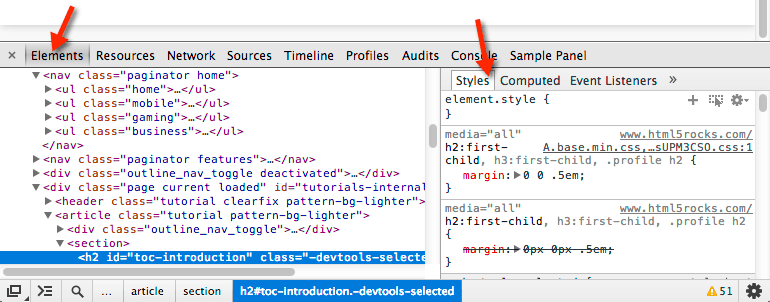
|
||||
|
||||
See the WXT's examples for a full walkthrough of extending the devtools window:
|
||||
|
||||
<ExampleList tag="devtools" />
|
||||
|
||||
@@ -10,10 +10,10 @@ Firefox does not support sandboxed pages.
|
||||
|
||||
<EntrypointPatterns
|
||||
:patterns="[
|
||||
['entrypoints/sandbox.html', 'sandbox.html'],
|
||||
['entrypoints/sandbox/index.html', 'sandbox.html'],
|
||||
['entrypoints/<name>.sandbox.html', '<name>.html` '],
|
||||
['entrypoints/<name>.sandbox/index.html', '<name>.html` '],
|
||||
['sandbox.html', 'sandbox.html'],
|
||||
['sandbox/index.html', 'sandbox.html'],
|
||||
['<name>.sandbox.html', '<name>.html` '],
|
||||
['<name>.sandbox/index.html', '<name>.html` '],
|
||||
]"
|
||||
/>
|
||||
|
||||
|
||||
@@ -2,18 +2,20 @@
|
||||
|
||||
[Chrome Docs](https://developer.chrome.com/docs/extensions/reference/sidePanel/) • [Firefox Docs](https://developer.mozilla.org/en-US/docs/Mozilla/Add-ons/WebExtensions/user_interface/Sidebars)
|
||||
|
||||
In Chrome, side panels use the "side_panel" API, while Firefox uses the "sidebar_action" API.
|
||||
|
||||
:::warning
|
||||
Chrome added support for sidepanels in Manifest V3, they are not available in Manfiest V2.
|
||||
Chrome added support for sidepanels in Manifest V3, they are not available in Manifest V2.
|
||||
:::
|
||||
|
||||
## Filenames
|
||||
|
||||
<EntrypointPatterns
|
||||
:patterns="[
|
||||
['entrypoints/sidepanel.html', 'sidepanel.html'],
|
||||
['entrypoints/sidepanel/index.html', 'sidepanel.html'],
|
||||
['entrypoints/<name>.sidepanel.html', '<name>.html` '],
|
||||
['entrypoints/<name>.sidepanel/index.html', '<name>.html` '],
|
||||
['sidepanel.html', 'sidepanel.html'],
|
||||
['sidepanel/index.html', 'sidepanel.html'],
|
||||
['<name>.sidepanel.html', '<name>.html` '],
|
||||
['<name>.sidepanel/index.html', '<name>.html` '],
|
||||
]"
|
||||
/>
|
||||
|
||||
@@ -25,7 +27,17 @@ Chrome added support for sidepanels in Manifest V3, they are not available in Ma
|
||||
<head>
|
||||
<meta charset="UTF-8" />
|
||||
<meta name="viewport" content="width=device-width, initial-scale=1.0" />
|
||||
<title>Title</title>
|
||||
<title>Default Side Panel Title</title>
|
||||
<meta
|
||||
name="manifest.default_icon"
|
||||
content="{
|
||||
16: '/icon-16.png',
|
||||
24: '/icon-24.png',
|
||||
...
|
||||
}"
|
||||
/>
|
||||
<meta name="manifest.open_at_install" content="true|false" />
|
||||
<meta name="manifest.browser_style" content="true|false" />
|
||||
<!-- Set include/exclude if the page should be removed from some builds -->
|
||||
<meta name="manifest.include" content="['chrome', ...]" />
|
||||
<meta name="manifest.exclude" content="['chrome', ...]" />
|
||||
|
||||
@@ -1,6 +1,8 @@
|
||||
# Unlisted Pages
|
||||
|
||||
HTML pages that are built by Vite, but are not included in the manifest.
|
||||
HTML pages that are bundled and shipped with the extension, but are not included in the manifest.
|
||||
|
||||
If you plan on using the page in an iframe, don't forget to add the page to [`web_accessible_resources`](https://developer.chrome.com/docs/extensions/reference/manifest/web-accessible-resources).
|
||||
|
||||
### Examples
|
||||
|
||||
|
||||
@@ -1,8 +1,8 @@
|
||||
# Unlisted Scripts
|
||||
|
||||
TypeScript files that are built, but are not included in the manifest.
|
||||
TypeScript files that are bundled and shipped with the extension, but are not included in the manifest.
|
||||
|
||||
You are responsible for loading/running these scripts where needed.
|
||||
You are responsible for loading/running these scripts where needed. If necessary, don't forget to add the script and/or any related stylesheets to [`web_accessible_resources`](https://developer.chrome.com/docs/extensions/reference/manifest/web-accessible-resources).
|
||||
|
||||
## Filenames
|
||||
|
||||
|
||||
@@ -2,26 +2,6 @@
|
||||
|
||||
Simple walkthroughs to accomplish common tasks or patterns with WXT.
|
||||
|
||||
<script lang="ts" setup>
|
||||
import { ref, onMounted } from 'vue';
|
||||
|
||||
const examples = ref()
|
||||
onMounted(async () => {
|
||||
const res = await fetch("https://raw.githubusercontent.com/wxt-dev/wxt-examples/main/examples.json");
|
||||
examples.value = await res.json();
|
||||
})
|
||||
|
||||
</script>
|
||||
|
||||
<ul>
|
||||
<li v-if="examples == null">
|
||||
Loading...
|
||||
</li>
|
||||
<template v-else>
|
||||
<li v-for="example of examples">
|
||||
<a :href="example.url" target="_blank">{{ example.name }}</a>
|
||||
</li>
|
||||
</template>
|
||||
</ul>
|
||||
<ExampleList />
|
||||
|
||||
> Full code available at [`wxt-dev/wxt-examples`](https://github.com/wxt-dev/wxt-examples)
|
||||
|
||||
@@ -63,7 +63,7 @@ Files in the assets directory will be processed by Vite. They are imported in yo
|
||||
<!-- ... -->
|
||||
</head>
|
||||
<body>
|
||||
<img src="~/illustration.svg" />
|
||||
<img src="~/assets/illustration.svg" />
|
||||
<!-- ... -->
|
||||
</body>
|
||||
</html>
|
||||
|
||||
@@ -14,7 +14,9 @@ Some WXT APIs can be used without importing them:
|
||||
- [`defineContentScript`](/api/wxt/sandbox/functions/defineContentScript) from `wxt/sandbox`
|
||||
- [`defineBackground`](/api/wxt/sandbox/functions/defineBackground) from `wxt/sandbox`
|
||||
- [`defineUnlistedScript`](/api/wxt/sandbox/functions/defineUnlistedScript) from `wxt/sandbox`
|
||||
- [`createContentScriptUi`](/api/wxt/client/functions/createContentScriptUi) from `wxt/client`
|
||||
- [`createIntegratedUi`](/api/wxt/client/functions/createIntegratedUi) from `wxt/client`
|
||||
- [`createShadowRootUi`](/api/wxt/client/functions/createShadowRootUi) from `wxt/client`
|
||||
- [`createIframeUi`](/api/wxt/client/functions/createIframeUi) from `wxt/client`
|
||||
- [`fakeBrowser`](/api/wxt/testing/variables/fakeBrowser) from `wxt/testing`
|
||||
|
||||
And more!
|
||||
@@ -63,7 +65,7 @@ import { defineConfig } from 'wxt';
|
||||
|
||||
export default defineConfig({
|
||||
imports: {
|
||||
// Add auto-imports for vue fuctions like createApp, ref, computed, watch, toRaw, etc...
|
||||
// Add auto-imports for vue functions like createApp, ref, computed, watch, toRaw, etc...
|
||||
presets: ['vue'],
|
||||
},
|
||||
});
|
||||
|
||||
@@ -1,46 +1,47 @@
|
||||
# Compare
|
||||
|
||||
Lets compare the features of WXT vs [Plasmo](https://docs.plasmo.com/framework), another web extension framework.
|
||||
Lets compare the features of WXT vs [Plasmo](https://docs.plasmo.com/framework) (another web extension framework) and [CRXJS](https://crxjs.dev/vite-plugin) (the most popular bundler plugin).
|
||||
|
||||
## Overview
|
||||
|
||||
| Features | WXT | Plasmo |
|
||||
| ---------------------------------------------------- | :-------------------------: | :--------------------------------------: |
|
||||
| Supports all browsers | ✅ | ✅ |
|
||||
| MV2 Support | ✅ | ✅ |
|
||||
| MV3 Support | ✅ | ✅ |
|
||||
| Create Extension ZIPs | ✅ | ✅ |
|
||||
| Create Firefox Sources ZIP | ✅ | ❌ |
|
||||
| First-class TypeScript support | ✅ | ✅ |
|
||||
| File based entrypoint discovery | ✅ | ✅ |
|
||||
| Inline entrypoint config | ✅ | ✅ |
|
||||
| Auto-imports | ✅ | ❌ |
|
||||
| Supports all frontend frameworks | ✅ | 🟡 Only React, Vue, and Svelte |
|
||||
| Framework specific entrypoints (like `Popup.tsx`) | 🟡 `.html` `.ts` `.tsx` | ✅ `.html` `.ts` `.tsx` `.vue` `.svelte` |
|
||||
| Automated publishing | 🟡 Coming soon | ✅ |
|
||||
| Remote Code Bundling (Google Analytics) | ✅ | ✅ |
|
||||
| Features | WXT | Plasmo | CRXJS |
|
||||
| ---------------------------------------------------- | :-------------------------: | :--------------------------------------: | :---------------------------------------------------------------------: |
|
||||
| Supports all browsers | ✅ | ✅ | ❌ See [#56](https://github.com/crxjs/chrome-extension-tools/issues/56) |
|
||||
| MV2 Support | ✅ | ✅ | 🟡 Either MV2 or MV3 |
|
||||
| MV3 Support | ✅ | ✅ | 🟡 Either MV2 or MV3 |
|
||||
| Create Extension ZIPs | ✅ | ✅ | ❌ |
|
||||
| Create Firefox Sources ZIP | ✅ | ❌ | ❌ |
|
||||
| First-class TypeScript support | ✅ | ✅ | ✅ |
|
||||
| Entrypoint discovery | File based | File based | ❌ |
|
||||
| Inline entrypoint config | ✅ | ✅ | Manifest based |
|
||||
| Auto-imports | ✅ | ❌ | ❌ |
|
||||
| Supports all frontend frameworks | ✅ | 🟡 Only React, Vue, and Svelte | ✅ |
|
||||
| Framework specific entrypoints (like `Popup.tsx`) | 🟡 `.html` `.ts` `.tsx` | ✅ `.html` `.ts` `.tsx` `.vue` `.svelte` | ❌ |
|
||||
| Automated publishing | ✅ | ✅ | ❌ |
|
||||
| Remote Code Bundling (Google Analytics) | ✅ | ✅ | ❌ |
|
||||
| <strong style="opacity: 50%">Dev Mode</strong> | | |
|
||||
| `.env` Files | ✅ | ✅ |
|
||||
| Opens browser and install extension | ✅ | ❌ |
|
||||
| HMR for UIs | ✅ | 🟡 React only |
|
||||
| Reload HTML Files on Change | ✅ | 🟡 Reloads entire extension |
|
||||
| Reload Content Scripts on Change | ✅ | 🟡 Reloads entire extension |
|
||||
| Reload Background on Change | 🟡 Reloads entire extension | 🟡 Reloads entire extension |
|
||||
| <strong style="opacity: 50%">Built-in Utils</strong> | | |
|
||||
| Storage | ✅ | ✅ |
|
||||
| Messaging | 🟡 Coming soon | ✅ |
|
||||
| Content Script UI | ✅ | ✅ |
|
||||
| `.env` Files | ✅ | ✅ | ✅ |
|
||||
| Opens browser and install extension | ✅ | ❌ | ❌ |
|
||||
| HMR for UIs | ✅ | 🟡 React only | ✅ |
|
||||
| Reload HTML Files on Change | ✅ | 🟡 Reloads entire extension | ✅ |
|
||||
| Reload Content Scripts on Change | ✅ | 🟡 Reloads entire extension | ✅ |
|
||||
| Reload Background on Change | 🟡 Reloads entire extension | 🟡 Reloads entire extension | 🟡 Reloads entire extension |
|
||||
| Respects Content Script `run_at` | ✅ | ✅ | ❌ ESM-style loaders run asynchronously |
|
||||
| <strong style="opacity: 50%">Built-in Utils</strong> | | | |
|
||||
| Storage | ✅ | ✅ | ❌ |
|
||||
| Messaging | ❌ | ✅ | ❌ |
|
||||
| Content Script UI | ✅ | ✅ | ❌ |
|
||||
|
||||
## Dev Mode
|
||||
## Why use WXT?
|
||||
|
||||
WXT's main goal is improving the development experience (DX) of creating web extensions. There are two things WXT does differently:
|
||||
WXT's main goal is improving the development experience (DX) of creating web extensions, while not sacrificing support. There are two things WXT does differently:
|
||||
|
||||
1. Automatically opens a browser with the extension installed when starting development
|
||||
2. Reload each part of the extension individually rather than reloading the entire extension
|
||||
|
||||
Opening a browser automatically makes it super easy to start and stop development without having to manually load the extension in your browser.
|
||||
|
||||
Reloading each part of the extension individually improves your iteration speed while developing UIs. This is because reloading the entire extension on every change will close the popup and any tabs open to an extension page, like options. If you save a file associated with a UI and a content script while working on the UI, it will randomly close because it needed to reload the extension when the content script changed. This interupts your development flow and is really annoying.
|
||||
Reloading each part of the extension individually improves your iteration speed while developing UIs. This is because reloading the entire extension on every change will close the popup and any tabs open to an extension page, like options. If you save a file associated with a UI and a content script while working on the UI, it will randomly close because it needed to reload the extension when the content script changed. This interrupts your development flow and is really annoying.
|
||||
|
||||
WXT solves this problem by reloading HTML pages and content scripts individually (when possible) to keep your UIs open while you develop them. This is a MV3 feature, so if you're developing a MV2 extension, you'll get the same dev experience as Plasmo.
|
||||
|
||||
|
||||
@@ -1,6 +1,6 @@
|
||||
# Configuration
|
||||
|
||||
WXT's behavior can be configured via the `wxt.config.ts` file. In this file, you can add Vite plugins, change the directory strucutre of your project, and set fields on your `manifest.json`.
|
||||
WXT's behavior can be configured via the `wxt.config.ts` file. In this file, you can add Vite plugins, change the directory structure of your project, and set fields on your `manifest.json`.
|
||||
|
||||
## Config File
|
||||
|
||||
@@ -51,12 +51,6 @@ export default defineConfig({
|
||||
});
|
||||
```
|
||||
|
||||
## Vite Config
|
||||
|
||||
[Vite](https://vitejs.dev/) is the bundler used to build each entrypoint of your extension. Vite can be configured via the `vite` option.
|
||||
|
||||
See [Vite's documentation](https://vitejs.dev/config/) for configuring the bundler.
|
||||
|
||||
## Frontend Frameworks
|
||||
|
||||
Adding a framework like Vue, React, or Svelte is easy!
|
||||
@@ -70,9 +64,9 @@ import { defineConfig } from 'wxt';
|
||||
import vue from '@vitejs/plugin-vue';
|
||||
|
||||
export default defineConfig({
|
||||
vite: {
|
||||
vite: () => ({
|
||||
plugins: [vue()],
|
||||
},
|
||||
}),
|
||||
});
|
||||
```
|
||||
|
||||
@@ -81,9 +75,9 @@ import { defineConfig } from 'wxt';
|
||||
import react from '@vitejs/plugin-react';
|
||||
|
||||
export default defineConfig({
|
||||
vite: {
|
||||
vite: () => ({
|
||||
plugins: [react()],
|
||||
},
|
||||
}),
|
||||
});
|
||||
```
|
||||
|
||||
@@ -92,10 +86,14 @@ import { defineConfig } from 'wxt';
|
||||
import { svelte } from '@sveltejs/vite-plugin-svelte';
|
||||
|
||||
export default defineConfig({
|
||||
vite: {
|
||||
vite: () => ({
|
||||
plugins: [svelte()],
|
||||
},
|
||||
}),
|
||||
});
|
||||
```
|
||||
|
||||
:::
|
||||
|
||||
:::info
|
||||
Internally, WXT runs `vite build` multiple times during a single build. It can't share the same instance of some plugins between each build, so a function is used to return completely new instances of each plugin for each build.
|
||||
:::
|
||||
|
||||
@@ -6,35 +6,36 @@ There are three ways to mount a UI inside a content script:
|
||||
|
||||
Each has their own set of advantages and disadvantages.
|
||||
|
||||
| Method | Isolated Styles | HMR | Use page's context |
|
||||
| ---------- | :-------------: | :-: | :----------------: |
|
||||
| Integrated | ❌ | ❌ | ✅ |
|
||||
| ShadowRoot | ✅ | ❌ | ✅ |
|
||||
| IFrame | ✅ | ✅ | ❌ |
|
||||
| Method | Isolated Styles | Isolated Events | HMR | Use page's context |
|
||||
| ----------- | :-------------: | :-----------------: | :-: | :----------------: |
|
||||
| Integrated | ❌ | ❌ | ❌ | ✅ |
|
||||
| Shadow Root | ✅ | ✅ (off by default) | ❌ | ✅ |
|
||||
| IFrame | ✅ | ✅ | ✅ | ❌ |
|
||||
|
||||
## Integrated
|
||||
|
||||
Integrated content script UIs are injected alongside the content of a page. This means that they are affected by CSS on that page.
|
||||
|
||||
You can control how CSS is injected for an integrated content script UI with the [`cssInjectionMode`](/api/wxt/interfaces/ContentScriptBaseDefinition#cssinjectionmode) property.
|
||||
|
||||
:::code-group
|
||||
|
||||
```ts [Vanilla]
|
||||
// entrypoints/example-ui.content.ts
|
||||
export default defineContentScript({
|
||||
matches: ['<all_urls>'],
|
||||
|
||||
main(ctx) {
|
||||
// Create the UI container
|
||||
const container = document.createElement('div');
|
||||
|
||||
// Add UI container to the page
|
||||
const anchor = document.querySelector('#anchor');
|
||||
anchore.append(container);
|
||||
|
||||
// Remove UI container when invalidated
|
||||
ctx.onInvalidated(() => {
|
||||
container.remove();
|
||||
const ui = createIntegratedUi(ctx, {
|
||||
position: 'inline',
|
||||
onMount: (container) => {
|
||||
// Append children to the container
|
||||
const app = document.createElement('p');
|
||||
app.textContent = '...';
|
||||
container.append(app);
|
||||
},
|
||||
});
|
||||
|
||||
// Call mount to add the UI to the DOM
|
||||
ui.mount();
|
||||
},
|
||||
});
|
||||
```
|
||||
@@ -42,25 +43,28 @@ export default defineContentScript({
|
||||
```ts [Vue]
|
||||
// entrypoints/example-ui.content/index.ts
|
||||
import { createApp } from 'vue';
|
||||
import App from './App.vue';
|
||||
|
||||
export default defineContentScript({
|
||||
matches: ['<all_urls>'],
|
||||
|
||||
main(ctx) {
|
||||
// Create the UI container
|
||||
const container = document.createElement('div');
|
||||
|
||||
// Create the app and mount it to the UI container
|
||||
const app = createApp(...);
|
||||
app.mount(container);
|
||||
|
||||
// Add UI container to the page
|
||||
const anchor = document.querySelector('#anchor');
|
||||
anchore.append(container);
|
||||
|
||||
// Unmount the app and remove UI container when invalidated
|
||||
ctx.onInvalidated(() => {
|
||||
app.unmount();
|
||||
container.remove();
|
||||
const ui = createIntegratedUi(ctx, {
|
||||
position: 'inline',
|
||||
onMount: (container) => {
|
||||
// Create the app and mount it to the UI container
|
||||
const app = createApp(App);
|
||||
app.mount(container);
|
||||
return app;
|
||||
},
|
||||
onRemove: (app) => {
|
||||
// Unmount the app when the UI is removed
|
||||
app.unmount();
|
||||
},
|
||||
});
|
||||
|
||||
// Call mount to add the UI to the DOM
|
||||
ui.mount();
|
||||
},
|
||||
});
|
||||
```
|
||||
@@ -68,52 +72,57 @@ export default defineContentScript({
|
||||
```tsx [React]
|
||||
// entrypoints/example-ui.content/index.tsx
|
||||
import ReactDOM from 'react-dom/client';
|
||||
import App from './App.tsx';
|
||||
|
||||
export default defineContentScript({
|
||||
matches: ['<all_urls>'],
|
||||
|
||||
main(ctx) {
|
||||
// Create the UI container
|
||||
const container = document.createElement('div');
|
||||
|
||||
// Create a root on the UI container and render a component
|
||||
const root = ReactDOM.createRoot(container);
|
||||
root.render(...);
|
||||
|
||||
// Add UI container to the page
|
||||
const anchor = document.querySelector('#anchor');
|
||||
anchore.append(container);
|
||||
|
||||
// Unmount the root and remove UI container when invalidated
|
||||
ctx.onInvalidated(() => {
|
||||
root.unmount();
|
||||
container.remove();
|
||||
const ui = createIntegratedUi(ctx, {
|
||||
position: 'inline',
|
||||
onMount: (container) => {
|
||||
// Create a root on the UI container and render a component
|
||||
const root = ReactDOM.createRoot(container);
|
||||
root.render(<App />);
|
||||
return root;
|
||||
},
|
||||
onRemove: (root) => {
|
||||
// Unmount the root when the UI is removed
|
||||
root.unmount();
|
||||
},
|
||||
});
|
||||
|
||||
// Call mount to add the UI to the DOM
|
||||
ui.mount();
|
||||
},
|
||||
});
|
||||
```
|
||||
|
||||
```ts [Svelete]
|
||||
```ts [Svelte]
|
||||
// entrypoints/example-ui.content/index.ts
|
||||
import App from './App.svelte';
|
||||
|
||||
export default defineContentScript({
|
||||
matches: ['<all_urls>'],
|
||||
|
||||
main(ctx) {
|
||||
// Create the UI container
|
||||
const container = document.createElement('div');
|
||||
|
||||
// Create the Svelte app inside the UI container
|
||||
const app = new App({
|
||||
target: ui,
|
||||
const ui = createIntegratedUi(ctx, {
|
||||
position: 'inline',
|
||||
onMount: (container) => {
|
||||
// Create the Svelte app inside the UI container
|
||||
const app = new App({
|
||||
target: container,
|
||||
});
|
||||
return app;
|
||||
},
|
||||
onRemove: (app) => {
|
||||
// Destroy the app when the UI is removed
|
||||
app.$destroy();
|
||||
},
|
||||
});
|
||||
|
||||
// Add UI container to the page
|
||||
const anchor = document.querySelector('#anchor');
|
||||
anchore.append(container);
|
||||
|
||||
// Destroy the app and remove UI container when invalidated
|
||||
ctx.onInvalidated(() => {
|
||||
app.$destroy();
|
||||
container.remove();
|
||||
});
|
||||
// Call mount to add the UI to the DOM
|
||||
ui.mount();
|
||||
},
|
||||
});
|
||||
```
|
||||
@@ -123,56 +132,63 @@ export default defineContentScript({
|
||||
import { render } from 'solid-js/web';
|
||||
|
||||
export default defineContentScript({
|
||||
matches: ['<all_urls>'],
|
||||
|
||||
main(ctx) {
|
||||
// Create the UI container
|
||||
const container = document.createElement('div');
|
||||
|
||||
// Render your app to the UI container
|
||||
const unmount = render(() => ..., container)
|
||||
|
||||
// Add UI container to the page
|
||||
const anchor = document.querySelector('#anchor');
|
||||
anchore.append(container);
|
||||
|
||||
// Unmount the app and remove UI container when invalidated
|
||||
ctx.onInvalidated(() => {
|
||||
unmount();
|
||||
container.remove();
|
||||
const ui = createIntegratedUi(ctx, {
|
||||
position: 'inline',
|
||||
onMount: (container) => {
|
||||
// Render your app to the UI container
|
||||
const unmount = render(() => <div>...</div>, container);
|
||||
},
|
||||
onRemove: (unmount) => {
|
||||
// Unmount the app when the UI is removed
|
||||
unmount();
|
||||
},
|
||||
});
|
||||
|
||||
// Call mount to add the UI to the DOM
|
||||
ui.mount();
|
||||
},
|
||||
});
|
||||
```
|
||||
|
||||
:::
|
||||
|
||||
## ShadowRoot
|
||||
See the [API Reference](/api/wxt/client/functions/createIntegratedUi) for the complete list of options.
|
||||
|
||||
You can control how CSS is injected for an integrated content script UI with the [`cssInjectionMode`](/api/wxt/interfaces/BaseContentScriptEntrypointOptions#cssinjectionmode) property. Usually, you'll want to leave it as `"manifest"`, the default, so the UI inherits its style from the website's CSS.
|
||||
|
||||
## Shadow Root
|
||||
|
||||
Often in web extensions, you don't want your content script's CSS affecting the page, or vise-versa. The [`ShadowRoot`](https://developer.mozilla.org/en-US/docs/Web/API/ShadowRoot) API is ideal for this.
|
||||
|
||||
WXT provides a helper function, [`createContentScriptUi`](/api/wxt/client/functions/createContentScriptUi), that abstracts all the `ShadowRoot` setup away, making it easy to create UIs with isolated CSS.
|
||||
WXT's [`createShadowRootUi`](/api/wxt/client/functions/createShadowRootUi) abstracts all the `ShadowRoot` setup away, making it easy to create UIs with isolated CSS. It also supports an optional `isolateEvents` parameter to further isolate user interactions.
|
||||
|
||||
To use `createContentScriptUi`, follow these steps:
|
||||
To use `createShadowRootUi`, follow these steps:
|
||||
|
||||
1. Import your CSS file at the top of your content script
|
||||
2. Set [`cssInjectionMode: "ui"`](/api/wxt/interfaces/ContentScriptBaseDefinition#cssinjectionmode) inside `defineContentScript`
|
||||
3. Define your UI with `createContentScriptUi()`
|
||||
2. Set [`cssInjectionMode: "ui"`](/api/wxt/interfaces/BaseContentScriptEntrypointOptions#cssinjectionmode) inside `defineContentScript`
|
||||
3. Define your UI with `createShadowRootUi()`
|
||||
4. Mount the UI so it is visible to users
|
||||
|
||||
```ts
|
||||
:::code-group
|
||||
|
||||
```ts [Vanilla]
|
||||
// 1. Import the style
|
||||
import './style.css';
|
||||
|
||||
export default defineContentScript({
|
||||
matches: ['<all_urls>'],
|
||||
// 2. Set cssInjectionMode
|
||||
cssInjectionMode: 'ui',
|
||||
|
||||
async main(ctx) {
|
||||
// 3. Define your UI
|
||||
const ui = await createContentScriptUi(ctx, {
|
||||
const ui = await createShadowRootUi(ctx, {
|
||||
name: 'example-ui',
|
||||
anchor: '#anchor',
|
||||
type: 'inline',
|
||||
mount(container) {
|
||||
position: 'inline',
|
||||
onMount(container) {
|
||||
// Define how your UI will be mounted inside the container
|
||||
const app = document.createElement('p');
|
||||
app.textContent = 'Hello world!';
|
||||
@@ -186,91 +202,156 @@ export default defineContentScript({
|
||||
});
|
||||
```
|
||||
|
||||
> `createContentScriptUi` will automatically remove the UI from the page when the content script is invalidated.
|
||||
|
||||
See the [API Reference](/api/wxt/client/functions/createContentScriptUi) for the complete list of options.
|
||||
|
||||
:::info TailwindCSS
|
||||
`createContentScriptUi` supports TailwindCSS out of the box! When importing the styles, just import the main CSS file containing the `@tailwind` directives, and everything will just work :+1:.
|
||||
:::
|
||||
|
||||
When using a frontend framework for your UI, you'll need to unmount the app when the UI is removed. This is accomplished by returning an app reference from the `mount` option and by passing in a custom `onRemoved` option:
|
||||
|
||||
:::code-group
|
||||
|
||||
```ts [Vue]
|
||||
// 1. Import the style
|
||||
import './style.css';
|
||||
import { createApp } from 'vue';
|
||||
import App from './App.vue';
|
||||
|
||||
const ui = createContentScriptUi(ctx, {
|
||||
// ...
|
||||
mount(container) {
|
||||
const app = createApp(App);
|
||||
app.mount(container);
|
||||
return app;
|
||||
},
|
||||
onRemove(app) {
|
||||
app.unmount();
|
||||
export default defineContentScript({
|
||||
matches: ['<all_urls>'],
|
||||
// 2. Set cssInjectionMode
|
||||
cssInjectionMode: 'ui',
|
||||
|
||||
async main(ctx) {
|
||||
// 3. Define your UI
|
||||
const ui = await createShadowRootUi(ctx, {
|
||||
name: 'example-ui',
|
||||
position: 'inline',
|
||||
onMount: (container) => {
|
||||
// Define how your UI will be mounted inside the container
|
||||
const app = createApp(App);
|
||||
app.mount(container);
|
||||
return app;
|
||||
},
|
||||
onRemove: (app) => {
|
||||
// Unmount the app when the UI is removed
|
||||
app?.unmount();
|
||||
},
|
||||
});
|
||||
|
||||
// 4. Mount the UI
|
||||
ui.mount();
|
||||
},
|
||||
});
|
||||
```
|
||||
|
||||
```tsx [React]
|
||||
// 1. Import the style
|
||||
import './style.css';
|
||||
import ReactDOM from 'react-dom/client';
|
||||
import App from './App.tsx';
|
||||
|
||||
const ui = createContentScriptUi(ctx, {
|
||||
// ...
|
||||
mount(container) {
|
||||
const root = ReactDOM.createRoot(container);
|
||||
root.render(...);
|
||||
return root;
|
||||
},
|
||||
onRemove(root) {
|
||||
root.unmount();
|
||||
export default defineContentScript({
|
||||
matches: ['<all_urls>'],
|
||||
// 2. Set cssInjectionMode
|
||||
cssInjectionMode: 'ui',
|
||||
|
||||
async main(ctx) {
|
||||
// 3. Define your UI
|
||||
const ui = await createShadowRootUi(ctx, {
|
||||
name: 'example-ui',
|
||||
position: 'inline',
|
||||
onMount: (container) => {
|
||||
// Container is a body, and React warns when creating a root on the body, so create a wrapper div
|
||||
const app = document.createElement('div');
|
||||
container.append(app);
|
||||
|
||||
// Create a root on the UI container and render a component
|
||||
const root = ReactDOM.createRoot(app);
|
||||
root.render(<App />);
|
||||
return root;
|
||||
},
|
||||
onRemove: (root) => {
|
||||
// Unmount the root when the UI is removed
|
||||
root?.unmount();
|
||||
},
|
||||
});
|
||||
|
||||
// 4. Mount the UI
|
||||
ui.mount();
|
||||
},
|
||||
});
|
||||
```
|
||||
|
||||
```ts [Svelte]
|
||||
// 1. Import the style
|
||||
import './style.css';
|
||||
import App from './App.svelte';
|
||||
|
||||
const ui = createContentScriptUi(ctx, {
|
||||
// ...
|
||||
mount(container) {
|
||||
return new App({ target: container });
|
||||
},
|
||||
onRemove(app) {
|
||||
app.$destry();
|
||||
export default defineContentScript({
|
||||
matches: ['<all_urls>'],
|
||||
// 2. Set cssInjectionMode
|
||||
cssInjectionMode: 'ui',
|
||||
|
||||
async main(ctx) {
|
||||
// 3. Define your UI
|
||||
const ui = await createShadowRootUi(ctx, {
|
||||
name: 'example-ui',
|
||||
position: 'inline',
|
||||
onMount: (container) => {
|
||||
// Create the Svelte app inside the UI container
|
||||
const app = new App({
|
||||
target: container,
|
||||
});
|
||||
return app;
|
||||
},
|
||||
onRemove: (app) => {
|
||||
// Destroy the app when the UI is removed
|
||||
app?.$destroy();
|
||||
},
|
||||
});
|
||||
|
||||
// 4. Mount the UI
|
||||
ui.mount();
|
||||
},
|
||||
});
|
||||
```
|
||||
|
||||
```tsx [Solid]
|
||||
// 1. Import the style
|
||||
import './style.css';
|
||||
import { render } from 'solid-js/web';
|
||||
|
||||
const ui = createContentScriptUi(ctx, {
|
||||
// ...
|
||||
mount(container) {
|
||||
return render(() => ..., container);
|
||||
},
|
||||
onRemove(unmount) {
|
||||
unmount();
|
||||
export default defineContentScript({
|
||||
matches: ['<all_urls>'],
|
||||
// 2. Set cssInjectionMode
|
||||
cssInjectionMode: 'ui',
|
||||
|
||||
async main(ctx) {
|
||||
// 3. Define your UI
|
||||
const ui = await createShadowRootUi(ctx, {
|
||||
name: 'example-ui',
|
||||
position: 'inline',
|
||||
onMount: (container) => {
|
||||
// Render your app to the UI container
|
||||
const unmount = render(() => <div>...</div>, container);
|
||||
},
|
||||
onRemove: (unmount) => {
|
||||
// Unmount the app when the UI is removed
|
||||
unmount?.();
|
||||
},
|
||||
});
|
||||
|
||||
// 4. Mount the UI
|
||||
ui.mount();
|
||||
},
|
||||
});
|
||||
```
|
||||
|
||||
:::
|
||||
|
||||
:::warning
|
||||
The `mount(container)` and `onRemove(app)` options passed into `createContentScriptUi` **_are different from_** the `ui.mount()` and `ui.remove()` functions available on the returned UI object.
|
||||
See the [API Reference](/api/wxt/client/functions/createShadowRootUi) for the complete list of options.
|
||||
|
||||
You don't need to pass anything into `ui.mount()` and `ui.remove()` because **_you already defined how and where the UI will be mounted_** in the options passed into `createContentScriptUi`.
|
||||
:::info TailwindCSS
|
||||
`createShadowRootUi` supports TailwindCSS out of the box! When importing the styles, just import the main CSS file containing the `@tailwind` directives, and everything will just work :+1:.
|
||||
:::
|
||||
|
||||
## IFrame
|
||||
|
||||
If you don't need to run your UI in the same frame as the content script, you can use an IFrame to host your UI instead. Since an IFrame just hosts an HTML page, **_HMR is supported_**.
|
||||
|
||||
WXT provides a helper function, [`createContentScriptIframe`](/api/wxt/client/functions/createContentScriptUi), which simplifies setting up the IFrame.
|
||||
WXT provides a helper function, [`createIframeUi`](/api/wxt/client/functions/createIframeUi), which simplifies setting up the IFrame.
|
||||
|
||||
1. Create an HTML page that will be loaded into your IFrame
|
||||
```html
|
||||
@@ -287,7 +368,7 @@ WXT provides a helper function, [`createContentScriptIframe`](/api/wxt/client/fu
|
||||
</body>
|
||||
</html>
|
||||
```
|
||||
1. Add the page to the manifest's `web_accessible_resouces`
|
||||
1. Add the page to the manifest's `web_accessible_resources`
|
||||
```ts
|
||||
// wxt.config.ts
|
||||
export default defineConfig({
|
||||
@@ -305,17 +386,18 @@ WXT provides a helper function, [`createContentScriptIframe`](/api/wxt/client/fu
|
||||
|
||||
```ts
|
||||
export default defineContentScript({
|
||||
// ...
|
||||
async main(ctx) {
|
||||
// Define the UI
|
||||
const ui = await createContentScriptIframe(ctx, {
|
||||
page: '/example-iframe.html',
|
||||
anchor: '#anchor',
|
||||
type: 'inline',
|
||||
});
|
||||
matches: ['<all_urls>'],
|
||||
|
||||
// Add styles to the iframe like width
|
||||
ui.iframe.width = 123;
|
||||
main(ctx) {
|
||||
// Define the UI
|
||||
const ui = createIframeUi(ctx, {
|
||||
page: '/example-iframe.html',
|
||||
position: 'inline',
|
||||
onMount: (wrapper, iframe) => {
|
||||
// Add styles to the iframe like width
|
||||
iframe.width = '123';
|
||||
},
|
||||
});
|
||||
|
||||
// Show UI to user
|
||||
ui.mount();
|
||||
@@ -323,4 +405,4 @@ WXT provides a helper function, [`createContentScriptIframe`](/api/wxt/client/fu
|
||||
});
|
||||
```
|
||||
|
||||
See the [API Reference](/api/wxt/client/functions/createContentScriptUi) for the complete list of options.
|
||||
See the [API Reference](/api/wxt/client/functions/createIframeUi) for the complete list of options.
|
||||
|
||||
@@ -13,6 +13,24 @@ WXT's main goal is providing the best DX it possibly can. When running your exte
|
||||
| `wxt.config.ts` | | | | 🟡 See [#10](https://github.com/wxt-dev/wxt/issues/10) |
|
||||
| `web-ext.config.ts` | | | | 🟡 See [#10](https://github.com/wxt-dev/wxt/issues/10) |
|
||||
|
||||
## Dev Mode vs Production Builds
|
||||
|
||||
There are some notable differences between the development and production versions of an extension. During development:
|
||||
|
||||
1. **Content scripts are not listed in the `manifest.json`** when targeting MV3. Instead, the [`scripting`](https://developer.chrome.com/docs/extensions/reference/api/scripting) permission is used to register content scripts at runtime so they can be reloaded individually.
|
||||
|
||||
To get the list of content scripts during development, run the following in the background's console:
|
||||
|
||||
```ts
|
||||
await chrome.scripting.getRegisteredContentScripts();
|
||||
```
|
||||
|
||||
2. **The CSP is modified to allow loading scripts from the dev server**. Make sure you're using Chrome v110 or above for HMR to work.
|
||||
|
||||
3. If you don't include a background script/service worker, one will be created to perform various tasks in dev mode, mostly related to reloading different parts of the extension on change.
|
||||
|
||||
For production builds, none of the above modifications will be applied, and you're extension/manifest will only include what you have defined.
|
||||
|
||||
## Configure Browser Startup
|
||||
|
||||
WXT uses [`web-ext` by Mozilla](https://github.com/mozilla/web-ext) to automatically open a browser with the extension installed. You can configure the runner's behavior via the [`runner`](/api/wxt/interfaces/InlineConfig#runner) option, or in a separate gitignored file, `web-ext.config.ts`.
|
||||
@@ -39,7 +57,9 @@ export default defineRunnerConfig({
|
||||
|
||||
:::
|
||||
|
||||
`web-ext`'s browser discovery is very limitted. By default, it only guesses at where Chrome and Firefox are installed. If you've customized your install locations, you may need to tell `web-ext` where the binaries/executables are located using the [`binaries` option](/api/wxt/interfaces/ExtensionRunnerConfig#binaries). For other Chromium based browsers, like Edge or Opera, you'll need to explicitly list them in the `binaries` option as well, otherwise they will open in Chrome by default.
|
||||
### Browser Binaries
|
||||
|
||||
`web-ext`'s browser discovery is very limited. By default, it only guesses at where Chrome and Firefox are installed. If you've customized your install locations, you may need to tell `web-ext` where the binaries/executables are located using the [`binaries` option](/api/wxt/interfaces/ExtensionRunnerConfig#binaries). For other Chromium based browsers, like Edge or Opera, you'll need to explicitly list them in the `binaries` option as well, otherwise they will open in Chrome by default.
|
||||
|
||||
```ts
|
||||
// ~/web-ext.config.ts
|
||||
@@ -57,3 +77,40 @@ export default defineRunnerConfig({
|
||||
:::tip
|
||||
When configuring browser binaries, it's helpful to put them in `~/web-ext.config.ts` instead of the project directory's `web-ext.config.ts` file. When placed in your home directory (`~/`), this config will be used by all WXT projects, so you only need to configure the binaries once.
|
||||
:::
|
||||
|
||||
### Other options
|
||||
|
||||
You can customize other options as well, like startup URLs, profiles, or additional command line arguments:
|
||||
|
||||
```ts
|
||||
// web-ext.config.ts
|
||||
import { defineRunnerConfig } from 'wxt';
|
||||
|
||||
export default defineRunnerConfig({
|
||||
startUrls: ['https://google.com', 'https://duckduckgo.com'],
|
||||
chromiumProfile: '/path/to/profile/to/use',
|
||||
chromiumArgs: ['--window-size=400,300'],
|
||||
});
|
||||
```
|
||||
|
||||
For a full list of options, see the [API Reference](/api/wxt/interfaces/ExtensionRunnerConfig).
|
||||
|
||||
## Reload the Extension
|
||||
|
||||
Normally, to manually reload an extension, you have to visit `chrome://extensions` and click the reload button for your extension.
|
||||
|
||||
When running `wxt` command to start the dev server, WXT adds a keyboard shortcut `Alt+R`, that reloads the extension when pressed, without visiting `chrome://extensions`. This can also be customized or disabled:
|
||||
|
||||
```ts [wxt.config.ts]
|
||||
import { defineConfig } from 'wxt';
|
||||
|
||||
export default defineConfig({
|
||||
dev: {
|
||||
reloadCommand: 'Alt+T', // false, to disable
|
||||
},
|
||||
});
|
||||
```
|
||||
|
||||
:::info
|
||||
This shortcut is only available during development, and is not be added to your extension when running `wxt build` or `wxt-zip`.
|
||||
:::
|
||||
|
||||
@@ -58,7 +58,7 @@ See [`/entrypoints` folder](/entrypoints/background) documentation for a full li
|
||||
|
||||
## Entrypoint Options
|
||||
|
||||
Some entrypoints, like content scripts, actions, or the background, can recieve additional options.
|
||||
Some entrypoints, like content scripts, actions, or the background, can receive additional options.
|
||||
|
||||
In HTML files, options are listed as `meta` tags:
|
||||
|
||||
@@ -86,3 +86,56 @@ export default defineContentScript({
|
||||
:::info
|
||||
For a full list of entrypoints and each of their options, see the [`/entrypoints` folder](/entrypoints/background) documentation.
|
||||
:::
|
||||
|
||||
### Side Effects
|
||||
|
||||
You cannot use imported variables outside the `main` function in JS entrypoints. This includes options, as shown below:
|
||||
|
||||
```ts
|
||||
// entrypoints/content.ts
|
||||
import { GOOGLE_MATCHES } from '~/utils/match-patterns';
|
||||
|
||||
export default defineContentScript({
|
||||
matches: GOOGLE_MATCHES,
|
||||
main() {
|
||||
// ...
|
||||
},
|
||||
});
|
||||
```
|
||||
|
||||
```
|
||||
$ wxt build
|
||||
wxt build
|
||||
|
||||
WXT 0.14.1
|
||||
ℹ Building chrome-mv3 for production with Vite 5.0.5
|
||||
✖ Command failed after 360 ms
|
||||
|
||||
[8:55:54 AM] ERROR entrypoints/content.ts: Cannot use imported variable "GOOGLE_MATCHES" before main function. See https://wxt.dev/guide/entrypoints.html#side-effects
|
||||
```
|
||||
|
||||
This throws an error because WXT needs to import each entrypoint during the build process to extract its definition (containing the `match`, `runAt`, `include`/`exclude`, etc.) to render the `manifest.json` correctly. Before loading an entrypoint, a transformation is applied to remove all imports. This prevents imported modules (local or NPM) with side-effects from running during the build process, potentially throwing an error.
|
||||
|
||||
:::details Why?
|
||||
|
||||
When importing your entrypoint to get its definition, the file is imported in a **_node environment_**, and doesn't have access to the `window`, `chrome`, or `browser` globals a web extension usually has access to. If WXT doesn't remove all the imports from the file, the imported modules could try and access one of these variables, throwing an error.
|
||||
|
||||
:::
|
||||
|
||||
:::warning
|
||||
See [`wxt-dev/wxt#336`](https://github.com/wxt-dev/wxt/issues/336) to track the status of this bug.
|
||||
:::
|
||||
|
||||
Usually, this error occurs when you try to extract options into a shared file or try to run code outside the `main` function. To fix the example from above, use literal values when defining an entrypoint instead of importing them:
|
||||
|
||||
```ts
|
||||
import { GOOGLE_MATCHES } from '~/utils/match-patterns'; // [!code --]
|
||||
|
||||
export default defineContentScript({
|
||||
matches: GOOGLE_MATCHES, // [!code --]
|
||||
matches: ['*//*.google.com/*'], // [!code ++]
|
||||
main() {
|
||||
// ...
|
||||
},
|
||||
});
|
||||
```
|
||||
|
||||
@@ -0,0 +1,38 @@
|
||||
# ES Modules
|
||||
|
||||
Configure entrypoints to use ESM at runtime.
|
||||
|
||||
Currently, ESM entrypoints are opt-in, so you must configure each entrypoint with that in mind.
|
||||
|
||||
## HTML Pages <Badge type="warning" text="≥0.0.1" />
|
||||
|
||||
In general, you should always make HTML pages import ESM scripts, unless you need to support old browsers.
|
||||
|
||||
To make a script ESM, add `type="module"`:
|
||||
|
||||
<!-- prettier-ignore -->
|
||||
```html
|
||||
<script src="./main.ts"></script> <!-- [!code --] -->
|
||||
<script src="./main.ts" type="module"></script> <!-- [!code ++] -->
|
||||
```
|
||||
|
||||
## Background <Badge type="warning" text="≥0.16.0" />
|
||||
|
||||
In your background script, set `type: "module"`:
|
||||
|
||||
```ts
|
||||
export default defineBackground({
|
||||
type: 'module', // !code ++
|
||||
main() {
|
||||
// ...
|
||||
},
|
||||
});
|
||||
```
|
||||
|
||||
:::warning
|
||||
Only MV3 support ESM background scripts/service workers. When targeting MV2, the `type` option is ignored and the background is always bundled into a single file as IIFE.
|
||||
:::
|
||||
|
||||
## Content Scripts
|
||||
|
||||
Coming soon. Follow [Content Script ESM Support #357](https://github.com/wxt-dev/wxt/issues/357) for updates.
|
||||
@@ -39,9 +39,9 @@ Then we can use `browser.storage` to save the install date to local storage.
|
||||
```ts
|
||||
// background.ts
|
||||
export default defineBackground(() => {
|
||||
browser.runtime.onInstall.addEventListener(({ reason }) => {
|
||||
browser.runtime.onInstalled.addListener(({ reason }) => {
|
||||
if (reason === 'install') {
|
||||
browser.storage.local.setItem({ installDate: Date.now() });
|
||||
browser.storage.local.set({ installDate: Date.now() });
|
||||
}
|
||||
});
|
||||
});
|
||||
@@ -57,21 +57,19 @@ Here's a basic request/response example:
|
||||
// popup/main.ts
|
||||
const res = await browser.runtime.sendMessage('ping');
|
||||
|
||||
console.log('res'); // "pong"
|
||||
console.log(res); // "pong"
|
||||
```
|
||||
|
||||
```ts
|
||||
// background.ts
|
||||
export default defineBackground(() => {
|
||||
browser.runtime.onMessage.addEventListener(
|
||||
(message, sender, sendResponse) => {
|
||||
console.log(message); // "ping"
|
||||
browser.runtime.onMessage.addListener((message, sender, sendResponse) => {
|
||||
console.log(message); // "ping"
|
||||
|
||||
// Wait 1 second and respond with "pong"
|
||||
setTimeout(() => sendResponse('pong'), 1000);
|
||||
return true;
|
||||
},
|
||||
);
|
||||
// Wait 1 second and respond with "pong"
|
||||
setTimeout(() => sendResponse('pong'), 1000);
|
||||
return true;
|
||||
});
|
||||
});
|
||||
```
|
||||
|
||||
|
||||
@@ -0,0 +1,116 @@
|
||||
# Handling Extension Updates
|
||||
|
||||
When releasing an update to your extension, there's a couple of things you need to keep in mind:
|
||||
|
||||
[[toc]]
|
||||
|
||||
## Content Script Cleanup
|
||||
|
||||
Old content scripts are not automatically stopped when an extension updates and reloads. Often, this leads to "Invalidated context" errors in production when a content script from an old version of your extension tries to use a web extension API (ie, the `browser` or `chrome` globals).
|
||||
|
||||
WXT provides a utility for handling this process: `ContentScriptContext`. An instance of this class is provided to you automatically inside the `main` function of each content script.
|
||||
|
||||
When your extension updates or reloads, the context will become invalidated, and will trigger any `ctx.onInvalidated` listeners you add:
|
||||
|
||||
```ts
|
||||
export default defineContentScript({
|
||||
main(ctx) {
|
||||
ctx.onInvalidated(() => {
|
||||
// Do something
|
||||
});
|
||||
},
|
||||
)
|
||||
```
|
||||
|
||||
The `ctx` also provides other convenient APIs for stopping your content script without manually calling `onInvalidated` to add a listener:
|
||||
|
||||
1. Setting timers:
|
||||
```ts
|
||||
ctx.setTimeout(() => { ... }, ...);
|
||||
ctx.setInterval(() => { ... }, ...);
|
||||
ctx.requestAnimationFrame(() => { ... });
|
||||
```
|
||||
1. Adding DOM events:
|
||||
```ts
|
||||
ctx.addEventListener(window, "mousemove", (event) => { ... });
|
||||
```
|
||||
1. Implements [`AbortController`](https://developer.mozilla.org/en-US/docs/Web/API/AbortController) for canceling standard APIs:
|
||||
```ts
|
||||
fetch('...', {
|
||||
signal: ctx.signal,
|
||||
});
|
||||
```
|
||||
|
||||
Other WXT APIs require a `ctx` object so they can clean themselves up. For example, [`createIntegratedUi`](/guide/content-script-ui#integrated), [`createShadowRootUi`](/guide/content-script-ui#shadow-root), and [`createIframeUi`](/guide/content-script-ui#iframe) automatically unmount and stop a UI when the script is invalidated.
|
||||
|
||||
:::warning
|
||||
When working with content scripts, **you should always use the `ctx` object to stop any async or future work.**
|
||||
|
||||
This prevents old content scripts from interfering with new content scripts, and prevents error messages from being logged to the console in production.
|
||||
:::
|
||||
|
||||
## Testing Permission Changes
|
||||
|
||||
When `permissions`/`host_permissions` change during an update, depending on what exactly changed, Chrome will disable your extension until the user accepts the new permissions.
|
||||
|
||||
It is possible to test this before you release an update, but it's not a simple process:
|
||||
|
||||
1. Get 2 ZIPs of your extension, both generated by `wxt zip`. The first contains a previous version of your extension, the second contains the latest version. Make sure the second ZIP's version is higher than the first's.
|
||||
2. Unzip the two ZIP files somewhere next to each other that's easy to locate.
|
||||
3. In Chrome, open `chrome://extensions` and make sure developer mode is enabled
|
||||
4. Pack the first extension into a CRX, generating a new private key:
|
||||
1. Click "Pack Extension" in the top left
|
||||
2. For "Extension root directory", enter the path to the first extracted zip directory. The directory should contain a `manifest.json` file
|
||||
3. Leave "Private key file" blank
|
||||
4. Click "Pack Extension". This will generate a `.crx` and `.pem` file
|
||||
5. Pack the second extension into a CRX, reusing the private key generated by the previous step
|
||||
1. Click "Pack Extension" in the top left
|
||||
2. For "Extension root directory", enter the path to the second extracted zip directory.
|
||||
3. For "Private key file", enter the path to the generated `.pem` private key file
|
||||
4. Click "Pack Extension". This will generate a second `.crx` file.
|
||||
6. Install the first CRX file by dragging and dropping it onto the `chrome://extensions` page
|
||||
7. Install the second CRX file by dragging and dropping it onthe the `chrome://extensions` page
|
||||
|
||||
If a new permission must be accepted, you'll be prompted to accept it after dropping the second CRX file onto the page.
|
||||
|
||||
:::Info Note
|
||||
Note: Chrome no longer allows self-signed CRX extensions to run, but that's OK for this test case. We're still prompted to accept new permissions, even if we can't interact with the installed extension.
|
||||
|
||||
To validate this, you can create a third ZIP file with a rare permission like `geolocation` in the manifest, that's guarenteed to reprompt permissions when added.
|
||||
:::
|
||||
|
||||
## Update Event
|
||||
|
||||
You can setup a callback that runs after your extension updates like so:
|
||||
|
||||
```ts
|
||||
browser.runtime.onInstalled.addListener(({ reason }) => {
|
||||
if (reason === 'update') {
|
||||
// Do something
|
||||
}
|
||||
});
|
||||
```
|
||||
|
||||
If the logic is simple, write a unit test to cover this logic. If you feel the need to manually test this callback, you can either:
|
||||
|
||||
1. In dev mode, remove the `if` statement and reload the extension from `chrome://extensions`
|
||||
2. Build two ZIPs with the same runtime ID and actually update the extension
|
||||
|
||||
The first approach is very straightforward. The second is more complicated...
|
||||
|
||||
Here are the steps:
|
||||
|
||||
So the steps:
|
||||
|
||||
1. Checkout an old commit.
|
||||
2. [Add a `key`](https://developer.chrome.com/docs/extensions/reference/manifest/key#keep-consistent-id) to the `manifest` in your `wxt.config.ts`.
|
||||
3. Run `wxt zip` to create the first ZIP.
|
||||
4. Stash or reset changes and checkout your latest code.
|
||||
5. Add back the same `key` to your manifest.
|
||||
6. Make sure the extension's version is higher than the first zip. It can be any version that's higher, since you won't be releasing this version.
|
||||
7. Run `wxt zip` to create the second ZIP.
|
||||
8. In a fresh chrome profile, go to `chrome://extensions`, enable dev mode, and drag and drop the first zip onto the page to install it.
|
||||
9. In the extension, play around and setup your test case.
|
||||
10. Back on `chrome://extensions`, drag and drop your second zip onto the page.
|
||||
|
||||
If you setup the `key` correctly, it will cause the extension to act like it was updated instead of installing a second version of your extension.
|
||||
@@ -7,13 +7,17 @@ Bootstrap a new project, start from scratch, or [migrate an existing project](/g
|
||||
:::code-group
|
||||
|
||||
```sh [pnpm]
|
||||
pnpx wxt@latest init <project-name>
|
||||
pnpm dlx wxt@latest init <project-name>
|
||||
```
|
||||
|
||||
```sh [npm]
|
||||
npx wxt@latest init <project-name>
|
||||
```
|
||||
|
||||
```sh [bun]
|
||||
bunx wxt@latest init <project-name>
|
||||
```
|
||||
|
||||
:::
|
||||
|
||||
There are several starting templates available.
|
||||
@@ -55,6 +59,12 @@ cd project-name
|
||||
yarn init
|
||||
```
|
||||
|
||||
```sh [bun]
|
||||
mkdir project-name
|
||||
cd project-name
|
||||
bun init
|
||||
```
|
||||
|
||||
:::
|
||||
|
||||
Then install `wxt`:
|
||||
@@ -73,6 +83,10 @@ npm i --save-dev wxt
|
||||
yarn add --dev wxt
|
||||
```
|
||||
|
||||
```sh [bun]
|
||||
bun add --dev wxt
|
||||
```
|
||||
|
||||
:::
|
||||
|
||||
Add your first entrypoint:
|
||||
@@ -102,7 +116,7 @@ Finally, add scripts to your `package.json`:
|
||||
|
||||
## Migrate an Existing Project
|
||||
|
||||
Before starting the migration, it is recommended to run `pnpx wxt@latest init` to see what a basic project looks like. Once you have an understanding of how WXT projects are structured, you're ready to convert the project, using the initialized project as a reference.
|
||||
Before starting the migration, it is recommended to run `pnpm dlx wxt@latest init` to see what a basic project looks like. Once you have an understanding of how WXT projects are structured, you're ready to convert the project, using the initialized project as a reference.
|
||||
|
||||
Migrating a project to WXT comes down to a few steps:
|
||||
|
||||
@@ -133,7 +147,7 @@ The dev command will build the extension for development, open the browser, and
|
||||
When running the dev command, WXT will make several changes to your `manifest.json` to improve your development experience:
|
||||
|
||||
- If missing, add a background script/service worker to enable fast reloads
|
||||
- Add serveral `permissions` and `host_permissions` to enable HMR and fast reloads
|
||||
- Add several `permissions` and `host_permissions` to enable HMR and fast reloads
|
||||
- Modify the CSP to allow connections with the dev server
|
||||
- Remove `content_scripts` and register them at runtime so they can be easily reloaded when you save a file
|
||||
|
||||
@@ -145,5 +159,6 @@ If you're an experienced web extension developer and think the dev manifest look
|
||||
You're ready to build your web extension!
|
||||
|
||||
- Learn how to [add entrypoints](./entrypoints) like the popup, options page, or content scripts
|
||||
- Configure your entrypoints to [use ESM](./esm) at runtime
|
||||
- [Configure WXT](./configuration) by creating a `wxt.config.ts` file
|
||||
- Checkout [example projects](https://github.com/wxt-dev/wxt-examples) to see how to perfom common tasks with WXT
|
||||
- Checkout [example projects](https://github.com/wxt-dev/wxt-examples) to see how to perform common tasks with WXT
|
||||
|
||||
@@ -7,7 +7,7 @@ head:
|
||||
|
||||
# Introduction
|
||||
|
||||
WXT is a free and open source framework for building web extensions in an conventional, intuative, and safe way **_for all browsers_**.
|
||||
WXT is a free and open source framework for building web extensions in an conventional, intuitive, and safe way **_for all browsers_**.
|
||||
|
||||
WXT is based of [Nuxt](https://nuxt.com), and aims to provide the same great DX with TypeScript, auto-imports, and an opinionated project structure.
|
||||
|
||||
@@ -15,12 +15,12 @@ WXT is based of [Nuxt](https://nuxt.com), and aims to provide the same great DX
|
||||
|
||||
## Conventions
|
||||
|
||||
WXT is an optionated framework. This helps keep projects consistent and easy to pick up.
|
||||
WXT is an opinionated framework. This helps keep projects consistent and easy to pick up.
|
||||
|
||||
- **Generated manifest**: Based on your project's file structure
|
||||
- **Entrypoint configuration**: Configure entrypoints from the same file they're declare in
|
||||
- **Type-safety is a priority**: Out-of-the-box TypeScript support with improved browser API typing
|
||||
- **Simple output file structure**: Ouptut file paths minimize the path at runtime
|
||||
- **Simple output file structure**: Output file paths minimize the path at runtime
|
||||
|
||||
## Development
|
||||
|
||||
|
||||
@@ -1,12 +1,17 @@
|
||||
---
|
||||
outline: deep
|
||||
---
|
||||
|
||||
# Manifest.json
|
||||
|
||||
The manifest.json is generated at build-time based on files in your `entrypoints` directory and your `wxt.config.ts`.
|
||||
The manifest.json is generated at build-time based on files in the `entrypoints/` directory and `wxt.config.ts`.
|
||||
|
||||
## Configuration
|
||||
|
||||
While entrypoints are generated and added to the manifest at build-time, you can customize or add to your `manifest.json` in the config file.
|
||||
|
||||
```ts
|
||||
// wxt.config.ts entrypoint of your extension
|
||||
import { defineConfig } from 'wxt';
|
||||
|
||||
export default defineConfig({
|
||||
@@ -19,18 +24,20 @@ export default defineConfig({
|
||||
});
|
||||
```
|
||||
|
||||
## `name`
|
||||
### `name`
|
||||
|
||||
If not provided via the `manifest` config, the [manifest's `name`](https://developer.chrome.com/docs/extensions/mv3/manifest/name/) defaults to your package.json's `name` property.
|
||||
|
||||
## `version` and `version_name`
|
||||
### `version` and `version_name`
|
||||
|
||||
The [manifest's `version` and `version_name`](https://developer.chrome.com/docs/extensions/mv3/manifest/version/) fields are based on your package.json's `version` property.
|
||||
The [manifest's `version` and `version_name`](https://developer.chrome.com/docs/extensions/mv3/manifest/version/) properties are based on the `version` field listed in your `package.json` or `wxt.config.ts`.
|
||||
|
||||
- `version_name` is the exact string listed in your package.json
|
||||
- `version_name` is the exact string listed in your `package.json` or `wxt.config.ts` file
|
||||
- `version` is the string cleaned up, with any invalid suffixes removed
|
||||
|
||||
### Example
|
||||
If a version is not found, a warning is logged and the version defaults to `"0.0.0"`.
|
||||
|
||||
#### Example
|
||||
|
||||
```json
|
||||
// package.json
|
||||
@@ -47,7 +54,7 @@ The [manifest's `version` and `version_name`](https://developer.chrome.com/docs/
|
||||
}
|
||||
```
|
||||
|
||||
## `icons`
|
||||
### `icons`
|
||||
|
||||
By default, WXT will discover icons in your [`public` directory](/guide/assets#public-directory) and use them for the [manifest's `icons`](https://developer.chrome.com/docs/extensions/mv3/manifest/icons/).
|
||||
|
||||
@@ -62,7 +69,7 @@ public/
|
||||
|
||||
Icon files need to match the following regex to be automatically included in the manifest. Most design software can output icons in one of these formats
|
||||
|
||||
<<< @/../src/core/utils/manifest.ts#snippet
|
||||
<<< @/../packages/wxt/src/core/utils/manifest.ts#snippet
|
||||
|
||||
If you prefer to use filenames in a different format, you can add the icons manually in your `wxt.config.ts` file:
|
||||
|
||||
@@ -80,7 +87,7 @@ export default defineConfig({
|
||||
});
|
||||
```
|
||||
|
||||
## `permissions`
|
||||
### `permissions`
|
||||
|
||||
[Permissions](https://developer.chrome.com/docs/extensions/reference/permissions/) must be listed in the manifest config.
|
||||
|
||||
@@ -118,3 +125,113 @@ export default defineConfig({
|
||||
},
|
||||
});
|
||||
```
|
||||
|
||||
See the official localization examples for more details:
|
||||
|
||||
<ExampleList tag="i18n" />
|
||||
|
||||
## Per-Manifest Version Config
|
||||
|
||||
WXT applies several transformations to your manifest to simplify managing both MV2 and MV3 keys in your `wxt.config.ts` file:
|
||||
|
||||
1. Top level MV2-only or MV3-only keys are stripped from the final manifest when targeting the other manifest version
|
||||
2. Some keys, are automatically converted between versions when possible:
|
||||
- Define `web_accessible_resources` in it's MV3 style and it will be converted to the MV2 style automatically
|
||||
- `action` will automatically be converted to `browser_action` for MV3. To use `page_action` instead, add both `action` and `page_action` entries to your manifest
|
||||
|
||||
For example, a `wxt.config.ts` file that looks like this:
|
||||
|
||||
```ts
|
||||
import { defineConfig } from 'wxt';
|
||||
|
||||
export default defineConfig({
|
||||
mainfest: {
|
||||
action: {
|
||||
default_title: 'Some Title',
|
||||
},
|
||||
web_accessible_resources: [
|
||||
{
|
||||
matches: ['*://*.google.com/*'],
|
||||
resources: ['icon/*.png'],
|
||||
},
|
||||
],
|
||||
},
|
||||
});
|
||||
```
|
||||
|
||||
Will be output differently for each manifest version:
|
||||
|
||||
:::code-group
|
||||
|
||||
```json [MV2]
|
||||
{
|
||||
"manifest_version": 2,
|
||||
// ...
|
||||
"browser_action": {
|
||||
"default_title": "Some Title"
|
||||
},
|
||||
"web_accessible_resources": ["icon/*.png"]
|
||||
}
|
||||
```
|
||||
|
||||
```json [MV3]
|
||||
{
|
||||
"manifest_version": 3,
|
||||
// ...
|
||||
"action": {
|
||||
"default_title": "Some Title"
|
||||
},
|
||||
"web_accessible_resources": [
|
||||
{
|
||||
"matches": ["*://*.google.com/*"],
|
||||
"resources": ["icon/*.png"]
|
||||
}
|
||||
]
|
||||
}
|
||||
```
|
||||
|
||||
:::
|
||||
|
||||
:::tip
|
||||
If this isn't enough control for your use-case, remember you can use a function for the `manifest` key and generate it however you'd like, or you can use the `build:manifestGenerated` hook to apply additional transformations.
|
||||
:::
|
||||
|
||||
## Per-Browser Configuration
|
||||
|
||||
The `manifest` field can be a function. If you are building and extension for multiple browsers, and need to modify the manifest per browser, using a function instead of an object is very useful.
|
||||
|
||||
```ts
|
||||
export default defineConfig({
|
||||
manifest: ({ browser, manifestVersion, mode, command }) => {
|
||||
return {
|
||||
// Your manifest
|
||||
};
|
||||
},
|
||||
});
|
||||
```
|
||||
|
||||
:::info
|
||||
The first argument is of type `ConfigEnv`. See the [API reference](/api/wxt/interfaces/ConfigEnv) for info about each property.
|
||||
:::
|
||||
|
||||
For example, say you use OAuth, and you need to provide a different `oauth.client_id` for each browser:
|
||||
|
||||
```ts
|
||||
const clientIds = {
|
||||
chrome: '<your-chrome-client-id>',
|
||||
edge: '<your-edge-client-id>',
|
||||
firefox: '<your-firefox-client-id>',
|
||||
opera: '<your-opera-client-id>',
|
||||
};
|
||||
|
||||
export default defineConfig({
|
||||
manifest: ({ browser }) => ({
|
||||
oauth: {
|
||||
client_id: clientIds[browser],
|
||||
scopes: [
|
||||
// ...
|
||||
],
|
||||
},
|
||||
}),
|
||||
});
|
||||
```
|
||||
|
||||
@@ -12,7 +12,7 @@ Always start by generating a new vanilla project and merging it into your projec
|
||||
|
||||
```sh
|
||||
cd path/to/your/project
|
||||
pnpx wxt@latest init example-wxt --template vanilla
|
||||
pnpm dlx wxt@latest init example-wxt --template vanilla
|
||||
```
|
||||
|
||||
In general, you'll need to:
|
||||
@@ -32,7 +32,7 @@ Every project is different, so there's no one-solution-fits-all to migrating you
|
||||
|
||||
## Popular Tools/Frameworks
|
||||
|
||||
Here's specific steps for other popuplar frameworks/build tools.
|
||||
Here's specific steps for other popular frameworks/build tools.
|
||||
|
||||
### `vite-plugin-web-extension`
|
||||
|
||||
|
||||
@@ -1,6 +1,6 @@
|
||||
# Multiple Browsers
|
||||
|
||||
You can build an extension for any combination of browser and manifest verison. Different browsers and manifest versions support different APIs and entrypoints, so be sure to check that your extension functions as expected for each target.
|
||||
You can build an extension for any combination of browser and manifest version. Different browsers and manifest versions support different APIs and entrypoints, so be sure to check that your extension functions as expected for each target.
|
||||
|
||||
Separate build targets are written to their own output directories:
|
||||
|
||||
@@ -17,11 +17,9 @@ Separate build targets are written to their own output directories:
|
||||
|
||||
To build for a specific browser, pass the `-b --browser` flag from the CLI:
|
||||
|
||||
```
|
||||
|
||||
```sh
|
||||
wxt --browser firefox
|
||||
wxt build --browser firefox
|
||||
|
||||
```
|
||||
|
||||
By default, it will build for `chrome`. When excluding the [manifest version flags](#target-manifest-version), it will default to the commonly accepted manifest version for that browser.
|
||||
@@ -47,7 +45,7 @@ wxt --mv2
|
||||
wxt build --mv2
|
||||
```
|
||||
|
||||
When the `-b --browser` flag is not passed, it defaults to `chrome`. So here, we're targetting MV2 for Chrome.
|
||||
When the `-b --browser` flag is not passed, it defaults to `chrome`. So here, we're targeting MV2 for Chrome.
|
||||
|
||||
## Customizing Entrypoints
|
||||
|
||||
@@ -112,3 +110,24 @@ export default defineContentScript({
|
||||
:::warning
|
||||
Only `defineBackground` and `defineContentScript` support per-browser options right now.
|
||||
:::
|
||||
|
||||
## Runtime
|
||||
|
||||
To determine the browser or manifest version at runtime, you can use any of the below variables:
|
||||
|
||||
- `import.meta.env.BROWSER`: A string, the target browser, usually equal to the `--browser` flag
|
||||
- `import.meta.env.MANIFEST_VERSION`: A number, either `2` or `3`, depending on the manifest version targeted
|
||||
- `import.meta.env.CHROME`: A boolean equivalent to `import.meta.env.BROWSER === "chrome"`
|
||||
- `import.meta.env.FIREFOX`: A boolean equivalent to `import.meta.env.BROWSER === "firefox"`
|
||||
- `import.meta.env.EDGE`: A boolean equivalent to `import.meta.env.BROWSER === "edge"`
|
||||
- `import.meta.env.SAFARI`: A boolean equivalent to `import.meta.env.BROWSER === "safari"`
|
||||
- `import.meta.env.OPERA`: A boolean equivalent to `import.meta.env.BROWSER === "opera"`
|
||||
- `import.meta.env.COMMAND`: A string, `"serve"` when running `wxt` for development or `"build"` in all other cases.
|
||||
|
||||
:::info
|
||||
These variables are constants defined at build time based on the build target. They do not actually detect which browser the code is running in.
|
||||
|
||||
For example, if you build for `--browser chrome` and publish it on Edge, `import.meta.env.BROWSER` will be `"chrome"`, not `"edge"`. You have to build a separate ZIP for `--browser edge` before `import.meta.env.BROWSER` will be `"edge"`.
|
||||
|
||||
If you need to know the actual browser your code is being ran on, you should use a [user agent parser](https://www.npmjs.com/package/ua-parser-js).
|
||||
:::
|
||||
|
||||
@@ -1,106 +1,127 @@
|
||||
---
|
||||
outline: deep
|
||||
---
|
||||
|
||||
# Publishing
|
||||
|
||||
WXT offers several utilities that simplify the publishing process.
|
||||
WXT will help you ZIP your extensions and submit them to the stores for review.
|
||||
|
||||
## First Time Publishing
|
||||
|
||||
If you're publishing an extension to a store for the first time, it's recommended that you manually navigate the process. Each store has unique steps and requirements that you need to familiarize yourself with.
|
||||
If you're publishing an extension to a store for the first time, you must manually navigate the process. WXT doesn't help you create listings, each store has unique steps and requirements that you need to familiarize yourself with.
|
||||
|
||||
Each store requires that a ZIP file be uploaded. You can generate these using the `wxt zip` command:
|
||||
For specific details about each store, see the stores sections below.
|
||||
|
||||
- [Chrome Web Store](#chrome-web-store)
|
||||
- [Firefox Addon Store](#firefox-addon-store)
|
||||
- [Edge Addons](#edge-addons)
|
||||
|
||||
## Automation
|
||||
|
||||
WXT provides two commands to help automate the release process:
|
||||
|
||||
- `wxt submit`: Submit new versions of your extension for review (and publish them automatically once approved)
|
||||
- `wxt submit init`: Help setup all the required secrets and options for the `wxt submit` command
|
||||
|
||||
To get started, run `wxt submit init` and follow the prompts. Once finished, you should have a `.env.submit` file! WXT will use this file to submit your updates.
|
||||
|
||||
> In CI, make sure you add all the environment variables to the submit step.
|
||||
|
||||
To release an update, build all the ZIPs you plan on releasing:
|
||||
|
||||
```sh
|
||||
wxt zip
|
||||
wxt zip -b firefox
|
||||
# etc
|
||||
```
|
||||
|
||||
Generated ZIP files are stored in the `.output` directory.
|
||||
Then run the `wxt submit` command, passing in all the ZIP files you want to release. In this case, we'll do a release for all 3 major stores: Chrome Web Store, Edge Addons, and Firefox Addons Store.
|
||||
|
||||
## Automation
|
||||
If it's your first time running the command, you'll want to test your secrets by passing the `--dry-run` flag:
|
||||
|
||||
To automate releasing updates, use the [`publish-browser-extension`](https://www.npmjs.com/package/publish-browser-extension) package.
|
||||
```sh
|
||||
wxt submit --dry-run \
|
||||
--chrome-zip .output/<your-extension>-<version>-chrome.zip \
|
||||
--firefox-zip .output/<your-extension>-<version>-firefox.zip --firefox-sources-zip .output/<your-extension>-<version>-sources.zip \
|
||||
--edge-zip .output/<your-extension>-<version>-chrome.zip
|
||||
```
|
||||
|
||||
:::info
|
||||
🚧 WXT plans to eventually incorporate the `publish-browser-extension` package into its own `wxt submit` command.
|
||||
If the dry run passes, remove the flag and do the actual release:
|
||||
|
||||
```sh
|
||||
wxt submit \
|
||||
--chrome-zip .output/<your-extension>-<version>-chrome.zip \
|
||||
--firefox-zip .output/<your-extension>-<version>-firefox.zip --firefox-sources-zip .output/<your-extension>-<version>-sources.zip \
|
||||
--edge-zip .output/<your-extension>-<version>-chrome.zip
|
||||
```
|
||||
|
||||
:::tip
|
||||
If you only need to release to a single store, only pass that store's ZIP flag.
|
||||
:::
|
||||
|
||||
1. Install the necessary dependencies:
|
||||
|
||||
```sh
|
||||
pnpm add -D publish-browser-extension env-cmd
|
||||
```
|
||||
|
||||
2. Add scripts to your `package.json` file:
|
||||
|
||||
```json
|
||||
{
|
||||
"scripts": {
|
||||
"submit": "env-cmd -f .env.submit -- publish-extension",
|
||||
"submit:dry": "env-cmd -f .env.submit -- publish-extension --dry-run"
|
||||
}
|
||||
}
|
||||
```
|
||||
|
||||
3. Create a `.env.submit` file and include the code below. If you're not publishing to certain stores, simply ignore their respective variables.
|
||||
|
||||
```txt
|
||||
CHROME_EXTENSION_ID=""
|
||||
CHROME_CLIENT_ID=""
|
||||
CHROME_CLIENT_SECRET=""
|
||||
CHROME_REFRESH_TOKEN=""
|
||||
|
||||
FIREFOX_EXTENSION_ID=""
|
||||
FIREFOX_JWT_ISSUER=""
|
||||
FIREFOX_JWT_SECRET=""
|
||||
|
||||
EDGE_PRODUCT_ID=""
|
||||
EDGE_CLIENT_ID=""
|
||||
EDGE_CLIENT_SECRET=""
|
||||
EDGE_ACCESS_TOKEN_URL=""
|
||||
```
|
||||
|
||||
> Each value will be filled in during the next step.
|
||||
|
||||
4. Run `npx publish-extension --help` for assistance with filling out all the values. Insert the obtained values within the double quotes.
|
||||
|
||||
5. ZIP all the targets you plan to publish, in this case Chrome and Firefox.
|
||||
|
||||
```sh
|
||||
wxt zip
|
||||
wxt zip -b firefox
|
||||
```
|
||||
|
||||
6. Test your credentials by running the `submit:dry` command:
|
||||
|
||||
```sh
|
||||
pnpm submit:dry \
|
||||
--chrome-zip .output/your-extension-X.Y.Z-chrome.zip \
|
||||
--firefox-zip .output/your-extension-X.Y.Z-firefox.zip \
|
||||
--firefox-sources-zip .output/your-extension-X.Y.Z-sources.zip \
|
||||
--edge-zip .output/your-extension-X.Y.Z-chrome.zip
|
||||
```
|
||||
|
||||
7. Upload and submit your extension for review:
|
||||
|
||||
```sh
|
||||
pnpm submit \
|
||||
--chrome-zip .output/your-extension-X.Y.Z-chrome.zip \
|
||||
--firefox-zip .output/your-extension-X.Y.Z-firefox.zip \
|
||||
--firefox-sources-zip .output/your-extension-X.Y.Z-sources.zip \
|
||||
--edge-zip .output/your-extension-X.Y.Z-chrome.zip
|
||||
```
|
||||
:::tip
|
||||
See the [Firefox Addon Store](#firefox-addon-store) section for more details about the `--firefox-sources-zip` option.
|
||||
:::
|
||||
|
||||
## GitHub Action
|
||||
|
||||
Here's an example of a GitHub Action to automate submiting new versions of your extension for review. Ensure that you've added all required secrets used in the workflow to the repo's settings.
|
||||
Here's an example of a GitHub Action that submits new versions of an extension for review. Ensure that you've added all required secrets used in the workflow to the repo's settings.
|
||||
|
||||
```yml
|
||||
# TODO
|
||||
name: Release
|
||||
|
||||
on:
|
||||
workflow_dispatch:
|
||||
|
||||
jobs:
|
||||
submit:
|
||||
runs-on: ubuntu-latest
|
||||
steps:
|
||||
- uses: actions/checkout@v4
|
||||
|
||||
- uses: pnpm/action-setup@v3
|
||||
with:
|
||||
version: 'latest'
|
||||
|
||||
- uses: actions/setup-node@v4
|
||||
with:
|
||||
node-version: 20
|
||||
cache: 'pnpm'
|
||||
|
||||
- name: Install dependencies
|
||||
run: pnpm install
|
||||
|
||||
- name: Zip extensions
|
||||
run: |
|
||||
pnpm zip
|
||||
pnpm zip:firefox
|
||||
|
||||
- name: Submit to stores
|
||||
run: |
|
||||
pnpm wxt submit \
|
||||
--chrome-zip .output/*-chrome.zip \
|
||||
--firefox-zip .output/*-firefox.zip --firefox-sources-zip .output/*-sources.zip
|
||||
env:
|
||||
CHROME_EXTENSION_ID: ${{ secrets.CHROME_EXTENSION_ID }}
|
||||
CHROME_CLIENT_ID: ${{ secrets.CHROME_CLIENT_ID }}
|
||||
CHROME_CLIENT_SECRET: ${{ secrets.CHROME_CLIENT_SECRET }}
|
||||
CHROME_REFRESH_TOKEN: ${{ secrets.CHROME_REFRESH_TOKEN }}
|
||||
FIREFOX_EXTENSION_ID: ${{ secrets.FIREFOX_EXTENSION_ID }}
|
||||
FIREFOX_JWT_ISSUER: ${{ secrets.FIREFOX_JWT_ISSUER }}
|
||||
FIREFOX_JWT_SECRET: ${{ secrets.FIREFOX_JWT_SECRET }}
|
||||
```
|
||||
|
||||
## Chrome Web Store
|
||||
The action above lays the foundation for a basic workflow, including `zip` and `submit` steps. To further enhance your GitHub Action and delve into more complex scenarios, consider exploring the following examples from real projects. They introduce advanced features such as version management, changelog generation, and GitHub releases, tailored for different needs:
|
||||
|
||||
✅ Automated • [Developer Dashboard](https://chrome.google.com/webstore/developer/dashboard) • [Publishing Docs](https://developer.chrome.com/docs/webstore/publish/)
|
||||
- [`aklinker1/github-better-line-counts`](https://github.com/aklinker1/github-better-line-counts/blob/main/.github/workflows/submit.yml) - Conventional commits, automated version bump and changelog generation, triggered manually, optional dry run for testing
|
||||
- [`GuiEpi/plex-skipper`](https://github.com/GuiEpi/plex-skipper/blob/main/.github/workflows/deploy.yml) - Triggered automatically when `package.json` version is changed, creates and uploads artifacts to GitHub release.
|
||||
|
||||
> These examples are designed to provide clear insights and are a good starting point for customizing your own workflows. Feel free to explore and adapt them to your project needs.
|
||||
|
||||
## Stores
|
||||
|
||||
### Chrome Web Store
|
||||
|
||||
> ✅ Supported • [Developer Dashboard](https://chrome.google.com/webstore/developer/dashboard) • [Publishing Docs](https://developer.chrome.com/docs/webstore/publish/)
|
||||
|
||||
To create a ZIP for Chrome:
|
||||
|
||||
@@ -108,15 +129,15 @@ To create a ZIP for Chrome:
|
||||
wxt zip
|
||||
```
|
||||
|
||||
## Firefox Addon Store
|
||||
### Firefox Addon Store
|
||||
|
||||
✅ Automated • [Developer Dashboard](https://addons.mozilla.org/developers/) • [Publishing Docs](https://extensionworkshop.com/documentation/publish/submitting-an-add-on/)
|
||||
> ✅ Supported • [Developer Dashboard](https://addons.mozilla.org/developers/) • [Publishing Docs](https://extensionworkshop.com/documentation/publish/submitting-an-add-on/)
|
||||
|
||||
Firefox requires you to upload a ZIP of your source code. This allows them to rebuild your extension and review the code in a readable way. More details can be found in [Firefox's docs](https://extensionworkshop.com/documentation/publish/source-code-submission/).
|
||||
|
||||
WXT and `publish-browser-extension` both fully support generating and automatically submitting a source code ZIP.
|
||||
WXT fully supports generating and automatically submitting a source code ZIP.
|
||||
|
||||
When you run `wxt zip -b firefox`, your sources are zipped into the `.output` directory along with your built extension. WXT is configured to exclude certain files such as config files, hidden files, and tests. However, it's important to manually check the ZIP to ensure it only contains the files necessary to rebuild your extension.
|
||||
When you run `wxt zip -b firefox`, your sources are zipped into the `.output` directory alongside the extension. WXT will automatically exclude certain files such as config files, hidden files, and tests. However, it's important to manually check the ZIP to ensure it only contains the files necessary to rebuild your extension.
|
||||
|
||||
To customize which files are zipped, add the `zip` option to your config file.
|
||||
|
||||
@@ -150,24 +171,63 @@ yarn
|
||||
yarn zip:firefox
|
||||
```
|
||||
|
||||
```sh [bun]
|
||||
bun i
|
||||
bun zip:firefox
|
||||
```
|
||||
|
||||
:::
|
||||
|
||||
Make sure the build output is the exact same when running `wxt build -b firefox` in your main project and inside the zipped sources.
|
||||
|
||||
:::warning
|
||||
If you use a `.env` files, they can effect the chunk hashes in the output directory. Either delete the .env file before running `wxt zip -b firefox`, or include it in your sources zip with the [`zip.includeSources`](/api/wxt/interfaces/InlineConfig#includesources) option. Be careful to not include any secrets in your `.env` files.
|
||||
|
||||
See Issue [#377](https://github.com/wxt-dev/wxt/issues/377) for more details.
|
||||
:::
|
||||
|
||||
Ensure that you have a `README.md` or `SOURCE_CODE_REVIEW.md` file with the above commands so that the Firefox team knows how to build your extension.
|
||||
|
||||
## Safari
|
||||
#### Private Packages
|
||||
|
||||
🚧 Not automated at this time
|
||||
If you use private packages and you don't want to provide your auth token to the Firefox team during the review process, you can use `zip.downloadPackages` to download any private packages and include them in the zip.
|
||||
|
||||
```ts
|
||||
// wxt.config.ts
|
||||
export default defineConfig({
|
||||
zip: {
|
||||
downloadPackages: [
|
||||
'@mycompany/some-package',
|
||||
//...
|
||||
],
|
||||
},
|
||||
});
|
||||
```
|
||||
|
||||
Depending on your package manager, the `package.json` in the sources zip will be modified to use the downloaded dependencies via the `overrides` or `resolutions` field.
|
||||
|
||||
:::warning
|
||||
🚧 WXT does not currently support automated publishing for Safari. Safari extensions require a native MacOS or iOS app wrapper, which WXT cannot create at this time. For now, if you want to publish to Safari, follow this guide:
|
||||
|
||||
https://developer.apple.com/documentation/safariservices/safari_web_extensions/distributing_your_safari_web_extension
|
||||
|
||||
WXT uses the command `npm pack <package-name>` to download the package. That means regardless of your package manager, you need to properly setup a `.npmrc` file. NPM and PNPM both respect `.npmrc` files, but Yarn and Bun have their own ways of authorizing private registries, so you'll need to add an `.npmrc` file.
|
||||
:::
|
||||
|
||||
## Edge Addons
|
||||
### Safari
|
||||
|
||||
✅ Automated • [Developer Dashboard](https://aka.ms/PartnerCenterLogin) • [Publishing Docs](https://learn.microsoft.com/en-us/microsoft-edge/extensions-chromium/publish/publish-extension)
|
||||
> 🚧 Not supported yet
|
||||
|
||||
WXT does not currently support automated publishing for Safari. Safari extensions require a native MacOS or iOS app wrapper, which WXT does not create yet. For now, if you want to publish to Safari, follow this guide:
|
||||
|
||||
- [Converting a web extension for Safari](https://developer.apple.com/documentation/safariservices/safari_web_extensions/converting_a_web_extension_for_safari) - "Convert your existing extension to a Safari web extension using Xcode’s command-line tool."
|
||||
|
||||
When running the `safari-web-extension-converter` CLI tool, pass the `.output/safari-mv2` or `.output/safari-mv3` directory, not your source code directory.
|
||||
|
||||
```sh
|
||||
pnpm wxt build -b safari
|
||||
xcrun safari-web-extension-converter .output/safari-mv2
|
||||
```
|
||||
|
||||
### Edge Addons
|
||||
|
||||
> ✅ Supported • [Developer Dashboard](https://aka.ms/PartnerCenterLogin) • [Publishing Docs](https://learn.microsoft.com/en-us/microsoft-edge/extensions-chromium/publish/publish-extension)
|
||||
|
||||
No need to create a specific ZIP for Edge. If you're already publishing to the Chrome Web Store, you can reuse your Chrome ZIP.
|
||||
|
||||
|
||||
@@ -1,10 +1,10 @@
|
||||
# Remote Code
|
||||
|
||||
WXT will automatically download and bundle imports with the `url:` prefix so the extension does not depend of remote code, [a requirement from Google for MV3](https://developer.chrome.com/docs/extensions/migrating/improve-security/#remove-remote-code).
|
||||
WXT will automatically download and bundle imports with the `url:` prefix so the extension does not depend on remote code, [a requirement from Google for MV3](https://developer.chrome.com/docs/extensions/migrating/improve-security/#remove-remote-code).
|
||||
|
||||
## Google Analytics
|
||||
|
||||
For example, you can import google analytics:
|
||||
For example, you can import Google Analytics:
|
||||
|
||||
```ts
|
||||
// utils/google-analytics.ts
|
||||
|
||||
@@ -1,36 +1,281 @@
|
||||
---
|
||||
outline: deep
|
||||
---
|
||||
|
||||
# Storage API
|
||||
|
||||
WXT's storage API is powered by `unstorage`. See [their docs](https://unstorage.unjs.io/usage#usage-1) for more details.
|
||||
|
||||
## Overview
|
||||
|
||||
:::code-group
|
||||
|
||||
```ts [native]
|
||||
const { installDate } = await browser.storage.local.get('installDate');
|
||||
await browser.storage.local.set({ key: 'value' });
|
||||
```
|
||||
|
||||
```ts [wxt/browser]
|
||||
const installDate = await storage.get('local:installDate');
|
||||
await storage.setItem('key', 'value');
|
||||
```
|
||||
|
||||
:::
|
||||
|
||||
Use the `"local:"`, `"session:"`, `"sync:"`, and `"managed:"` prefixes to specify which storage area to use.
|
||||
|
||||
## Customization
|
||||
|
||||
WXT also provides a driver for `unstorage`. To customize the `storage` object's setup, like removing the prefixes and using a single storage area, you can create your own storage:
|
||||
WXT provides a simplified API to replace the `browser.storage.*` APIs. Use the `storage` auto-import from `wxt/storage` or import it manually to get started:
|
||||
|
||||
```ts
|
||||
// storage.ts
|
||||
export default createStorage({
|
||||
driver: webExtensionDriver({ storageArea: 'local' }),
|
||||
import { storage } from 'wxt/storage';
|
||||
```
|
||||
|
||||
:::warning
|
||||
To use the `wxt/storage` API, the `"storage"` permission must be added to the manifest:
|
||||
|
||||
```ts
|
||||
// wxt.config.ts
|
||||
export default defineConfig({
|
||||
manifest: {
|
||||
permissions: ['storage'],
|
||||
},
|
||||
});
|
||||
```
|
||||
|
||||
:::note
|
||||
`wxt/browser` re-exports all of `unstorage`, which is where `createStorage` comes from.
|
||||
More info on permissions [here](/guide/manifest#permissions).
|
||||
:::
|
||||
|
||||
[[toc]]
|
||||
|
||||
## Basic Usage
|
||||
|
||||
All storage keys must be prefixed by their storage area.
|
||||
|
||||
```ts
|
||||
// ❌ This will throw an error
|
||||
await storage.getItem('installDate');
|
||||
|
||||
// ✅ This is good
|
||||
await storage.getItem('local:installDate');
|
||||
```
|
||||
|
||||
You can use `local:`, `session:`, `sync:`, or `managed:`.
|
||||
|
||||
If you use TypeScript, you can add a type parameter to most methods to specify the expected type of the key's value:
|
||||
|
||||
```ts
|
||||
await storage.getItem<number>('local:installDate');
|
||||
await storage.watch<number>(
|
||||
'local:installDate',
|
||||
(newInstallDate, oldInstallDate) => {
|
||||
// ...
|
||||
},
|
||||
);
|
||||
await storage.getMeta<{ v: number }>('local:installDate');
|
||||
```
|
||||
|
||||
For a full list of methods available, see the [API reference](/api/wxt/storage/interfaces/WxtStorage).
|
||||
|
||||
## Watchers
|
||||
|
||||
To listen for storage changes, use the `storage.watch` function. It lets you setup a listener for a single key:
|
||||
|
||||
```ts
|
||||
const unwatch = storage.watch<number>('local:counter', (newCount, oldCount) => {
|
||||
console.log('Count changed:', { newCount, oldCount });
|
||||
});
|
||||
```
|
||||
|
||||
To remove the listener, call the returned `unwatch` function:
|
||||
|
||||
```ts
|
||||
const unwatch = storage.watch(...);
|
||||
|
||||
// Some time later...
|
||||
unwatch();
|
||||
```
|
||||
|
||||
## Metadata
|
||||
|
||||
`wxt/storage` also supports setting metadata for keys, stored at `key + "$"`. Metadata is a collection of properties associated with a key. It might be a version number, last modified date, etc.
|
||||
|
||||
[Other than versioning](#versioning), you are responsible for managing a field's metadata:
|
||||
|
||||
```ts
|
||||
await Promise.all([
|
||||
storage.setItem('local:preference', true),
|
||||
storage.setMeta('local:preference', { lastModified: Date.now() }),
|
||||
]);
|
||||
```
|
||||
|
||||
When setting different properties of metadata from multiple calls, the properties are combined instead of overwritten:
|
||||
|
||||
```ts
|
||||
await storage.setMeta('local:preference', { lastModified: Date.now() });
|
||||
await storage.setMeta('local:preference', { v: 2 });
|
||||
|
||||
await storage.getMeta('local:preference'); // { v: 2, lastModified: 1703690746007 }
|
||||
```
|
||||
|
||||
You can remove all metadata associated with a key, or just specific properties:
|
||||
|
||||
```ts
|
||||
// Remove all properties
|
||||
await storage.removeMeta('local:preference');
|
||||
|
||||
// Remove one property
|
||||
await storage.removeMeta('local:preference', 'lastModified');
|
||||
|
||||
// Remove multiple properties
|
||||
await storage.removeMeta('local:preference', ['lastModified', 'v']);
|
||||
```
|
||||
|
||||
## Defining Storage Items
|
||||
|
||||
Writing the key and type parameter for the same key over and over again can be annoying. As an alternative, you can use `storage.defineItem` to create a "storage item".
|
||||
|
||||
Storage items contain the same APIs as the `storage` variable, but you can configure its type, default value, and more in a single place:
|
||||
|
||||
```ts
|
||||
// utils/storage.ts
|
||||
const showChangelogOnUpdate = storage.defineItem<boolean>(
|
||||
'local:showChangelogOnUpdate',
|
||||
{
|
||||
defaultValue: true,
|
||||
},
|
||||
);
|
||||
```
|
||||
|
||||
Now, instead of using the `storage` variable, you can use the helper functions on the storage item you created:
|
||||
|
||||
```ts
|
||||
await showChangelogOnUpdate.getValue();
|
||||
await showChangelogOnUpdate.setValue(false);
|
||||
await showChangelogOnUpdate.removeValue();
|
||||
const unwatch = showChangelogOnUpdate.watch((newValue) => {
|
||||
// ...
|
||||
});
|
||||
```
|
||||
|
||||
For a full list of properties and methods available, see the [API reference](/api/wxt/storage/interfaces/WxtStorageItem).
|
||||
|
||||
### Versioning
|
||||
|
||||
You can add versioning to storage items if you expect them to grow or change over time. When defining the first version of an item, start with version 1.
|
||||
|
||||
For example, consider a storage item that stores a list of websites that are ignored by an extension.
|
||||
|
||||
:::code-group
|
||||
|
||||
```ts [v1]
|
||||
type IgnoredWebsiteV1 = string;
|
||||
|
||||
export const ignoredWebsites = storage.defineItem<IgnoredWebsiteV1[]>(
|
||||
'local:ignoredWebsites',
|
||||
{
|
||||
defaultValue: [],
|
||||
version: 1,
|
||||
},
|
||||
);
|
||||
```
|
||||
|
||||
<!-- prettier-ignore -->
|
||||
```ts [v2]
|
||||
import { nanoid } from 'nanoid'; // [!code ++]
|
||||
|
||||
type IgnoredWebsiteV1 = string;
|
||||
interface IgnoredWebsiteV2 { // [!code ++]
|
||||
id: string; // [!code ++]
|
||||
website: string; // [!code ++]
|
||||
} // [!code ++]
|
||||
|
||||
export const ignoredWebsites = storage.defineItem<IgnoredWebsiteV1[]>( // [!code --]
|
||||
export const ignoredWebsites = storage.defineItem<IgnoredWebsiteV2[]>( // [!code ++]
|
||||
'local:ignoredWebsites',
|
||||
{
|
||||
defaultValue: [],
|
||||
version: 1, // [!code --]
|
||||
version: 2, // [!code ++]
|
||||
migrations: { // [!code ++]
|
||||
// Ran when migrating from v1 to v2 // [!code ++]
|
||||
2: (websites: IgnoredWebsiteV1[]): IgnoredWebsiteV2[] => { // [!code ++]
|
||||
return websites.map((website) => ({ id: nanoid(), website })); // [!code ++]
|
||||
}, // [!code ++]
|
||||
}, // [!code ++]
|
||||
},
|
||||
);
|
||||
```
|
||||
|
||||
<!-- prettier-ignore -->
|
||||
```ts [v3]
|
||||
import { nanoid } from 'nanoid';
|
||||
|
||||
type IgnoredWebsiteV1 = string;
|
||||
interface IgnoredWebsiteV2 {
|
||||
id: string;
|
||||
website: string;
|
||||
}
|
||||
interface IgnoredWebsiteV3 { // [!code ++]
|
||||
id: string; // [!code ++]
|
||||
website: string; // [!code ++]
|
||||
enabled: boolean; // [!code ++]
|
||||
} // [!code ++]
|
||||
|
||||
export const ignoredWebsites = storage.defineItem<IgnoredWebsiteV2[]>( // [!code --]
|
||||
export const ignoredWebsites = storage.defineItem<IgnoredWebsiteV3[]>( // [!code ++]
|
||||
'local:ignoredWebsites',
|
||||
{
|
||||
defaultValue: [],
|
||||
version: 2, // [!code --]
|
||||
version: 3, // [!code ++]
|
||||
migrations: {
|
||||
// Ran when migrating from v1 to v2
|
||||
2: (websites: IgnoredWebsiteV1[]): IgnoredWebsiteV2[] => {
|
||||
return websites.map((website) => ({ id: nanoid(), website }));
|
||||
},
|
||||
// Ran when migrating from v2 to v3 // [!code ++]
|
||||
3: (websites: IgnoredWebsiteV2[]): IgnoredWebsiteV3[] => { // [!code ++]
|
||||
return websites.map((website) => ({ ...website, enabled: true })); // [!code ++]
|
||||
}, // [!code ++]
|
||||
},
|
||||
},
|
||||
);
|
||||
```
|
||||
|
||||
:::
|
||||
|
||||
:::info
|
||||
Internally, this uses a metadata property called `v` to track the value's current version.
|
||||
:::
|
||||
|
||||
In this case, we thought that the ignored website list might change in the future, and were able to setup a versioned storage item from the start.
|
||||
|
||||
Realistically, you won't know a item needs versioned until you need to change it's schema. Thankfully, it's simple to add versioning to an unversioned storage item.
|
||||
|
||||
When a previous version isn't found, WXT assumes the version was `1`. That means you just need to set `version: 2` and add a migration for `2`, and it will just work!
|
||||
|
||||
Lets look at the same ignored websites example from before, but start with an unversioned item this time:
|
||||
|
||||
:::code-group
|
||||
|
||||
```ts [Unversioned]
|
||||
export const ignoredWebsites = storage.defineItem<string[]>(
|
||||
'local:ignoredWebsites',
|
||||
{
|
||||
defaultValue: [],
|
||||
},
|
||||
);
|
||||
```
|
||||
|
||||
<!-- prettier-ignore -->
|
||||
```ts [v2]
|
||||
import { nanoid } from 'nanoid'; // [!code ++]
|
||||
|
||||
// Retroactively add a type for the first version // [!code ++]
|
||||
type IgnoredWebsiteV1 = string; // [!code ++]
|
||||
interface IgnoredWebsiteV2 { // [!code ++]
|
||||
id: string; // [!code ++]
|
||||
website: string; // [!code ++]
|
||||
} // [!code ++]
|
||||
|
||||
export const ignoredWebsites = storage.defineItem<string[]>( // [!code --]
|
||||
export const ignoredWebsites = storage.defineItem<IgnoredWebsiteV2[]>( // [!code ++]
|
||||
'local:ignoredWebsites',
|
||||
{
|
||||
defaultValue: [],
|
||||
version: 2, // [!code ++]
|
||||
migrations: { // [!code ++]
|
||||
// Ran when migrating from v1 to v2 // [!code ++]
|
||||
2: (websites: IgnoredWebsiteV1[]): IgnoredWebsiteV2[] => { // [!code ++]
|
||||
return websites.map((website) => ({ id: nanoid(), website })); // [!code ++]
|
||||
}, // [!code ++]
|
||||
}, // [!code ++]
|
||||
},
|
||||
);
|
||||
```
|
||||
|
||||
:::
|
||||
|
||||
### Running Migrations
|
||||
|
||||
As soon as `storage.defineItem` is called, WXT checks if migrations need to be ran, and if so, runs them. Calls to get or update the storage item's value or metadata (`getValue`, `setValue`, `removeValue`, `getMeta`, etc) will automatically wait for the migration process to finish before actually reading or writing values.
|
||||
|
||||
@@ -1,162 +1,25 @@
|
||||
# Testing
|
||||
|
||||
WXT provides several utils for writing tests.
|
||||
## Official Frameworks
|
||||
|
||||
## Unit tests
|
||||
WXT officially supports [Vitest](https://vitest.dev/) for unit tests and either [Playwright](https://playwright.dev/) or [Puppeteer](https://pptr.dev/) for E2E tests against Chromium browsers.
|
||||
|
||||
If you're using auto-imports (enabled by default), [Vitest](https://vitest.dev/) is the only testing framework that supports them.
|
||||
For details setting up each testing framework, see the official examples:
|
||||
|
||||
If you want to use a different testing library/framework (like Jest, mocha, node:test, etc), you can keep using it, but you have two options:
|
||||
<ExampleList tag="testing" />
|
||||
|
||||
1. Switch to Vitest (recommended)
|
||||
2. Configure the testing library manually
|
||||
- Disable auto-imports by setting `imports: false` in your `wxt.config.ts` file
|
||||
- Manually add globals normally provided by WXT (like `__BROWSER__`) that you consume to the global scope before accessing them (`globalThis.__BROWSER__ = "chrome"`)
|
||||
### Unofficial Frameworks
|
||||
|
||||
### Vitest Setup
|
||||
Puppeteer and Playwright are the only E2E test runners that support Chrome Extensions. There are no other options at the time of writing.
|
||||
|
||||
Install vitest and add the `WxtVitest` plugin to your `vitest.config.ts` file.
|
||||
There are other options for unit tests however, like [Jest](https://jestjs.io/), [Mocha](https://mochajs.org/), or [`node:test`](https://nodejs.org/api/test.html). **_WXT does not claim to support any of them_** because none of them support all of WXT's features, like TypeScript or auto-imports.
|
||||
|
||||
```sh
|
||||
pnpm i -D vitest
|
||||
```
|
||||
If you want to try to use a different framework for unit tests, you will need to configure the environment manually:
|
||||
|
||||
```ts
|
||||
// <root>/vitest.config.ts
|
||||
import { defineConfig } from 'vitest/config';
|
||||
import { WxtVitest } from 'wxt/testing';
|
||||
- **Auto-imports**: Add `unimport` to your test environment or disable them by setting `imports: false` in your `wxt.config.ts` file
|
||||
- **`browser` mock**: Mock the `webextension-polyfill` module globally with `wxt/dist/virtual/mock-browser.js`
|
||||
- **[Remote Code Bundling](/guide/remote-code)**: If you use it, configure your environment to handle the `url:` module prefix
|
||||
- **Global Variables**: If you consume them, manually define globals provided by WXT (like `import.meta.env.BROWSER`) by adding them to the global scope before accessing them (`import.meta.env.BROWSER = "chrome"`)
|
||||
- **Import paths**: If you use the `@/` or `~/` path aliases, add them to your test environment
|
||||
|
||||
export default defineConfig({
|
||||
plugins: [WxtVitest()],
|
||||
test: {
|
||||
server: {
|
||||
deps: {
|
||||
// Add any dependencies that import webextension-polyfill here, otherwise tests will attempt to import the real polyfill, breaking the
|
||||
// TODO: Auto-detect these dependencies inside `WxtVitest` so maintaining this list manually isn't necessary
|
||||
inline: [...],
|
||||
},
|
||||
},
|
||||
},
|
||||
});
|
||||
```
|
||||
|
||||
And that's it. You're ready to start writing tests.
|
||||
|
||||
### Writing Tests
|
||||
|
||||
Here's a very basic test, written with a few different testing libraries, with a few different approaches for mocking the `browser` global.
|
||||
|
||||
:::code-group
|
||||
|
||||
```ts [Vitest]
|
||||
import { describe, it, expect, vi } from 'vitest';
|
||||
|
||||
function logRuntimeId() {
|
||||
// Vitest automatically mocks "browser" with "fakeBrowser"
|
||||
console.log(browser.runtime.id);
|
||||
}
|
||||
|
||||
describe('logRuntimeId', () => {
|
||||
it("should log the extension's runtime ID", () => {
|
||||
// Set a known ID on fakeBrowser for the test
|
||||
const id = 'some-runtime-id';
|
||||
fakeBrowser.runtime.id = id;
|
||||
const logSpy = vi.spyOn(console, 'log');
|
||||
|
||||
logRuntimeId();
|
||||
|
||||
expect(logSpy).toBeCalledWith(id);
|
||||
});
|
||||
});
|
||||
```
|
||||
|
||||
```ts [Jest - Manual Mock]
|
||||
import { fakeBrowser } from 'wxt/testing';
|
||||
import { browser } from 'wxt/browser';
|
||||
|
||||
function logRuntimeId() {
|
||||
console.log(browser.runtime.id);
|
||||
}
|
||||
|
||||
// Manually mock
|
||||
jest.mock('wxt/browser', () => {
|
||||
const { fakeBrowser } = require('wxt/testing');
|
||||
return { browser: fakeBrowser };
|
||||
});
|
||||
|
||||
describe('logRuntimeId', () => {
|
||||
it("should log the extension's runtime ID", () => {
|
||||
// Set a known ID on fakeBrowser for the test
|
||||
const id = 'some-runtime-id';
|
||||
fakeBrowser.runtime.id = id;
|
||||
const logSpy = jest.spyOn(console, 'log');
|
||||
|
||||
logRuntimeId();
|
||||
|
||||
expect(logSpy).toBeCalledWith(id);
|
||||
});
|
||||
});
|
||||
```
|
||||
|
||||
```ts [node:test - Parameterized]
|
||||
import { describe, it, mock } from 'node:test';
|
||||
import { assert } from 'node:assert';
|
||||
import { fakeBrowser } from 'wxt/testing';
|
||||
import { browser } from 'wxt/browser';
|
||||
|
||||
// Add browser as a parameter so fakeBrowser can be passed instead of browser
|
||||
function logRuntimeId(browser = browser) {
|
||||
console.log(browser.runtime.id);
|
||||
}
|
||||
|
||||
describe('logRuntimeId', () => {
|
||||
it("should log the extension's runtime ID", () => {
|
||||
// Set a known ID on fakeBrowser for the test
|
||||
const id = 'some-runtime-id';
|
||||
fakeBrowser.runtime.id = id;
|
||||
console.log = mock.fn();
|
||||
|
||||
// pass in fakeBrowser during tests
|
||||
logRuntimeId(fakeBrowser);
|
||||
|
||||
assert.deepStrictEqual(console.log.mock.calls[0].arguments, [id]);
|
||||
});
|
||||
});
|
||||
```
|
||||
|
||||
:::
|
||||
|
||||
:::warning
|
||||
Without mocking the `browser` variable, you'll see errors like this:
|
||||
|
||||
```
|
||||
This script should only be loaded in a browser extension.
|
||||
```
|
||||
|
||||
:::
|
||||
|
||||
WXT provides an in-memory, partial implementation of `browser`, [`fakeBrowser`](/api/wxt/testing/variables/fakeBrowser), from the [`@webext-core/fake-browser`](https://webext-core.aklinker1.io/guide/fake-browser/) package. `fakeBrowser` works with all testing frameworks/libraries. See their docs for a list of [implemented APIs](https://webext-core.aklinker1.io/guide/fake-browser/implemented-apis.html) and more example tests.
|
||||
|
||||
## E2E Tests
|
||||
|
||||
WXT does not provide any utils for running E2E tests. There are two libraries you can use to run E2E tests for any chrome extension.
|
||||
|
||||
- [`playwright`](https://playwright.dev/docs/chrome-extensions) (recommended) - "A high-level API to automate web browsers"
|
||||
- [`puppeteer`](https://pptr.dev/guides/chrome-extensions) - "A high-level API to control headless Chrome over the DevTools Protocol"
|
||||
|
||||
:::info
|
||||
Note that both only support running tests on Chrome.
|
||||
:::
|
||||
|
||||
Before running tests with either of these tools, you must build the extension with `wxt build` and then load the extension from the output directory in a new tab.
|
||||
|
||||
To test an extension's UI, like the popup or options page, you'll need to know the extension's ID to open the URL directly.
|
||||
|
||||
> _chrome-extension://`browser.runtime.id`/popup.html_
|
||||
|
||||
- Playwright provides an API to get your extension ID after it has been installed. [See their docs](https://playwright.dev/docs/chrome-extensions#testing).
|
||||
- Puppeteer requires you know the ID before installing the extension, so you can hard code it into the URLs you open. Follow [Chrome's guide](https://developer.chrome.com/docs/extensions/mv3/manifest/key/) to setup a consistent runtime id.
|
||||
|
||||
:::info
|
||||
You cannot test popups in their normal popup window, you have to open them in a tab.
|
||||
:::
|
||||
[Here's how Vitest is configured](https://github.com/wxt-dev/wxt/blob/main/packages/wxt/src/testing/wxt-vitest-plugin.ts) for reference.
|
||||
|
||||
@@ -6,7 +6,7 @@ title: Next-gen Web Extension Framework
|
||||
hero:
|
||||
name: WXT
|
||||
text: Next-gen Web Extension Framework
|
||||
tagline: An open source tool that makes Chrome Extension devlopment faster than ever before.
|
||||
tagline: An open source tool that makes Chrome Extension development faster than ever before.
|
||||
image:
|
||||
src: /hero-logo.svg
|
||||
alt: WXT
|
||||
@@ -47,11 +47,9 @@ features:
|
||||
details: Nuxt-like auto-imports to speed up development.
|
||||
link: /guide/auto-imports
|
||||
linkText: Read docs
|
||||
- icon: ⬇️
|
||||
title: Bundle Remote Code
|
||||
details: Downloads and bundles remote code imported from URLs.
|
||||
link: /guide/remote-code
|
||||
linkText: Read docs
|
||||
- icon: 🤖
|
||||
title: Automated Publishing
|
||||
details: Automatically zip, upload, submit, and publish extensions.
|
||||
- icon: 🎨
|
||||
title: Frontend Framework Agnostic
|
||||
details: Works with any front-end framework with a Vite plugin.
|
||||
@@ -64,20 +62,22 @@ features:
|
||||
linkText: See templates
|
||||
- icon: 📏
|
||||
title: Bundle Analysis
|
||||
details: Tools for analyizing the final extension bundle and minimizing your extension's size.
|
||||
- icon: 🤖
|
||||
title: Automated Publishing
|
||||
details: 'Coming soon. Automatically zip, upload, and release extensions.'
|
||||
details: Tools for analyzing the final extension bundle and minimizing your extension's size.
|
||||
- icon: ⬇️
|
||||
title: Bundle Remote Code
|
||||
details: Downloads and bundles remote code imported from URLs.
|
||||
link: /guide/remote-code
|
||||
linkText: Read docs
|
||||
---
|
||||
|
||||
<section class="vp-doc">
|
||||
<section class="vp-doc" style="padding: 0 48px">
|
||||
<div class="container">
|
||||
<h2>Put <span style="color: var(--vp-c-brand-1)">Developer Experience</span> First</h2>
|
||||
<p>
|
||||
WXT's simplifies the chrome extension development process by providing tools for zipping and publishing, the best-in-class dev mode, an opinionated project structure, and more. Iterate faster, develop features not build scripts, and use everything the JS ecosystem has to offer.
|
||||
</p>
|
||||
<div style="margin: auto; width: 100%; max-width: 900px; text-align: center">
|
||||
<video src="https://github.com/wxt-dev/wxt/assets/10101283/b32e6766-ec11-45a4-9677-226ee4718e1c" controls></video>
|
||||
<video src="https://github.com/wxt-dev/wxt/assets/10101283/4d678939-1bdb-495c-9c36-3aa281d84c94" controls></video>
|
||||
<br />
|
||||
<small>
|
||||
And who doesn't appreciate a beautiful CLI?
|
||||
|
||||
@@ -1,12 +1,7 @@
|
||||
{
|
||||
"entryPoints": [
|
||||
"../src",
|
||||
"../src/client",
|
||||
"../src/browser.ts",
|
||||
"../src/sandbox",
|
||||
"../src/storage.ts",
|
||||
"../src/testing"
|
||||
],
|
||||
"$schema": "https://typedoc.org/schema.json",
|
||||
"entryPointStrategy": "packages",
|
||||
"entryPoints": ["../packages/wxt"],
|
||||
"plugin": ["typedoc-plugin-markdown", "typedoc-vitepress-theme"],
|
||||
"out": "./api",
|
||||
"githubPages": false,
|
||||
|
||||
@@ -1,103 +0,0 @@
|
||||
import { describe, it, expect } from 'vitest';
|
||||
import { TestProject } from '../utils';
|
||||
|
||||
describe('Auto Imports', () => {
|
||||
describe('imports: { ... }', () => {
|
||||
it('should generate a declaration file, imports.d.ts, for auto-imports', async () => {
|
||||
const project = new TestProject();
|
||||
project.addFile('entrypoints/popup.html', `<html></html>`);
|
||||
|
||||
await project.build();
|
||||
|
||||
expect(await project.serializeFile('.wxt/types/imports.d.ts'))
|
||||
.toMatchInlineSnapshot(`
|
||||
".wxt/types/imports.d.ts
|
||||
----------------------------------------
|
||||
// Generated by wxt
|
||||
export {}
|
||||
declare global {
|
||||
const ContentScriptContext: typeof import('wxt/client')['ContentScriptContext']
|
||||
const browser: typeof import('wxt/browser')['browser']
|
||||
const builtinDrivers: typeof import('wxt/storage')['builtinDrivers']
|
||||
const createContentScriptIframe: typeof import('wxt/client')['createContentScriptIframe']
|
||||
const createContentScriptUi: typeof import('wxt/client')['createContentScriptUi']
|
||||
const createStorage: typeof import('wxt/storage')['createStorage']
|
||||
const defineBackground: typeof import('wxt/sandbox')['defineBackground']
|
||||
const defineConfig: typeof import('wxt')['defineConfig']
|
||||
const defineContentScript: typeof import('wxt/sandbox')['defineContentScript']
|
||||
const defineDriver: typeof import('wxt/storage')['defineDriver']
|
||||
const defineUnlistedScript: typeof import('wxt/sandbox')['defineUnlistedScript']
|
||||
const fakeBrowser: typeof import('wxt/testing')['fakeBrowser']
|
||||
const joinKeys: typeof import('wxt/storage')['joinKeys']
|
||||
const normalizeBaseKey: typeof import('wxt/storage')['normalizeBaseKey']
|
||||
const normalizeKey: typeof import('wxt/storage')['normalizeKey']
|
||||
const prefixStorage: typeof import('wxt/storage')['prefixStorage']
|
||||
const restoreSnapshot: typeof import('wxt/storage')['restoreSnapshot']
|
||||
const snapshot: typeof import('wxt/storage')['snapshot']
|
||||
const storage: typeof import('wxt/storage')['storage']
|
||||
const webExtensionDriver: typeof import('wxt/storage')['webExtensionDriver']
|
||||
}
|
||||
"
|
||||
`);
|
||||
});
|
||||
|
||||
it('should include auto-imports in the project', async () => {
|
||||
const project = new TestProject();
|
||||
project.addFile('entrypoints/popup.html', `<html></html>`);
|
||||
|
||||
await project.build();
|
||||
|
||||
expect(await project.serializeFile('.wxt/wxt.d.ts'))
|
||||
.toMatchInlineSnapshot(`
|
||||
".wxt/wxt.d.ts
|
||||
----------------------------------------
|
||||
// Generated by wxt
|
||||
/// <reference types="vite/client" />
|
||||
/// <reference types="./types/imports.d.ts" />
|
||||
/// <reference types="./types/paths.d.ts" />
|
||||
/// <reference types="./types/i18n.d.ts" />
|
||||
/// <reference types="./types/globals.d.ts" />
|
||||
"
|
||||
`);
|
||||
});
|
||||
});
|
||||
|
||||
describe('imports: false', () => {
|
||||
it('should not generate a imports.d.ts file', async () => {
|
||||
const project = new TestProject();
|
||||
project.setConfigFileConfig({
|
||||
imports: false,
|
||||
});
|
||||
project.addFile('entrypoints/popup.html', `<html></html>`);
|
||||
|
||||
await project.build();
|
||||
|
||||
expect(await project.fileExists('.wxt/types/imports.d.ts')).toBe(false);
|
||||
});
|
||||
|
||||
it('should not include imports.d.ts in the type references', async () => {
|
||||
const project = new TestProject();
|
||||
project.setConfigFileConfig({
|
||||
imports: false,
|
||||
});
|
||||
project.addFile('entrypoints/popup.html', `<html></html>`);
|
||||
|
||||
await project.build();
|
||||
|
||||
expect(
|
||||
await project.serializeFile('.wxt/wxt.d.ts'),
|
||||
).toMatchInlineSnapshot(
|
||||
`
|
||||
".wxt/wxt.d.ts
|
||||
----------------------------------------
|
||||
// Generated by wxt
|
||||
/// <reference types="vite/client" />
|
||||
/// <reference types="./types/paths.d.ts" />
|
||||
/// <reference types="./types/i18n.d.ts" />
|
||||
/// <reference types="./types/globals.d.ts" />
|
||||
"
|
||||
`,
|
||||
);
|
||||
});
|
||||
});
|
||||
});
|
||||
@@ -1,673 +0,0 @@
|
||||
import { describe, it, expect } from 'vitest';
|
||||
import { TestProject } from '../utils';
|
||||
|
||||
// TODO: move to unit tests to speed this up - this doesn't have to be in E2E tests
|
||||
|
||||
describe('Manifest Content', () => {
|
||||
describe('popup', () => {
|
||||
const popupContent = (type?: 'browser_action' | 'page_action') => `
|
||||
<html>
|
||||
<head>
|
||||
${type == null ? '' : `<meta name="manifest.type" content="${type}">`}
|
||||
<meta name="manifest.default_icon" content="{ '16': '/icon/16.png' }">
|
||||
<title>Default Title</title>
|
||||
</head>
|
||||
</html>
|
||||
`;
|
||||
|
||||
it('should include an action for mv3', async () => {
|
||||
const project = new TestProject();
|
||||
project.addFile('entrypoints/popup.html', popupContent());
|
||||
|
||||
await project.build();
|
||||
|
||||
const manifest = await project.getOutputManifest();
|
||||
expect(manifest.action).toEqual({
|
||||
default_icon: { '16': '/icon/16.png' },
|
||||
default_title: 'Default Title',
|
||||
default_popup: 'popup.html',
|
||||
});
|
||||
});
|
||||
|
||||
it.each([
|
||||
[undefined, 'browser_action'],
|
||||
['browser_action', 'browser_action'],
|
||||
['page_action', 'page_action'],
|
||||
] as const)(
|
||||
'should include a browser_action for mv2',
|
||||
async (type, expectedType) => {
|
||||
const project = new TestProject();
|
||||
project.addFile('entrypoints/popup.html', popupContent(type));
|
||||
|
||||
await project.build({ manifestVersion: 2 });
|
||||
|
||||
const manifest = await project.getOutputManifest(
|
||||
'.output/chrome-mv2/manifest.json',
|
||||
);
|
||||
expect(manifest[expectedType]).toEqual({
|
||||
default_icon: { '16': '/icon/16.png' },
|
||||
default_title: 'Default Title',
|
||||
default_popup: 'popup.html',
|
||||
});
|
||||
},
|
||||
);
|
||||
});
|
||||
|
||||
describe('options', () => {
|
||||
const optionsContent = `
|
||||
<html>
|
||||
<head>
|
||||
<meta name="manifest.open_in_tab" content="false">
|
||||
<meta name="manifest.chrome_style" content="true">
|
||||
<meta name="manifest.browser_style" content="true">
|
||||
</head>
|
||||
</html>
|
||||
`;
|
||||
|
||||
it('should include a options_ui and chrome_style for chrome', async () => {
|
||||
const project = new TestProject();
|
||||
project.addFile('entrypoints/options.html', optionsContent);
|
||||
|
||||
await project.build();
|
||||
const manifest = await project.getOutputManifest();
|
||||
|
||||
expect(manifest.options_ui).toEqual({
|
||||
open_in_tab: false,
|
||||
chrome_style: true,
|
||||
page: 'options.html',
|
||||
});
|
||||
});
|
||||
|
||||
it('should include a options_ui and browser_style for firefox', async () => {
|
||||
const project = new TestProject();
|
||||
project.addFile('entrypoints/options.html', optionsContent);
|
||||
|
||||
await project.build({ browser: 'firefox' });
|
||||
const manifest = await project.getOutputManifest(
|
||||
'.output/firefox-mv2/manifest.json',
|
||||
);
|
||||
|
||||
expect(manifest.options_ui).toEqual({
|
||||
open_in_tab: false,
|
||||
browser_style: true,
|
||||
page: 'options.html',
|
||||
});
|
||||
});
|
||||
});
|
||||
|
||||
describe('background', () => {
|
||||
const backgroundContent = `
|
||||
export default defineBackground({
|
||||
persistent: true,
|
||||
type: "module",
|
||||
main: () => {},
|
||||
})
|
||||
`;
|
||||
|
||||
it.each(['chrome', 'safari'])(
|
||||
'should include scripts and persistent for %s mv2',
|
||||
async (browser) => {
|
||||
const project = new TestProject();
|
||||
project.addFile('entrypoints/background.ts', backgroundContent);
|
||||
|
||||
await project.build({ browser, manifestVersion: 2 });
|
||||
const manifest = await project.getOutputManifest(
|
||||
`.output/${browser}-mv2/manifest.json`,
|
||||
);
|
||||
|
||||
expect(manifest.background).toEqual({
|
||||
persistent: true,
|
||||
scripts: ['background.js'],
|
||||
});
|
||||
},
|
||||
);
|
||||
|
||||
it.each(['chrome', 'safari'])(
|
||||
'should include a service worker and type for %s mv3',
|
||||
async (browser) => {
|
||||
const project = new TestProject();
|
||||
project.addFile('entrypoints/background.ts', backgroundContent);
|
||||
|
||||
await project.build({ browser, manifestVersion: 3 });
|
||||
const manifest = await project.getOutputManifest(
|
||||
`.output/${browser}-mv3/manifest.json`,
|
||||
);
|
||||
|
||||
expect(manifest.background).toEqual({
|
||||
type: 'module',
|
||||
service_worker: 'background.js',
|
||||
});
|
||||
},
|
||||
);
|
||||
|
||||
it('should include a background script and type for firefox mv3', async () => {
|
||||
const project = new TestProject();
|
||||
project.addFile('entrypoints/background.ts', backgroundContent);
|
||||
|
||||
await project.build({ browser: 'firefox', manifestVersion: 3 });
|
||||
const manifest = await project.getOutputManifest(
|
||||
'.output/firefox-mv3/manifest.json',
|
||||
);
|
||||
|
||||
expect(manifest.background).toEqual({
|
||||
type: 'module',
|
||||
scripts: ['background.js'],
|
||||
});
|
||||
});
|
||||
|
||||
it('should include a background script and persistent for firefox mv2', async () => {
|
||||
const project = new TestProject();
|
||||
project.addFile('entrypoints/background.ts', backgroundContent);
|
||||
|
||||
await project.build({ browser: 'firefox', manifestVersion: 2 });
|
||||
const manifest = await project.getOutputManifest(
|
||||
'.output/firefox-mv2/manifest.json',
|
||||
);
|
||||
|
||||
expect(manifest.background).toEqual({
|
||||
persistent: true,
|
||||
scripts: ['background.js'],
|
||||
});
|
||||
});
|
||||
});
|
||||
|
||||
describe('icons', () => {
|
||||
it('should auto-discover icons with the correct name', async () => {
|
||||
const project = new TestProject();
|
||||
project.addFile('entrypoints/unlisted.html');
|
||||
project.addFile('public/icon-16.png');
|
||||
project.addFile('public/icon/32.png');
|
||||
project.addFile('public/icon@48w.png');
|
||||
project.addFile('public/icon-64x64.png');
|
||||
project.addFile('public/icon@96.png');
|
||||
project.addFile('public/icons/128x128.png');
|
||||
|
||||
await project.build();
|
||||
const manifest = await project.getOutputManifest();
|
||||
|
||||
expect(manifest.icons).toEqual({
|
||||
'16': 'icon-16.png',
|
||||
'32': 'icon/32.png',
|
||||
'48': 'icon@48w.png',
|
||||
'64': 'icon-64x64.png',
|
||||
'96': 'icon@96.png',
|
||||
'128': 'icons/128x128.png',
|
||||
});
|
||||
});
|
||||
|
||||
it('should return undefined when no icons are found', async () => {
|
||||
const project = new TestProject();
|
||||
project.addFile('entrypoints/unlisted.html');
|
||||
project.addFile('public/logo.png');
|
||||
project.addFile('public/icon.jpeg');
|
||||
|
||||
await project.build();
|
||||
const manifest = await project.getOutputManifest();
|
||||
|
||||
expect(manifest.icons).toBeUndefined();
|
||||
});
|
||||
|
||||
it('should allow icons to be overwritten from the wxt.config.ts file', async () => {
|
||||
const project = new TestProject();
|
||||
project.addFile('entrypoints/unlisted.html');
|
||||
project.addFile('public/icon-16.png');
|
||||
project.addFile('public/icon-32.png');
|
||||
project.addFile('public/logo-16.png');
|
||||
project.addFile('public/logo-32.png');
|
||||
project.addFile('public/logo-48.png');
|
||||
|
||||
const icons = {
|
||||
'16': 'logo-16.png',
|
||||
'32': 'logo-32.png',
|
||||
'48': 'logo-48.png',
|
||||
};
|
||||
project.setConfigFileConfig({
|
||||
manifest: {
|
||||
icons,
|
||||
},
|
||||
});
|
||||
|
||||
await project.build();
|
||||
const manifest = await project.getOutputManifest();
|
||||
|
||||
expect(manifest.icons).toEqual(icons);
|
||||
});
|
||||
});
|
||||
|
||||
describe('content_scripts', () => {
|
||||
it('should group content scripts and styles together based on their manifest properties', async () => {
|
||||
const project = new TestProject();
|
||||
project.addFile(
|
||||
'entrypoints/one.content/index.ts',
|
||||
`import "./style.css";
|
||||
export default defineContentScript({
|
||||
matches: ["*://google.com/*"],
|
||||
main: () => {},
|
||||
})`,
|
||||
);
|
||||
project.addFile(
|
||||
'entrypoints/one.content/style.css',
|
||||
`body { color: red }`,
|
||||
);
|
||||
project.addFile(
|
||||
'entrypoints/two.content/index.ts',
|
||||
`import "./style.css";
|
||||
export default defineContentScript({
|
||||
matches: ["*://google.com/*"],
|
||||
runAt: "document_end",
|
||||
main: () => {},
|
||||
})`,
|
||||
);
|
||||
project.addFile(
|
||||
'entrypoints/two.content/style.css',
|
||||
`body { color: green }`,
|
||||
);
|
||||
project.addFile(
|
||||
'entrypoints/three.content/index.ts',
|
||||
`import "./style.css";
|
||||
export default defineContentScript({
|
||||
matches: ["*://google.com/*"],
|
||||
runAt: "document_end",
|
||||
main: () => {},
|
||||
})`,
|
||||
);
|
||||
project.addFile(
|
||||
'entrypoints/three.content/style.css',
|
||||
`body { color: blue }`,
|
||||
);
|
||||
project.addFile(
|
||||
'entrypoints/four.content/index.ts',
|
||||
`import "./style.css";
|
||||
export default defineContentScript({
|
||||
matches: ["*://duckduckgo.com/*"],
|
||||
runAt: "document_end",
|
||||
main: () => {},
|
||||
})`,
|
||||
);
|
||||
project.addFile(
|
||||
'entrypoints/four.content/style.css',
|
||||
`body { color: yellow }`,
|
||||
);
|
||||
|
||||
await project.build();
|
||||
|
||||
const manifest = await project.getOutputManifest();
|
||||
|
||||
expect(manifest.content_scripts).toContainEqual({
|
||||
matches: ['*://duckduckgo.com/*'],
|
||||
run_at: 'document_end',
|
||||
css: ['content-scripts/four.css'],
|
||||
js: ['content-scripts/four.js'],
|
||||
});
|
||||
expect(manifest.content_scripts).toContainEqual({
|
||||
matches: ['*://google.com/*'],
|
||||
run_at: 'document_end',
|
||||
css: ['content-scripts/three.css', 'content-scripts/two.css'],
|
||||
js: ['content-scripts/three.js', 'content-scripts/two.js'],
|
||||
});
|
||||
expect(manifest.content_scripts).toContainEqual({
|
||||
matches: ['*://google.com/*'],
|
||||
css: ['content-scripts/one.css'],
|
||||
js: ['content-scripts/one.js'],
|
||||
});
|
||||
});
|
||||
|
||||
it('should add to any content scripts declared in wxt.config.ts', async () => {
|
||||
const project = new TestProject();
|
||||
project.addFile(
|
||||
'entrypoints/one.content/index.ts',
|
||||
`export default defineContentScript({
|
||||
matches: ["*://google.com/*"],
|
||||
main: () => {},
|
||||
})`,
|
||||
);
|
||||
project.addFile(
|
||||
'entrypoints/two.content/style.css',
|
||||
`body {
|
||||
background-color: red;
|
||||
}`,
|
||||
);
|
||||
project.setConfigFileConfig({
|
||||
manifest: {
|
||||
content_scripts: [
|
||||
{
|
||||
css: ['content-scripts/two.css'],
|
||||
matches: ['*://*.google.com/*'],
|
||||
},
|
||||
],
|
||||
},
|
||||
});
|
||||
|
||||
await project.build();
|
||||
|
||||
const manifest = await project.getOutputManifest();
|
||||
|
||||
expect(manifest.content_scripts).toContainEqual({
|
||||
css: ['content-scripts/two.css'],
|
||||
matches: ['*://*.google.com/*'],
|
||||
});
|
||||
expect(manifest.content_scripts).toContainEqual({
|
||||
matches: ['*://google.com/*'],
|
||||
js: ['content-scripts/one.js'],
|
||||
});
|
||||
});
|
||||
|
||||
it('should add a CSS entry when cssInjectionMode is undefined', async () => {
|
||||
const project = new TestProject();
|
||||
project.addFile(
|
||||
'entrypoints/content/style.css',
|
||||
'body { background-color: red; }',
|
||||
);
|
||||
project.addFile(
|
||||
'entrypoints/content/index.ts',
|
||||
`import "./style.css";
|
||||
|
||||
export default defineContentScript({
|
||||
matches: ["https://*.google.com/*"],
|
||||
|
||||
main() {},
|
||||
});`,
|
||||
);
|
||||
await project.build();
|
||||
|
||||
expect(await project.serializeFile('.output/chrome-mv3/manifest.json'))
|
||||
.toMatchInlineSnapshot(`
|
||||
".output/chrome-mv3/manifest.json
|
||||
----------------------------------------
|
||||
{"manifest_version":3,"name":"E2E Extension","description":"Example description","version":"0.0.0","content_scripts":[{"matches":["https://*.google.com/*"],"css":["content-scripts/content.css"],"js":["content-scripts/content.js"]}]}"
|
||||
`);
|
||||
});
|
||||
|
||||
it('should add a CSS entry when cssInjectionMode is "manifest"', async () => {
|
||||
const project = new TestProject();
|
||||
project.addFile(
|
||||
'entrypoints/content/style.css',
|
||||
'body { background-color: red; }',
|
||||
);
|
||||
project.addFile(
|
||||
'entrypoints/content/index.ts',
|
||||
`import "./style.css";
|
||||
|
||||
export default defineContentScript({
|
||||
matches: ["https://*.google.com/*"],
|
||||
cssInjectionMode: "manifest",
|
||||
|
||||
main() {},
|
||||
});`,
|
||||
);
|
||||
await project.build();
|
||||
|
||||
expect(await project.serializeFile('.output/chrome-mv3/manifest.json'))
|
||||
.toMatchInlineSnapshot(`
|
||||
".output/chrome-mv3/manifest.json
|
||||
----------------------------------------
|
||||
{"manifest_version":3,"name":"E2E Extension","description":"Example description","version":"0.0.0","content_scripts":[{"matches":["https://*.google.com/*"],"css":["content-scripts/content.css"],"js":["content-scripts/content.js"]}]}"
|
||||
`);
|
||||
});
|
||||
|
||||
it('should not add an entry for CSS when cssInjectionMode is "manual"', async () => {
|
||||
const project = new TestProject();
|
||||
project.addFile(
|
||||
'entrypoints/content/style.css',
|
||||
'body { background-color: red; }',
|
||||
);
|
||||
project.addFile(
|
||||
'entrypoints/content/index.ts',
|
||||
`import "./style.css";
|
||||
|
||||
export default defineContentScript({
|
||||
matches: ["https://*.google.com/*"],
|
||||
cssInjectionMode: "manual",
|
||||
|
||||
main() {},
|
||||
});`,
|
||||
);
|
||||
await project.build();
|
||||
|
||||
expect(await project.serializeFile('.output/chrome-mv3/manifest.json'))
|
||||
.toMatchInlineSnapshot(`
|
||||
".output/chrome-mv3/manifest.json
|
||||
----------------------------------------
|
||||
{"manifest_version":3,"name":"E2E Extension","description":"Example description","version":"0.0.0","content_scripts":[{"matches":["https://*.google.com/*"],"js":["content-scripts/content.js"]}]}"
|
||||
`);
|
||||
});
|
||||
|
||||
it('should not add a content script entry for CSS when cssInjectionMode is "ui", but add a web_accessible_resources entry for MV2', async () => {
|
||||
const project = new TestProject();
|
||||
project.addFile(
|
||||
'entrypoints/content/style.css',
|
||||
'body { background-color: red; }',
|
||||
);
|
||||
project.addFile(
|
||||
'entrypoints/content/index.ts',
|
||||
`import "./style.css";
|
||||
|
||||
export default defineContentScript({
|
||||
matches: ["https://*.google.com/*"],
|
||||
cssInjectionMode: "ui",
|
||||
|
||||
main() {},
|
||||
});`,
|
||||
);
|
||||
await project.build({
|
||||
manifestVersion: 2,
|
||||
});
|
||||
|
||||
expect(await project.serializeFile('.output/chrome-mv2/manifest.json'))
|
||||
.toMatchInlineSnapshot(`
|
||||
".output/chrome-mv2/manifest.json
|
||||
----------------------------------------
|
||||
{"manifest_version":2,"name":"E2E Extension","description":"Example description","version":"0.0.0","content_scripts":[{"matches":["https://*.google.com/*"],"js":["content-scripts/content.js"]}],"web_accessible_resources":["content-scripts/content.css"]}"
|
||||
`);
|
||||
});
|
||||
|
||||
it('should not add a content script entry for CSS when cssInjectionMode is "ui", but add a web_accessible_resources entry for MV3', async () => {
|
||||
const project = new TestProject();
|
||||
project.addFile(
|
||||
'entrypoints/content/style.css',
|
||||
'body { background-color: red; }',
|
||||
);
|
||||
project.addFile(
|
||||
'entrypoints/content/index.ts',
|
||||
`import "./style.css";
|
||||
|
||||
export default defineContentScript({
|
||||
matches: ["https://*.google.com/*"],
|
||||
cssInjectionMode: "ui",
|
||||
|
||||
main() {},
|
||||
});`,
|
||||
);
|
||||
await project.build({
|
||||
manifestVersion: 3,
|
||||
});
|
||||
|
||||
expect(await project.serializeFile('.output/chrome-mv3/manifest.json'))
|
||||
.toMatchInlineSnapshot(`
|
||||
".output/chrome-mv3/manifest.json
|
||||
----------------------------------------
|
||||
{"manifest_version":3,"name":"E2E Extension","description":"Example description","version":"0.0.0","content_scripts":[{"matches":["https://*.google.com/*"],"js":["content-scripts/content.js"]}],"web_accessible_resources":[{"resources":["content-scripts/content.css"],"matches":["https://*.google.com/*"]}]}"
|
||||
`);
|
||||
});
|
||||
});
|
||||
|
||||
it('should combine web accessible resources', async () => {
|
||||
const project = new TestProject();
|
||||
project.addFile(
|
||||
'entrypoints/content/style.css',
|
||||
'body { background-color: red; }',
|
||||
);
|
||||
project.addFile(
|
||||
'entrypoints/content/index.ts',
|
||||
`import "./style.css";
|
||||
|
||||
export default defineContentScript({
|
||||
matches: ["https://*.google.com/*"],
|
||||
cssInjectionMode: "ui",
|
||||
|
||||
main() {},
|
||||
});`,
|
||||
);
|
||||
project.setConfigFileConfig({
|
||||
manifest: {
|
||||
web_accessible_resources: [
|
||||
{ resources: ['one.png'], matches: ['https://one.com/*'] },
|
||||
],
|
||||
},
|
||||
});
|
||||
await project.build();
|
||||
|
||||
expect(await project.serializeFile('.output/chrome-mv3/manifest.json'))
|
||||
.toMatchInlineSnapshot(`
|
||||
".output/chrome-mv3/manifest.json
|
||||
----------------------------------------
|
||||
{"manifest_version":3,"name":"E2E Extension","description":"Example description","version":"0.0.0","web_accessible_resources":[{"resources":["one.png"],"matches":["https://one.com/*"]},{"resources":["content-scripts/content.css"],"matches":["https://*.google.com/*"]}],"content_scripts":[{"matches":["https://*.google.com/*"],"js":["content-scripts/content.js"]}]}"
|
||||
`);
|
||||
});
|
||||
|
||||
it('should respect the transformManifest option', async () => {
|
||||
const project = new TestProject();
|
||||
project.addFile('entrypoints/unlisted.html');
|
||||
project.addFile(
|
||||
'wxt.config.ts',
|
||||
`import { defineConfig } from 'wxt';
|
||||
|
||||
export default defineConfig({
|
||||
transformManifest(manifest) {
|
||||
manifest.author = "Custom Author"
|
||||
}
|
||||
})`,
|
||||
);
|
||||
|
||||
await project.build();
|
||||
|
||||
const output = await project.serializeFile(
|
||||
'.output/chrome-mv3/manifest.json',
|
||||
);
|
||||
expect(output).toMatchInlineSnapshot(`
|
||||
".output/chrome-mv3/manifest.json
|
||||
----------------------------------------
|
||||
{"manifest_version":3,"name":"E2E Extension","description":"Example description","version":"0.0.0","author":"Custom Author"}"
|
||||
`);
|
||||
});
|
||||
|
||||
it.each([
|
||||
{ browser: undefined, outDir: 'chrome-mv3', expected: undefined },
|
||||
{ browser: 'chrome', outDir: 'chrome-mv3', expected: undefined },
|
||||
{ browser: 'firefox', outDir: 'firefox-mv2', expected: true },
|
||||
{ browser: 'safari', outDir: 'safari-mv2', expected: false },
|
||||
])(
|
||||
'should respect the per-browser entrypoint option with %j',
|
||||
async ({ browser, expected, outDir }) => {
|
||||
const project = new TestProject();
|
||||
|
||||
project.addFile(
|
||||
'entrypoints/background.ts',
|
||||
`export default defineBackground({
|
||||
persistent: {
|
||||
firefox: true,
|
||||
safari: false,
|
||||
},
|
||||
main: () => {},
|
||||
})`,
|
||||
);
|
||||
await project.build({ browser });
|
||||
|
||||
const safariManifest = await project.getOutputManifest(
|
||||
`.output/${outDir}/manifest.json`,
|
||||
);
|
||||
expect(safariManifest.background.persistent).toBe(expected);
|
||||
},
|
||||
);
|
||||
|
||||
describe('versions', () => {
|
||||
it.each([
|
||||
['chrome', 3] as const,
|
||||
['safari', 2] as const,
|
||||
['edge', 3] as const,
|
||||
])(
|
||||
'should include version_name on %s when it needs simplified',
|
||||
async (browser, manifestVersion) => {
|
||||
const project = new TestProject({
|
||||
version: '1.0.0-alpha1',
|
||||
});
|
||||
project.addFile('entrypoints/unlisted.html');
|
||||
|
||||
await project.build({ browser, manifestVersion });
|
||||
const manifest = await project.getOutputManifest(
|
||||
`.output/${browser}-mv${manifestVersion}/manifest.json`,
|
||||
);
|
||||
|
||||
expect(manifest.version).toBe('1.0.0');
|
||||
expect(manifest.version_name).toBe('1.0.0-alpha1');
|
||||
},
|
||||
);
|
||||
|
||||
it.each([['firefox', 2] as const])(
|
||||
"should not include a version_name on %s because the browser doesn't support it",
|
||||
async (browser, manifestVersion) => {
|
||||
const project = new TestProject({
|
||||
version: '1.0.0-alpha1',
|
||||
});
|
||||
project.addFile('entrypoints/unlisted.html');
|
||||
|
||||
await project.build({ browser, manifestVersion });
|
||||
const manifest = await project.getOutputManifest(
|
||||
`.output/${browser}-mv${manifestVersion}/manifest.json`,
|
||||
);
|
||||
|
||||
expect(manifest.version).toBe('1.0.0');
|
||||
expect(manifest.version_name).toBeUndefined();
|
||||
},
|
||||
);
|
||||
|
||||
it.each([
|
||||
['chrome', 3] as const,
|
||||
['firefox', 2] as const,
|
||||
['safari', 3] as const,
|
||||
['edge', 3] as const,
|
||||
])(
|
||||
'should not include the version_name if it is equal to version',
|
||||
async (browser, manifestVersion) => {
|
||||
const project = new TestProject({
|
||||
version: '1.0.0.1',
|
||||
});
|
||||
project.addFile('entrypoints/unlisted.html');
|
||||
|
||||
await project.build({ browser, manifestVersion });
|
||||
const manifest = await project.getOutputManifest(
|
||||
`.output/${browser}-mv${manifestVersion}/manifest.json`,
|
||||
);
|
||||
|
||||
expect(manifest.version).toBe('1.0.0.1');
|
||||
expect(manifest.version_name).toBeUndefined();
|
||||
},
|
||||
);
|
||||
});
|
||||
|
||||
it('should respect the action field in the manifest without a popup', async () => {
|
||||
const project = new TestProject();
|
||||
project.addFile('entrypoints/unlisted.html');
|
||||
project.setConfigFileConfig({
|
||||
manifest: {
|
||||
action: {
|
||||
default_title: 'Hello world',
|
||||
},
|
||||
},
|
||||
});
|
||||
|
||||
await project.build();
|
||||
|
||||
expect(await project.getOutputManifest()).toMatchInlineSnapshot(`
|
||||
{
|
||||
"action": {
|
||||
"default_title": "Hello world",
|
||||
},
|
||||
"description": "Example description",
|
||||
"manifest_version": 3,
|
||||
"name": "E2E Extension",
|
||||
"version": "0.0.0",
|
||||
}
|
||||
`);
|
||||
});
|
||||
});
|
||||
@@ -1,177 +1,48 @@
|
||||
{
|
||||
"name": "wxt",
|
||||
"private": true,
|
||||
"type": "module",
|
||||
"version": "0.12.2-alpha1",
|
||||
"description": "Next gen framework for developing web extensions",
|
||||
"engines": {
|
||||
"node": ">=18",
|
||||
"pnpm": ">=8"
|
||||
},
|
||||
"repository": {
|
||||
"type": "git",
|
||||
"url": "https://github.com/wxt-dev/wxt"
|
||||
},
|
||||
"homepage": "https://wxt.dev",
|
||||
"keywords": [
|
||||
"vite",
|
||||
"chrome",
|
||||
"web",
|
||||
"extension",
|
||||
"browser",
|
||||
"bundler",
|
||||
"framework"
|
||||
],
|
||||
"author": {
|
||||
"name": "Aaron Klinker",
|
||||
"email": "aaronklinker1+wxt@gmail.com"
|
||||
},
|
||||
"license": "MIT",
|
||||
"files": [
|
||||
"bin",
|
||||
"dist"
|
||||
],
|
||||
"bin": "./bin/wxt.mjs",
|
||||
"main": "./dist/index.cjs",
|
||||
"module": "./dist/index.js",
|
||||
"types": "./dist/index.d.ts",
|
||||
"exports": {
|
||||
".": {
|
||||
"import": {
|
||||
"types": "./dist/index.d.ts",
|
||||
"default": "./dist/index.js"
|
||||
},
|
||||
"require": {
|
||||
"types": "./dist/index.d.cts",
|
||||
"default": "./dist/index.cjs"
|
||||
}
|
||||
},
|
||||
"./client": {
|
||||
"types": "./dist/client.d.ts",
|
||||
"import": "./dist/client.js"
|
||||
},
|
||||
"./sandbox": {
|
||||
"types": "./dist/sandbox.d.ts",
|
||||
"import": "./dist/sandbox.js"
|
||||
},
|
||||
"./browser": {
|
||||
"types": "./dist/browser.d.ts",
|
||||
"import": "./dist/browser.js"
|
||||
},
|
||||
"./testing": {
|
||||
"import": {
|
||||
"types": "./dist/testing.d.ts",
|
||||
"default": "./dist/testing.js"
|
||||
},
|
||||
"require": {
|
||||
"types": "./dist/testing.d.cts",
|
||||
"default": "./dist/testing.cjs"
|
||||
}
|
||||
},
|
||||
"./storage": {
|
||||
"import": {
|
||||
"types": "./dist/storage.d.ts",
|
||||
"default": "./dist/storage.js"
|
||||
},
|
||||
"require": {
|
||||
"types": "./dist/storage.d.cts",
|
||||
"default": "./dist/storage.cjs"
|
||||
}
|
||||
}
|
||||
},
|
||||
"packageManager": "pnpm@8.6.3",
|
||||
"scripts": {
|
||||
"wxt": "tsx src/cli.ts",
|
||||
"build": "tsx scripts/build.ts",
|
||||
"format": "prettier --write .",
|
||||
"format:check": "prettier --check .",
|
||||
"lint": "run-p -c -s lint:*",
|
||||
"lint:eslint": "echo 'ESLint: TODO'",
|
||||
"lint:package": "publint",
|
||||
"compile": "tsc --noEmit",
|
||||
"check": "check && pnpm -r run check",
|
||||
"test": "vitest",
|
||||
"test:coverage": "vitest run --coverage",
|
||||
"test:coverage": "vitest run --coverage.enabled \"--coverage.include=packages/wxt/src/**\" \"--coverage.exclude=packages/wxt/src/core/utils/testing/**\" \"--coverage.exclude=**/*.d.ts\" \"--coverage.exclude=**/fixtures/**\"",
|
||||
"prepare": "simple-git-hooks",
|
||||
"prepublish": "pnpm -s build",
|
||||
"docs:gen": "typedoc --options docs/typedoc.json",
|
||||
"docs:dev": "pnpm -s docs:gen && vitepress dev docs",
|
||||
"docs:build": "pnpm -s docs:gen && vitepress build docs",
|
||||
"docs:preview": "pnpm -s docs:gen && vitepress preview docs",
|
||||
"sync-releases": "pnpx changelogen@latest gh release"
|
||||
},
|
||||
"dependencies": {
|
||||
"@types/webextension-polyfill": "^0.10.5",
|
||||
"@webext-core/fake-browser": "^1.3.1",
|
||||
"@webext-core/isolated-element": "^1.0.4",
|
||||
"@webext-core/match-patterns": "^1.0.3",
|
||||
"async-mutex": "^0.4.0",
|
||||
"c12": "^1.5.1",
|
||||
"cac": "^6.7.14",
|
||||
"chokidar": "^3.5.3",
|
||||
"consola": "^3.2.3",
|
||||
"defu": "^6.1.3",
|
||||
"esbuild": "^0.19.5",
|
||||
"fast-glob": "^3.3.1",
|
||||
"filesize": "^10.0.8",
|
||||
"fs-extra": "^11.1.1",
|
||||
"get-port": "^7.0.0",
|
||||
"giget": "^1.1.3",
|
||||
"immer": "^10.0.3",
|
||||
"is-wsl": "^3.0.0",
|
||||
"jiti": "^1.21.0",
|
||||
"json5": "^2.2.3",
|
||||
"linkedom": "^0.16.1",
|
||||
"minimatch": "^9.0.3",
|
||||
"normalize-path": "^3.0.0",
|
||||
"ora": "^7.0.1",
|
||||
"picocolors": "^1.0.0",
|
||||
"prompts": "^2.4.2",
|
||||
"rollup-plugin-visualizer": "^5.9.2",
|
||||
"unimport": "^3.4.0",
|
||||
"unstorage": "^1.9.0",
|
||||
"vite": "^5.0.0",
|
||||
"web-ext-run": "^0.1.0",
|
||||
"webextension-polyfill": "^0.10.0",
|
||||
"zip-dir": "^2.0.0"
|
||||
"docs:preview": "pnpm -s docs:gen && vitepress preview docs"
|
||||
},
|
||||
"devDependencies": {
|
||||
"@faker-js/faker": "^8.3.1",
|
||||
"@types/fs-extra": "^11.0.4",
|
||||
"@types/lodash.merge": "^4.6.9",
|
||||
"@types/node": "^20.10.3",
|
||||
"@types/normalize-path": "^3.0.2",
|
||||
"@types/prompts": "^2.4.9",
|
||||
"@aklinker1/check": "^1.1.1",
|
||||
"@vitest/coverage-v8": "^1.0.1",
|
||||
"consola": "^3.2.3",
|
||||
"execa": "^8.0.1",
|
||||
"happy-dom": "^12.10.3",
|
||||
"lint-staged": "^15.2.0",
|
||||
"lodash.merge": "^4.6.2",
|
||||
"npm-run-all": "^4.1.5",
|
||||
"p-map": "^7.0.0",
|
||||
"prettier": "^3.1.0",
|
||||
"publint": "^0.2.6",
|
||||
"simple-git-hooks": "^2.9.0",
|
||||
"tsup": "^8.0.1",
|
||||
"tsx": "^4.6.2",
|
||||
"typedoc": "^0.25.4",
|
||||
"typedoc-plugin-markdown": "4.0.0-next.23",
|
||||
"typedoc-vitepress-theme": "1.0.0-next.3",
|
||||
"typescript": "^5.3.2",
|
||||
"vitepress": "1.0.0-rc.31",
|
||||
"vitest": "^1.0.0",
|
||||
"vitepress": "1.0.0-rc.34",
|
||||
"vitest": "^1.5.3",
|
||||
"vitest-mock-extended": "^1.3.1",
|
||||
"vue": "^3.3.10"
|
||||
"vitest-plugin-random-seed": "^1.0.2",
|
||||
"vue": "^3.3.10",
|
||||
"wxt": "workspace:*"
|
||||
},
|
||||
"packageManager": "pnpm@8.6.3",
|
||||
"simple-git-hooks": {
|
||||
"pre-commit": "pnpm lint-staged"
|
||||
},
|
||||
"lint-staged": {
|
||||
"*": "prettier --ignore-unknown --write"
|
||||
},
|
||||
"changelog": {
|
||||
"excludeAuthors": [
|
||||
"aaronklinker1@gmail.com"
|
||||
]
|
||||
},
|
||||
"pnpm": {
|
||||
"peerDependencyRules": {
|
||||
"ignoreMissing": [
|
||||
|
||||
@@ -0,0 +1,31 @@
|
||||
{
|
||||
"name": "wxt-demo",
|
||||
"version": "1.0.0",
|
||||
"private": true,
|
||||
"type": "module",
|
||||
"scripts": {
|
||||
"dev": "pnpm build:deps && wxt",
|
||||
"build:deps": "pnpm --filter wxt build",
|
||||
"build": "pnpm build:deps && wxt build",
|
||||
"build:all": "pnpm build:deps && run-s -s 'build:all:*'",
|
||||
"build:all:chrome-mv3": "wxt build",
|
||||
"build:all:chrome-mv2": "wxt build --mv2",
|
||||
"build:all:firefox-mv3": "wxt build -b firefox --mv3",
|
||||
"build:all:firefox-mv2": "wxt build -b firefox",
|
||||
"test": "pnpm build:deps && vitest",
|
||||
"zip": "pnpm build:deps && wxt zip",
|
||||
"check": "pnpm build:deps && check",
|
||||
"postinstall": "pnpm build:deps && wxt prepare"
|
||||
},
|
||||
"dependencies": {
|
||||
"react": "^18.2.0",
|
||||
"react-dom": "^18.2.0"
|
||||
},
|
||||
"devDependencies": {
|
||||
"@types/react": "^18.2.34",
|
||||
"@types/react-dom": "^18.2.14",
|
||||
"sass": "^1.69.5",
|
||||
"typescript": "^5.3.2",
|
||||
"wxt": "workspace:*"
|
||||
}
|
||||
}
|
||||
@@ -1,4 +1,4 @@
|
||||
import { describe, expect, it, vi } from 'vitest';
|
||||
import { beforeEach, describe, expect, it, vi } from 'vitest';
|
||||
import background from '../background';
|
||||
|
||||
browser.i18n.getMessage = () => 'fake-message';
|
||||
@@ -7,6 +7,10 @@ const logMock = vi.fn();
|
||||
console.log = logMock;
|
||||
|
||||
describe('Background Entrypoint', () => {
|
||||
beforeEach(() => {
|
||||
fakeBrowser.reset();
|
||||
});
|
||||
|
||||
it("should log the extenion's runtime ID", () => {
|
||||
const id = 'some-id';
|
||||
fakeBrowser.runtime.id = id;
|
||||
@@ -15,4 +19,11 @@ describe('Background Entrypoint', () => {
|
||||
|
||||
expect(logMock).toBeCalledWith(id);
|
||||
});
|
||||
|
||||
it('should set the start time in storage', async () => {
|
||||
background.main();
|
||||
await new Promise((res) => setTimeout(res));
|
||||
|
||||
expect(await storage.getItem('session:startTime')).toBeDefined();
|
||||
});
|
||||
});
|
||||
@@ -0,0 +1,42 @@
|
||||
import messages from '~/public/_locales/en/messages.json';
|
||||
|
||||
export default defineBackground({
|
||||
// type: 'module',
|
||||
|
||||
main() {
|
||||
console.log(browser.runtime.id);
|
||||
logId();
|
||||
console.log({
|
||||
url: import.meta.url,
|
||||
browser: import.meta.env.BROWSER,
|
||||
chrome: import.meta.env.CHROME,
|
||||
firefox: import.meta.env.FIREFOX,
|
||||
manifestVersion: import.meta.env.MANIFEST_VERSION,
|
||||
messages,
|
||||
});
|
||||
|
||||
// @ts-expect-error: should only accept entrypoints or public assets
|
||||
browser.runtime.getURL('/');
|
||||
browser.runtime.getURL('/background.js');
|
||||
browser.runtime.getURL('/icon/128.png');
|
||||
browser.runtime.getURL('/example.html#hash');
|
||||
browser.runtime.getURL('/example.html?query=param');
|
||||
// @ts-expect-error: should only allow hashes/query params on HTML files
|
||||
browser.runtime.getURL('/icon-128.png?query=param');
|
||||
|
||||
// @ts-expect-error: should only accept known message names
|
||||
browser.i18n.getMessage('test');
|
||||
browser.i18n.getMessage('prompt_for_name');
|
||||
browser.i18n.getMessage('hello', 'Aaron');
|
||||
browser.i18n.getMessage('bye', ['Aaron']);
|
||||
browser.i18n.getMessage('@@extension_id');
|
||||
|
||||
console.log('WXT MODE:', {
|
||||
MODE: import.meta.env.MODE,
|
||||
DEV: import.meta.env.DEV,
|
||||
PROD: import.meta.env.PROD,
|
||||
});
|
||||
|
||||
storage.setItem('session:startTime', Date.now());
|
||||
},
|
||||
});
|
||||
@@ -2,9 +2,9 @@ export default defineContentScript({
|
||||
matches: ['*://*.google.com/*'],
|
||||
|
||||
main(ctx) {
|
||||
const ui = createContentScriptIframe(ctx, {
|
||||
const ui = createIframeUi(ctx, {
|
||||
page: '/iframe-src.html',
|
||||
type: 'overlay',
|
||||
position: 'overlay',
|
||||
anchor: 'form[action="/search"]',
|
||||
});
|
||||
ui.mount();
|
||||
@@ -6,12 +6,12 @@ export default defineContentScript({
|
||||
cssInjectionMode: 'ui',
|
||||
|
||||
async main(ctx) {
|
||||
const ui = await createContentScriptUi(ctx, {
|
||||
const ui = await createShadowRootUi(ctx, {
|
||||
name: 'demo-ui',
|
||||
type: 'inline',
|
||||
position: 'inline',
|
||||
append: 'before',
|
||||
anchor: 'form[role=search]',
|
||||
mount: (container) => {
|
||||
onMount: (container) => {
|
||||
const app = document.createElement('div');
|
||||
app.textContent = 'Custom content script UI';
|
||||
container.append(app);
|
||||

|
Before Width: | Height: | Size: 2.6 KiB After Width: | Height: | Size: 2.6 KiB |

|
Before Width: | Height: | Size: 504 B After Width: | Height: | Size: 504 B |

|
Before Width: | Height: | Size: 936 B After Width: | Height: | Size: 936 B |

|
Before Width: | Height: | Size: 1.2 KiB After Width: | Height: | Size: 1.2 KiB |

|
Before Width: | Height: | Size: 2.2 KiB After Width: | Height: | Size: 2.2 KiB |
@@ -1,5 +1,5 @@
|
||||
{
|
||||
"extends": ["../tsconfig.base.json", "./.wxt/tsconfig.json"],
|
||||
"extends": ["../../tsconfig.base.json", "./.wxt/tsconfig.json"],
|
||||
"compilerOptions": {
|
||||
"allowImportingTsExtensions": true,
|
||||
"jsx": "react-jsx"
|
||||
@@ -1,7 +1,7 @@
|
||||
import { defineConfig } from 'vitest/config';
|
||||
import { defineProject } from 'vitest/config';
|
||||
import { WxtVitest } from 'wxt/testing';
|
||||
|
||||
export default defineConfig({
|
||||
export default defineProject({
|
||||
test: {
|
||||
mockReset: true,
|
||||
restoreMocks: true,
|
||||
@@ -12,7 +12,13 @@ export default defineConfig({
|
||||
},
|
||||
],
|
||||
},
|
||||
alias: {
|
||||
public: 'src/public',
|
||||
zip: {
|
||||
downloadPackages: ['sass'],
|
||||
},
|
||||
analysis: {
|
||||
open: true,
|
||||
},
|
||||
experimental: {
|
||||
viteRuntime: true,
|
||||
},
|
||||
});
|
||||
@@ -0,0 +1,70 @@
|
||||
<h1 align="center">
|
||||
<img style="vertical-align:middle" width="44" src="./docs/public/hero-logo.svg" alt="WXT Logo">
|
||||
<span>WXT</span>
|
||||
</h1>
|
||||
|
||||
<p align="center">
|
||||
<a href="https://www.npmjs.com/package/wxt" target="_blank"><img alt="npm" src="https://img.shields.io/npm/v/wxt?labelColor=black&color=%234fa048"></a>
|
||||
<span> </span>
|
||||
<a href="https://www.npmjs.com/package/wxt" target="_blank"><img alt="npm" src="https://img.shields.io/npm/dm/wxt?labelColor=black&color=%234fa048"></a>
|
||||
<span> </span>
|
||||
<a href="https://github.com/wxt-dev/wxt/blob/main/LICENSE" target="_blank"><img alt="NPM" src="https://img.shields.io/npm/l/wxt?labelColor=black&color=%234fa048"></a>
|
||||
<span> </span>
|
||||
<a href="https://codecov.io/github/wxt-dev/wxt" target="_blank"><img alt="Codecov" src="https://img.shields.io/codecov/c/github/wxt-dev/wxt?labelColor=black&color=%234fa048"></a>
|
||||
</p>
|
||||
|
||||
<p align="center">
|
||||
<span>Next-gen framework for developing web extensions.</span>
|
||||
<br/>
|
||||
<span>⚡</span>
|
||||
<br/>
|
||||
<q><i>It's like Nuxt, but for Chrome Extensions</i></q>
|
||||
</p>
|
||||
|
||||
<p align="center">
|
||||
<a href="https://wxt.dev" target="_blank">Get Started</a>
|
||||
•
|
||||
<a href="https://wxt.dev/guide/installation.html" target="_blank">Installation</a>
|
||||
•
|
||||
<a href="https://wxt.dev/api/config.html" target="_blank">Configuration</a>
|
||||
•
|
||||
<a href="https://wxt.dev/examples.html" target="_blank">Examples</a>
|
||||
•
|
||||
<a href="https://discord.gg/ZFsZqGery9" target="_blank">Discord</a>
|
||||
</p>
|
||||
|
||||

|
||||
|
||||
## Demo
|
||||
|
||||
https://github.com/wxt-dev/wxt/assets/10101283/4d678939-1bdb-495c-9c36-3aa281d84c94
|
||||
|
||||
## Quick Start
|
||||
|
||||
Bootstrap a new project:
|
||||
|
||||
```sh
|
||||
pnpm dlx wxt@latest init <project-name>
|
||||
```
|
||||
|
||||
Or see the [installation guide](https://wxt.dev/guide/installation.html) to get started with WXT.
|
||||
|
||||
## Features
|
||||
|
||||
- 🌐 Supports all browsers
|
||||
- ✅ Supports both MV2 and MV3
|
||||
- ⚡ Dev mode with HMR & fast reload
|
||||
- 📂 File based entrypoints
|
||||
- 🚔 TypeScript
|
||||
- 🦾 Auto-imports
|
||||
- 🤖 Automated publishing
|
||||
- 🎨 Frontend framework agnostic: works with Vue, React, Svelte, etc
|
||||
- 🖍️ Quickly bootstrap a new project
|
||||
- 📏 Bundle analysis
|
||||
- ⬇️ Download and bundle remote URL imports
|
||||
|
||||
## Contributors
|
||||
|
||||
<a href="https://github.com/wxt-dev/wxt/graphs/contributors">
|
||||
<img src="https://contrib.rocks/image?repo=wxt-dev/wxt" />
|
||||
</a>
|
||||
@@ -0,0 +1,7 @@
|
||||
#!/usr/bin/env node
|
||||
/**
|
||||
* A alias around `publish-extension` that is always installed on the path without having to install
|
||||
* `publish-browser-extension` as a direct dependency (like for PNPM, which doesn't link
|
||||
* sub-dependency binaries to "node_modules/.bin")
|
||||
*/
|
||||
require('publish-browser-extension/cli');
|
||||
@@ -0,0 +1,120 @@
|
||||
import { describe, it, expect, beforeEach, vi } from 'vitest';
|
||||
import { TestProject } from '../utils';
|
||||
import { resetBundleIncrement } from '~/core/builders/vite/plugins';
|
||||
import open from 'open';
|
||||
|
||||
vi.mock('open');
|
||||
const openMock = vi.mocked(open);
|
||||
|
||||
vi.mock('ci-info', () => ({
|
||||
isCI: false,
|
||||
}));
|
||||
|
||||
describe('Analysis', () => {
|
||||
beforeEach(() => {
|
||||
resetBundleIncrement();
|
||||
});
|
||||
|
||||
it('should output a stats.html with no part files by default', async () => {
|
||||
const project = new TestProject();
|
||||
project.addFile('entrypoints/popup.html');
|
||||
project.addFile('entrypoints/options.html');
|
||||
project.addFile(
|
||||
'entrypoints/background.ts',
|
||||
'export default defineBackground(() => {});',
|
||||
);
|
||||
|
||||
await project.build({
|
||||
analysis: {
|
||||
enabled: true,
|
||||
},
|
||||
});
|
||||
|
||||
expect(await project.fileExists('stats.html')).toBe(true);
|
||||
expect(await project.fileExists('.output/chrome-mv3/stats-0.json')).toBe(
|
||||
false,
|
||||
);
|
||||
});
|
||||
|
||||
it('should save part files when requested', async () => {
|
||||
const project = new TestProject();
|
||||
project.addFile('entrypoints/popup.html');
|
||||
project.addFile('entrypoints/options.html');
|
||||
project.addFile(
|
||||
'entrypoints/background.ts',
|
||||
'export default defineBackground(() => {});',
|
||||
);
|
||||
|
||||
await project.build({
|
||||
analysis: {
|
||||
enabled: true,
|
||||
keepArtifacts: true,
|
||||
},
|
||||
});
|
||||
|
||||
expect(await project.fileExists('stats.html')).toBe(true);
|
||||
expect(await project.fileExists('stats-0.json')).toBe(true);
|
||||
expect(await project.fileExists('stats-1.json')).toBe(true);
|
||||
});
|
||||
|
||||
it('should support customizing the stats output directory', async () => {
|
||||
const project = new TestProject();
|
||||
project.addFile('entrypoints/popup.html');
|
||||
project.addFile('entrypoints/options.html');
|
||||
project.addFile(
|
||||
'entrypoints/background.ts',
|
||||
'export default defineBackground(() => {});',
|
||||
);
|
||||
|
||||
await project.build({
|
||||
analysis: {
|
||||
enabled: true,
|
||||
outputFile: 'stats/bundle.html',
|
||||
},
|
||||
});
|
||||
|
||||
expect(await project.fileExists('stats/bundle.html')).toBe(true);
|
||||
});
|
||||
|
||||
it('should place artifacts next to the custom output file', async () => {
|
||||
const project = new TestProject();
|
||||
project.addFile('entrypoints/popup.html');
|
||||
project.addFile('entrypoints/options.html');
|
||||
project.addFile(
|
||||
'entrypoints/background.ts',
|
||||
'export default defineBackground(() => {});',
|
||||
);
|
||||
|
||||
await project.build({
|
||||
analysis: {
|
||||
enabled: true,
|
||||
outputFile: 'stats/bundle.html',
|
||||
keepArtifacts: true,
|
||||
},
|
||||
});
|
||||
|
||||
expect(await project.fileExists('stats/bundle.html')).toBe(true);
|
||||
expect(await project.fileExists('stats/bundle-0.json')).toBe(true);
|
||||
expect(await project.fileExists('stats/bundle-1.json')).toBe(true);
|
||||
});
|
||||
|
||||
it('should open the stats in the browser when requested', async () => {
|
||||
const project = new TestProject();
|
||||
project.addFile('entrypoints/popup.html');
|
||||
project.addFile('entrypoints/options.html');
|
||||
project.addFile(
|
||||
'entrypoints/background.ts',
|
||||
'export default defineBackground(() => {});',
|
||||
);
|
||||
|
||||
await project.build({
|
||||
analysis: {
|
||||
enabled: true,
|
||||
open: true,
|
||||
},
|
||||
});
|
||||
|
||||
expect(openMock).toBeCalledTimes(1);
|
||||
expect(openMock).toBeCalledWith(project.resolvePath('stats.html'));
|
||||
});
|
||||
});
|
||||
@@ -0,0 +1,174 @@
|
||||
import { describe, it, expect } from 'vitest';
|
||||
import { TestProject } from '../utils';
|
||||
|
||||
describe('Auto Imports', () => {
|
||||
describe('imports: { ... }', () => {
|
||||
it('should generate a declaration file, imports.d.ts, for auto-imports', async () => {
|
||||
const project = new TestProject();
|
||||
project.addFile('entrypoints/popup.html', `<html></html>`);
|
||||
|
||||
await project.prepare();
|
||||
|
||||
expect(await project.serializeFile('.wxt/types/imports.d.ts'))
|
||||
.toMatchInlineSnapshot(`
|
||||
".wxt/types/imports.d.ts
|
||||
----------------------------------------
|
||||
// Generated by wxt
|
||||
export {}
|
||||
declare global {
|
||||
const ContentScriptContext: typeof import('wxt/client')['ContentScriptContext']
|
||||
const InvalidMatchPattern: typeof import('wxt/sandbox')['InvalidMatchPattern']
|
||||
const MatchPattern: typeof import('wxt/sandbox')['MatchPattern']
|
||||
const browser: typeof import('wxt/browser')['browser']
|
||||
const createIframeUi: typeof import('wxt/client')['createIframeUi']
|
||||
const createIntegratedUi: typeof import('wxt/client')['createIntegratedUi']
|
||||
const createShadowRootUi: typeof import('wxt/client')['createShadowRootUi']
|
||||
const defineBackground: typeof import('wxt/sandbox')['defineBackground']
|
||||
const defineConfig: typeof import('wxt')['defineConfig']
|
||||
const defineContentScript: typeof import('wxt/sandbox')['defineContentScript']
|
||||
const defineUnlistedScript: typeof import('wxt/sandbox')['defineUnlistedScript']
|
||||
const fakeBrowser: typeof import('wxt/testing')['fakeBrowser']
|
||||
const storage: typeof import('wxt/storage')['storage']
|
||||
}
|
||||
"
|
||||
`);
|
||||
});
|
||||
|
||||
it('should include auto-imports in the project', async () => {
|
||||
const project = new TestProject();
|
||||
project.addFile('entrypoints/popup.html', `<html></html>`);
|
||||
|
||||
await project.prepare();
|
||||
|
||||
expect(await project.serializeFile('.wxt/wxt.d.ts'))
|
||||
.toMatchInlineSnapshot(`
|
||||
".wxt/wxt.d.ts
|
||||
----------------------------------------
|
||||
// Generated by wxt
|
||||
/// <reference types="wxt/vite-builder-env" />
|
||||
/// <reference types="./types/imports.d.ts" />
|
||||
/// <reference types="./types/paths.d.ts" />
|
||||
/// <reference types="./types/i18n.d.ts" />
|
||||
/// <reference types="./types/globals.d.ts" />
|
||||
"
|
||||
`);
|
||||
});
|
||||
});
|
||||
|
||||
describe('imports: false', () => {
|
||||
it('should not generate a imports.d.ts file', async () => {
|
||||
const project = new TestProject();
|
||||
project.setConfigFileConfig({
|
||||
imports: false,
|
||||
});
|
||||
project.addFile('entrypoints/popup.html', `<html></html>`);
|
||||
|
||||
await project.prepare();
|
||||
|
||||
expect(await project.fileExists('.wxt/types/imports.d.ts')).toBe(false);
|
||||
});
|
||||
|
||||
it('should not include imports.d.ts in the type references', async () => {
|
||||
const project = new TestProject();
|
||||
project.setConfigFileConfig({
|
||||
imports: false,
|
||||
});
|
||||
project.addFile('entrypoints/popup.html', `<html></html>`);
|
||||
|
||||
await project.prepare();
|
||||
|
||||
expect(
|
||||
await project.serializeFile('.wxt/wxt.d.ts'),
|
||||
).toMatchInlineSnapshot(
|
||||
`
|
||||
".wxt/wxt.d.ts
|
||||
----------------------------------------
|
||||
// Generated by wxt
|
||||
/// <reference types="wxt/vite-builder-env" />
|
||||
/// <reference types="./types/paths.d.ts" />
|
||||
/// <reference types="./types/i18n.d.ts" />
|
||||
/// <reference types="./types/globals.d.ts" />
|
||||
"
|
||||
`,
|
||||
);
|
||||
});
|
||||
});
|
||||
|
||||
describe('eslintrc', () => {
|
||||
it('should output the globals list for ESLint to consume', async () => {
|
||||
const project = new TestProject();
|
||||
project.addFile('entrypoints/popup.html', `<html></html>`);
|
||||
|
||||
await project.prepare({
|
||||
imports: {
|
||||
eslintrc: {
|
||||
enabled: true,
|
||||
},
|
||||
},
|
||||
});
|
||||
|
||||
expect(await project.serializeFile('.wxt/eslintrc-auto-import.json'))
|
||||
.toMatchInlineSnapshot(`
|
||||
".wxt/eslintrc-auto-import.json
|
||||
----------------------------------------
|
||||
{
|
||||
"globals": {
|
||||
"ContentScriptContext": true,
|
||||
"InvalidMatchPattern": true,
|
||||
"MatchPattern": true,
|
||||
"browser": true,
|
||||
"createIframeUi": true,
|
||||
"createIntegratedUi": true,
|
||||
"createShadowRootUi": true,
|
||||
"defineBackground": true,
|
||||
"defineConfig": true,
|
||||
"defineContentScript": true,
|
||||
"defineUnlistedScript": true,
|
||||
"fakeBrowser": true,
|
||||
"storage": true
|
||||
}
|
||||
}
|
||||
"
|
||||
`);
|
||||
});
|
||||
|
||||
it('should allow customizing the output', async () => {
|
||||
const project = new TestProject();
|
||||
project.addFile('entrypoints/popup.html', `<html></html>`);
|
||||
|
||||
await project.prepare({
|
||||
imports: {
|
||||
eslintrc: {
|
||||
enabled: true,
|
||||
filePath: project.resolvePath('example.json'),
|
||||
globalsPropValue: 'readonly',
|
||||
},
|
||||
},
|
||||
});
|
||||
|
||||
expect(await project.serializeFile('example.json'))
|
||||
.toMatchInlineSnapshot(`
|
||||
"example.json
|
||||
----------------------------------------
|
||||
{
|
||||
"globals": {
|
||||
"ContentScriptContext": "readonly",
|
||||
"InvalidMatchPattern": "readonly",
|
||||
"MatchPattern": "readonly",
|
||||
"browser": "readonly",
|
||||
"createIframeUi": "readonly",
|
||||
"createIntegratedUi": "readonly",
|
||||
"createShadowRootUi": "readonly",
|
||||
"defineBackground": "readonly",
|
||||
"defineConfig": "readonly",
|
||||
"defineContentScript": "readonly",
|
||||
"defineUnlistedScript": "readonly",
|
||||
"fakeBrowser": "readonly",
|
||||
"storage": "readonly"
|
||||
}
|
||||
}
|
||||
"
|
||||
`);
|
||||
});
|
||||
});
|
||||
});
|
||||
@@ -0,0 +1,112 @@
|
||||
import { describe, it, expect, vi, beforeEach } from 'vitest';
|
||||
import { TestProject } from '../utils';
|
||||
import { WxtHooks } from '~/types';
|
||||
|
||||
const hooks: WxtHooks = {
|
||||
ready: vi.fn(),
|
||||
'build:before': vi.fn(),
|
||||
'build:done': vi.fn(),
|
||||
'build:manifestGenerated': vi.fn(),
|
||||
'entrypoints:resolved': vi.fn(),
|
||||
'entrypoints:grouped': vi.fn(),
|
||||
'vite:build:extendConfig': vi.fn(),
|
||||
'vite:devServer:extendConfig': vi.fn(),
|
||||
};
|
||||
|
||||
function expectHooksToBeCalled(
|
||||
called: Record<keyof WxtHooks, boolean | number>,
|
||||
) {
|
||||
Object.keys(hooks).forEach((key) => {
|
||||
const hookName = key as keyof WxtHooks;
|
||||
const value = called[hookName];
|
||||
const times = typeof value === 'number' ? value : value ? 1 : 0;
|
||||
expect(
|
||||
hooks[hookName],
|
||||
`Expected "${hookName}" to be called ${times} time(s)`,
|
||||
).toBeCalledTimes(times);
|
||||
});
|
||||
}
|
||||
|
||||
describe('Hooks', () => {
|
||||
beforeEach(() => {
|
||||
Object.values(hooks).forEach((fn) => fn.mockReset());
|
||||
});
|
||||
|
||||
it('prepare should call hooks', async () => {
|
||||
const project = new TestProject();
|
||||
project.addFile('entrypoints/popup.html', '<html></html>');
|
||||
|
||||
await project.prepare({ hooks });
|
||||
|
||||
expectHooksToBeCalled({
|
||||
ready: true,
|
||||
'build:before': false,
|
||||
'build:done': false,
|
||||
'build:manifestGenerated': false,
|
||||
'entrypoints:grouped': false,
|
||||
'entrypoints:resolved': true,
|
||||
'vite:build:extendConfig': false,
|
||||
'vite:devServer:extendConfig': false,
|
||||
});
|
||||
});
|
||||
|
||||
it('build should call hooks', async () => {
|
||||
const project = new TestProject();
|
||||
project.addFile('entrypoints/popup.html', '<html></html>');
|
||||
|
||||
await project.build({ hooks });
|
||||
|
||||
expectHooksToBeCalled({
|
||||
ready: true,
|
||||
'build:before': true,
|
||||
'build:done': true,
|
||||
'build:manifestGenerated': true,
|
||||
'entrypoints:grouped': true,
|
||||
'entrypoints:resolved': true,
|
||||
'vite:build:extendConfig': 1,
|
||||
'vite:devServer:extendConfig': false,
|
||||
});
|
||||
});
|
||||
|
||||
it('zip should call hooks', async () => {
|
||||
const project = new TestProject();
|
||||
project.addFile('entrypoints/popup.html', '<html></html>');
|
||||
|
||||
await project.zip({ hooks });
|
||||
|
||||
expectHooksToBeCalled({
|
||||
ready: true,
|
||||
'build:before': true,
|
||||
'build:done': true,
|
||||
'build:manifestGenerated': true,
|
||||
'entrypoints:grouped': true,
|
||||
'entrypoints:resolved': true,
|
||||
'vite:build:extendConfig': 1,
|
||||
'vite:devServer:extendConfig': false,
|
||||
});
|
||||
});
|
||||
|
||||
it('server.start should call hooks', async () => {
|
||||
const project = new TestProject();
|
||||
project.addFile('entrypoints/popup.html', '<html></html>');
|
||||
|
||||
const server = await project.startServer({
|
||||
hooks,
|
||||
runner: {
|
||||
disabled: true,
|
||||
},
|
||||
});
|
||||
await server.stop();
|
||||
|
||||
expectHooksToBeCalled({
|
||||
ready: true,
|
||||
'build:before': true,
|
||||
'build:done': true,
|
||||
'build:manifestGenerated': true,
|
||||
'entrypoints:grouped': true,
|
||||
'entrypoints:resolved': true,
|
||||
'vite:build:extendConfig': 2,
|
||||
'vite:devServer:extendConfig': 1,
|
||||
});
|
||||
});
|
||||
});
|
||||
@@ -2,6 +2,8 @@ import { describe, it, expect } from 'vitest';
|
||||
import { TestProject } from '../utils';
|
||||
import { execaCommand } from 'execa';
|
||||
import glob from 'fast-glob';
|
||||
import { mkdir, writeJson } from 'fs-extra';
|
||||
import { WXT_PACKAGE_DIR } from '../utils';
|
||||
|
||||
describe('Init command', () => {
|
||||
it('should download and create a template', async () => {
|
||||
@@ -10,6 +12,7 @@ describe('Init command', () => {
|
||||
await execaCommand(`pnpm -s wxt init ${project.root} -t vue --pm npm`, {
|
||||
env: { ...process.env, CI: 'true' },
|
||||
stdio: 'ignore',
|
||||
cwd: WXT_PACKAGE_DIR,
|
||||
});
|
||||
const files = await glob('**/*', {
|
||||
cwd: project.root,
|
||||
@@ -25,6 +28,7 @@ describe('Init command', () => {
|
||||
"assets/vue.svg",
|
||||
"components/HelloWorld.vue",
|
||||
"entrypoints/background.ts",
|
||||
"entrypoints/content.ts",
|
||||
"entrypoints/popup/App.vue",
|
||||
"entrypoints/popup/index.html",
|
||||
"entrypoints/popup/main.ts",
|
||||
@@ -41,4 +45,18 @@ describe('Init command', () => {
|
||||
]
|
||||
`);
|
||||
});
|
||||
|
||||
it('should throw an error if the directory is not empty', async () => {
|
||||
const project = new TestProject();
|
||||
await mkdir(project.root, { recursive: true });
|
||||
await writeJson(project.resolvePath('package.json'), {});
|
||||
|
||||
await expect(() =>
|
||||
execaCommand(`pnpm -s wxt init ${project.root} -t vue --pm npm`, {
|
||||
env: { ...process.env, CI: 'true' },
|
||||
stdio: 'ignore',
|
||||
cwd: WXT_PACKAGE_DIR,
|
||||
}),
|
||||
).rejects.toThrowError('Command failed with exit code 1:');
|
||||
});
|
||||
});
|
||||
@@ -0,0 +1,36 @@
|
||||
import { describe, it, expect } from 'vitest';
|
||||
import { TestProject } from '../utils';
|
||||
|
||||
describe.each([true, false])(
|
||||
'Manifest Content (Vite runtime? %s)',
|
||||
(viteRuntime) => {
|
||||
it.each([
|
||||
{ browser: undefined, outDir: 'chrome-mv3', expected: undefined },
|
||||
{ browser: 'chrome', outDir: 'chrome-mv3', expected: undefined },
|
||||
{ browser: 'firefox', outDir: 'firefox-mv2', expected: true },
|
||||
{ browser: 'safari', outDir: 'safari-mv2', expected: false },
|
||||
])(
|
||||
'should respect the per-browser entrypoint option with %j',
|
||||
async ({ browser, expected, outDir }) => {
|
||||
const project = new TestProject();
|
||||
|
||||
project.addFile(
|
||||
'entrypoints/background.ts',
|
||||
`export default defineBackground({
|
||||
persistent: {
|
||||
firefox: true,
|
||||
safari: false,
|
||||
},
|
||||
main: () => {},
|
||||
})`,
|
||||
);
|
||||
await project.build({ browser, experimental: { viteRuntime } });
|
||||
|
||||
const safariManifest = await project.getOutputManifest(
|
||||
`.output/${outDir}/manifest.json`,
|
||||
);
|
||||
expect(safariManifest.background.persistent).toBe(expected);
|
||||
},
|
||||
);
|
||||
},
|
||||
);
|
||||
@@ -227,4 +227,176 @@ describe('Output Directory Structure', () => {
|
||||
true,
|
||||
);
|
||||
});
|
||||
|
||||
it('should generate ESM background script when type=module', async () => {
|
||||
const project = new TestProject();
|
||||
project.addFile(
|
||||
'utils/log.ts',
|
||||
`export function logHello(name: string) {
|
||||
console.log(\`Hello \${name}!\`);
|
||||
}`,
|
||||
);
|
||||
project.addFile(
|
||||
'entrypoints/background.ts',
|
||||
`export default defineBackground({
|
||||
type: "module",
|
||||
main() {
|
||||
logHello("background");
|
||||
},
|
||||
})`,
|
||||
);
|
||||
project.addFile(
|
||||
'entrypoints/popup/index.html',
|
||||
`<html>
|
||||
<head>
|
||||
<script type="module" src="./main.ts"></script>
|
||||
</head>
|
||||
</html>`,
|
||||
);
|
||||
project.addFile('entrypoints/popup/main.ts', `logHello('popup')`);
|
||||
|
||||
await project.build({
|
||||
experimental: {
|
||||
// Simplify the build output for comparison
|
||||
includeBrowserPolyfill: false,
|
||||
},
|
||||
vite: () => ({
|
||||
build: {
|
||||
// Make output for snapshot readible
|
||||
minify: false,
|
||||
},
|
||||
}),
|
||||
});
|
||||
|
||||
expect(await project.serializeFile('.output/chrome-mv3/background.js'))
|
||||
.toMatchInlineSnapshot(`
|
||||
".output/chrome-mv3/background.js
|
||||
----------------------------------------
|
||||
import { l as logHello } from "./chunks/log-BsZv2eRn.js";
|
||||
function defineBackground(arg) {
|
||||
if (typeof arg === "function")
|
||||
return { main: arg };
|
||||
return arg;
|
||||
}
|
||||
const definition = defineBackground({
|
||||
type: "module",
|
||||
main() {
|
||||
logHello("background");
|
||||
}
|
||||
});
|
||||
chrome;
|
||||
function print(method, ...args) {
|
||||
return;
|
||||
}
|
||||
var logger = {
|
||||
debug: (...args) => print(console.debug, ...args),
|
||||
log: (...args) => print(console.log, ...args),
|
||||
warn: (...args) => print(console.warn, ...args),
|
||||
error: (...args) => print(console.error, ...args)
|
||||
};
|
||||
var result;
|
||||
try {
|
||||
result = definition.main();
|
||||
if (result instanceof Promise) {
|
||||
console.warn(
|
||||
"The background's main() function return a promise, but it must be synchronous"
|
||||
);
|
||||
}
|
||||
} catch (err) {
|
||||
logger.error("The background crashed on startup!");
|
||||
throw err;
|
||||
}
|
||||
"
|
||||
`);
|
||||
});
|
||||
|
||||
it('should generate IIFE background script when type=undefined', async () => {
|
||||
const project = new TestProject();
|
||||
project.addFile(
|
||||
'utils/log.ts',
|
||||
`export function logHello(name: string) {
|
||||
console.log(\`Hello \${name}!\`);
|
||||
}`,
|
||||
);
|
||||
project.addFile(
|
||||
'entrypoints/background.ts',
|
||||
`export default defineBackground({
|
||||
main() {
|
||||
logHello("background");
|
||||
},
|
||||
})`,
|
||||
);
|
||||
project.addFile(
|
||||
'entrypoints/popup/index.html',
|
||||
`<html>
|
||||
<head>
|
||||
<script type="module" src="./main.ts"></script>
|
||||
</head>
|
||||
</html>`,
|
||||
);
|
||||
project.addFile('entrypoints/popup/main.ts', `logHello('popup')`);
|
||||
|
||||
await project.build({
|
||||
experimental: {
|
||||
// Simplify the build output for comparison
|
||||
includeBrowserPolyfill: false,
|
||||
},
|
||||
vite: () => ({
|
||||
build: {
|
||||
// Make output for snapshot readible
|
||||
minify: false,
|
||||
},
|
||||
}),
|
||||
});
|
||||
|
||||
expect(await project.serializeFile('.output/chrome-mv3/background.js'))
|
||||
.toMatchInlineSnapshot(`
|
||||
".output/chrome-mv3/background.js
|
||||
----------------------------------------
|
||||
var _background = function() {
|
||||
"use strict";
|
||||
function defineBackground(arg) {
|
||||
if (typeof arg === "function")
|
||||
return { main: arg };
|
||||
return arg;
|
||||
}
|
||||
function logHello(name) {
|
||||
console.log(\`Hello \${name}!\`);
|
||||
}
|
||||
_background;
|
||||
const definition = defineBackground({
|
||||
main() {
|
||||
logHello("background");
|
||||
}
|
||||
});
|
||||
_background;
|
||||
chrome;
|
||||
function print(method, ...args) {
|
||||
return;
|
||||
}
|
||||
var logger = {
|
||||
debug: (...args) => print(console.debug, ...args),
|
||||
log: (...args) => print(console.log, ...args),
|
||||
warn: (...args) => print(console.warn, ...args),
|
||||
error: (...args) => print(console.error, ...args)
|
||||
};
|
||||
var result;
|
||||
try {
|
||||
result = definition.main();
|
||||
if (result instanceof Promise) {
|
||||
console.warn(
|
||||
"The background's main() function return a promise, but it must be synchronous"
|
||||
);
|
||||
}
|
||||
} catch (err) {
|
||||
logger.error("The background crashed on startup!");
|
||||
throw err;
|
||||
}
|
||||
var background_entrypoint_default = result;
|
||||
return background_entrypoint_default;
|
||||
}();
|
||||
_background;
|
||||
"
|
||||
`);
|
||||
});
|
||||
});
|
||||
@@ -6,7 +6,7 @@ describe('TypeScript Project', () => {
|
||||
const project = new TestProject();
|
||||
project.addFile('entrypoints/unlisted.html');
|
||||
|
||||
await project.build();
|
||||
await project.prepare();
|
||||
|
||||
const output = await project.serializeFile('.wxt/types/globals.d.ts');
|
||||
expect(output).toMatchInlineSnapshot(`
|
||||
@@ -14,16 +14,19 @@ describe('TypeScript Project', () => {
|
||||
----------------------------------------
|
||||
// Generated by wxt
|
||||
export {}
|
||||
declare global {
|
||||
const __MANIFEST_VERSION__: 2 | 3;
|
||||
const __BROWSER__: string;
|
||||
const __IS_CHROME__: boolean;
|
||||
const __IS_FIREFOX__: boolean;
|
||||
const __IS_SAFARI__: boolean;
|
||||
const __IS_EDGE__: boolean;
|
||||
const __IS_OPERA__: boolean;
|
||||
const __COMMAND__: "build" | "serve";
|
||||
const __ENTRYPOINT__: string;
|
||||
interface ImportMetaEnv {
|
||||
readonly MANIFEST_VERSION: 2 | 3;
|
||||
readonly BROWSER: string;
|
||||
readonly CHROME: boolean;
|
||||
readonly FIREFOX: boolean;
|
||||
readonly SAFARI: boolean;
|
||||
readonly EDGE: boolean;
|
||||
readonly OPERA: boolean;
|
||||
readonly COMMAND: "build" | "serve";
|
||||
readonly ENTRYPOINT: string;
|
||||
}
|
||||
interface ImportMeta {
|
||||
readonly env: ImportMetaEnv
|
||||
}
|
||||
"
|
||||
`);
|
||||
@@ -35,7 +38,7 @@ describe('TypeScript Project', () => {
|
||||
project.addFile('entrypoints/options.html');
|
||||
project.addFile('entrypoints/sandbox.html');
|
||||
|
||||
await project.build();
|
||||
await project.prepare();
|
||||
|
||||
const output = await project.serializeFile('.wxt/types/paths.d.ts');
|
||||
expect(output).toMatchInlineSnapshot(`
|
||||
@@ -49,8 +52,10 @@ describe('TypeScript Project', () => {
|
||||
| "/options.html"
|
||||
| "/popup.html"
|
||||
| "/sandbox.html"
|
||||
type HtmlPublicPath = Extract<PublicPath, \`\${string}.html\`>
|
||||
export interface WxtRuntime extends Runtime.Static {
|
||||
getURL(path: PublicPath): string;
|
||||
getURL(path: \`\${HtmlPublicPath}\${string}\`): string;
|
||||
}
|
||||
}
|
||||
"
|
||||
@@ -98,7 +103,7 @@ describe('TypeScript Project', () => {
|
||||
},
|
||||
});
|
||||
|
||||
await project.build();
|
||||
await project.prepare();
|
||||
|
||||
const output = await project.serializeFile('.wxt/types/i18n.d.ts');
|
||||
expect(output).toMatchInlineSnapshot(`
|
||||
@@ -131,7 +136,7 @@ describe('TypeScript Project', () => {
|
||||
options?: GetMessageOptions,
|
||||
): string;
|
||||
/**
|
||||
*
|
||||
* No message description.
|
||||
*
|
||||
* "<browser.i18n.getUiLocale()>"
|
||||
*/
|
||||
@@ -220,14 +225,14 @@ describe('TypeScript Project', () => {
|
||||
const project = new TestProject();
|
||||
project.addFile('entrypoints/unlisted.html');
|
||||
|
||||
await project.build();
|
||||
await project.prepare();
|
||||
|
||||
const output = await project.serializeFile('.wxt/wxt.d.ts');
|
||||
expect(output).toMatchInlineSnapshot(`
|
||||
".wxt/wxt.d.ts
|
||||
----------------------------------------
|
||||
// Generated by wxt
|
||||
/// <reference types="vite/client" />
|
||||
/// <reference types="wxt/vite-builder-env" />
|
||||
/// <reference types="./types/imports.d.ts" />
|
||||
/// <reference types="./types/paths.d.ts" />
|
||||
/// <reference types="./types/i18n.d.ts" />
|
||||
@@ -240,7 +245,7 @@ describe('TypeScript Project', () => {
|
||||
const project = new TestProject();
|
||||
project.addFile('entrypoints/unlisted.html');
|
||||
|
||||
await project.build();
|
||||
await project.prepare();
|
||||
|
||||
const output = await project.serializeFile('.wxt/tsconfig.json');
|
||||
expect(output).toMatchInlineSnapshot(`
|
||||
@@ -284,7 +289,7 @@ describe('TypeScript Project', () => {
|
||||
srcDir: 'src',
|
||||
});
|
||||
|
||||
await project.build();
|
||||
await project.prepare();
|
||||
|
||||
const output = await project.serializeFile('.wxt/tsconfig.json');
|
||||
expect(output).toMatchInlineSnapshot(`
|
||||
@@ -332,7 +337,7 @@ describe('TypeScript Project', () => {
|
||||
},
|
||||
});
|
||||
|
||||
await project.build();
|
||||
await project.prepare();
|
||||
|
||||
const output = await project.serializeFile('.wxt/tsconfig.json');
|
||||
expect(output).toMatchInlineSnapshot(`
|
||||
@@ -107,4 +107,29 @@ describe('User Config', () => {
|
||||
});
|
||||
expect(withoutPolyfill).not.toBe(withPolyfill);
|
||||
});
|
||||
|
||||
it('should respect changing config files', async () => {
|
||||
const project = new TestProject();
|
||||
project.addFile(
|
||||
'src/entrypoints/background.ts',
|
||||
`export default defineBackground(
|
||||
() => console.log('Hello background'),
|
||||
);`,
|
||||
);
|
||||
project.addFile(
|
||||
'test.config.ts',
|
||||
`import { defineConfig } from 'wxt';
|
||||
|
||||
export default defineConfig({
|
||||
outDir: ".custom-output",
|
||||
srcDir: "src",
|
||||
});`,
|
||||
);
|
||||
|
||||
await project.build({ configFile: 'test.config.ts' });
|
||||
|
||||
expect(
|
||||
await project.fileExists('.custom-output/chrome-mv3/background.js'),
|
||||
).toBe(true);
|
||||
});
|
||||
});
|
||||
@@ -0,0 +1,99 @@
|
||||
import { describe, expect, it } from 'vitest';
|
||||
import { TestProject } from '../utils';
|
||||
import extract from 'extract-zip';
|
||||
import { execaCommand } from 'execa';
|
||||
import { readFile, writeFile } from 'fs-extra';
|
||||
|
||||
process.env.WXT_PNPM_IGNORE_WORKSPACE = 'true';
|
||||
|
||||
describe('Zipping', () => {
|
||||
it('should download packages and produce a valid build when zipping sources', async () => {
|
||||
const project = new TestProject({
|
||||
name: 'test',
|
||||
version: '1.0.0',
|
||||
dependencies: {
|
||||
flatten: '1.0.3',
|
||||
},
|
||||
});
|
||||
project.addFile(
|
||||
'entrypoints/background.ts',
|
||||
'export default defineBackground(() => {});',
|
||||
);
|
||||
const unzipDir = project.resolvePath('.output/test-1.0.0-sources');
|
||||
const sourcesZip = project.resolvePath('.output/test-1.0.0-sources.zip');
|
||||
|
||||
await project.zip({
|
||||
browser: 'firefox',
|
||||
zip: { downloadPackages: ['flatten'] },
|
||||
});
|
||||
expect(await project.fileExists('.output/')).toBe(true);
|
||||
|
||||
await extract(sourcesZip, { dir: unzipDir });
|
||||
// Update package json wxt path
|
||||
const packageJsonPath = project.resolvePath(unzipDir, 'package.json');
|
||||
const packageJson = JSON.parse(await readFile(packageJsonPath, 'utf-8'));
|
||||
packageJson.dependencies.wxt = '../../../../..';
|
||||
await writeFile(
|
||||
packageJsonPath,
|
||||
JSON.stringify(packageJson, null, 2),
|
||||
'utf-8',
|
||||
);
|
||||
|
||||
// Build zipped extension
|
||||
await expect(
|
||||
execaCommand('pnpm i --ignore-workspace --frozen-lockfile false', {
|
||||
cwd: unzipDir,
|
||||
}),
|
||||
).resolves.toMatchObject({ exitCode: 0 });
|
||||
await expect(
|
||||
execaCommand('pnpm wxt build -b firefox', { cwd: unzipDir }),
|
||||
).resolves.toMatchObject({ exitCode: 0 });
|
||||
|
||||
await expect(project.fileExists(unzipDir, '.output')).resolves.toBe(true);
|
||||
expect(
|
||||
await project.serializeFile(
|
||||
project.resolvePath(unzipDir, 'package.json'),
|
||||
),
|
||||
).toMatchInlineSnapshot(`
|
||||
".output/test-1.0.0-sources/package.json
|
||||
----------------------------------------
|
||||
{
|
||||
"name": "test",
|
||||
"description": "Example description",
|
||||
"version": "1.0.0",
|
||||
"dependencies": {
|
||||
"wxt": "../../../../..",
|
||||
"flatten": "1.0.3"
|
||||
},
|
||||
"resolutions": {
|
||||
"flatten@1.0.3": "file://./.wxt/local_modules/flatten-1.0.3.tgz"
|
||||
}
|
||||
}"
|
||||
`);
|
||||
});
|
||||
|
||||
it('should correctly apply template variables for zip file names based on provided config', async () => {
|
||||
const project = new TestProject({
|
||||
name: 'test',
|
||||
version: '1.0.0',
|
||||
});
|
||||
project.addFile(
|
||||
'entrypoints/background.ts',
|
||||
'export default defineBackground(() => {});',
|
||||
);
|
||||
const artifactZip = '.output/test-1.0.0-firefox-development.zip';
|
||||
const sourcesZip = '.output/test-1.0.0-development-sources.zip';
|
||||
|
||||
await project.zip({
|
||||
browser: 'firefox',
|
||||
mode: 'development',
|
||||
zip: {
|
||||
artifactTemplate: '{{name}}-{{version}}-{{browser}}-{{mode}}.zip',
|
||||
sourcesTemplate: '{{name}}-{{version}}-{{mode}}-sources.zip',
|
||||
},
|
||||
});
|
||||
|
||||
expect(await project.fileExists(artifactZip)).toBe(true);
|
||||
expect(await project.fileExists(sourcesZip)).toBe(true);
|
||||
});
|
||||
});
|
||||