 Aaron
Aaron
41 lines
1.3 KiB
Markdown
41 lines
1.3 KiB
Markdown
# Devtools
|
|
|
|
[Chrome Docs](https://developer.chrome.com/docs/extensions/mv3/devtools/) • [Firefox Docs](https://developer.mozilla.org/en-US/docs/Mozilla/Add-ons/WebExtensions/manifest.json/devtools_page)
|
|
|
|
## Filenames
|
|
|
|
<EntrypointPatterns
|
|
:patterns="[
|
|
['devtools.html', 'devtools.html'],
|
|
['devtools/index.html', 'devtools.html'],
|
|
]"
|
|
/>
|
|
|
|
## Definition
|
|
|
|
```html
|
|
<!doctype html>
|
|
<html lang="en">
|
|
<head>
|
|
<meta charset="UTF-8" />
|
|
<meta name="viewport" content="width=device-width, initial-scale=1.0" />
|
|
<!-- Set include/exclude if the page should be removed from some builds -->
|
|
<meta name="manifest.include" content="['chrome', ...]" />
|
|
<meta name="manifest.exclude" content="['chrome', ...]" />
|
|
</head>
|
|
<body>
|
|
<!-- ... -->
|
|
</body>
|
|
</html>
|
|
```
|
|
|
|
## Adding UI Elements
|
|
|
|
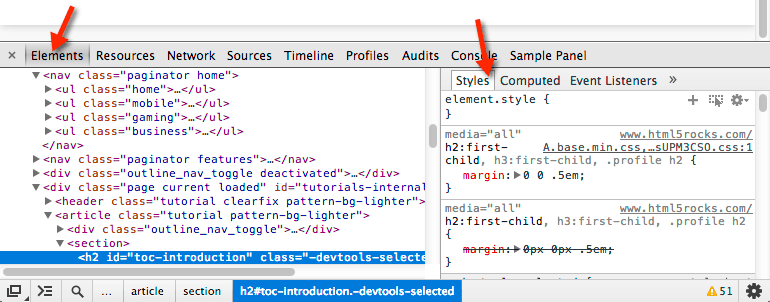
Chrome extensions allow you to add panels and side panes to the devtools window.
|
|
|
|
|
|
|
|
See the WXT's examples for a full walkthrough of extending the devtools window:
|
|
|
|
- [Devtools Setup](https://github.com/wxt-dev/wxt-examples/tree/main/examples/vanilla-devtools#readme)
|