 Aaron
Aaron
164 lines
4.7 KiB
TypeScript
164 lines
4.7 KiB
TypeScript
export type ContentScriptOverlayAlignment =
|
|
| 'top-left'
|
|
| 'top-right'
|
|
| 'bottom-left'
|
|
| 'bottom-right';
|
|
|
|
/**
|
|
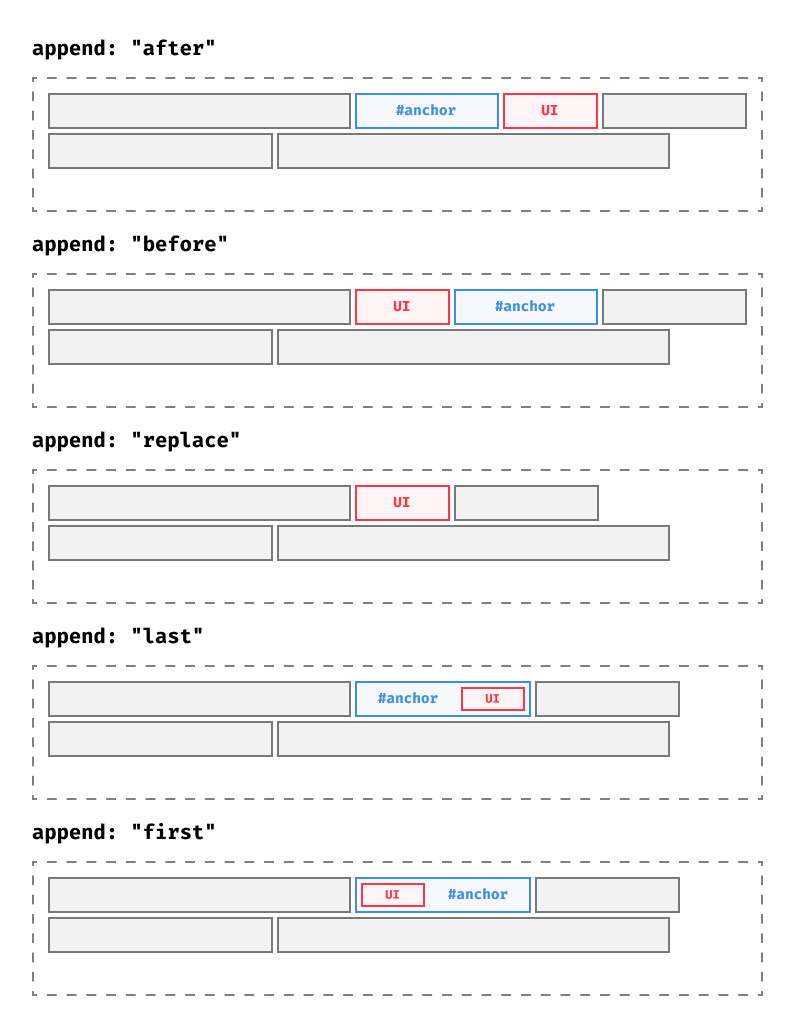
* 
|
|
*/
|
|
export type ContentScriptAppendMode =
|
|
| 'last'
|
|
| 'first'
|
|
| 'replace'
|
|
| 'before'
|
|
| 'after'
|
|
| ((anchor: Element, ui: Element) => void);
|
|
|
|
export function mountContentScriptUiRoot(
|
|
root: HTMLElement,
|
|
options: ContentScriptAnchoredOptions,
|
|
): void {
|
|
const anchor = getAnchor(options);
|
|
if (anchor == null)
|
|
throw Error(
|
|
'Failed to mount content script UI: could not find anchor element',
|
|
);
|
|
|
|
switch (options.append) {
|
|
case undefined:
|
|
case 'last':
|
|
anchor.append(root);
|
|
break;
|
|
case 'first':
|
|
if (anchor.firstChild) {
|
|
anchor.insertBefore(root, anchor.firstChild);
|
|
} else {
|
|
anchor.append(root);
|
|
}
|
|
break;
|
|
case 'replace':
|
|
anchor.replaceWith(root);
|
|
break;
|
|
case 'after':
|
|
anchor.replaceWith(anchor, root);
|
|
break;
|
|
case 'before':
|
|
anchor.replaceWith(root, anchor);
|
|
break;
|
|
default:
|
|
options.append(anchor, root);
|
|
break;
|
|
}
|
|
}
|
|
|
|
export interface ContentScriptInlinePositioningOptions {
|
|
type: 'inline';
|
|
}
|
|
|
|
export interface ContentScriptOverlayPositioningOptions {
|
|
type: 'overlay';
|
|
/**
|
|
* The `z-index` used on the `shadowHost`. Set to a positive number to show your UI over website
|
|
* content.
|
|
*/
|
|
zIndex?: number;
|
|
/**
|
|
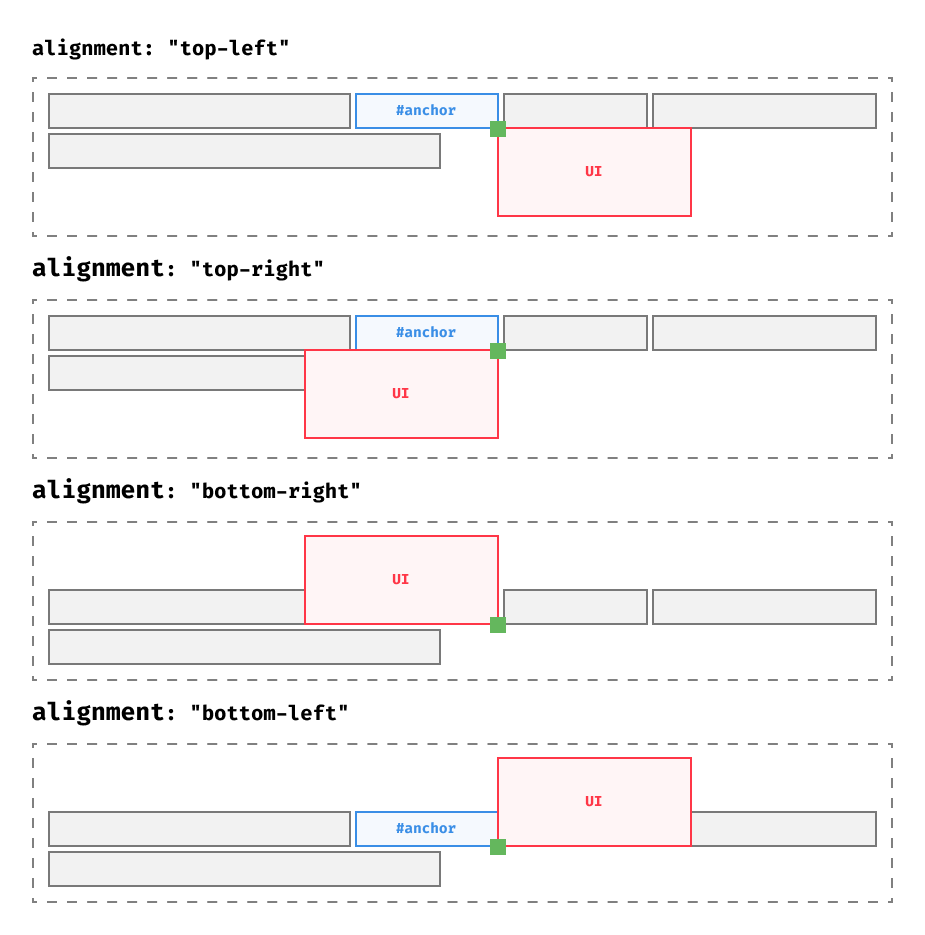
* When using `type: "overlay"`, the mounted element is 0px by 0px in size. Alignment specifies
|
|
* which corner is aligned with that 0x0 pixel space.
|
|
*
|
|
* 
|
|
*
|
|
* @default "top-left"
|
|
*/
|
|
alignment?: ContentScriptOverlayAlignment;
|
|
}
|
|
|
|
export interface ContentScriptModalPositioningOptions {
|
|
type: 'modal';
|
|
/**
|
|
* The `z-index` used on the `shadowHost`. Set to a positive number to show your UI over website
|
|
* content.
|
|
*/
|
|
zIndex?: number;
|
|
}
|
|
|
|
/**
|
|
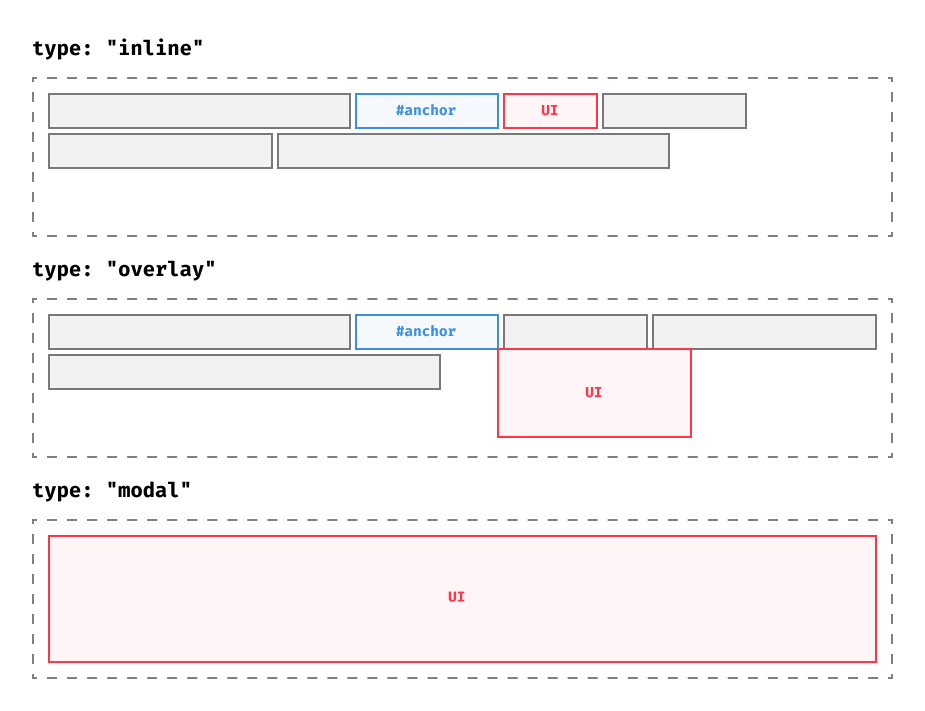
* Choose between `"inline"`, `"overlay"`, or `"modal" `types.
|
|
*
|
|
* 
|
|
*/
|
|
export type ContentScriptPositioningOptions =
|
|
| ContentScriptInlinePositioningOptions
|
|
| ContentScriptOverlayPositioningOptions
|
|
| ContentScriptModalPositioningOptions;
|
|
|
|
export function applyContentScriptUiPosition(
|
|
root: HTMLElement,
|
|
positionedElement: HTMLElement | undefined | null,
|
|
options: ContentScriptPositioningOptions,
|
|
): void {
|
|
if (options.type !== 'inline') {
|
|
if (options.zIndex != null) root.style.zIndex = String(options.zIndex);
|
|
|
|
root.style.overflow = 'visible';
|
|
root.style.position = 'relative';
|
|
root.style.width = '0';
|
|
root.style.height = '0';
|
|
root.style.display = 'block';
|
|
|
|
if (positionedElement) {
|
|
if (options.type === 'overlay') {
|
|
positionedElement.style.position = 'absolute';
|
|
if (options.alignment?.startsWith('bottom-'))
|
|
positionedElement.style.bottom = '0';
|
|
else positionedElement.style.top = '0';
|
|
|
|
if (options.alignment?.endsWith('-right'))
|
|
positionedElement.style.right = '0';
|
|
else positionedElement.style.left = '0';
|
|
} else {
|
|
positionedElement.style.position = 'fixed';
|
|
positionedElement.style.top = '0';
|
|
positionedElement.style.bottom = '0';
|
|
positionedElement.style.left = '0';
|
|
positionedElement.style.right = '0';
|
|
}
|
|
}
|
|
}
|
|
}
|
|
|
|
function getAnchor(options: ContentScriptAnchoredOptions): Element | undefined {
|
|
if (options.anchor == null) return document.body;
|
|
|
|
let resolved =
|
|
typeof options.anchor === 'function' ? options.anchor() : options.anchor;
|
|
if (typeof resolved === 'string')
|
|
return document.querySelector<Element>(resolved) ?? undefined;
|
|
return resolved ?? undefined;
|
|
}
|
|
|
|
export interface ContentScriptAnchoredOptions {
|
|
/**
|
|
* A CSS selector, element, or function that returns one of the two. Along with `append`, the
|
|
* `anchor` dictates where in the page the UI will be added.
|
|
*/
|
|
anchor?:
|
|
| string
|
|
| Element
|
|
| null
|
|
| undefined
|
|
| (() => string | Element | null | undefined);
|
|
/**
|
|
* In combination with `anchor`, decide how to add the UI to the DOM.
|
|
*
|
|
* - `"last"` (default) - Add the UI as the last child of the `anchor` element
|
|
* - `"first"` - Add the UI as the last child of the `anchor` element
|
|
* - `"replace"` - Replace the `anchor` element with the UI.
|
|
* - `"before"` - Add the UI as the sibling before the `anchor` element
|
|
* - `"after"` - Add the UI as the sibling after the `anchor` element
|
|
* - `(anchor, ui) => void` - Customizable function that let's you add the UI to the DOM
|
|
*/
|
|
append?: ContentScriptAppendMode | ((anchor: Element, ui: Element) => void);
|
|
}
|